
Fantastic - could not be better! The support has been amazing and I now have three different Stripe payment forms that I can keep on duplicating and changing the name of the product.

Last updated on June 14, 2023 by Njones35
How To Add a Captcha to WordPress Contact Forms
We're just like you. We only want humans to fill out our forms. Add a Google reCAPTCHA to your WordPress contact forms to stop those bots!

Approximate read time: 4 minutes
Did you get a boost in your form submissions? Are you getting spam messages in your WordPress contact forms? Sometimes spam can look a lot like a growing audience. What a bummer! 😞
You need a spam solution for your WordPress website.
Luckily, it's easy to create an attractive, user-friendly WordPress form that kicks spam to the curb. The form we're building today uses reCAPTCHA to block spambots without wrecking the user experience.
There are a lot of dedicated spam plugins for WordPress 🔌, but today we're going to show you a solution that has reCAPTCHA v2 built in. Yeah, we're talking about the most advanced WordPress form builder, Formidable Forms!
Formidable is comparable to any contact form plugin out there — plus it does a whole lot more. You can build contact forms, registration forms, and any other form you need with a reCAPTCHA section at the bottom.
Upgrade your WordPress site with powerful, flexible forms.
What is reCAPTCHA?
ReCAPTCHA is a free spam-killing service from Google, designed to protect your site from spam 🛡️. A captcha is a test to tell if the page viewer is really human, or an evil spambot. It's the famous robot checkbox we've all grown to love.
Of course, it is easy for humans to solve, but hard for bots to figure out. An integrated reCAPTCHA in your contact forms will block automated software but let real people contact you with ease.
All you need is a Google account and some API keys to install it with Formidable Forms.
From Idea to Reality in Minutes. Build Powerful Forms, Dashboards, Apps and More.
Formidable Forms makes advanced site building simple. Launch forms, directories, dashboards, and custom WordPress apps faster than ever before.
Build your WordPress contact form

ReCAPTCHA doesn't require any advanced planning or custom code. Build your form as you had originally intended. It doesn't matter if it's a simple contact form or a complex quote calculator. It's easy to add a captcha to any and all forms 👍.
So go ahead, build a form, and tweak it until it's perfect. Then add reCAPTCHA protection at the end. That's right, it works like any other form field!
Now, we'll show you how to add captchas in WordPress forms.
Add a captcha to contact forms in WordPress
Protecting your form couldn't be easier! Formidable includes a reCAPTCHA field that can be added in the same way as a number field or text field. Add it to your form with just one click.
If this is the first time you've added reCAPTCHA to a Formidable form on your website, you'll also need to get Site and Secret Keys from Google.
This is completely free and takes only two minutes to set up.
Go to Formidable → Global Settings to enter your keys 🔑. Click the link in your settings to sign up for a free reCAPTCHA key, and signup with your Google account.

Enter your website URL and pick a title. That's it!
Google will give you a Site Key and a Secret Key. Copy and paste these into your Formidable settings and click Update Options and you're set!
Who knew it was this easy to register your site with reCAPTCHA?
How reCAPTCHA works
Now that you know how to add reCAPTCHAs to contact forms in WordPress, let's take a look at how they work 🔎.
ReCAPTCHA is really a clever system. And there's even an invisible reCAPTCHA now that makes verifying your humanity even easier!
We're already a long way past the frustrating, complex strings of random blurred letters that the old captchas relied on. Thank heavens! That method was tedious, complex, and often just as hard for us as they are for the spambots 🤖.
I imagine one day using them in a story to my grandkids about how tough we had it in "the good old days"!

Now, captcha spam protection is a simple checkbox.
Click the box, and most of the time, you'll see a green checkmark. ✅
Congratulations! You've passed the robot test (yes, it's that easy). Your website visitor can submit the form with no hassle and no delay.
And by the way, if you're wondering what's the difference between captcha and reCAPTCHA — there isn't any! ReCAPTCHA is just the name Google gave to their version of a "captcha".
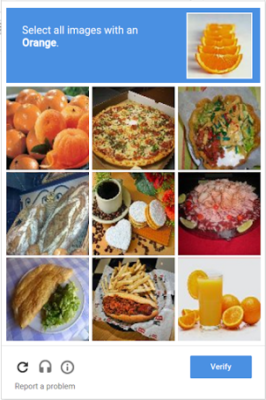
Sometimes reCAPTCHA isn't convinced and will need some extra info to make sure you're human and not a robot.
You may be asked to solve a simple picture-based challenge. Even this extra challenge is user-friendly, quick, and has minimal impact on user experience.
reCAPTCHA accessibility
Protecting your form should never limit who can complete it.
You'll be glad to know that reCAPTCHA works with major screen readers such as ChromeVox, JAWS, NVDA, and VoiceOver.
It will alert screen readers of status changes, such as when the reCAPTCHA verification challenge is complete.
The status can also be found by looking for the heading titled "recaptcha status" in the "recaptcha widget". More information on accessibility can be found in Google's official reCAPTCHA guide.
reCAPTCHA styling
Enhance your reCAPTCHA visibility with either the light or dark color scheme to best suit your site design 🎨.

Are you working in a widget with a small amount of space? Use the compact option to limit the reCAPTCHA size and you're good to go.
Other ways to stop spambots

Not a fan of reCAPTCHA? Did you know reCaptcha can be invisible too?
Looking for a captcha-free alternative? Akismet is built right into Formidable Forms, and so is honeypot spam protection. There's also Cloudflare Turnstile in WordPress, which is a free Captcha alternative.
Or take matters into your own hands and fill your WordPress comment blocklist ⛔.
WordPress reCAPTCHA for the win
Spambot protection is an essential part of modern WordPress contact forms. The best WordPress form builders should not only include it standard, but also make it really easy to use.
We've made Formidable Forms easy to protect, regardless of whether you're building brand new contact forms or adding invisible WordPress spam protection to existing forms.
Now that you know how to add reCAPTCHA to WordPress contact forms, why not check out some of our other WordPress tips?
It's all live on the Formidable Forms blog.
Read more articles about WordPress forms
 How One Freelancer Manages 30 Websites with Formidable Forms
 The Formidable Forms 2025 Black Friday Sale
 Unlock HUGE WordPress Form Builder Savings This Black Friday!
 Make Your WordPress Form Notification Emails Look Professional
 The Fastest Way to Test WordPress Forms Accurately
 How to Build Custom Database Applications in WordPress
 How to Build a Custom Booking System in WordPress
 Stripe versus Square for WordPress Forms
 How to Create a WordPress Calculator with Formidable Forms
 The Simple Way to Sell Digital Downloads & Make Money!
 The Ultimate WordPress Square Plugin
 Unlock Advanced WordPress Form Date Logic & Lookup with Formidable
 Say Goodbye to Spam with Formidable’s WordPress Form Anti-Spam
 7 Powerful Things You Can Do With Formidable Forms Lite
 GDPR Compliance is Now Easier With Formidable Forms
Not using Formidable Forms on your WordPress site? Check out the free version that includes Akismet, honeypot, and CAPTCHA.
This article may contain affiliate links. Once in a while, we earn commissions from those links. But we only recommend products we like, with or without commissions.
