

Using a DNS firewall protects your online activities by continuously monitoring the DNS traffic. When used in conjunction with encryption, the DNS firewall becomes a crucial tool for your security. Here are some DNS-releated cyberattacks and how FDNS handles them.
Surveillance and Censorship
DNS has changed a lot since it was first standardized in 1983, but its privacy properties haven’t changed. Anyone can see the information you attempt to access and change it as it goes through. DNS traffic is logged by default in most countries around the world. This is called surveillance. And if they don’t like something they see, they just filter it out. That’s called censorship.
This is a brief bittorrent client trace captured in FDNS monitor. It may be difficult to explain this trace if someone in authority starts asking questions.
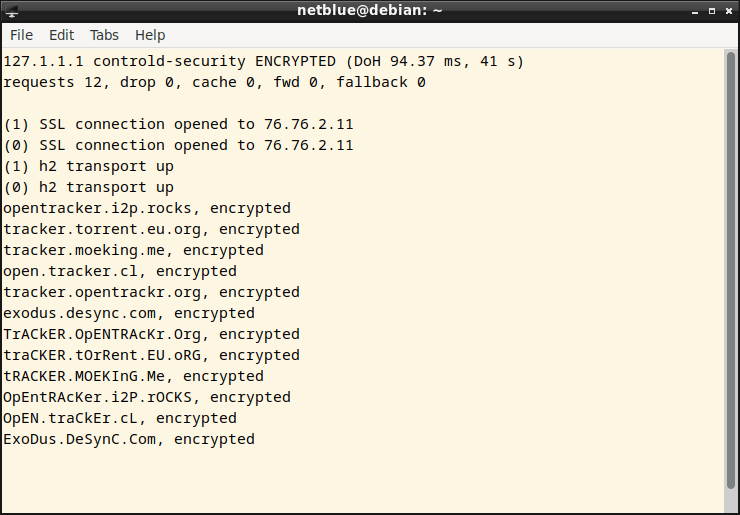
The solution is simple: encrypt your DNS traffic and send it to a service provider that has a no logging and no censoring policy. Encryption also defends against various man-in-the-middle and cache poisoning attacks.
Ads, Trackers, Malware, Phishing
As a group, they make up half of all DNS traffic. First thing first, use an adblocker like uBlock Origin. Also add Privacy Badger, which is a browser extension that prevents advertisers and other trackers from following you. Both tools work at the DNS level within your web browser.
The next layer of defense is FDNS proxy. The blocklists are placed in /etc/fdns directory. When FNDS starts, it loads all the files with a .list extension there. You can also add your own lists.
Even though there is some overlap, it’s always better to have two layers of protection. You can also connect to a DNS service provider like Quad9 or CleanBrowsing to add a third layer. Start the proxy by using the security tag:
$ sudo fdns --server=security --daemonize
Or list all the security servers
$ fdns --list=security

cira-security - security, Canada, Americas

cira-security2 - security, Canada, Americas

    https://www.cira.ca/cybersecurity-services/canadianshield/how-works

cleanbrowsing - anycast, security, Americas, AsiaPacific, Europe

cleanbrowsing2 - anycast, security, Americas, AsiaPacific, Europe

    https://cleanbrowsing.org>

cloudflare-security - anycast, security, Americas, AsiaPacific, Europe

cloudflare-security2 - anycast, security, Americas, AsiaPacific, Europe

    https://www.cloudflare.com

controld-security - security, adblocker, anycast, Americas, AsiaPacific, Europe

    https://controld.com/free-dns/

dns0eu - security, anycast, Europe

dns0eu-dot - security, anycast, Europe

dns0eu-2 - security, anycast, Europe

dns0eu-dot2 - security, anycast, Europe

    https://dns0.eu

quad9 - anycast, security, Americas, AsiaPacific, Europe

quad9-2 - anycast, security, Americas, AsiaPacific, Europe

quad9-3 - anycast, security, Americas, AsiaPacific, Europe

    https://quad9.net

14 servers found
and connect to a specific server
$ sudo fdns --server=quad9 --daemonize
DNS Tunneling
It is believed that 90% of harmful software uses DNS for command and control (C&C). After getting into your network, the malware sends various DNS queries to the central server in order to receive commands. Most attackers use DNS TXT or NULL records, although other records have been observed in the wild.
In our DNS firewall, we only allow A (IPv4 address) and AAAA (IPv6 address) records. These records are sufficient for running a typical Linux or Windows workstation, and help block most botnet command and control traffic. This is a dns2tcp client (sudo apt-get install dns2tcp) trying to connect to a remote server using TXT records:

DNS Rebinding Attacks
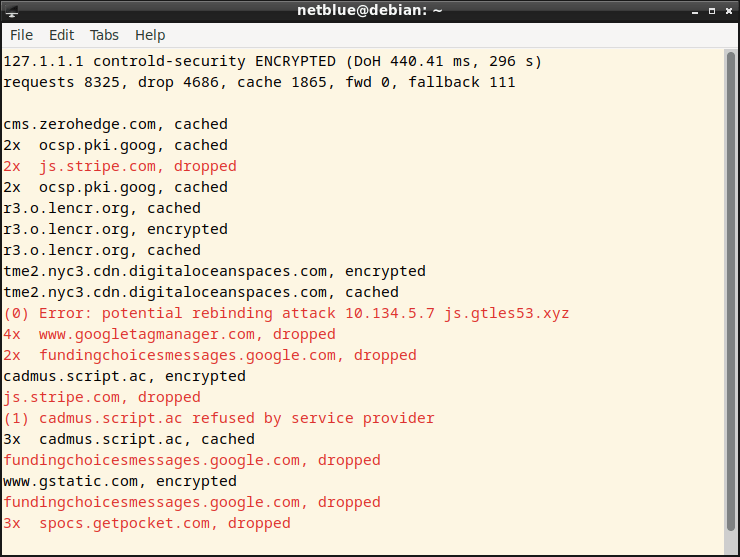
In this attack, a harmful web page makes visitors run a script that attacks other computers on the local network. We check the incoming responses, examine the returned IP addresses, and discard the response if we find a local network address.
CNAME Cloaking
Online advertising companies use cloaking to deceive web browsers into believing they are displaying first-party ads. Basically, you ask for the IP address of site A, and in response you get the address of site B, where B is an advertising company. This can easily be prevented by a DNS proxy or a genuine DNS server.

 fdns
fdns 