

توضیحات
A simple WooCommerce analytics plugin that provides detailed reports, insights, exports, segments, subscriptions & GA4 integration all in one place.
All your WooCommerce and GA4 data in one place
Putler is the all-in-one WooCommerce reporting plugin that provides you with detailed reports and actionable insights across Products, Sales, Customers, Subscriptions, and Website Traffic. You can also connect your GA4 data to Putler and see both store and website analytics in one place. Additionally, Putler can help you track multiple WooCommerce stores from one centralized dashboard.
Note: Putler is a paid service, but you can try it free for 14 days – no credit card required.
Putler is built to grow your WooCommerce business, offering advanced features like:
✅ Advanced eCommerce analytics & reports
✅ Key subscription metrics (MRR, churn, LTV)
✅ Multistore reporting
✅ Personalized product insights & customer analytics
✅ Forecasting & goal tracking
✅ Advanced segmentation & funnels
✅ GDPR-compliant, privacy-first reporting
See Putler in action to get a clearer picture.
Features
🎯 Advanced WooCommerce Analytics
- Real-time reports on orders, customers, products, refunds, and subscriptions
- GA4 integration for a complete performance view
- 200+ eCommerce KPIs, including net sales, MRR, churn, active subscriptions, and forecasts
- Real-time transaction tracking for up-to-the-minute insights
- Unified dashboard for WooCommerce + Shopify + Stripe + Etsy + PayPal + others
- Advanced product analytics, including top-selling products, products bought together, and product variation trends
- Market-level insights, such as top-performing countries and the best times to run discounts.
🚀 Built for Growth
- Advanced customer segmentation using RFM analysis
- Built-in sales forecasting and goal tracking
- Conversion funnel insights to identify bottlenecks and boost revenue
- Easy CSV exports & Mailchimp integration for targeted campaigns
💡 Multi-Store Made Simple
- Connect multiple WooCommerce stores and other platforms
- Consolidate reports or drill down per store
- Multi-currency & timezone support for global WooCommerce sellers
- Intuitive search & filtering for quick insights
Start your free 14-day trial today — no credit card required.
❤️ Why WooCommerce Sellers Love Putler?
⭐⭐⭐⭐⭐
“Better Than Baremetrics! Tried various platforms like Baremetrics. Putler is great for combining sales stats and getting customer data sorted across multiple payment platforms, especially PayPal and Stripe. Great dashboard and excellent support.”
⭐⭐⭐⭐⭐
“Best tool out there for WooCommerce-based business. It’s the best option in value for money and ease of integration. Customer service solves problems at lightning speed.”
⭐⭐⭐⭐⭐
“WooCommerce / eBay / PayPal / Stripe reporting solution since 2017. Consolidates sales from various sources in one place. Responsive support always listens and implements improvements. The platform keeps evolving.”
⭐⭐⭐⭐⭐
“All my Woo sales and customer analytics consolidated in one place. Used every day for years. Fast and effortless sales research, powerful customer segmentation and data consolidation across WooCommerce, PayPal, and Stripe.”
Join thousands of WooCommerce sellers across 100+ countries who trust Putler – Get started now!
👥 Who can benefit from Putler?
- Store Owners Unified revenue dashboard & actionable KPIs
- Marketers Customer segmentation, funnel tracking & campaign insights
- Finance Teams Forecasting, refunds tracking & subscription revenue growth
🏆 What makes Putler better than other WooCommerce analytics plugins
✔️ WooCommerce Real-time Reports Unlike GA4 (ExactMetrics) and others, Putler gives fast, unified, and accurate real-time reports for all your WooCommerce stores.
✔️ Multi-store & Multi-platform Support Manage all your stores and platforms in one dashboard. Competitors like Metorik and Metrilo have limited capabilities, and GA4 doesn’t support this at all.
✔️ Sales Forecasting & Goal Tracking Putler predicts future revenue, trends, and growth patterns—something GA4 and Metrilo lack.
✔️ Subscriptions & Refunds Analytics Get complete insights into subscriptions, refunds, churn, and recurring revenue—more advanced than GA4 and Metrilo.
✔️ GDPR & Privacy-first Reporting Putler is fully GDPR-compliant and secure, unlike GA4 and most competitors.
✔️ Advanced Customer Segmentation Go beyond basic metrics with RFM-based segmentation, behavioral insights, and smart targeting.
✔️ Lightweight & Optimized for WooCommerce Putler is fast, efficient, and purpose-built for WooCommerce—no unnecessary bloat.
Start your free 14-day trial today — unlock insights that GA4 misses!
💬 Got Questions? We’re Here for You!
Stuck with setup, have queries, or need a feature explained?
Our friendly support team is just a click away.
Contact Support — we usually respond within 24 hours.
Or visit our Knowledge Base for quick answers.
External Services
Putler uses secure token-based authentication to access your store’s order, customer, product, subscription, and related eCommerce data for the purpose of providing analytics and reporting. All data is sent over [encrypted, secure channels.] (https://www.putler.com/data-security/)
Want to know more? You can review Putler’s policies here:
1. Terms of Service
2. Privacy Policy
3. Third Party Service Info
عکسهای صفحه

Putler Home Dashboard

Putler Sales Dashboard

Putler Products Dashboard

Putler Customers Dashboard
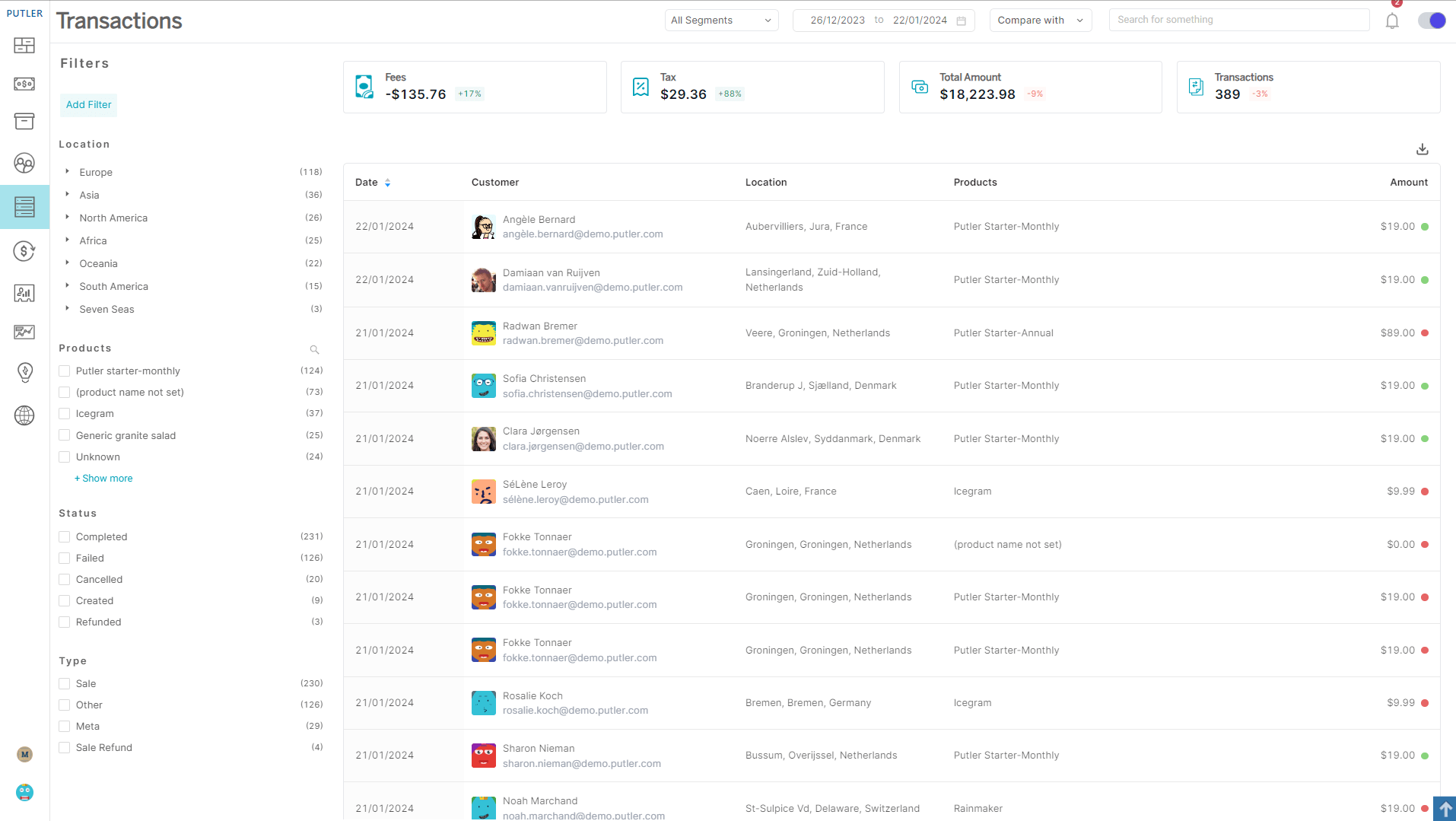
Putler Transactions Dashboard

Putler Subscriptions Dashboard
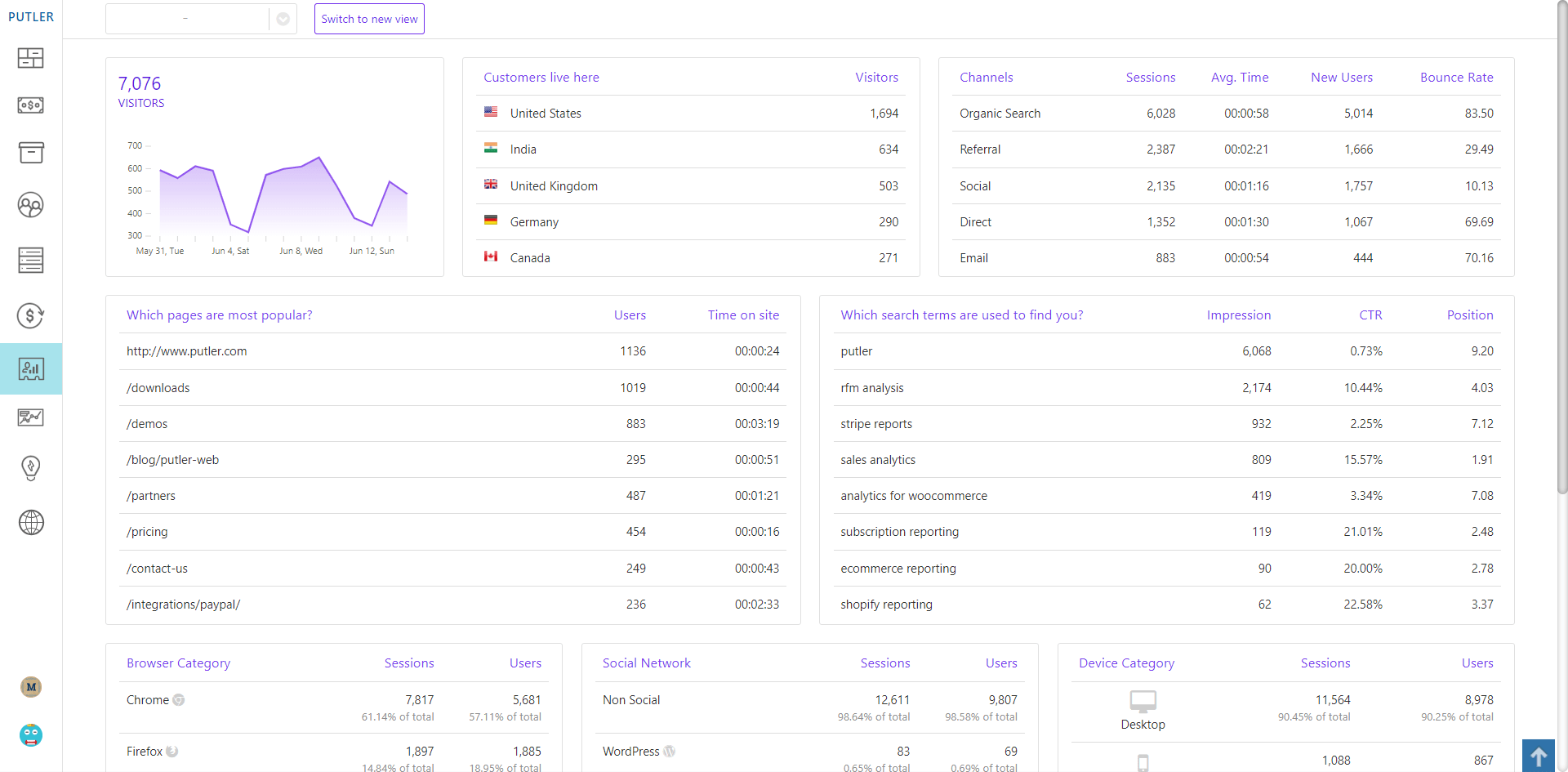
Putler Audience Dashboard

Putler Forecasting Dashboard

Putler Holiday Season Insights Dashboard

Putler Inhouse Website Analytics Dashboard
نصب
- Install and activate this plugin.
- Sign up for a free Putler account and start your 14-day trial.
- Connect your WooCommerce store to Putler via the plugin settings.
- Existing and new orders will sync automatically.
- Access your detailed WooCommerce analytics dashboard on Putler.com.
- Optionally, connect your GA4 account to combine WooCommerce + GA4 data.
سوالات متداول
-
1. Do I need a Putler account to use the WooCommerce plugin?
-
Yes. A Putler account is required to connect your WooCommerce store and sync real-time data. Setup takes less than 5 minutes.
-
2. Is Putler a GA4 or Google Analytics alternative for WooCommerce?
-
Yes. While GA4 focuses on only traffic analytics, Putler provides eCommerce-first insights — real-time sales reporting, customer analytics, subscription tracking, forecasts, website analytics, and multi-store data consolidation.
-
3. Does Putler slow down my WooCommerce site?
-
No, Putler doesn’t slow down your WooCommerce site. It processes data on its own secure servers, so your store remains fast, lightweight, and optimized.
-
4. Can I manage multiple WooCommerce stores in one Putler account?
-
Absolutely. Putler lets you connect multiple stores and platforms in one dashboard. You can view combined reports or analyze each store separately.
-
5. Does Putler support subscriptions, MRR, churn, and LTV tracking?
-
Yes. Putler provides subscription analytics — MRR, churn rate, LTV — plus real-time alerts to help you grow recurring revenue.
-
6. How does Putler handle GDPR compliance and privacy?
-
Putler is fully GDPR-compliant and privacy-focused. Customer data is securely processed, anonymized where needed, and never misused.
-
7. What eCommerce platforms and payment gateways does Putler support?
-
Putler integrates with WooCommerce, Shopify, Etsy, PayPal, Stripe, Braintree, and 17+ other platforms.
Additionally, Putler offers a powerful Inbound API that lets you send data from any platform, payment gateway, or custom app into Putler. This means you can centralize sales, subscriptions, and customer insights from virtually any source — all in one dashboard.
-
8. Does Putler support multiple currencies?
-
Yes. Putler supports 36+ currencies and automatically converts transactions into your preferred base currency.
-
9. How is Putler different from Google Analytics?
-
Unlike GA4, which measures web traffic, Putler is built for WooCommerce KPIs — revenue, customer behavior, subscriptions, and forecasts. You can also integrate GA4 into Putler to get a single, simplified dashboard.
-
10. Does Putler integrate with Google Analytics 4 (GA4)?
-
Yes. Putler integrates with GA4 and combines key GA4 metrics like sessions, conversions, and revenue with detailed WooCommerce reports.
-
11. Does Putler support team access and role-based permissions?
-
Yes. Putler lets you invite team members and manage custom access levels. You can control what each user sees — from full admin privileges to read-only analytics — making collaboration simple and secure.
نقد و بررسیها


توسعه دهندگان و همکاران
“Putler – Simple WooCommerce Analytics for your Store” نرم افزار متن باز است. افراد زیر در این افزونه مشارکت کردهاند.
مشارکت کنندگان

ترجمه “Putler – Simple WooCommerce Analytics for your Store” به زبان شما.
علاقه مند به توسعه هستید؟
Browse the code, check out the SVN repository, or subscribe to the development log by RSS.
گزارش تغییرات
2.17.0 (06.01.2026)
- New: WooCommerce 10.4.3 compatible
- Fix: WooCommerce Subscription ‘Created’ transactions use modified date instead of created date
- Update: Changes in the Authentication Process
- Update: POT file
2.16.0 (05.12.2025)
- New: WooCommerce 10.3.6 compatible
- New: WordPress 6.9 compatible
- Fix: Important Security issues
- Update: POT file
2.15.0 (21.11.2024)
- New: WooCommerce 9.4.2 compatible
- New: WordPress 6.7 compatible
- Fix: Special characters in WooCommerce Product title not decoded properly
- Fix: Authentication issues occur on certain servers when required headers are missing
- Update: Removed the ‘Resync data’ functionality from the plugin
- Update: POT file
2.14.0 (11.04.2024)
- New: WooCommerce 8.7.0 compatible
- New: WordPress 6.5.2 compatible
- Fix: Line item totals field displayed as 0 in the final XML/CSV
- Update: Code improvements
- Update: POT file
2.13.0 (05.10.2023)
- New: WooCommerce 8.1.1 compatible
- New: WordPress 6.3.1 compatible
- Fix: Important Security issues
- Update: Changes in the Authentication Process
- Update: POT file
2.12.0 (31.07.2023)
- New: Declare Putler Connector for WooCommerce compatible with High-Performance Order Storage (HPOS)
- New: WordPress v6.2.2 compatible
- New: WooCommerce v7.9.0 compatible
- Fix: PHP Fatal Error: Uncaught TypeError: round(), count()
- Fix: Some minor fixes related to formatted date and Stripe fee
- Update: Code improvements
- Update: POT file
2.11.2 (12.01.2023)
- Fix: PHP Error: Call to undefined function in some cases post v2.11.0
- Fix: Some minor fixes
- Update: POT file
2.11.1 (26.12.2022)
- Fix: PHP Warning in some cases post last release
- Update: POT file
2.11.0 (20.12.2022)
- New: WordPress Coding Standards
- New: WordPress v6.1.1 & WooCommerce v7.0.1 compatible
- Update: Plugin name
- Update: POT file
2.10.0 (01.02.2021)
- New: WordPress 5.6 & WooCommerce 4.9.2 compatible
- Update: Remove usage of deprecated jQuery event ‘ready’
- Update: POT file
- Fix: Some minor fixes
2.9.13.1 (08.01.2020)
- Fixed: Important fixes related to Authentication Process
2.9.13 (08.01.2020)
- Update: Changes in the Authentication Process
- Fixed: Minor Fixes and compatibility
2.9.12 (02.08.2019)
- Update: Changes in the Authentication Process
- Fixed: Minor Fixes and compatibility
2.9.11 (09.10.2018)
- Fixed: WooCommerce Product Name not syncing properly
- Fixed: Fixes related to switch subscription handling
- Fixed: Stripe Fee not getting synced in some cases
- Fixed: Minor Fixes and compatibility
2.9.10 (08.08.2018)
- Fixed: Subscription status change transactions not getting sent to Putler in some cases
- Fixed: Minor Fixes and compatibility
2.9.9 (03.04.2018)
- Update: Added new function to get require information during connection with Putler
2.9.8 (01.12.2017)
- Update: Support for ‘woocommerce_reports_order_statuses’ filter for treating any order status as sales
2.9.7 (30.11.2017)
- Fixed: Compatibility for ‘woocommerce_order_is_paid_statuses’ filter for WooCommerce (lower than v3.0)
2.9.6 (29.11.2017)
- Update: Support for ‘woocommerce_order_is_paid_statuses’ filter for treating any order status as sales
- Fixed: Minor Fixes and compatibility
2.9.5 (18.11.2017)
- Fixed: External Transaction Id and Payment Source not syncing properly for transactions
- Fixed: Unhandled HTML tags getting appended to the data getting sent to Putler
- Fixed: Minor Fixes and compatibility
2.9.4 (23.10.2017)
- New: Support for re-syncing transactions
- Update: Changes in the authentication process
2.9.3 (18.09.2017)
- New: Support for handling permanently deleted transactions
- Fixed: Ignoring the transactions whose status is set as blank
- Fixed: Authentication process not working in some cases
- Fixed: Minor Fixes and compatibility
2.9.2 (01.08.2017)
- Fixed: Authentication Failure in some of the cases
- Fixed: Minor Fixes and compatibility
2.9.1 (13.07.2017)
- Update: Sending trash transactions to get them removed from Putler Web
- Update: Sending Stripe Fees in the transactions
- Update: Changes in the XML data getting sent to Putler
- Fixed: Subscription status not getting reflected properly in some cases
2.9 (17.04.2017)
- Update: Removed support for Putler Desktop
- Update: Changes in the authentication process
2.8 (09.03.2017)
- Fixed: Subscription orders not getting synced properly in intial data sync
- Fixed: Minor Fixes and compatibility
2.7
- New: Syncing additional WooCommerce Subscriptions [v2.0 & greater] data for subscriptions metrics
- New: Support of trash & untrash transactions
- Fixed: Cart discount not getting considered in transactions
- Fixed: Transaction ID not getting synced in some cases
- Fixed: Prevent syncing of orders having ‘draft’ and ‘auto-draft’ status
- Fixed: Refunds not getting reflected properly in some cases
- Fixed: Handling WooCommerce custom order statuses
2.6
- Update: Track additional WooCommerce Order meta data for Putler Web
- Fixed: Minor Fixes and compatibility
2.5
- Fixed: Issue with subscription renewals not working when plugin is active
2.4
- New: Support for WooCommerce Subscriptions [v2.0 & greater]
- New: Support for WooCommerce Manual Refunds
- Update: Track all WooCommerce Order meta data along with coupons
- Fixed: Minor Fixes and compatibility
2.3
- Update: Transactions will show updated statuses in Putler.
- Update: Compatibility with new versions of WordPress & WooCommerce (v2.3 or greater)
- Fixed: Issue of product SKU not getting synced
- Fixed: Issue of orders in trash getting synced
2.2
- Update: Compatibility with new versions of WordPress & WooCommerce (v2.2 or greater)
- Fixed: Issue with syncing of product custom attributes
2.1
- Fix: Date & Timezone issue
2.0
- New: Support for multiple API Tokens
- Fixed: Minor Fixes and compatibility
1.1
- Fixed: Minor Fixes related to variations data getting posted and Putler API url changes
1.0
- Initial release