

توضیحات
Open Close Store for WooCommerce is the best store scheduler plugin in the market which offers you comprehensive business hours management for your WooCommerce store.
Easily set up your store schedule in minutes and choose what days and hours your store is open. Like a real store, your website will open and close following the schedules you define. Your customers will know your actual business hours and won’t be able to place orders when your store is closed.
⭐ Upgrade to Pro | 🚀 Try the Demo | 🛟 Get Support
Perfect for store owners who want to manage their business hours effectively and provide a better shopping experience for their customers.
🎥 Plugin Overview
🚀 Key Features
- Flexible Schedule Management – Create unlimited schedules with multiple daily shifts for complete business hour control
- Smart Order Blocking – Automatically prevent orders when your store is closed with customizable customer notifications
- Instant Store Control – Open or close your store instantly with a single click for unexpected changes
- Frontend Schedule Display – Show your business hours beautifully on any page with customizable widgets
- Dynamic Countdown Timers – Display stylish countdown timers showing when your store reopens
- Multi-Location Support – Manage different schedules for multiple store locations or departments
- Timezone Compatibility – Automatically adjust to your WordPress timezone settings
- Customer-Friendly Notifications – Display informative notice bars and popups about store status
⭐ PRO Features
- Advanced Pre-Order System – Accept pre-orders for specific products when your store is temporarily closed
- Enhanced Pre-Order Options – Customizable pre-order messages and button text
- Intelligent Cart Management – Automatically empty cart or allow specific products during store closure
- 24/7 Operation Mode – Keep your store open 24 hours with per-day toggle options
- Advanced Frontend Manager – Manage schedules directly from the frontend with an intuitive interface
- Instant Override Controls – Force your store open or closed instantly with custom messages
- Selective Product Availability – Allow or disallow specific products based on store status
- Multivendor Integration – Full Dokan marketplace support for vendor-specific schedules
🔄 Plugin Integrations
Dokan Multivendor Marketplace
Full compatibility with Dokan, allowing each vendor to set their own store hours.
⚙️ Shortcodes
Display Single Schedule
[schedule id="71"]
Display a specific schedule anywhere on your site. Replace “71” with your actual schedule ID.
Frontend Schedule Manager (Pro)
[wooopenclose-manage-schedules]
Allow administrators to manage store schedules directly from the frontend. Create, update, or delete schedules without accessing the WordPress admin.
Countdown Timer
[wooopenclose-countdown]
Show a countdown timer until the store reopens. Customize the appearance in the plugin settings.
Today’s Hours
[wooopenclose-today]
Display today’s store hours in a clean, easy-to-read format.
Is Open/Closed Status
Show whether your store is currently open or closed based on your schedule.
StackWC Recommended Plugins
عکسهای صفحه

Main Settings – Configure your store hours and general settings 
Schedule Management – Set up multiple schedules for different days 
Time Slots – Add multiple time slots for each day 
Special Days – Configure holidays and special opening hours 
Messages – Customize all notification messages 
Display Options – Control how your store hours are displayed 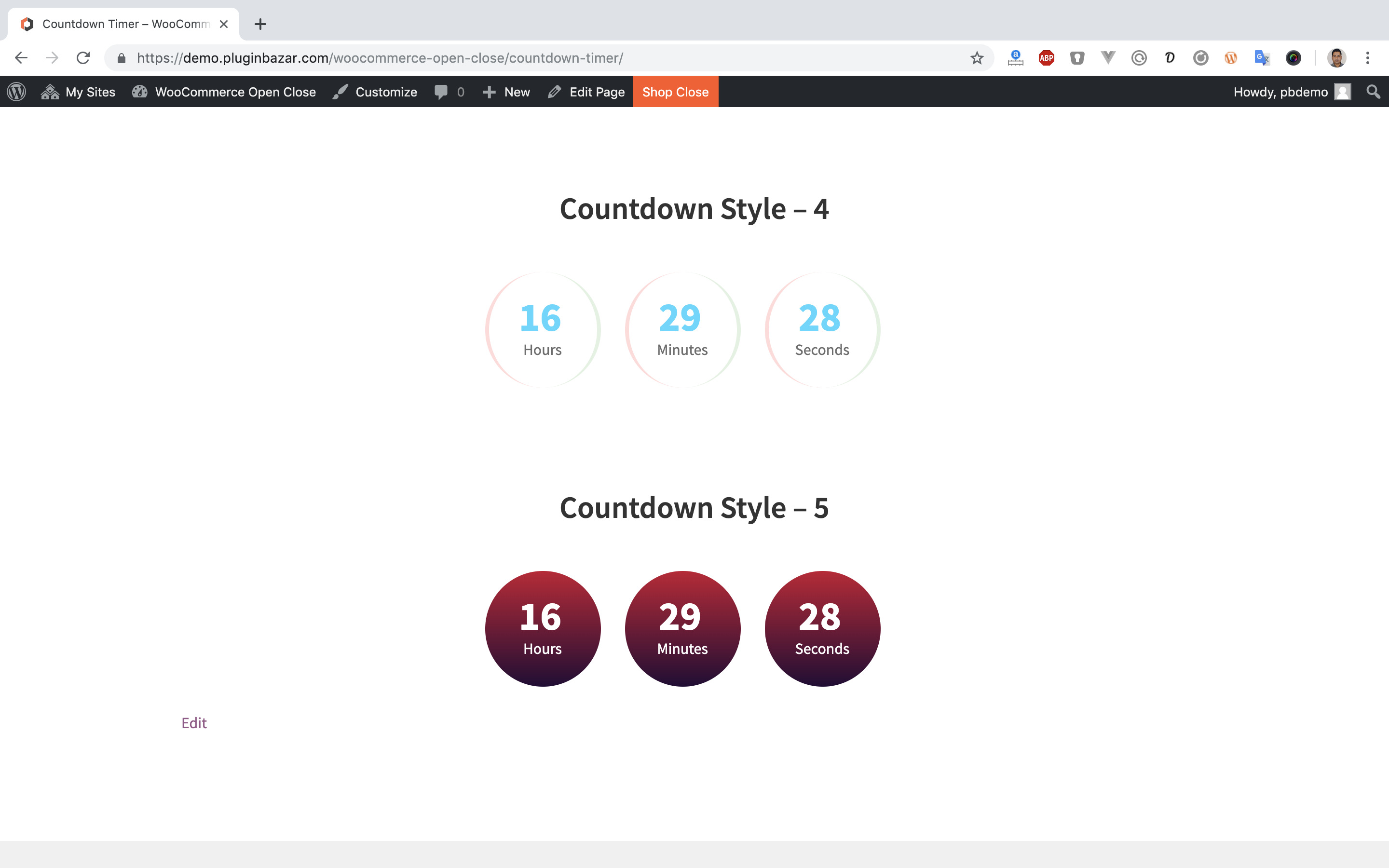
Advanced Settings – Configure additional options 
Shortcode Generator – Easily create shortcodes for your store hours 
Frontend Display – See how the schedule appears to customers 
Mobile Responsive – Works perfectly on all devices 


نصب
- Upload the plugin files to the
/wp-content/plugins/directory, or install the plugin through the WordPress plugins screen directly. - Activate the plugin through the ‘Plugins’ menu in WordPress.
- Go to WooCommerce > Open Close Store to configure your store hours and settings.
- Set up your business hours, messages, and notification preferences.
- Use the provided shortcodes to display your store hours anywhere on your site.
- Save your settings and your store will now follow the defined schedule automatically.
سوالات متداول
-
How does the store scheduling work?
-
The plugin allows you to set specific days and hours when your store is open. During closed hours, you can choose to disable purchases, show a notice, or allow pre-orders.
-
Will this plugin work with my timezone?
-
Yes! The plugin automatically uses your WordPress timezone settings. You can find these settings at Settings > General > Timezone in your WordPress admin panel.
-
Does it work with WordPress Multisite?
-
Yes! The plugin is fully compatible with WordPress Multisite installations.
-
Is it compatible with my theme?
-
The plugin is compatible with most WordPress and WooCommerce themes. If you encounter any issues, our support team is ready to help.
-
Can I set different hours for different days?
-
Yes! You can set unique schedules for each day of the week, with multiple time slots per day if needed.
-
Is this plugin available in my language?
-
The plugin is translation ready. You can contribute translations at WordPress Translate.
نقد و بررسیها


توسعه دهندگان و همکاران
“Open Close Store for WooCommerce – Business Hours Schedules Manager” نرم افزار متن باز است. افراد زیر در این افزونه مشارکت کردهاند.
مشارکت کنندگان

ترجمه “Open Close Store for WooCommerce – Business Hours Schedules Manager” به زبان شما.
علاقه مند به توسعه هستید؟
Browse the code, check out the SVN repository, or subscribe to the development log by RSS.
گزارش تغییرات
4.9.9 – 2 Jan 2026
- NEW: Added “Keep open for 24 hours” toggle option for each day in schedule settings
- FIX: Fixed fatal error when viewing orders with deleted products
- Updated: Tested up to WooCommerce 10.4
- Updated: WordPress compatibility to 6.9
4.9.8 – 17 Sep 2025
- FIX: Fixed schedule creation issues.
- FIX: Fixed the add to cart through URL when the store is closed.
- Updated: Tested up to WooCommerce 10.1.2
4.9.7 – 27 Jun 2025
- FIX: Fixed plugin activation error.
4.9.6 – 26 Jun 2025
- NEW: Added Freemius.
- FIX: Tested with the latest WordPress and WooCommerce versions.
4.9.5 – 16 Apr 2025
- FIX: Tested with the latest WP version.
- FIX: Fixed some broken links.
4.9.4 – 24 Jan 2025
- FIX: Fixed load textdomain issue.
- FIX: Compatibility Test with Latest WordPress and WooCommerce Versions.
4.9.3 – 09 May 2024
- FIX: Compatibility Test with Latest WordPress and WooCommerce Versions
4.9.2 – 07 Mar 2024
- FIX: Security bug fixed
4.9.1 – 17 Jan 2024
- FIX: Bug fixed
4.9.0 – 06 Dec 2023
- FIX: Bug fixed
4.8.0 – 26 Nov 2023
- FIX: Bug fixed
4.7.9 – 11 Nov 2023
- FIX: Bug fixed
4.7.5 – 20 Sep 2023
- FIX: Bug fixed
4.7.0 – 20 Sep 2023
- FIX: Compatibility Test with Latest WordPress and WooCommerce Versions
4.6.0 – 06 Aug 2023
- FIX: Add support for stripe pay button
4.5.0 – 17 Jun 2023
- FIX: Fixed issues
4.4.7 – 09 Apr 2023
- FIX: Fixed issues
4.4.5 – 27 Mar 2023
- FIX: Fixed plugin action link
4.4.4 – 20 Mar 2023
- FIX: Bug fixed
4.4.3 – 26 Feb 2023
- FIX: Fix status bar visibility issue
4.4.2 – 25 Feb 2023
- FIX: Issue fix while updating with pro version
4.4.1 – 22 Feb 2023
- NEW: New meta box system implemented
4.3.7 – 14 Aug 2022
- NEW: Hide button of store status bar hides actually for specific time
- FIX: After update cart timer issue has been fixed
4.3.6 – 13 Aug 2022
- FIX: Pro version issue fixed
4.3.5 – 12 Aug 2022
- FIX: Fixed SDK issue
4.3.3 – 07 Aug 2022
- NEW: Added new settings library in updated SDK
4.3.0 – 10 Apr 2022
- FIX: Fix security issues
4.2.14 – 24 Feb 2022
- FIX: Handle updates of pro version lower version
4.2.13 – 21 Feb 2022
- FEATURE: Options added for changing texts of Hours, Minutes and Seconds for the countdown timer
4.2.12 – 17 Feb 2022
- BUG: SDK update and moved to free plugin only
4.2.11 – 28 May 2021
- FIX: Bug fixed
4.2.10 – 26 May 2021
- NEW: Preorder feature added
4.2.9 – 24 May 2021
- FIX: Bug fixed
4.2.6 – 05 May 2021
- NEW: Pluginbazar SDK added
4.2.5
- Litespeed Cache support enabled
4.1.9
- Sunday store closing issue fixed
4.1.8
- A serious bug has been fixed
4.1.5
- Admin UI Update
4.1.4
- Compatibility Test with Latest WordPress and WooCommerce Versions
4.0.8
- Enable option to disable notice bar and fix a bug
4.0.7
- Instant closing feature added in pro version and minor bug fixes
4.0.2
- Dokan plugin support in Pro version
4.0.1
- Frontend schedules manager added with shortcode in Pro version
4.0.0
- Major Update
3.2.0
- New variations and styles
3.0.4
- Bug Fixing
3.0.3
- New 2 features added to Pro version
3.0.2
- Bug Fixing
3.0.0
- Added so many things, Came with New Look, interface and new Technologies.
2.5.5
- Allow or Block products no matter shop is Opened or Closed
2.5.3
- Video Help section added
2.5.3
- Translation Ready
- Open Close WooCommerce Store – Reports : A New addon ready for this Release.
2.5.1
- License Management Added!!!
2.5
- New feature – Order Number Restrictions
2.4
- This is a Big Update. We change the structures and layout in a big format. Hope you will enjoy this.
2.3
- Added extra features to the Settings Panel.
2.2
- Solved the Problem arise in New Version.
2.1
- Add New Feature: Add 2 Opening and Closing Hours.
2.0
- Changed to a Super Edition.
1.3
- Automation in PRO Feature.
1.2
- Fixed a BUG.
1.1
- Changed a Lots in functionality and compatibility with WordPress.