

توضیحات
WP Admin Columns gives you complete control over the WordPress admin columns for any post type.
- ✅ Add, edit, and remove columns from a simple interface
- ✅ Select or deselect all columns using the top-left checkbox
- ✅ Display post meta, static text, or use your own callback for full customization
- ✅ Works with all registered post types (restricted types require Pro)
- ✅ Beautiful, responsive interface
⚠️ Pro-Only Features
– 🔄 Drag & drop column reordering
– 🧩 Code editor popup for editing filter hook callbacks
– 🛒 WooCommerce post type support
🔍 Key Features
- Add/edit/remove any admin columns
- Enable/disable columns per post type
- Supports core fields, post fields, meta fields, additional fields and custom fields
- Filter hook provided per column for rendering output
- Clean, intuitive UI
- Works with all custom post types
- (Pro) Drag & drop reordering
- (Pro) Built-in editor for custom callbacks
🧩 Column Types Explained
(In the “Edit Columns” popup for each post type)
-
Core Field – Native WordPress columns (e.g., Title, Date)
- Only the label is editable
- To customize, uncheck and re-add it as a custom field
-
Post Field – Columns from the
wp_poststable (e.g., post_status, post_author)- Label is editable
- Output can be modified via filter hook only
-
Meta Field – Auto-detected from the
postmetatable- Label is editable
- Do not change the meta key — it must match the database exactly
-
Custom Field – Fully flexible
- Set your own key and label
- Use the hook to render any content
- Ideal for developers or integrating third-party fields
-
Additional Field –
- Useful derived values like featured image, word count etc.
- Filter hook can be used to modify the content
Credits
Developed by Dipankar Pal(dipankarpal212)
License
This plugin is licensed under the GPLv2 or later.
عکسهای صفحه

Walkthrough. 
Admin UI – edit columns in a clean popup. 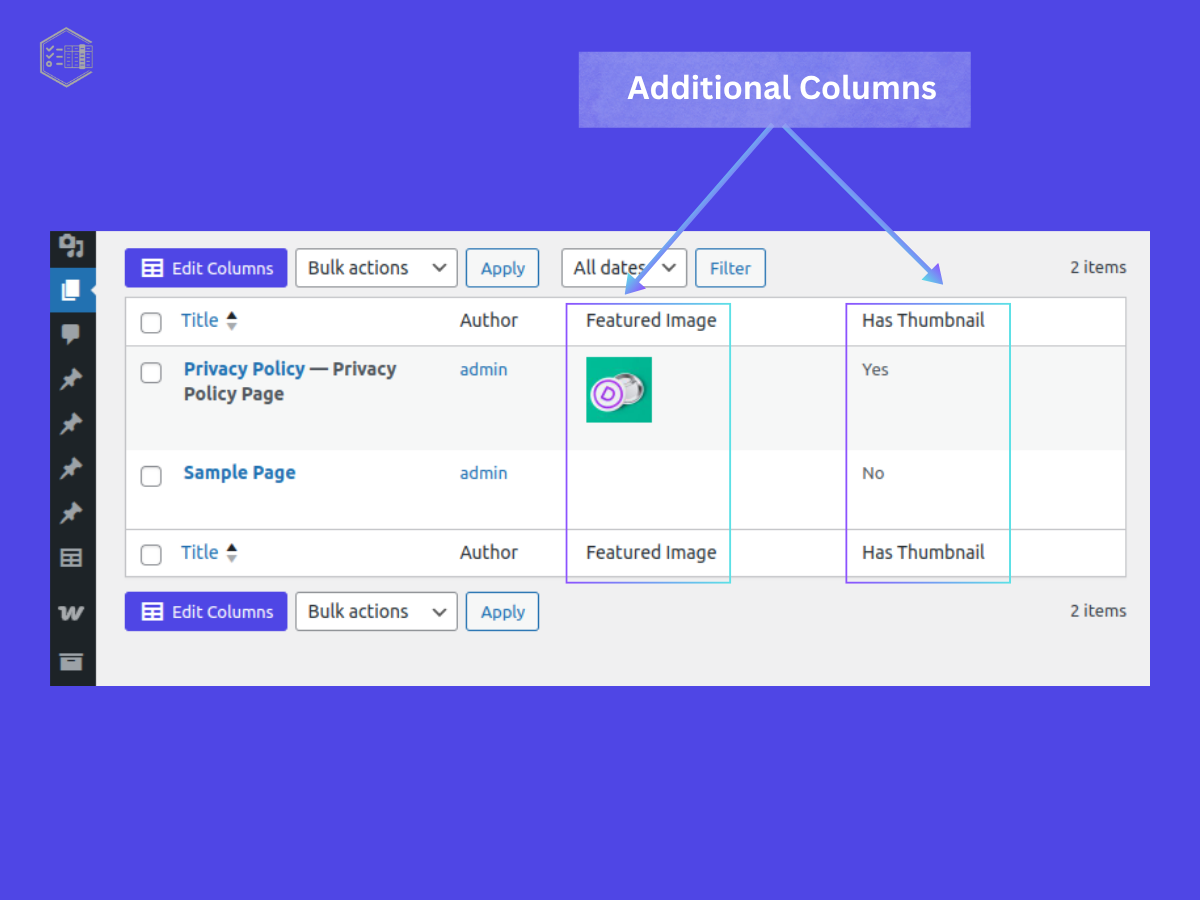
Example of a additional fields shown in the post list table. 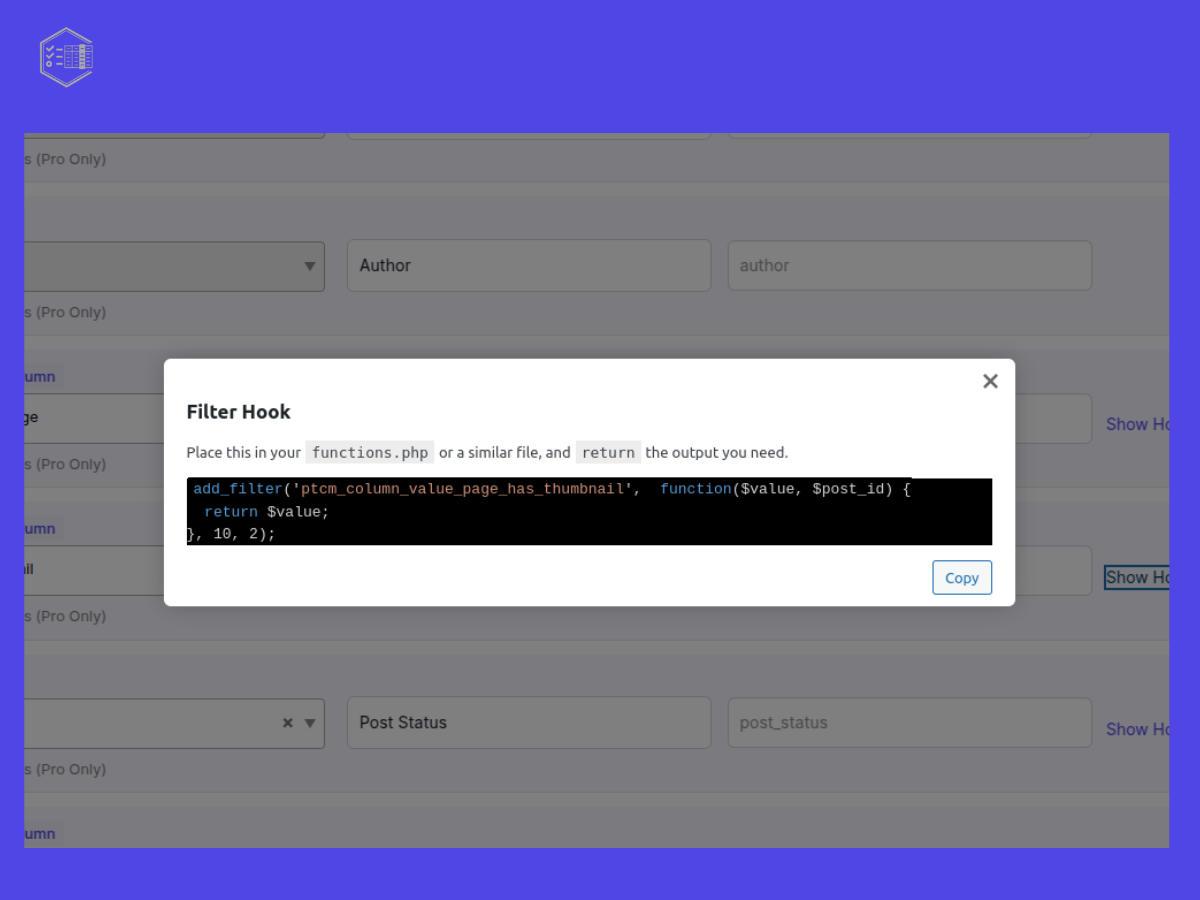
Hook preview with copyfeature.
Backend settings page 
Help section
نصب
- Upload the plugin to
/wp-content/plugins/post-type-column-editoror install via the Plugins screen - Activate it through Plugins Installed Plugins
- Go to WP-Admin Column Editor to configure your columns
سوالات متداول
-
Does this work with custom post types?
-
Yes, all registered post types will appear. (Some types like WooCommerce are Pro-only.)
-
Can I show ACF fields in a column?
-
Yes! In Pro plugin the ACF fields can be shown.
-
How do I use a custom callback to render column content?
-
Click “Show Hook” on the column to see the filter hook. Copy the snippet into your theme’s
functions.phpfile and return your custom output.
(Pro version includes an inline code editor.) -
What is the filter hook?
-
Developers can extend the
WP Admin Columnsusing WordPress filter hooks. Below is a key filter provided by the plugin:
Use this filter to control what gets displayed in custom columns:add_filter( "ptcm_screen_column_value_{$screen_type}_{$post_type}_{$column_key}", function( $value, $post_id , $screen_data) { ... }, 10, 3 );This hook allows you to customize the content displayed in your custom admin columns based on the post type and the column key.
🧪 Code Snippet:
php$
<?php
/**
*screen_type = "post" ,$post_type = "page",$column_key = "author_name"$
*/
add_filter("ptcm_screen_column_value_post_page_author_name", function(value,$post_id ,$screen_data ) {$
returnvalue;
}, 10, 2);
نقد و بررسیها
نقد و بررسیای برای این افزونه یافت نشد.
توسعه دهندگان و همکاران
“WP Admin Columns – Easy Admin Columns Builder for WordPress – Custom Post Types, Taxonomy, Users & More” نرم افزار متن باز است. افراد زیر در این افزونه مشارکت کردهاند.
مشارکت کنندگان
علاقه مند به توسعه هستید؟
Browse the code, check out the SVN repository, or subscribe to the development log by RSS.
گزارش تغییرات
1.0.0
- Initial release
- Support for core/post/meta/custom fields
- Enable/disable columns
- Show hook callback preview
- Bulk selection support
- Dedicated Settings page
1.0.1
- Introduced hooks in various places.
- Support locate template facilities
1.0.2
- Renamed label in various places.
- Added Fields Type select2 Dropdown functionalities.
- Minimised number of rows in the popup.
1.0.3
- Fine tuning jquery methods.
- Resolve ‘Show Hook’ trigger and modified the logic.
- Styled checkboxes – backend settings
1.0.4
- author_picture added.
- ptcmData Object manipulated for col_types and sources.
- Removed ‘field_group_labels’ from ptcmData
- UI Style improve
- Change the Hookname and arguments for modifying column data
1.0.5
- Show Hook – popup UI modification
- Modification of some custom filter and action hhoks in JS.
- Introduced Help tab for each screen (enabled by the users).