
توضیحات
Fine-grained control over how search engines index and display your WordPress content. Apply 5 independent robots directives to 25 different page contexts with flexible implementation methods.
5 Robots Directives:
- noindex: Prevent search engines from indexing the page
- nofollow: Prevent search engines from following links on the page
- noarchive: Prevent search engines from showing cached versions
- nosnippet: Prevent search engines from showing text snippets in results
- noimageindex: Prevent search engines from indexing images on the page
Implementation Methods:
- HTML Meta Tags: Traditional method, easy to verify in page source (default)
- HTTP Headers: More robust, works with all content types including PDFs and images
- Both: Maximum compatibility for all scenarios
Control Levels:
- Global Settings: Apply directives to 25 different page contexts (posts, pages, archives, etc.)
- Granular Control (Optional): Override global settings for individual posts, pages, and custom post types via meta boxes in the editor
Perfect for:
- Blocking indexing of attachment pages while allowing link following
- Preventing duplicate content issues with flexible directive combinations
- Controlling archive page indexing with granular control
- Managing pagination SEO with independent settings
- Protecting private content from search engine caching
- Preventing snippet display while still indexing content
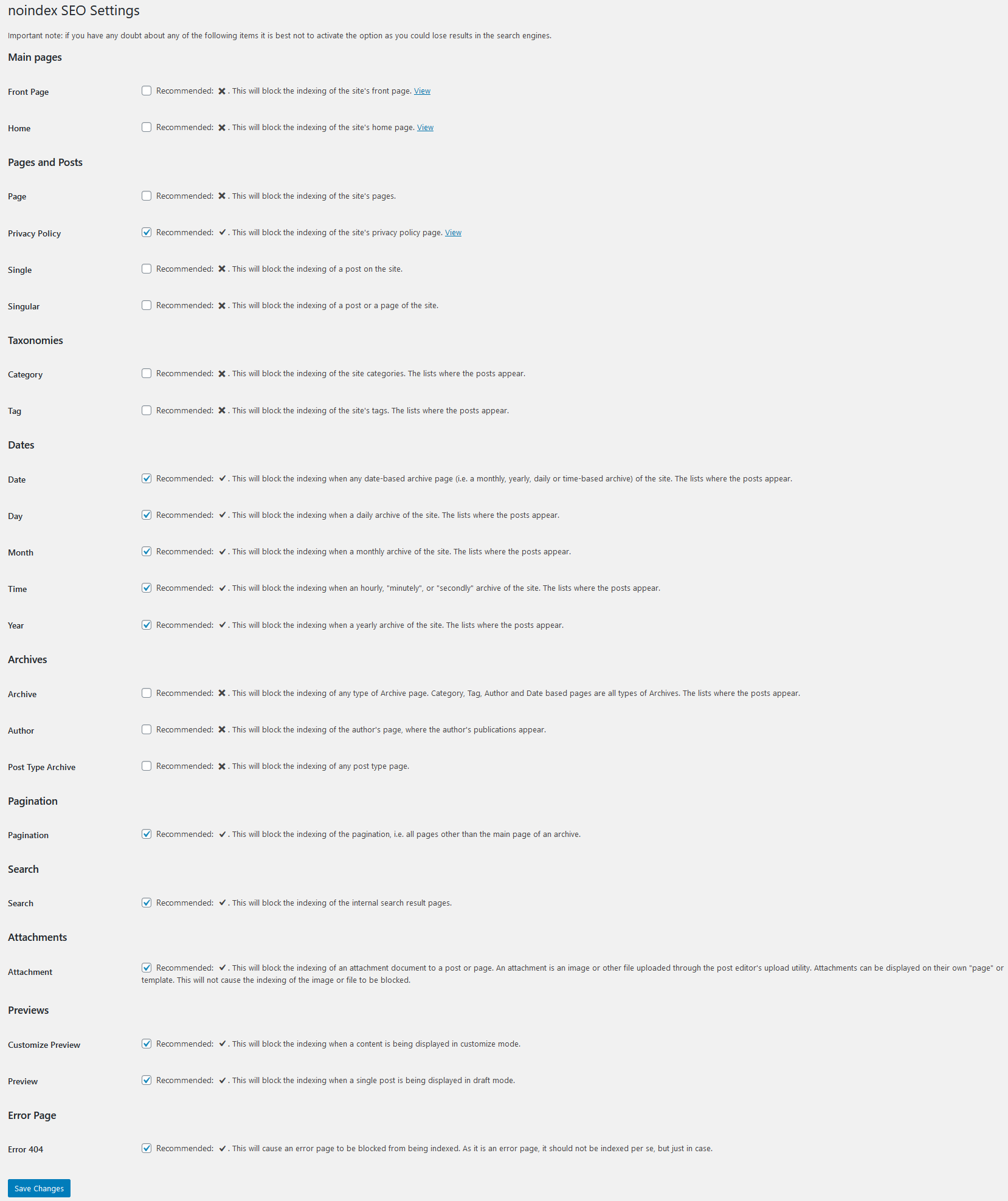
Main pages
- Front Page: Block the indexing of the site’s front page.
- Home: Block the indexing of the site’s home page.
Pages and Posts
- Page: Block the indexing of the site’s pages.
- Privacy Policy: Block the indexing of the site’s privacy policy page.
- Single: Block the indexing of a post on the site.
- Singular: Block the indexing of a post or a page of the site.
Taxonomies
- Category: Block the indexing of the site categories. The lists where the posts appear.
- Tag: Block the indexing of the site’s tags. The lists where the posts appear.
Dates
- Date: Block the indexing when any date-based archive page (i.e. a monthly, yearly, daily or time-based archive) of the site. The lists where the posts appear.
- Day: Block the indexing when a daily archive of the site. The lists where the posts appear.
- Month: Block the indexing when a monthly archive of the site. The lists where the posts appear.
- Time: Block the indexing when an hourly, “minutely”, or “secondly” archive of the site. The lists where the posts appear.
- Year: Block the indexing when a yearly archive of the site. The lists where the posts appear.
Archives
- Archive: Block the indexing of any type of Archive page. Category, Tag, Author and Date based pages are all types of Archives. The lists where the posts appear.
- Author: Block the indexing of the author’s page, where the author’s publications appear.
- Post Type Archive: Block the indexing of any post type page.
Pagination
- Pagination: Block the indexing of the pagination, i.e. all pages other than the main page of an archive.
Search
- Search: Block the indexing of the internal search result pages.
Attachments
- Attachment: Block the indexing of an attachment document to a post or page. An attachment is an image or other file uploaded through the post editor’s upload utility. Attachments can be displayed on their own “page” or template. This will not cause the indexing of the image or file to be blocked.
Previews
- Customize Preview: Block the indexing when a content is being displayed in customize mode.
- Preview: Block the indexing when a single post is being displayed in draft mode.
Error Page
- Error 404: This will cause an error page to be blocked from being indexed. As it is an error page, it should not be indexed per se, but just in case.
Important note: if you have any doubt about any of the following items it is best not to activate the option as you could lose results in the search engines.
Compatibility
- WordPress: 6.6 – 6.9
- PHP: 7.2 – 8.5
Security
This plugin adheres to the following security measures and review protocols for each version:
- WordPress Plugin Handbook
- WordPress Plugin Security
- WordPress APIs Security
- WordPress Coding Standards
- Plugin Check (PCP)
Privacy
- This plugin does not collect any information about your site, your identity, the plugins, themes or content the site has.
Vulnerabilities
- No vulnerabilities have been published up to version 2.0.0.
- Version 2.0.0 includes proactive security hardening based on comprehensive security audit (see docs/SECURITY-2026-01-20.md).
Found a security vulnerability? Please report it to us privately at the noindex SEO GitHub repository.
عکسهای صفحه
نصب
Automatic download
Visit the plugin section in your WordPress, search for [noindex-seo]; download and install the plugin.
Manual download
Extract the contents of the ZIP and upload the contents to the /wp-content/plugins/noindex-seo/ directory. Once uploaded, it will appear in your plugin list.
نقد و بررسیها


توسعه دهندگان و همکاران
“noindex SEO” نرم افزار متن باز است. افراد زیر در این افزونه مشارکت کردهاند.
مشارکت کنندگان
“noindex SEO” به 3 زبان ترجمه شده است. با تشکر از مترجمین برای همکاری و کمکهایشان.
ترجمه “noindex SEO” به زبان شما.
علاقه مند به توسعه هستید؟
Browse the code, check out the SVN repository, or subscribe to the development log by RSS.
گزارش تغییرات
2.0.0 [2026-01-20]
New Features
- 5 independent robots directives: noindex, nofollow, noarchive, nosnippet, noimageindex
- Each directive can be enabled independently for any page context (125 total options)
- HTTP Headers support: Choose between HTML meta tags, HTTP headers, or both
- Granular per-post/page control (optional):
- Override global settings for individual posts/pages
- Meta boxes for Classic Editor
- Native Gutenberg sidebar panel for Block Editor
- Quick Edit support for fast inline editing
- Bulk actions to enable/disable overrides
- Custom “Robots” column in post lists
- Filter posts by override status
- Modern checkbox-based interface with emoji icons and tooltips
Security & Code Quality
- Modernized code with PHP 7.2+ strict types and type declarations
Compatibility & Migration
- WordPress: 6.6 – 6.9
- PHP: 7.2 – 8.5
- Automatic migration from v1.x (your existing settings are preserved)
- No manual configuration needed – just update and go
- Fully backward compatible
1.2.0 [2025-04-08]
Changes
- Improved functions documentation.
Fixes
- The way the options are saved.
Compatibility
- WordPress: 4.1 – 6.8
- PHP: 5.6 – 8.4
Tests
- PHP Coding Standards: 3.12.1
- WordPress Coding Standards: 3.1.0
- Plugin Check (PCP): 1.4.0
1.1.1 [2024-11-04]
Added
- Configuration option to dismiss other SEO plugin incompatibilities.
Compatibility
- WordPress: 4.1 – 6.7
- PHP: 5.6 – 8.4
1.1.0 [2024-11-02]
Added
- Detects other WordPress SEO plugins, and creates a notice about it, to avoid conflicts.
- Has filters, so other plugins can hack.
Changed
- Uses native wp_robots functions (since WP 5.7+)
- Big refactory.
- Less size, improved code quality.
Compatibility
- WordPress: 4.1 – 6.7
- PHP: 5.6 – 8.4
Tests
- PHP Coding Standards: 3.10.3
- WordPress Coding Standards: 3.1.0
- Plugin Check (PCP): 1.1.0