
توضیحات
You can delete a user metadata one by one or a metadata of all users. It is a powerful tool, so use it responsibly.
The deleted data can not be recovered, so we strongly recommend making a backup of your database before deleting the metadata.
If you leave the User ID field blank, the deletion of the metadata will apply to ALL users. But if you add a user ID, only the chosen metadata of that user will be deleted.
Now you can select user by dropdown!
عکسهای صفحه
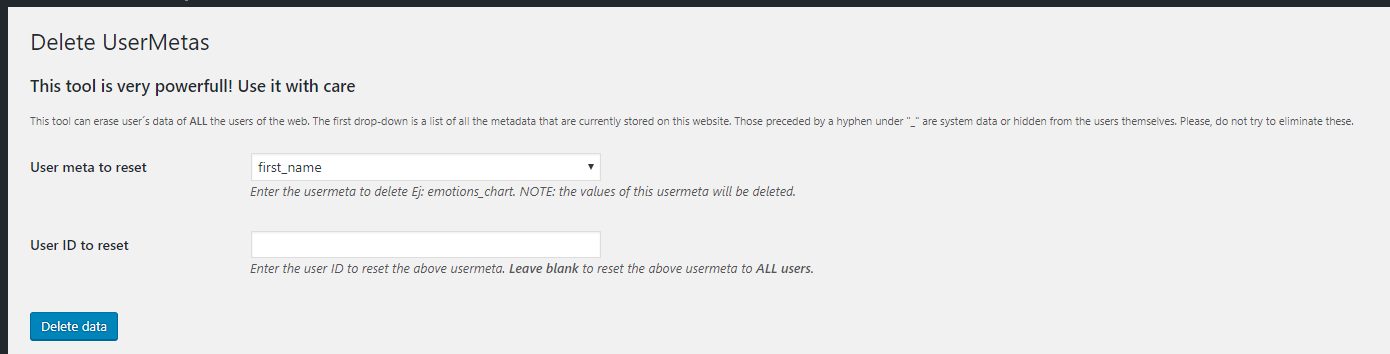
Easy and intuitive interface
نصب
- Upload the plugin files to the
/wp-content/plugins/delete-usermetasdirectory, or install the plugin through the WordPress plugins screen directly. - Activate the plugin through the ‘Plugins’ screen in WordPress
- Use the Settings->Plugin Name screen to configure the plugin
سوالات متداول
-
Can I delete one metadata in all users?
-
Yes you can. You have to select one metadata and leave blank the field “User ID”.
-
Can I selected multiple users to delete one usermeta?
-
No, you can’t yet (next release). If you need to delete one metadata to multiple user, you need do it one by one.
نقد و بررسیها

توسعه دهندگان و همکاران
“Delete Usermetas” نرم افزار متن باز است. افراد زیر در این افزونه مشارکت کردهاند.
مشارکت کنندگان

“Delete Usermetas” به 2 زبان ترجمه شده است. با تشکر از مترجمین برای همکاری و کمکهایشان.
ترجمه “Delete Usermetas” به زبان شما.
علاقه مند به توسعه هستید؟
Browse the code, check out the SVN repository, or subscribe to the development log by RSS.
گزارش تغییرات
1.2.1
- Fixed security issues with escaping
1.2.0
- Tested 6.3
- Fixed security issue with nonces
- Added list of users in the selection input
- Added some translatable strings
1.1.2
- Tested 6.1
1.1.1
- Tested 5.8.1
1.1
- Tested 5.5.3
- Fixed minor bugs
1.0
- Initial release