

توضیحات
Are you tired of managing changelogs manually or using plain text that looks unprofessional? ChangelogWP transforms how you create and display changelogs for your WordPress products, making it easy to show users what’s new, what’s fixed, and what’s improved—all with beautiful, color-coded badges that make your updates stand out.
Why You Need a Professional Changelog Plugin
Whether you’re a plugin developer, theme creator, or agency managing multiple WordPress products, maintaining clear, visually appealing changelogs is essential for:
* Building user trust by transparently showing what’s changed
* Reducing support requests with clear update documentation
* Increasing user engagement with searchable, filterable changelogs
* Providing REST API endpoints for automation and syndication
Our changelog plugin solves the problem of unprofessional changelog displays by giving you a dedicated post type, beautiful badge system, and flexible display options—all while using the familiar WordPress readme.txt format you already know.
🌐 Optional: ChangelogWP.com – Centralized Changelog Service & Email Notifications
This plugin works perfectly on its own, but you can also optionally use it with ChangelogWP.com—a centralized changelog service that enhances your changelog workflow:
For Product Owners: Submit your changelogs to ChangelogWP.com using this plugin. Your changelogs will be available in a centralized directory where users can discover and subscribe to your product updates.
For Site Owners: Subscribe to any product’s changelog on ChangelogWP.com to receive email notifications whenever new versions are released. Stay informed about updates, new features, bug fixes, and security patches for all your favorite WordPress plugins and themes—all in one place.
Whether you use ChangelogWP.com or not, this plugin provides everything you need to create and display beautiful changelogs on your WordPress site.
What Makes This Changelog Plugin Different
Unlike basic changelog solutions or manual HTML, our changelog plugin provides:
Professional Display with Color-Coded Badges
Automatically detect and display badges for Added (green), Fixed (orange), Improved (blue), Security (red), and more. Each badge is color-coded and customizable, making your changelog visually appealing and easy to scan.
Flexible Display Options
Display your changelog anywhere using shortcodes or the Gutenberg block. Customize heading levels, order (newest/oldest first), enable search and filtering, and control which versions to show—all without touching code.
Easy Content Creation
Use the familiar WordPress readme.txt format you already know. No HTML required, just simple text with version headers and bullet points. The plugin automatically formats everything beautifully.
Developer-Friendly
Full REST API support for automation and syndication. Integrates with Easy Digital Downloads for seamless product changelog management. Extensive filter and action hooks for complete customization.
Key Features
- Dedicated Changelog Post Type – Manage all your changelogs in one place
- Color-Coded Badge System – Automatic badges for Added, Fixed, Improved, Security, Dev, Deprecated, Removed, and Tweak
- Fully Customizable Badges – Customize colors, labels, emojis, and create unlimited custom badge types
- Shortcode & Gutenberg Block – Display changelogs anywhere with
[changelog_service]or use the modern block editor - WordPress.org Plugin Support – Display changelogs from any WordPress.org plugin by specifying its slug, with automatic daily caching
- Search & Filter Functionality – Let users search changelog content and filter by badge type
- REST API Endpoints – JSON endpoints for changelog syndication and automation
- EDD Integration – Works seamlessly with Easy Digital Downloads products
- Version Control Meta Fields – Track version, tested up to, requires WordPress/PHP, and homepage
- Copy Link Buttons – One-click copy links to specific versions (always enabled on hover)
- Responsive & Accessible – Full keyboard navigation, ARIA labels, and screen reader support
Who Is This Plugin For?
WordPress Plugin Developers
Maintain professional changelogs for your free and premium plugins. Display updates on your website with beautiful badges that build user trust.
WordPress Theme Developers
Show your theme updates clearly with searchable, filterable changelogs. Let users see exactly what changed in each version.
Product Managers
Keep users informed about updates, new features, bug fixes, and security patches with transparent, professional changelog displays.
Credits
Badge system inspired by EDD Changelog Badges by Very Good Plugins.
Emoji picker powered by emoji-picker-element by Nolan Lawson (Apache-2.0 license).
عکسهای صفحه

Changelog edit screen showing the plain text editor with readme.txt format – easy to use, no HTML required 
Settings page displaying badge customization options – customize colors, labels, emojis, and add custom badge types 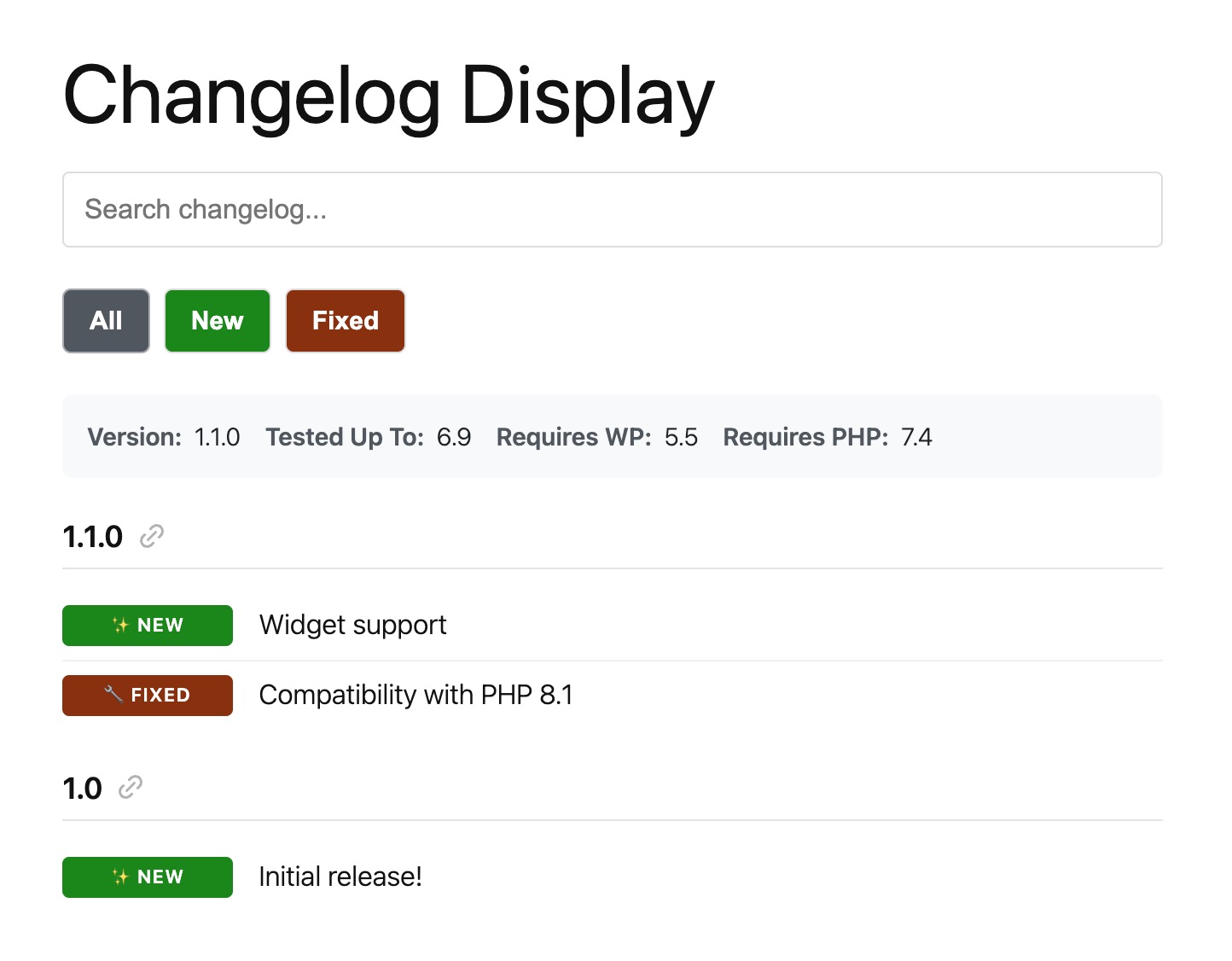
Frontend changelog display with color-coded badges – professional, easy-to-scan changelog with Added, Fixed, Improved, and Security badges 
Gutenberg block interface in the editor – select changelog and configure display options with the modern block editor
بلوکها
این افزونه 1 بلوک ارائه میدهد.
- Changelog
سوالات متداول
-
How do I display my changelog on my website?
-
You have three easy options:
1. Shortcode: Use[changelog_service id="123"]or[changelog_service slug="my-plugin"]anywhere on your site
2. Gutenberg Block: Search for “Changelog” in the block inserter and select your changelog
3. Automatic Display: If your changelog post type is public, it displays automatically on single changelog pages -
Can I customize the badge colors and styles?
-
Absolutely! Go to Changelogs > Settings > Badges to customize colors, labels, and emojis for each badge type. Choose from three badge styles (rounded, square, or pill) and position them left or inline. You can also create unlimited custom badge types with your own prefixes.
-
Can I use this for WordPress themes or other projects?
-
Yes! While the terminology focuses on plugins, it works perfectly for themes, any WordPress product, or even non-WordPress project changelogs. Just create a changelog post and use the shortcode or block wherever you need it.
-
How do I format my changelog entries to get badges?
-
Use the format “Prefix – Description” or “Prefix: Description” or “Prefix : Description”. For example:
*Added - New feature(shows green “New” badge)
*Fixed: Bug resolved(shows orange “Fixed” badge)
*Improved - Performance boost(shows blue “Improved” badge)See the Badge Format section below for all supported prefixes.
-
Does this work with page builders like Elementor, Beaver Builder, or Divi?
-
Yes! Use the
[changelog_service]shortcode in any page builder that supports shortcodes. Most popular page builders have shortcode widgets or modules you can use. -
Can I search and filter changelog entries?
-
Yes! Enable search and filtering in your shortcode:
[changelog_service id="123" search="true" filter_badges="true"]. Users can search changelog content or filter by badge type (Added, Fixed, Improved, etc.). Results show version headers with matching items. -
Is there a REST API I can use?
-
Yes! This changelog plugin provides REST API endpoints for changelog data:
*GET /wp-json/changelogwp/v1/changelog/{slug}– Get single changelog
*GET /wp-json/changelogwp/v1/changelogs– Get all changelogs with paginationPerfect for automation, syndication, or integrating with external services.
-
Does this integrate with Easy Digital Downloads?
-
Yes! If you have EDD Software Licensing active, you can display changelogs for your EDD products using the
edd_idattribute:[changelog_service edd_id="456"]. This is perfect for premium plugin developers managing product changelogs. -
Is it accessible for screen readers?
-
Yes! It includes full accessibility support:
* Keyboard navigation for all interactive elements
* ARIA labels and roles for screen readers
* Visible focus indicators
* Semantic HTML structure
* Screen reader text for icon-only buttons like copy links -
Can I create custom badge types?
-
Yes! Go to Changelogs > Settings > Badges and click “Add Badge” to create custom badge types with your own prefixes (like “Enhancement”, “Performance”, “Breaking”), colors, and emojis. No coding required.
-
How do I link to specific versions in my changelog?
-
Copy link buttons are always enabled and appear on hover next to each version number. Users can click to copy the URL with the version anchor, making it easy to share specific updates.
نقد و بررسیها


توسعه دهندگان و همکاران
“Changelog as a Service – Publish, Display, and Communicate Beautiful Changelogs” نرم افزار متن باز است. افراد زیر در این افزونه مشارکت کردهاند.
مشارکت کنندگان


ترجمه “Changelog as a Service – Publish, Display, and Communicate Beautiful Changelogs” به زبان شما.
علاقه مند به توسعه هستید؟
Browse the code, check out the SVN repository, or subscribe to the development log by RSS.
گزارش تغییرات
1.1.0
- New: WordPress.org plugin slug support – Display changelogs from any WordPress.org plugin by specifying its slug
- New: Filter for ‘changelog-service’ post type arguments
- Change: Post type rewrite slug changed to “changelog-details” to better avoid permalink collisions
- Fix: Processing EDD changelogs with HTML structure
1.0.0
- New: Changelog custom post type with plain text editor
- New: Color-coded badge system (Added, Fixed, Improved, Security, Dev, Deprecated, Removed, Tweak)
- New: Customizable badge colors, labels, and emojis
- New: Custom badge types with user-defined prefixes
- New: Shortcode support with flexible attributes
- New: Gutenberg block integration
- New: REST API endpoints for changelog data
- New: Search and filter functionality
- New: Copy link buttons for version anchors
- New: EDD Software Licensing integration
- New: Full accessibility support