

Description
WebSync Checkout & Cart for Elementor gives you full visual control over the two most important WooCommerce pages — Checkout and Cart.
Replace the default WooCommerce checkout and cart layouts with beautifully designed, fully customizable Elementor widgets that integrate seamlessly with your Elementor-built website, without breaking WooCommerce functionality.
This plugin is perfect for store owners who want a modern, conversion-focused checkout and cart experience using Elementor.
Key Features
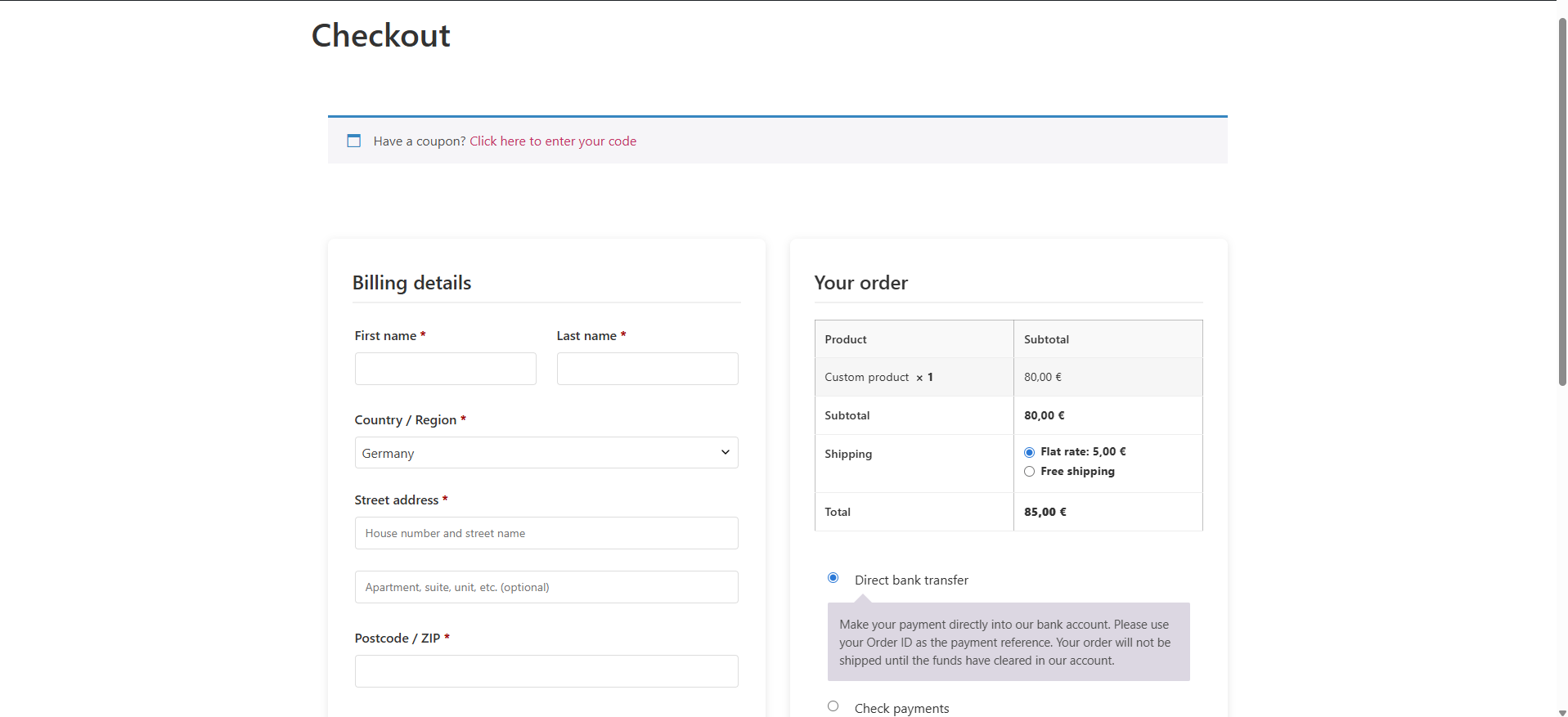
- Checkout Widget – Fully customizable WooCommerce checkout built with Elementor
- Cart Widget – Custom WooCommerce cart with modern layout and styling controls
- Full Design Control – Style every part of checkout and cart using Elementor
- Responsive Layouts – Optimized for desktop, tablet, and mobile
- Modern UI – Clean, professional cart and checkout interfaces
- Performance Optimized – Lightweight and WooCommerce-safe implementation
- Easy Setup – Drag & drop widgets into Elementor, no coding required
Widgets Included
- WooCommerce Checkout
- WooCommerce Cart
Checkout Layout Options
- One Column Layout – Mobile-first stacked checkout
- Two Column Layout – Forms on the left, order summary on the right
- Sticky Order Summary – Keeps order review visible while scrolling
- Custom Spacing Controls – Padding, gaps, and margins
Cart Features
- Custom Cart Table Layout
- Optional Coupon Form
- Continue Shopping Button
- Cross-Sells Display (with column and limit controls)
- Fully AJAX Compatible
- Empty Cart State Styling
Style Controls
- Container Styles – Backgrounds, padding, borders, shadows
- Section Styles – Billing, shipping, order summary, cart totals
- Typography Controls – Fonts, sizes, colors, spacing
- Button Styles – Checkout, update cart, apply coupon, continue shopping
- Field Styles – Inputs, labels, validation states
- Table Styles – Cart and order summary tables
Data Collection (Usage Statistics)
To help improve the plugin, anonymous usage statistics are collected:
On Activation and deactivation:
* Plugin name, slug and version
* Whether it’s an update or new installation
On Deactivation (Optional):
* Reason for deactivation (if you choose to provide it)
* Optional comments about your experience
Data usage:
* Used solely to improve plugin features and user experience
* Anonymous aggregated statistics only
* Never shared or sold to third parties
You can review our privacy policy at https://websync.tech/privacy-policy/
Support
For support:
1. Review the FAQ section
2. Visit https://websync.tech/contact/
3. Open an issue on GitHub
Please include:
* WordPress version
* Elementor version
* WooCommerce version
* PHP version
* Error messages (if any)
License
This plugin is licensed under the GPL v2 or later.
Credits
- Built for the Elementor community
- Powered by WooCommerce
- Thanks to all contributors and testers
A Note on Compatibility
Required:
* WordPress 5.0+
* Elementor Free 3.0+
* WooCommerce 4.0+
* PHP 7.4+
Always test updates on a staging site before deploying to production.
Screenshots

Installation
- Upload the plugin files to the
/wp-content/plugins/websync-checkout-for-elementordirectory, or install the plugin via the WordPress Plugins screen. - Activate the plugin through the Plugins screen.
- Create or edit a page using Elementor.
- Drag the WooCommerce Checkout or WooCommerce Cart widget onto the page.
- Configure layout and styling options to match your design.
FAQ
-
What do I need to use this plugin?
-
You need:
* WordPress 5.0 or higher
* Elementor Free (latest recommended)
* WooCommerce 4.0 or higher -
Can I use this with any theme?
-
Yes. The plugin works with any theme that supports Elementor and WooCommerce.
-
Will this affect WooCommerce functionality?
-
No. This plugin only changes the presentation layer.
All WooCommerce logic — payments, shipping, taxes, coupons — works as usual. -
Can I customize checkout or cart fields?
-
The widgets use standard WooCommerce fields.
You can customize fields using WooCommerce hooks or third-party plugins. -
Is it mobile-friendly?
-
Yes. Both Cart and Checkout widgets are fully responsive and optimized for mobile.
-
Does it support AJAX cart updates?
-
Yes. The Cart widget supports WooCommerce AJAX updates, including item removal and totals refresh.
-
What if I encounter issues?
-
- Ensure WooCommerce is properly configured
- Confirm your Cart and Checkout pages are set in WooCommerce settings
- Update Elementor and WooCommerce to the latest versions
- Temporarily disable other plugins to test for conflicts
Reviews

Contributors & Developers
“WebSync Checkout for Elementor” is open source software. The following people have contributed to this plugin.
Contributors
Translate “WebSync Checkout for Elementor” into your language.
Interested in development?
Browse the code, check out the SVN repository, or subscribe to the development log by RSS.
Changelog
1.0.4
- Fixed: Deactivated reason
1.0.3
- NEW: Deactivated reason
1.0.2
- NEW: WooCommerce Cart widget for Elementor
- NEW: Cart layout and style controls
- NEW: Optional coupon form and continue shopping button
- NEW: Cross-sells display controls
- Improved compatibility with Elementor preview mode
- Bug fixes and performance improvements
1.0.1
- Initial public release with WooCommerce Checkout widget