

Deskripzioa
Its Awesome. Only 1 Plugin and have 2 widgets. you do not need any shortcode and customization.
Just Install and Enjoy 2 Dashboard Widgets.
A few notes about the sections above:
- User Status – Show your all user like as admin, administator, author, subscriber. and edit them.
- Todo List – Add, edit, delete your list
Features
WP Dashboard Eathim has many feature.
- Includes 2 awesome Dashboard widgets
- Easy to set up and customize options
Privacy
It does not set any coockies. and does not links any third party location. this plugin does not collect any data of user.
Pantaila-argazkiak

Active Plugin 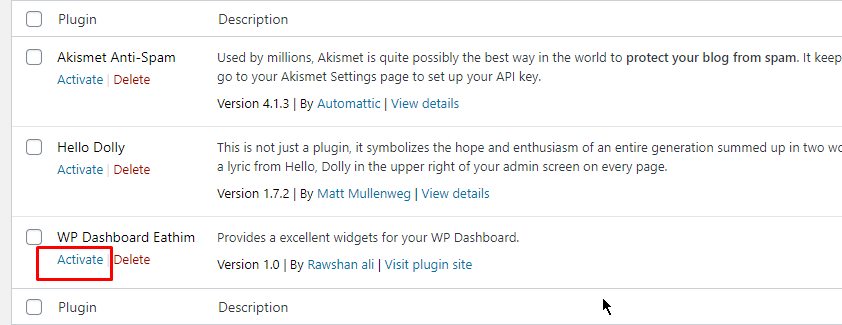
Goto Dashboard Area 
All User Status Widgets 
Lists Widgets
Instalazioa
- Upload the plugin files to the
/wp-content/plugins/wp-dashboard-eathimdirectory, or install the plugin through the WordPress plugins screen directly. - Activate the plugin through the ‘Plugins’ screen in WordPress
- Use the Dashboard->Plugin Name screen to configure the plugin
MEG
-
How to install this Plugins
-
Upload the plugin files to the
/wp-content/plugins/wp-dashboard-eathimdirectory -
How to see Widgets
-
Goto Dashboard or click the clink dashboard of plugin links
Berrikuspenak

2019(e)ko abenduaren 17(a)
You can add a todo list from your dashboard & also you can check all your user from the dashboard page and take action for the editing!
Laguntzaileak eta Garatzaileak
“WP Dashboard Eathim” software librea da. Ondoko pertsonek egin dizkiote ekarpenak plugin honi.
Laguntzaileak
Itzul zaitez WP Dashboard Eathim zure hizkuntzara.
Garapena interesatzen zaizu?
Araka kodea, begiratu SVN biltegia edo harpidetu garapen erregistrora RSS bidez.
Aldaketen loga
1.0.2
- Check all Latest Version.
1.0.1
- Check all Latest Version.
1.0
- Just New Release.