
Deskripzioa
This plugin allows passwordless login for Worpdress using SSI as a decentralized technology. Sideos has deployed a proxy service for you to use with your WordPress Instance. If you wish to use your own server, check the documentation on how to deploy your own SSI service integration.
Here you can see a document that explain step by step how to do it
Passwordless login for Worpress powered by Self Sovereign Identity and Sideos Gmbh
Features
- Adds a QRCode on the login page to scan for log in
- Ability to send credentials to users, using their email as ID
- Ability to give credentials based on the domain e.g. email-domain is the key to allow login
- Ability to disable completely the username/password submission to avoid possible brute force attacks
- Ability to enable-disable username/password via http post secure call
Disable Username/Password submit
The plug in has a checkbox that when checked, disable the submission of the login page. This is useful to allow only login via the PasswordleSSI plugin. If you want to enable the feature back, you can use the REST API endpoint, and use the Juno Token as a header token to reset the status. After the call you can login again with Username/Password.
The CURL command is the following:
curl -d ‘{}’ -H “X-Token: ” -H “Content-Type: application/json” -X POST /wp-json/sideos-ssi/v1/enable“
Replace with the token you have in the options, and with the instance of your WordPress website.
Pantaila-argazkiak

Login page 
Juno SSI settings 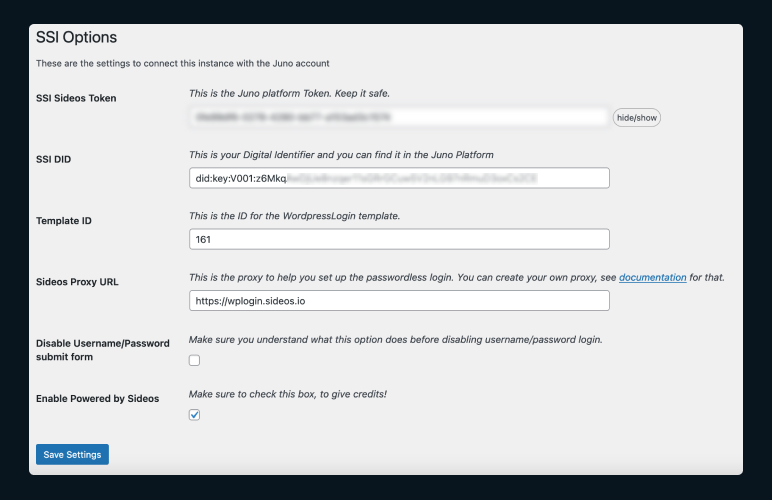
Send Credential to Users
Instalazioa
You need to do the following steps in order to have a functional passwordless login in your worpress instance powered by SSI & Sideos
Here you can see a document that explain step by step how to do it
- Create a free account on Juno
Check out this video to see how to register and create the WordPressLogin template.
- Install the plugin in your worpress instance
- Copy from the Juno account the following values and save them in the settings SSI page
| TOKEN | The TOKEN from the settings page in Juno |
| DID |The DID (Digital Identifier) from the settings page in Juno|
| Template ID| The Template ID you created following the steps in the documentation |
| Proxy Server | Either leave “https://wplogin.sideos.io” as default or build your own proxy. |
- Send credentials to yourself and other users.
MEG
-
What is the purpose of this plugin?
-
The primary purpose of the PasswordleSSI plugin is to allow authentication and access to the WordPress administration area without password. It uses a new technology, Self Sovereign Identity, or SSI, to perform the issuance and verification of credentials.
-
Can I use this plugin on my production site?
-
Yes you can however it relies on a Proxy Server managed by Sideos GmbH. If you wish to create your own implementation of the service there is documentation on https://docs.sideos.io.
-
Where can I submit my plugin feedback?
-
Feedback is encouraged and much appreciated, especially since this plugin is a small use case of waht SSI is capable of. If you have suggestions or requests for new features, you can submit them as an issue in the Sideos GitHub repository.
Berrikuspenak
Ez dago berrikuspenik plugin honentzat.
Laguntzaileak eta Garatzaileak
“PasswordleSSI” software librea da. Ondoko pertsonek egin dizkiote ekarpenak plugin honi.
Laguntzaileak

Itzul zaitez PasswordleSSI zure hizkuntzara.
Garapena interesatzen zaizu?
Araka kodea, begiratu SVN biltegia edo harpidetu garapen erregistrora RSS bidez.
Aldaketen loga
1.0.0
Enhancements
- First Release