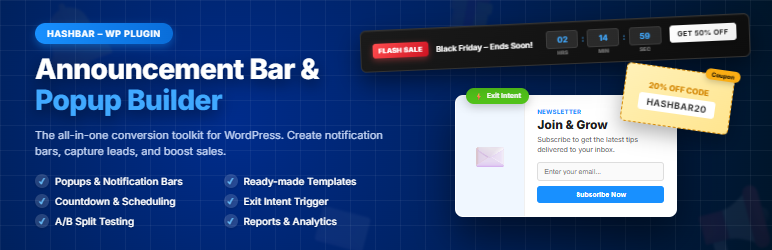

Description
🔔 The Most Powerful WordPress Announcement Bar, Notification Bar & Popup Campaign Plugin
HashBar is a powerful all-in-one WordPress plugin for Announcement Bars, Notification Bars, and Popup Campaigns that will take your WordPress site to the next level. Create unlimited Announcement Bars with countdown timers and coupons, embed Notification Bars with page builders, and build high-converting Popup Campaigns with smart triggers and lead capture forms. Advanced customization options, professional design controls, intelligent targeting, and advanced scheduling maximize your engagement and conversions.
Sometimes notification bars and popups can increase up to 500% of subscribers or conversions!
👉 Plugin Landing Page | Live Demo | Purchase Pro | Documentation | Support 👈
🎬 Video Tutorial
🎯 Key Highlights
- 🎨 18 Announcement Bar Templates – Get started in seconds with beautiful pre-designed templates
- 🎪 8 Popup Campaign Types – Lead capture, announcements, promotions, exit intent, and more
- 🖌️ Advanced Design Options – Solid colors, gradients, background images, and custom CSS
- 📊 A/B Testing – Test multiple variations to find the winning design
- 🎬 15 Smooth Animations – Multiple entry and exit animation options
- 📈 Comprehensive Analytics – Track impressions, clicks, conversions, and CTR
- 🎯 Smart Targeting – Display based on pages, devices, countries, and user behavior
- ⏱️ Countdown Timers – Fixed, recurring, or evergreen timers for urgency
- 📝 Lead Capture Forms – 11 field types with FREE Mailchimp integration
- ⚡ 8 Smart Triggers – Exit intent, scroll depth, time delay, and more
- 👁️ Live Preview – See changes in real-time before publishing
HashBar is an easy-to-install plugin for WordPress, allowing you to easily create notification bars and popup campaigns that work perfectly on all devices. With options for custom backgrounds, beautiful gradients, professional CSS styling, stunning animations, and smart triggers, there’s no way your notifications and popups won’t be noticed!
🎨 Announcement Bar Features
📚 18 Pre-built Templates
Get started quickly with professionally designed templates.
🆓 Free Templates:
- ✅ Classic – Simple and clean notification banner
- ✅ Sale Alert – Eye-catching design for flash sales
- ✅ Free Shipping – Green theme for shipping promotions
- ✅ Info Banner – Blue style for updates and news
- ✅ Countdown Sale – Includes countdown timer
- ✅ Coupon Display – Showcases discount codes
- ✅ Minimal Elegant – Clean design for premium brands
- ✅ Urgent Alert – Bold orange for urgency
- ✅ Holiday Special – Festive seasonal design
- ✅ Limited Stock – Red urgency design
⭐ Pro Templates:
- ⭐ Trust Builder – Gradient with trust signals
- ⭐ New Launch – Product launch style
- ⭐ Premium Gold – Luxury gradient design
- ⭐ Summer Vibes – Warm seasonal design
- ⭐ Social Media – Purple gradient for social
- ⭐ Bundle Deal – Green gradient for bundles
- ⭐ VIP Exclusive – Members-only style
- ⭐ Early Bird – Pre-order style
📝 Content & Messaging
- ✅ Message Text – Up to 500 characters per message
- ✅ Multiple Messages – Add unlimited rotating messages
- ✅ Message Rotation – Auto-cycle between messages (5-60 seconds)
- ✅ CTA Button – Customizable text, URL, and target
- ✅ Default Button Text – Auto-fills “Shop Now” when enabled
📍 Position & Display
- ✅ Top of Page – Display at website top
- ✅ Bottom of Page – Display at website bottom
- ✅ Sticky Mode – Stays visible while scrolling
- ✅ Z-Index Control – Set stacking order (1-999999)
- ✅ Close Button – Customizable text and position (left/right)
- ⭐ Reopen Button (Pro) – Allow reopening closed bars
🍪 Cookie Duration Options
- ✅ Show on each page reload
- ✅ Session only (until browser closes)
- ✅ 1 Hour / 6 Hours / 1 Day / 7 Days / 2 Weeks / 1 Month
- ✅ Never (persistent dismissal)
🎨 Design & Styling
Background Options:
- ✅ Solid Color (Free)
- ⭐ Gradient (Pro) – Two-color with 4 directions
- ⭐ Image (Pro) – Upload with Cover/Contain/Auto
Typography:
- ✅ Font Family: System UI, Arial, Georgia, Courier New, Trebuchet MS, Times New Roman
- ✅ Font Weight: Light (300) to Bold (700)
- ✅ Font Size: 12px to 32px
- ✅ Text Alignment: Left, Center, Right
Spacing:
- ✅ Bar Height: 40px to 200px
- ✅ Padding: Individual control for all sides
Button Styling:
- ✅ CTA Button: Colors, hover effects, font size, border radius
- ✅ Close Button: Colors, hover effects, font size, border radius
Custom CSS (Pro):
- ⭐ CSS Editor with syntax highlighting
- ⭐ Selectors:
.hashbar-announcement-bar,.hashbar-announcement-cta,.hashbar-coupon-display,.hashbar-announcement-close
🎪 Popup Campaign Features
📋 8 Campaign Types
🆓 Free:
- ✅ Lead Capture – Collect emails and build your list
- ✅ Announcement – Share important news and updates
- ✅ Promotion – Highlight special offers and deals
- ✅ Exit Intent – Catch leaving visitors with offers
- ✅ Welcome – Greet new visitors
⭐ Pro:
- ⭐ Survey – Collect feedback and opinions
- ⭐ Age Verification – Verify visitor age before entry
- ⭐ Cookie Consent – GDPR-compliant cookie notices
📍 7 Popup Positions
🆓 Free:
- ✅ Center Modal – Classic centered popup
- ✅ Bottom Right – Corner slide-in popup
- ✅ Bottom Left – Alternative corner position
- ✅ Floating Box – Floating element that stays in view
⭐ Pro:
- ⭐ Fullscreen – Covers entire viewport
- ⭐ Side Panel Left – Slides in from left edge
- ⭐ Side Panel Right – Slides in from right edge
⚡ 8 Smart Triggers
🆓 Free:
- ✅ Immediate – Show as soon as page loads
- ✅ Time Delay – Show after X seconds on page
- ✅ Exit Intent – Show when mouse moves to leave
⭐ Pro:
- ⭐ Scroll Depth – Show after scrolling X% of page
- ⭐ Element Click – Show when specific element is clicked
- ⭐ User Inactivity – Show after X seconds of no activity
- ⭐ Element Visible – Show when element enters viewport
- ⭐ Page Views – Show after X page views
📝 Form Builder (11 Field Types)
🆓 Free:
- ✅ Email – Email address with validation
- ✅ Name – Single name field
- ✅ Checkbox – Single checkbox for consent
⭐ Pro:
- ⭐ Text – Single-line text input
- ⭐ Textarea – Multi-line text area
- ⭐ Phone – Phone number input
- ⭐ Dropdown – Select with options
- ⭐ Radio Buttons – Multiple choice options
- ⭐ Date Picker – Date selection field
- ⭐ Hidden Field – Invisible data field
- ⭐ GDPR Consent – Privacy consent checkbox
Form Features:
- ✅ Drag & drop field ordering
- ✅ Custom labels and placeholders
- ✅ Required field validation
- ✅ Success message customization
- ✅ Redirect URL after submission
- ✅ Custom submit button text
📦 Content Types
🆓 Free:
- ✅ Custom Content – Rich text editor with heading, text, image, button
- ✅ HT Contact Form – HashThemes form integration
⭐ Pro:
- ⭐ Custom HTML – Write your own HTML code
- ⭐ Contact Form 7 – Embed CF7 forms
- ⭐ WPForms – Embed WPForms
- ⭐ Ninja Forms – Embed Ninja Forms
- ⭐ Gravity Forms – Embed Gravity Forms
- ⭐ Fluent Forms – Embed Fluent Forms
- ⭐ Shortcode – Any shortcode-based content
🖼️ Image Position Options
- ✅ Free: Top, Bottom
- ⭐ Pro: Left, Right, Background
🔄 Frequency Control
🆓 Free:
- ✅ Every Page Load
- ✅ Once Per Session
- ✅ Once Per Day
⭐ Pro:
- ⭐ Once Every X Days
- ⭐ Once Ever
- ⭐ X Times Total
🔗 Mailchimp Integration (Free)
- ✅ Connect with API key
- ✅ Select audience/list
- ✅ Enable/disable double opt-in
- ✅ Auto-tag subscribers for segmentation
🔧 Shared Features (Both Announcement Bar & Popup)
⏰ Countdown Timer
Create urgency with powerful countdown timers in both Announcement Bars and Popup Campaigns.
Timer Types:
- ✅ Fixed Date (Free) – Countdown to specific date/time
- ⭐ Evergreen (Pro) – Personal timer per visitor
- ⭐ Recurring (Pro) – Resets at set times/days
Timer Styles:
- ✅ Simple/Inline (Free)
- ✅ Boxes (Free)
- ✅ Digital (Free)
- ⭐ Circular (Pro)
Timer Options:
- ✅ Show/Hide: Days, hours, minutes, seconds
- ✅ Custom text before and after timer
- ✅ Site or visitor timezone
- ✅ Full color customization
🎟️ Coupon Display
Distribute discount codes with one-click copy functionality.
Styles:
- ✅ Simple (Free) – Clean text with border
- ✅ Dashed (Free) – Dashed border style
- ⭐ Ticket (Pro) – Voucher/ticket design
- ⭐ Gradient (Pro) – Modern gradient background
Features:
- ✅ One-click copy to clipboard
- ✅ Custom label and description
- ✅ Custom “Copy” and “Copied!” text
- ✅ Full color customization
- ✅ Auto-apply to WooCommerce cart (Announcement Bar)
🎯 Targeting Options
Show your bars and popups to the right audience.
📄 Page Targeting:
- ✅ All Pages
- ✅ Homepage Only
- ✅ Specific Pages/Posts
- ✅ All Except Excluded
📱 Device Targeting:
- ✅ Desktop
- ✅ Tablet
- ✅ Mobile
🌍 Geographic Targeting:
- ✅ All Countries (Free)
- ⭐ Specific Country Selection (Pro)
👤 User Targeting:
- ✅ All Users
- ✅ Logged-in Users Only
- ✅ Guest Visitors Only
📅 Scheduling
Automate your campaigns with advanced scheduling.
- ✅ Start date and time
- ✅ End date and time
- ✅ Site or visitor timezone
- ⭐ Recurring days – Monday through Sunday (Pro)
- ⭐ Time targeting – Start and end time daily (Pro)
✨ Animations
Professional entry and exit animations for attention-grabbing displays.
Entry Animations:
- ✅ Fade In (Free)
- ✅ Slide Down/Up (Free)
- ⭐ Slide Left/Right (Pro)
- ⭐ Zoom In (Pro)
- ⭐ Bounce In (Pro)
- ⭐ Flip In (Pro)
Exit Animations:
- ✅ Fade Out (Free)
- ✅ Slide Out Up/Down (Free)
- ⭐ Slide Out Left/Right (Pro)
- ⭐ Zoom Out (Pro)
- ⭐ Bounce Out (Pro)
Duration: 100ms to 2000ms customizable
📊 Analytics Dashboard (FREE!)
Track performance with comprehensive built-in analytics.
- ✅ Total views, clicks, and conversions
- ✅ Click-through rate (CTR)
- ✅ Conversion rate
- ✅ Device breakdown (Desktop, Mobile, Tablet)
- ✅ Geographic insights by country
- ✅ Page performance by URL
- ✅ Timeline: Daily, weekly, monthly views
- ✅ CSV export for detailed analysis
🔬 A/B Testing (Pro)
Find the winning design with automatic split testing.
- ⭐ Create unlimited test variants
- ⭐ Automatic traffic splitting
- ⭐ Track impressions, clicks, conversions per variant
- ⭐ Statistical confidence levels (Low/Medium/High)
- ⭐ Automatic winner detection
- ⭐ Per-variant analytics
📢 Notification Bar Features
The classic Notification Bar with page builder integration for embedding notifications directly into your content.
🔌 Page Builder Compatibility
- ✅ Gutenberg – 4 native blocks included
- ✅ Elementor – Full support
- ✅ WPBakery – Full support
- ✅ King Composer – Full support
- ✅ Classic Editor – Shortcode generator included
📦 Gutenberg Blocks
- ✅ Promo Banner Block – Create promotional banners
- ✅ Promo Banner Image Block – Image-based promo banners
- ✅ Countdown Block – Add countdown timers
- ✅ Notification Block – Display notifications
📍 Position Options
- ✅ Top Position
- ✅ Bottom Position
- ✅ Left Wall
- ✅ Right Wall
- ✅ Promo Banner Top
- ✅ Promo Banner Bottom
🎛️ Display Controls
- ✅ Show/Hide on Desktop
- ✅ Show/Hide on Mobile
- ✅ Custom mobile breakpoint
- ✅ Load as minimized option
- ✅ Show/Hide based on scroll position
- ✅ Close button with custom text
- ✅ Open button with custom text
- ✅ Keep closed after manual close
Note: Announcement Bar and Popup Campaign have their own dedicated admin panel with live preview – no page builder required!
🌐 WPML Compatibility
HashBar offers seamless integration with WPML, the leading multilingual translation plugin. Translate and localize your notification bars and popup campaigns for a global audience.
📊 Use Cases
🔔 Announcement Bars:
- 🔥 Flash sales and limited-time offers
- 📧 Newsletter and email signups
- 🆕 New product announcements
- 🎟️ Coupon code distribution
- 🚚 Free shipping threshold notices
- 🎄 Holiday hours and closures
- 📱 Social media follower campaigns
🎪 Popup Campaigns:
- 📥 Lead capture and email list building
- 🛒 Exit intent cart abandonment recovery
- 🎉 Welcome popups for first-time visitors
- 📊 Survey collection and user feedback
- 🔞 Age verification for restricted content
- 🍪 Cookie consent for GDPR compliance
- ⏰ Urgency campaigns with countdown timers
- 💰 Promotional offers with coupon codes
🔥 Other Popular Plugins by HasThemes
-
ShopLentor (formerly WooLentor) – WooCommerce page builder plugin with 120+ free Elementor widgets, 110+ WooCommerce templates, and Gutenberg Blocks. Best alternative for ShopReady, Kadence, JetWidgets, ShopEngine, and CoDesigner.
-
HT Mega For Elementor – Elementor Addons with 135+ professional widgets, AI-powered content writer, theme builder, and 790+ ready-made blocks. Works like ElementsKit, Essential Addons, Royal Elementor Addons.
-
WP Plugin Manager – Disable certain plugins on specific pages or posts for better performance. Activate or deactivate plugins on a per-page basis.
-
Extensions For CF7 – Contact Form 7 Database, Conditional Fields, and Mailchimp integration for lead generation.
-
Whols – WooCommerce wholesale pricing plugin. Set wholesale prices, custom registration fields, and minimum requirements. Works like Wholesale Suite, B2Bking.
-
JustTables – WooCommerce product table plugin with 28 pre-built columns, custom fields support, and drag-and-drop ordering.
-
Swatchly – WooCommerce product variation swatches with color, label, and image swatch types.
-
HT Slider For Elementor – Powerful slider addon for Elementor with custom styling options and navigation controls.
-
HT Contact Form – Elementor addon for Contact Form 7 with drag-and-drop and custom styling options.
Wanna see the pro version? Check it out now!
💬 Need Help?
Is there any feature that you want to get in this plugin?
Needs assistance to use this plugin?
Screenshots

Unlimited Announcement Bars – Create, manage, and schedule campaigns instantly 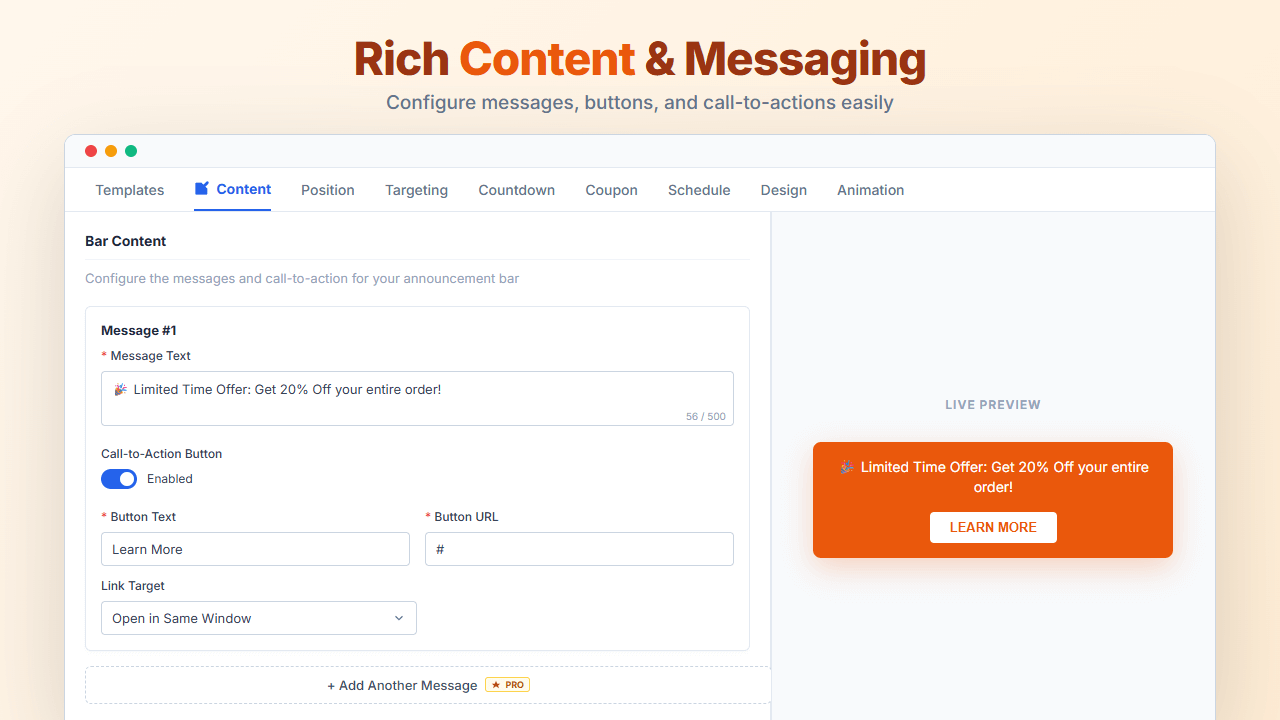
Rich Content & Messaging – Configure messages, buttons, and call-to-actions easily 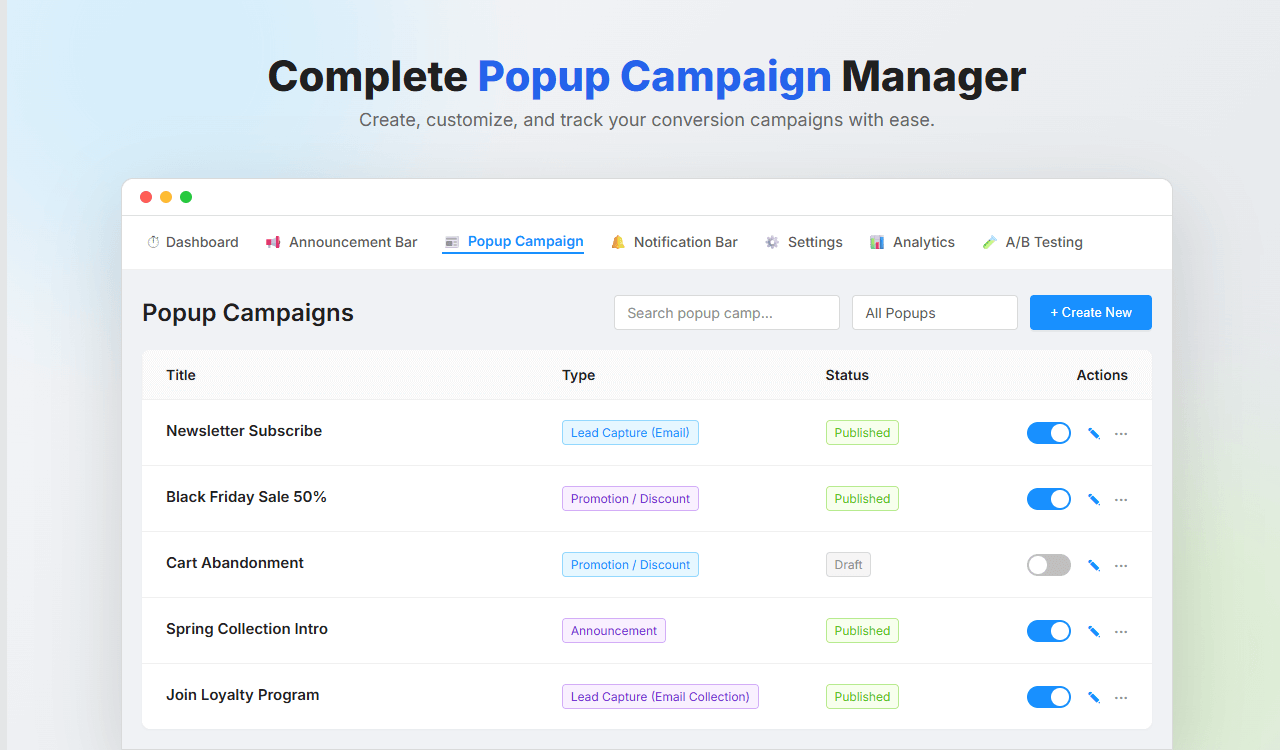
Complete Popup Campaign Manager – Create, customize, and track conversion campaigns 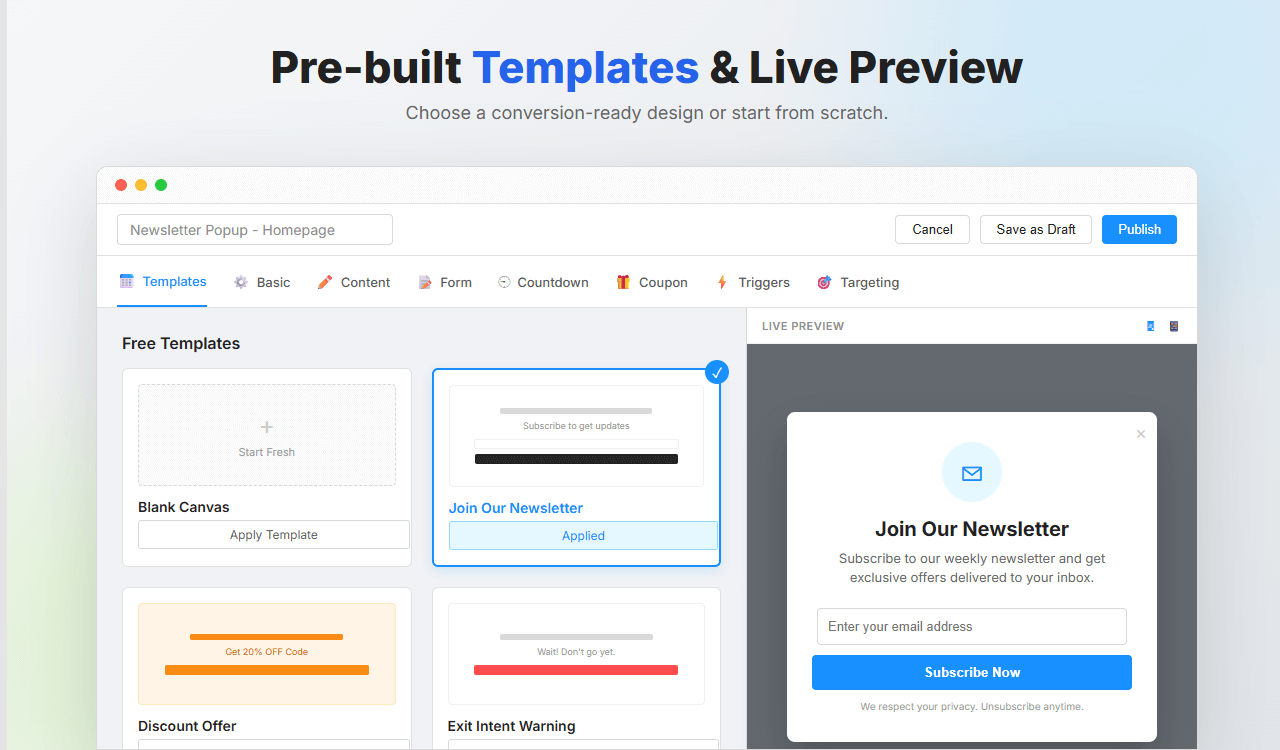
Pre-built Templates & Live Preview – Choose a conversion-ready design or start from scratch 
7 Popup Positions & 8 Campaign Types – From fullscreen takeovers to subtle slide-ins 
Boost Sales with Countdowns – Create urgency with Evergreen & Recurring timers 
Advanced Gradients & Design – Full control over backgrounds, typography, and visual styling 
Eye-Catching Animations – Control entrance and exit effects with precision timing 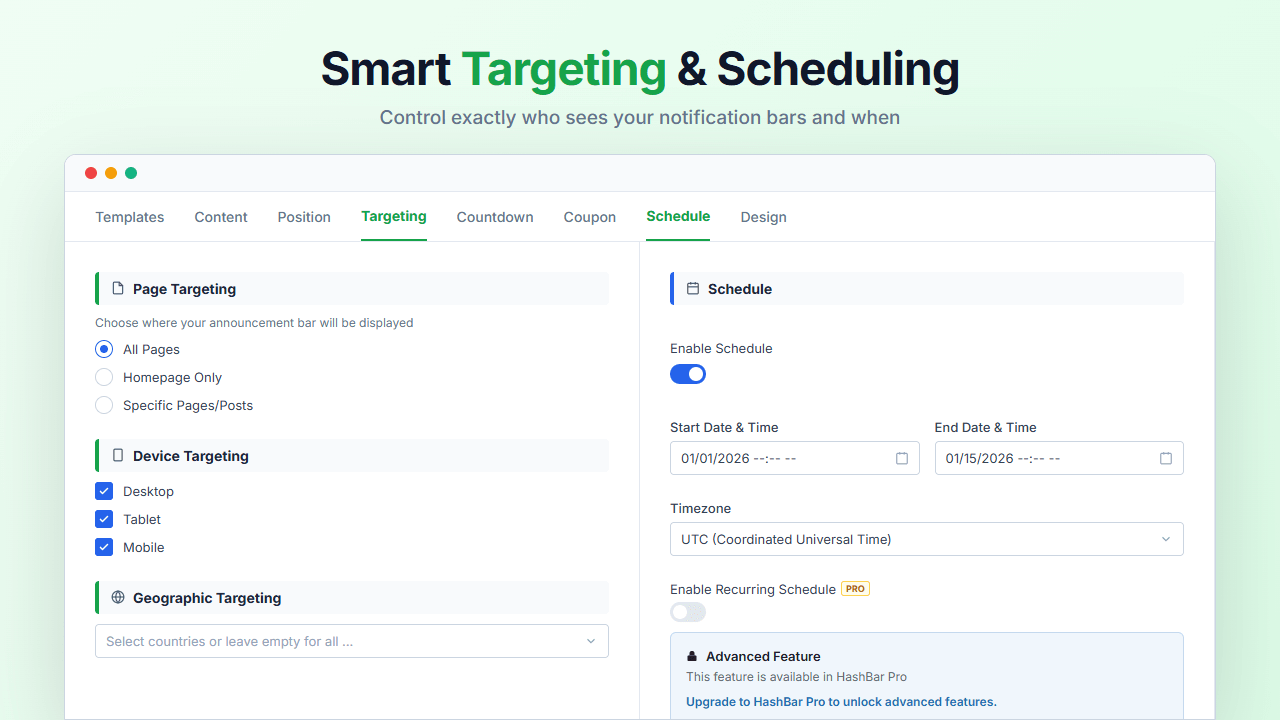
Smart Targeting & Scheduling – Control exactly who sees your notification bars and when 
Real-Time Analytics & Reporting – Track impressions, clicks, CTR, and conversions visually 
A/B Testing & Analytics – Compare variants, split traffic, and pick a winner automatically
Blocks
This plugin provides 4 blocks.
- Hashbar Promo Banner
- Hashbar Countdown
- Hashbar Notification
- Hashbar Promo Banner Image
Installation
Modern Way:
- Go to WordPress Dashboard > Plugins > Add New
- Search for “HashBar”
- Click Install, then Activate
Manual Way:
- Download and unzip the plugin
- Upload
hashbar-wp-notification-barfolder to/wp-content/plugins/ - Activate via the Plugins menu
After Activation:
- Go to HashBar menu in your WordPress admin
- Create a new Announcement Bar or Popup Campaign
- Customize using the visual editor with live preview
- Publish and watch your conversions grow!
FAQ
-
Is coding knowledge required?
-
No! HashBar features a visual editor with live preview. Pro users can add custom CSS for advanced styling.
-
Can I create unlimited notification bars?
-
Yes! Both Free and Pro versions allow unlimited bars and popups.
-
Does HashBar work with my theme?
-
Yes, HashBar works with all standard WordPress themes including Astra, OceanWP, GeneratePress, Kadence, Divi, and more.
-
Can I target visitors from specific countries?
-
Yes! Free version shows to all countries. Pro version allows targeting specific countries.
-
Does it work with page builders?
-
Yes! The Notification Bar integrates with Gutenberg (4 blocks), Elementor, WPBakery, King Composer, and Classic Editor. Announcement Bar and Popup Campaign have their own dedicated admin panel with live preview.
-
Can I schedule bars to appear automatically?
-
Yes! Set start and end dates with specific times. Pro adds recurring schedules.
-
Does HashBar include countdown timers?
-
Yes! Free includes fixed countdown. Pro adds recurring and evergreen timers.
-
Will HashBar slow down my website?
-
No! HashBar uses optimized asset delivery and lightweight code.
-
Is it mobile responsive?
-
Yes! All bars and popups are fully responsive with device-specific visibility options.
-
Can I track performance?
-
Yes! Built-in analytics tracks impressions, clicks, CTR, and conversions.
-
Does it work with WooCommerce?
-
Yes! Target specific products, categories, or shop pages. Coupons can auto-apply to cart.
-
Is WPML supported?
-
Yes! Full WPML compatibility for multilingual sites.
-
What is A/B testing?
-
Create multiple variants and automatically split traffic to find the best performer. Available in Pro.
-
What is an evergreen countdown?
-
A personalized timer that starts fresh for each visitor, creating individual urgency. Pro feature.
-
What triggers are available for popups?
-
8 triggers: Immediate, Time Delay, Exit Intent (Free), plus Scroll Depth, Element Click, User Inactivity, Element Visible, Page Views (Pro).
-
Can I capture leads?
-
Yes! Form builder with 11 field types and FREE Mailchimp integration included.
-
Is there a money-back guarantee?
-
Yes! 30-day money-back guarantee on Pro purchases.
Reviews


Contributors & Developers
“HashBar – Announcement, Notification Bar & Popup Campaign” is open source software. The following people have contributed to this plugin.
Contributors


Translate “HashBar – Announcement, Notification Bar & Popup Campaign” into your language.
Interested in development?
Browse the code, check out the SVN repository, or subscribe to the development log by RSS.
Changelog
Version: 1.9.1 – Date: 08 Feb 2026
- Added: Delay After Click option for On Element Click popup trigger (Pro).
- Improved: 2-column layout for Exit Intent and On Element Click trigger settings.
- Fixed: Close Button Reopen issue in Notification bar.
Version: 1.9.0 – Date: 28 Jan 2026
- Added: Popup Campaign with templates, 8 campaign types, 7 positions, and 8 smart triggers.
- Added: Form Builder with 11 field types and Mailchimp integration.
- Added: Popup Countdown Timer, Coupon Display, and Smooth Animations.
- Added: Popup Analytics Dashboard and A/B Testing (Pro).
- Added: Default CTA button text and sticky live preview in Announcement Bar Editor.
- Improved: Page targeting and typography sections in Announcement Bar Editor.
- Improved: Timezone select option with Site and visitor Timezone in Announcement Bar.
Version: 1.8.0 – Date: 06 Jan 2026
- Added: Modern Announcement Bar with Templates, Countdown, Targeting, Animation, and Scheduling
- Added: Announcement Bar Analytics
- Added: Coupon code display with copy functionality
- Improved: UI/UX for better user experience
Version: 1.7.5 – Date: 13 Nov 2025
- Fixed: Admin notice display issue.
Version: 1.7.4 – Date: 23 Oct 2025
- Improved: Minor UI update and optimizations.
Version: 1.7.3 – Date: 13 Oct 2025
- Added: Scheduled Notifications filter option in notification list.
- Improved: Filter logic to show only active scheduled notifications.
- Fixed: Pagination reset issue when changing filters or search query.
Version: 1.7.2 – Date: 22 Sep 2025
- Fixed: Schedule Notification Display issue.
- Fixed: Draft Notification Switcher Enable/Disable issue.
- Fixed: A few minor issues.
Version: 1.7.1 – Date: 06 Aug 2025
- Fixed: Analytics Enable/Disable issue.
Version: 1.7.0 – Date: 06 Aug 2025
- Improved: UI/UX for a better user experience
- Fixed: Analytics report display issue.
Version: 1.6.1 – Date: 17 Jun 2025
- Fixed: Notification position value change issue on reload.
Version: 1.6.0 – Date: 16 Apr 2025
- Added: Compatibility with the latest WordPress version.
Version: 1.5.9 – Date: 05 Mar 2025
- Fixed: Notice dismiss issue.
Version: 1.5.8 – Date: 04 Feb 2025
- Added: Option to enable/disable sticky notification bar on top.
Version: 1.5.7 – Date: 01 Jan 2025
- Added: Typography options for “Hashbar Notification” block.