

Description
Cosmic Slider is a powerful and feature-rich WordPress slider plugin powered by Swiper.js, the most modern mobile touch slider library. This plugin seamlessly integrates with the WordPress Gutenberg block editor, allowing you to create beautiful, responsive sliders with rich content using blocks.
Unlike traditional image-only sliders, Cosmic Slider lets you build slides using the full power of Gutenberg blocks – add images, text, headings, videos, galleries, and any other block content to create engaging, interactive sliders.
External Services
This plugin includes the following open-source libraries:
-
Swiper.js
A modern mobile touch slider library used to power the slider functionality.
License: MIT -
wp-color-picker-alpha
An extension script for WordPress Color Picker that adds support for RGBA colors with transparency.
License: GPL-2.0+
Presentation
Features
⭐ Powered by Swiper.js – the most modern mobile slider library
⭐ Gutenberg Block Editor Integration – Create slides using any Gutenberg blocks (images, text, videos etc.)
⭐ 10+ Transition Effects – Choose from slide, fade, flip, cube, cards effects etc.
⭐ Customizable navigation arrows with multiple style options
⭐ Flexible pagination options: Bullets, Progress Bar and etc.
⭐ Autoplay functionality with customizable delay and time indicator
⭐ Background settings for both slider container and individual slides
⭐ Lazy loading images for better performance
⭐ Drag & drop to reorder slides
⭐ Shortcode support: [wpsp_slider id="123"]
⭐ Grid layout support with customizable rows and columns
⭐ Compatible with all major themes and page builders
⭐ Thumbnail Gallery – Display thumbnail gallery below the main slider with customizable size and spacing
⭐ Scrollbar Navigation – Customizable scrollbar with position options (top, bottom, left, right) and color control
⭐ Vertical Slider – Create vertical sliders with full height control
⭐ RTL Support – Right-to-left language support for international websites
⭐ Grid Layout – Enable grid layout with row or column options for multi-slide displays
⭐ Image Zoom – Pinch-to-zoom functionality for images on touch devices
⭐ Keyboard Control – Navigate sliders using arrow keys
⭐ Mousewheel Control – Scroll through slides using mouse wheel
⭐ Slides Grouping – Control how many slides advance at once
⭐ Coverflow Options – Advanced coverflow settings (rotate, stretch, depth, modifier, shadows)
⭐ Centered Slides – Center slides for better visual presentation
⭐ Slides View Auto – Automatic slides per view calculation
⭐ Fully responsive and mobile-friendly with touch gestures
⭐ Developer-Friendly – Extensible with filters and actions for customization
Screenshots

Slider Frontend 
Slider Frontend – Dott Style 
Slider Frontend – Gutenberg Support 
Slider Frontend – Card Effects 
Slider Settings – Preview 
Slider Settings – Transition Options & Arrow Styles 
Slider Settings – Bullets Options 
Slider Settings – Autoplay Settings 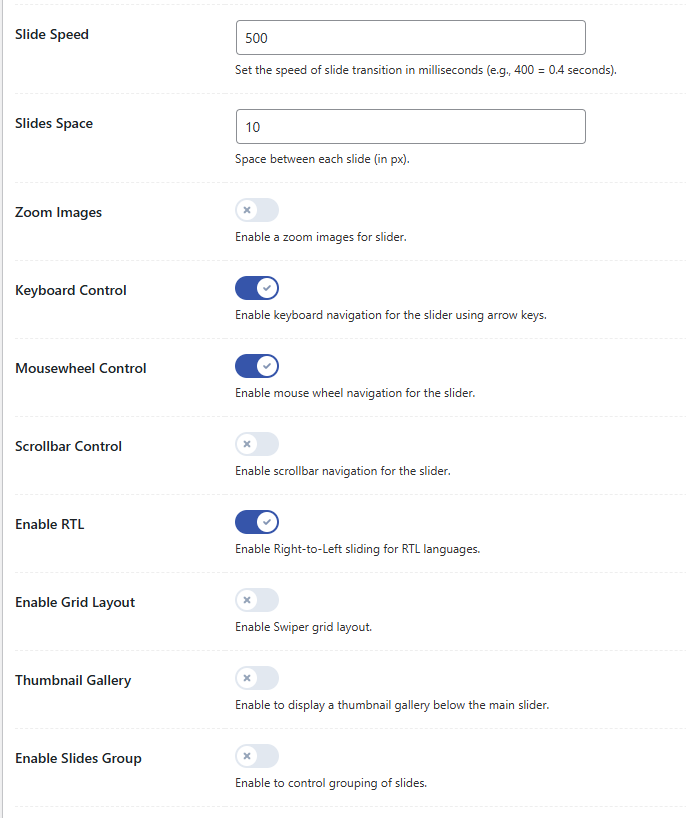
Slider Settings – Responsive & Other Options
Installation
- Upload the plugin to the
/wp-content/plugins/cosmic-slider/directory or install it via Plugins > Add New. - Activate the plugin through the Plugins menu in WordPress.
- Navigate to Cosmic Slider in the WordPress admin menu to create a new slider.
- Add slides using the Gutenberg block editor – each slide can contain any combination of blocks (images, text, videos, etc.).
- Configure slider options in the settings tabs: Transition, Navigation, Pagination, Autoplay, Responsive, and Other Options.
- Use the shortcode
[wpsp_slider id="SLIDER_ID"]to display the slider anywhere on your site, whereSLIDER_IDis the ID of your slider.
FAQ
-
How do I add a slider to my page?
-
Use the shortcode
[wpsp_slider id="SLIDER_ID"]whereSLIDER_IDis the ID of the slider post. You can find the shortcode in the slider edit screen sidebar. -
Does this plugin support responsive design?
-
Absolutely! All sliders are fully responsive and support touch gestures for mobile devices. You can also configure responsive breakpoints in the settings.
-
Will this work with my theme?
-
It works with most well-coded WordPress themes. For custom themes, minimal CSS adjustments may be needed.
-
Can I use multiple sliders on one page?
-
Yes! You can insert multiple sliders using different shortcodes on the same or different pages.
-
What animation effects are available?
-
The plugin includes 10+ transition effects: Slide, Fade, Flip etc. You can choose any of these effects in the Transition settings tab.
Reviews
There are no reviews for this plugin.
Contributors & Developers
“Cosmic Slider” is open source software. The following people have contributed to this plugin.
Contributors
Translate “Cosmic Slider” into your language.
Interested in development?
Browse the code, check out the SVN repository, or subscribe to the development log by RSS.
Changelog
1.0.0
- Initial release
- Swiper.js-powered responsive slider
- Multiple transition effects (slide, fade, flip, cube)
- Gutenberg block editor integration for slide content
- Admin interface with tabbed settings
- Customizable navigation arrows and pagination
- Autoplay functionality with time indicator
- Background settings for slider and slides
- Shortcode output:
[wpsp_slider id="123"] - Responsive design with mobile touch support