

Descripción
Err – Custom Login Page allows you to easily customize the appearance of your WordPress login page. Impress your clients or brand your website right from the login screen.
With this plugin, you can:
- Customize the Login Logo:
- Upload your own logo.
- Set a custom URL for the logo link (defaults to your site’s homepage).
- Define a specific height for your logo.
- The width is automatically calculated based on the height, which helps prevent image distortion, maintain the correct aspect ratio, and ensure the link area is not exceeded.
- Format Login Page Content:
- Set a custom background image for the entire page.
- Choose a fallback background color if not using an image.
- Customize the Login Form:
- Change the form’s background color and adjust its opacity.
- Set a custom border width, color (with opacity), and border radius for the form.
- Modify the text color for labels and input fields.
- Customize link colors (normal and hover states).
- Format Login Button:
- Change the background color and text color for the login button (normal and hover states).
- Hide Elements:
- Option to hide the «Privacy Policy» link.
- Option to hide the language switcher (if present).
- Option to hide the «Back to [Site Name]» link.
- User-Friendly Settings Page:
- Easy-to-use interface under «Settings» > «Custom Login Page».
- Uses the WordPress Media Uploader for image selection.
- Includes a color picker for easy color selection.
- AJAX-powered settings saving for a smooth experience.
- Reset to default options available.
- Lightweight and Secure:
- Clean code following WordPress standards.
- Properly sanitizes all inputs and escapes outputs.
- Translation Ready: This plugin is ready for translation.
- A
.pot(Portable Object Template) file namederr-custom-login-page.potis included in thelanguages/folder. Translators can use this file to create new language packs. - The text domain used is
err-custom-login-page.
- A
This plugin provides a simple yet powerful way to transform your standard WordPress login page into a branded and visually appealing entry point for your website.
Support
If you have any issues or suggestions, please use the plugin’s support forum on WordPress.org or contact the author via their Author URI.
Donations
If you find this plugin useful and would like to support its development, please consider making a donation. Thank you!
Capturas
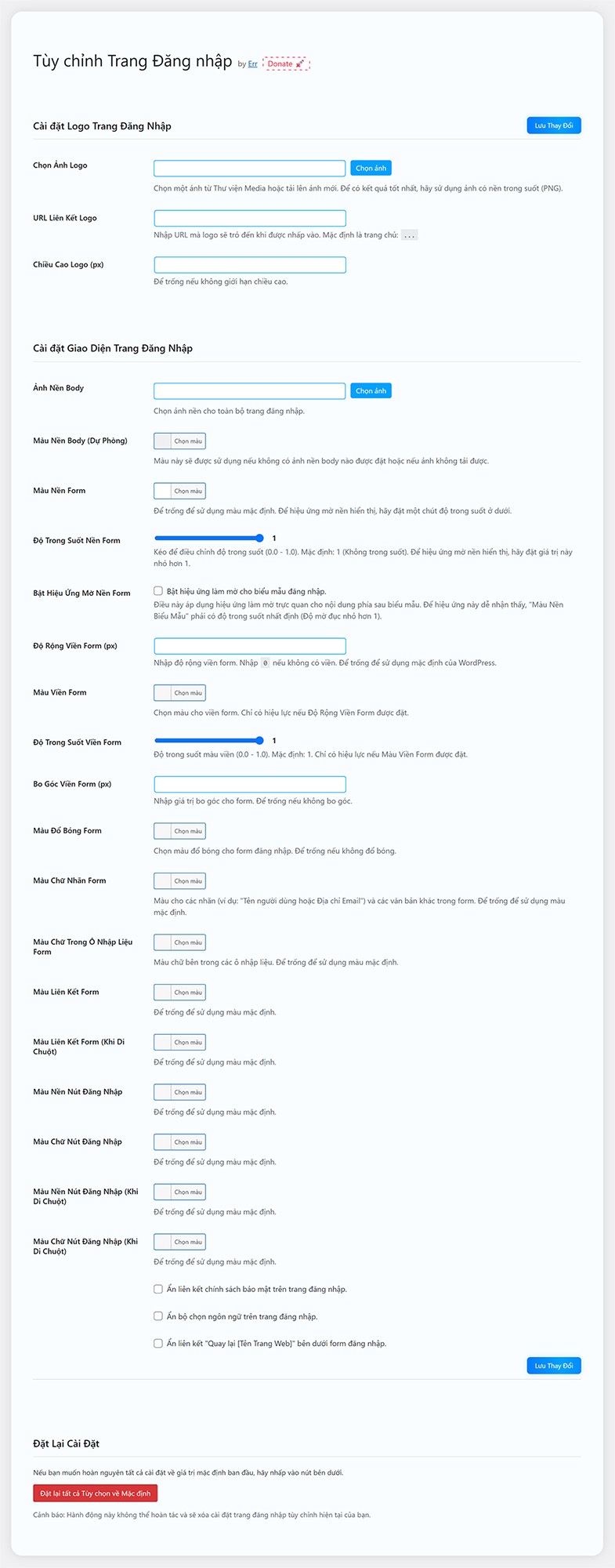
Plugin Settings Page: The main settings panel where you can customize all options. 
Customized Login Page Example: An example of a login page customized with a new logo, background and colors.
Instalación
-
Via WordPress Plugin Uploader:
- Download the plugin ZIP file (
err-custom-login-page.zip). - In your WordPress admin panel, go to
Plugins>Add New. - Click
Upload Pluginat the top. - Click
Choose Fileand select the downloaded ZIP file. - Click
Install Now. - Activate the plugin through the ‘Plugins’ menu in WordPress.
- Download the plugin ZIP file (
-
Via FTP:
- Download the plugin ZIP file (
err-custom-login-page.zip). - Extract the ZIP file. You will get a folder named
err-custom-login-page. - Upload the
err-custom-login-pagefolder to the/wp-content/plugins/directory on your server. - Activate the plugin through the ‘Plugins’ menu in WordPress.
- Download the plugin ZIP file (
-
Configuration:
- After activation, navigate to
Settings>Custom Login Pagein your WordPress admin panel to customize the login page.
- After activation, navigate to
FAQ
-
Where can I configure the plugin?
-
You can find the settings page under
Settings>Custom Login Pagein your WordPress admin dashboard. -
How do I select an image for the logo or background?
-
The plugin uses the native WordPress Media Uploader. In the settings page, click the «Select image» button next to the respective field. You can then choose an existing image from your Media Library or upload a new one.
-
What happens if I don’t set a body background image?
-
If no body background image is selected, the «Body Background Color (Fallback)» will be used. If that is also not set, it will default to the standard WordPress login page background color.
-
Can I reset the settings to default?
-
Yes, on the plugin’s settings page, there is a «Reset All Options to Default» button. Be careful, as this action is irreversible.
-
Is the plugin translation ready?
-
Yes, the plugin is translation ready. The text domain is
err-custom-login-page. A Vietnamese translation is already included. You can create your own translations using tools like Poedit. -
My logo looks stretched or too small. How can I fix this?
-
Try adjusting the «Logo Height (px)» setting. If you leave it blank, the plugin will try to size it automatically based on the image dimensions, but for best results, provide a logo that is appropriately sized for a login page and then fine-tune with the height setting if needed. Using a PNG with a transparent background is recommended for logos.
Reseñas

Colaboradores y desarrolladores
«Err – Custom Login Page» es un software de código abierto. Las siguientes personas han colaborado con este plugin.
Colaboradores
«Err – Custom Login Page» está traducido en 2 idiomas. Gracias a los traductores por sus contribuciones.
Traduce «Err – Custom Login Page» a tu idioma.
¿Interesado en el desarrollo?
Revisa el código , echa un vistazo al repositorio SVN o suscríbete al registro de desarrollo por RSS.
Registro de cambios
1.25.6
- Initial public release.
- Feature: Customize login page logo, logo URL and logo height.
- Feature: Customize body background image and color.
- Feature: Customize login form background color, opacity, border (width, color, opacity, radius).
- Feature: Customize form text color, input text color, link colors (normal & hover).
- Feature: Customize login button background and text colors (normal & hover).
- Feature: Options to hide privacy policy link, language switcher and «back to site» link.
- Feature: AJAX settings save and reset to default functionality.
- Feature: Added Vietnamese translation.