

Descripción
El plugin de búsqueda de productos de WooCommerce más popular. Ofrece a los usuarios una barra de búsqueda AJAX avanzada y bien diseñada con sugerencias de búsqueda en tiempo real.
De forma por defecto, WooCommerce ofrece una solución de búsqueda muy sencilla, sin búsqueda de productos en tiempo real ni búsqueda de SKU. FiboSearch (anteriormente Ajax Search para WooCommerce) ofrece una búsqueda avanzada con sugerencias en tiempo real.
¿A quién no le gustan las sugerencias instantáneas mientras escribe? En 2025, los clientes esperan una búsqueda de productos inteligente. La última investigación de UX del Baymard Institute revela que el autocompletado en la búsqueda, la sugerencia automática o una característica de búsqueda instantánea ahora se ofrece en el 96% de los principales sitios de comercio electrónico. Es una característica imprescindible para cada negocio en línea que no puede permitirse perder clientes. ¿Por qué? FiboSearch ayuda a los usuarios a ahorrar tiempo y facilita las compras. Como resultado, Fibo realmente impulsa las ventas.
Características
✔️ Buscar por título de producto, descripción larga y corta
✔️ Buscar por SKU
✔️ Mostrar la imagen del producto en los resultados de búsqueda en vivo
✔️ Mostrar el precio del producto en los resultados de búsqueda en vivo
✔️ Mostrar la descripción del producto en los resultados de búsqueda en vivo
✔️ Mostrar el SKU en los resultados de búsqueda en vivo
✔️ Móvil primero – modo de búsqueda móvil especial para mejor experiencia de usuario
✔️ Paneles de detalles con información extendida – botón «añadir al carrito” con un campo de cantidad y datos de producto extendidos mostrados al pasar el ratón sobre la sugerencia en vivo
✔️ Fácil implementación en tu tema – incrusta el plugin usando un shortcode, como un elemento de menú o como un widget
✔️ Búsqueda por términos – busca categorías y etiquetas de productos
✔️ Historial de búsqueda – el historial de búsqueda actual se presenta cuando el usuario hace clic/toca la barra de búsqueda, pero aún no ha escrito la consulta.
✔️ Limitar sugerencias mostradas – el número es personalizable
✔️ El número mínimo de caracteres requerido para mostrar sugerencias – el número es personalizable
✔️ Mejor ordenamiento – un algoritmo inteligente asegura que los resultados mostrados sean lo más precisos posible
✔️ Soporte para la página de resultados de búsqueda de WooCommerce – después de presionar intro, los usuarios obtienen los mismos resultados que en la barra de FiboSearch
✔️ Agrupación de resultados de búsqueda instantánea por tipo – mostrando, por ejemplo, primero categorías coincidentes, luego productos coincidentes
✔️ Soporte para Google Analytics
✔️ Compatibilidad multilingüe incluyendo WPML, Polylang y qTranslate-XT
✔️ Personalización de la barra de búsqueda y sugerencias de autocompletado – etiquetas, colores, precarga, imagen y más
Prueba la versión PRO
FiboSearch también viene en una versión Pro, con un motor de búsqueda moderno basado en índices invertidos. FiboSearch Pro funciona hasta 10 veces más rápido que la versión gratuita u otras soluciones de búsqueda populares para WooCommerce.
¡Actualiza a PRO y aumenta tus ventas!
Características PRO
✅ Motor de búsqueda ultra-rápido basado en el índice invertido – funciona muy rápido, incluso con más de 100,000 productos
✅ Búsqueda difusa – funciona incluso con errores tipográficos menores
✅ Búsqueda en campos personalizados con soporte dedicado para ACF
✅ Búsqueda en atributos
✅ Búsqueda en categorías. Soporta miniaturas de categorías.
✅ Búsqueda en etiquetas
✅ Búsqueda en marcas (Soportamos WooCommerce Brands, Perfect Brands for WooCommerce, Brands for WooCommerce, YITH WooCommerce Brands). Soporta miniaturas de marcas.
✅ Búsqueda por variación de SKU del producto – también muestra productos variables en la búsqueda en vivo después de escribir el SKU coincidente exacto
✅ Búsqueda de publicaciones – también muestra entradas coincidentes en la búsqueda en vivo
✅ Búsqueda de páginas – también muestra entradas coincidentes en la búsqueda en vivo
✅ Sinónimos
✅ Exclusión condicional de productos
✅ Compatible con TranslatePress
✅ Ayuda profesional y rápida con la incrustación o reemplazo de la barra de búsqueda en tu tema
✅ y más…
✅ ¡VER TODAS LAS CARACTERÍSTICAS PROFESIONALES!
Escaparate
Mira cómo funciona para otros: escaparate.
Comentario
Cualquier sugerencia o comentario es bienvenido. No dudes en contactarnos a través del formulario de contacto.
Capturas

Sugerencias de búsqueda con un panel de detalles 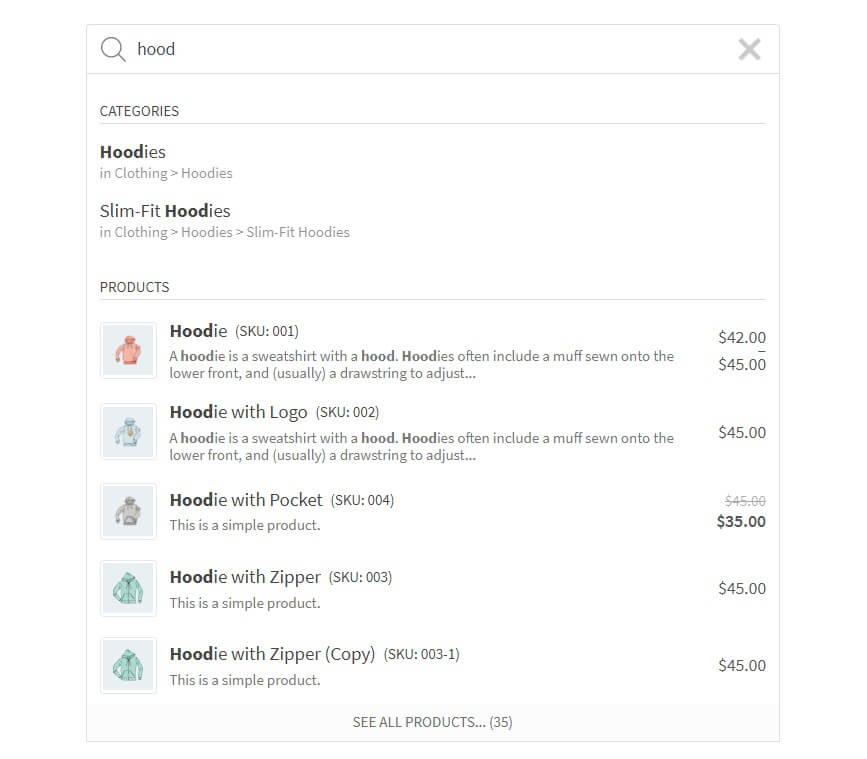
Sugerencias de búsqueda 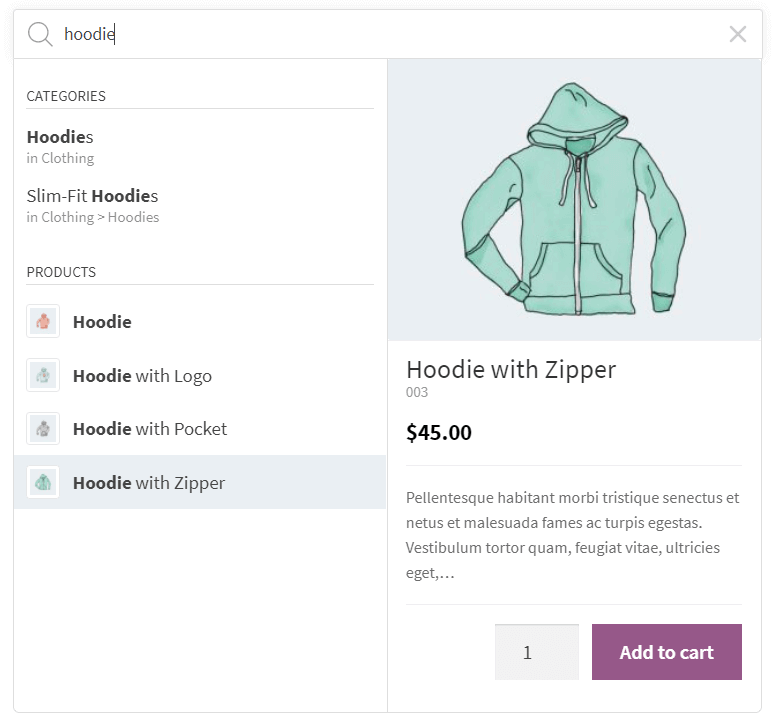
Sugerencias de búsqueda con un panel de detalles 
Sugerencias de búsqueda (Pirx search style) 
Sugerencias de búsqueda (Pirx compact search style) 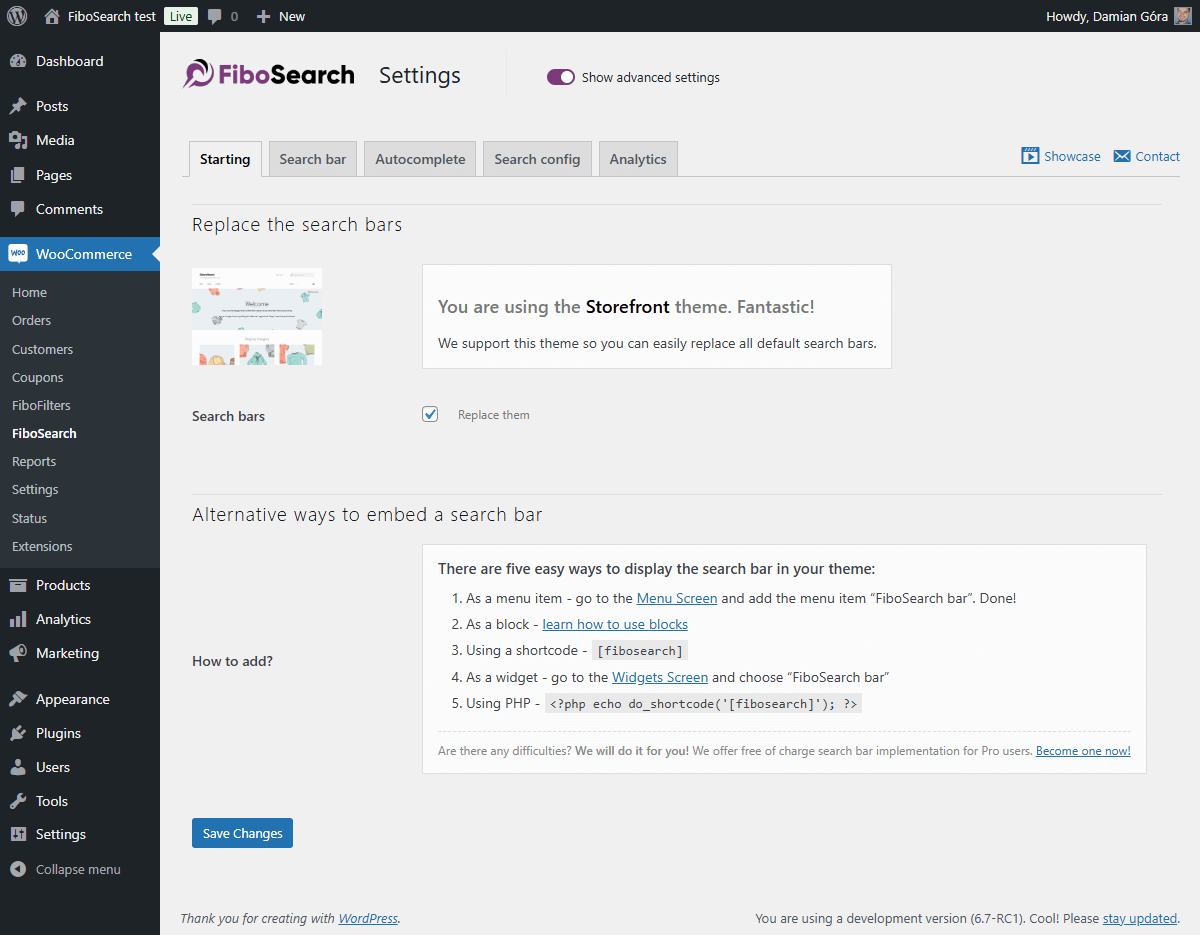
Sample settings page (Starting tab) 
Sample settings page (Search bar tab) 
Sample settings page (Autocomplete tab) 
Sample settings page (Search Analytics tab)
Bloques
Este plugin proporciona 2 bloques.
- FiboSearch AJAX (live) search form for WooCommerce
- FiboSearch navigation item AJAX (live) search form for WooCommerce
Instalación
- Instala el plugin desde el Panel de control o subelo al directorio
ajax-search-for-woocommercey todo tu contenido al directorio/wp-content/plugins/. - Activa el plugin a través del menú «Plugins» en WordPress.
- Vate a
WooCommerce FiboSearchy configura tus preferencias. - Incrustar la barra de búsqueda en tu tema.
FAQ
-
¿Cómo puedo incrustar la barra de búsqueda en mi tema?
-
Hay muchas formas sencillas de mostrar la barra FiboSearch en tu tema:
– Sustituyendo la barra de búsqueda existente con un clic – es posible para docenas de temas populares
– Como un elemento del menú – en tu panel de administración de WordPress, ve aApariencia Menúy añadeBarra de FiboSearchcomo un elemento del menú
– Usando un shortcode[fibosearch]– Como un widget – en tu panel de administración de WordPress, ve a
Apariencia Widgetsy eligeFiboSearch
– Como un bloque – aprende a usar bloques y FiboSearch juntos
– Usando PHP<?php echo do_shortcode('[fibosearch]'); ?>– ¡Lo haremos por tí! Ofrecemos implementación gratuita de la barra de búsqueda para usuarios Pro. ¡Conviértete en uno ahora!
O inserta esta función dentro de un archivo PHP (a menudo, se utiliza para insertar un formulario dentro de archivos de plantilla de página):
-
¿Cómo reemplazo la barra de búsqueda existente en mi tema con FiboSearch?
-
Hemos preparado un reemplazo con un solo clic de la barra de búsqueda para los siguientes temas:
- Escaparate
- Divi
- Flatsome
- OceanWP
- Astra
- Avada
- Silencioso
- y 46 más… Consulta una lista completa de temas integrados en nuestra documentación.
Si deseas reemplazar tu barra de búsqueda en otro tema, por favor contacta a nuestro equipo de soporte.
Te ayudaremos a reemplazar la barra de búsqueda en tu tema de forma gratuita después de que actualices a la versión Pro. -
¡Sí, puedes! Ve a
Apariencia Menú. Verás un nuevo elemento de menú llamado «FiboSearch». Selecciónalo y haz clic en «Añadir al menú». ¡Listo! -
¿Cómo puedo hacer una pregunta?
-
Puedes enviar un ticket en el sitio web del complemento y el equipo de soporte se pondrá en contacto con usted en breve. También respondemos preguntas en el Foro de soporte de WordPress.
-
¿Ofrecen soporte de personalización?
-
Dependiendo del tema que uses, a veces la barra de búsqueda requiere pequeñas mejoras en su apariencia. Garantizamos correcciones rápidas de CSS para todos los usuarios del plugin Pro, pero también ayudamos a los usuarios del plugin gratís.
-
¿Dónde puedo encontrar los ajustes del plugin?
-
En el panel de control de WordPress, vate a
WooCommerce FiboSearch. La página de ajustes de FiboSearch es un submenú del menú de WooCommerce. -
¿Para quién está destinada la versión Pro del plugin?
-
La versión Pro del plugin es para todos los vendedores en línea que buscan aumentar las ventas proporcionando un motor de búsqueda inteligente ultrarrápido a sus clientes.
La principal diferencia entre las versiones Pro y Gratis es la velocidad de búsqueda y el alcance de búsqueda. La versión Pro tiene un nuevo motor de búsqueda inteligente y rápido. Para algunas tiendas en línea que ofrecen muchos productos a la venta, la velocidad de búsqueda puede aumentar hasta 10×, proporcionando una experiencia completamente nueva a los usuarios finales.
Con todo, la versión Pro está dedicada a todas las tiendas WooCommerce donde las sugerencias de autocompletar funcionan demasiado lentamente.
Puedes leer más y comparar las características Pro y gratís aquí: Comparación completa: Pro vs Gratís.
Reseñas


Colaboradores y desarrolladores
«FiboSearch – Ajax Search for WooCommerce» es un software de código abierto. Las siguientes personas han colaborado con este plugin.
Colaboradores

«FiboSearch – Ajax Search for WooCommerce» está traducido en 14 idiomas. Gracias a los traductores por sus contribuciones.
Traduce «FiboSearch – Ajax Search for WooCommerce» a tu idioma.
¿Interesado en el desarrollo?
Revisa el código , echa un vistazo al repositorio SVN o suscríbete al registro de desarrollo por RSS.
Registro de cambios
1.32.2, January 05, 2026
- ADDED: Integration with the Themify Builder Pro plugin
- ADDED: Integration with the FOX WooCommerce Currency Switcher plugin
- FIXED: Improved visibility checks for products
- FIXED: Added nonce validation in an AJAX action
- FIXED: Improved detection of visibility plugin integrations
1.32.1, December 15, 2025
- FIXED: The Details panel inside the results wrapper didn’t expand to match the width of the search bar
- FIXED: Improved input handling in TheGem theme integration
- FIXED: The search didn’t work when the «Load JavaScript deferred» feature in WP Rocket was enabled
- FIXED: No search results appeared when using a multilingual setup and the exact SKU match function was triggered
- REFACTOR: Implemented a more consistent and unified PHP code style
1.32.0, November 17, 2025
- ADDED: Integration with the Bacola theme.
- ADDED: Debugger view for active plugin integrations
- ADDED: Helper function for retrieving plugin information
- ADDED: Option to make the search endpoint return only product IDs
- ADDED: Greek language files
- FIXED: Mobile search bar display issue in the WoodMart theme
- FIXED: Compatibility issue in the Bricks theme. The “Enable AJAX add to cart” option now works properly with the FiboSearch details panel
- FIXED: Search replacement issue on the Flatsome theme 404 page
- FIXED: Support for diacritic and accent characters in search and scoring calculation
- FIXED: Infinite loop on mobile devices caused by an Impreza theme event conflict
- FIXED: Improved CSS styles for the details panel in the Bricks theme
- FIXED: Limited the number of suggestions in preview settings to a maximum of 15 items
- FIXED: Removed unnecessary banners from the settings page
- FIXED: Replaced preloader with the correct search bar or icon in Elementor editor preview
- FIXED: HTML semantic issue in category suggestions caused by an unescaped
>character in titles - FIXED: Deprecated PHP
8.3and8.4warnings - FIXED: Protection against external CSS styles (e.g., targeting the
.woocommerceclass) overriding the details panel width - TWEAK: Added a prefix to the Freemius placeholder class to prevent potential conflicts
- TWEAK: Moved Freemius SDK to the vendor directory
- TWEAK: Cleaned up code style
- TWEAK: Passed additional data to filters to improve customization of search results display
- REFACTOR: Moved indexer logs to a separate database table
- UPDATED: Updating the
.potfile - UPDATED: Freemius SDK
1.31.0, July 16, 2025
- ADDED: Info about Elementor widget
- ADDED: Documentation links to Search in SKU and GUID
- ADDED: Add filter to conditionally disable analytics recording (e.g. by IP, phrase, lang)
- ADDED: Add the ARIA label to the search icon for accessibility improvement
- ADDED: Option to skip plugin loading on search page by adding the
nofibosearch=1parameter to the URL - ADDED: Troubleshooting — tests for the minimum required versions of themes and plugins with available integrations
- ADDED: New filter to optionally show “Products” headline when only product suggestions are returned
- ADDED: Filter to always show “See all products” button in autocomplete
- ADDED: Filter to disable inline styles from the
Personalizationclass - ADDED: CSS adjustments in Uncode theme — centered the search bar in the menu
- FIXED: Managing initial search bar interactivity before the main script has loaded
- FIXED: Incorrect language code in speech recognition
- FIXED: Removed the
.woocommerceclass from the FiboSearch bar widget - FIXED: Prevent JS error when
getFormWrapperreturns undefined or emptyjQueryobject - FIXED: Deprecated:
Automatic conversion of false to array(PHP >= 8.1) - FIXED: Styling issues in the Enfold theme
- FIXED: There was an error in the SQL syntax that occurred during the plugin uninstallation process
- FIXED: Escape double quotes in
optionsRawto preventJSON.parseerrors - TWEAK: Moved the JS ‘fibosearch/show-details-panel’ event to just before the preloader is hidden
- TWEAK: Code styling adjustments
- TWEAK: Hiding unwanted banner on settings page
- TWEAK: Optimized database queries
- REFACTOR: Removed Listeo theme integration
- UPDATED: Updating the
.potfile - UPDATED: Freemius SDK
1.30.0, January 27, 2025
- ADDED: “Bricks theme” integration – support for “Products” element on the search results page
- ADDED: “Bricks theme” integration – incorrect order of results on the search results page
- ADDED: Integration with the “Discontinued Product Stock Status for WooCommerce” plugin
- ADDED: The link to edit the FiboSearch bar in Customizer
- ADDED: The
xbutton was added to the review request notice - FIXED: Missing data in the “Details Panel” for product variations
- FIXED: Resolved an error when attempting to insert FiboSearch blocks in the block editor
- FIXED: Eliminated duplicate search results in autocomplete
- FIXED: Enabled searching for products whose variations are all out of stock but have the “allow backorders” status
- FIXED: WCAG “Links do not have a discernible name”
- FIXED: WPML integration – no results when option «use translation if available or fallback to default language» is used
- FIXED: Flatsome theme integration – can’t search in mobile overlay view when search is activated from the mobile menu
- FIXED: Incorrect display of the FiboSearch form when it is embedded in the shop page description
- FIXED: Mobile search in the menu does not work when the Divi Mobile plugin is active
- FIXED: Unnecessary header “Search results for…” when there are no results for post types other than products
- FIXED: Google PageSpeed Insights – avoid non-composited animations
- FIXED: Search icon padding when the search icon is a part of the main menu
- TWEAK: Theme integration is not loaded when the minimal version condition is not met
- TWEAK: Improved clearing of plugin data on uninstall
- TWEAK: Hiding unwanted banner on the settings page
- TWEAK: Remove the “(beta)” suffix from the “User search history” option
- REFACTOR: Remove the “Grouped results” option
- UPDATED: The
.potfile - UPDATED: Freemius SDK
1.29.0, October 29, 2024
- ADDED: Integration with the Listeo theme
- ADDED: New troubleshooting test – warning when “Ajax Search Lite” or “Ajax Search Pro” plugins are active
- ADDED: WCAG improvements – possibility to select and open a search icon using the keyboard
- ADDED: Search icon preloader. In some rare cases, a user can wait longer to display the search icon or search bar. Instead of an empty place, a placeholder is displayed
- FIXED: Generatepress theme integration – incorrect mobile overlay on the checkout in the Generatepress theme
- FIXED: A better way of calculating window width when the breakpoint is checked
- TWEAK: Hiding the XStore theme documentation button on the settings page
- UPDATED: The
.potfile. - UPDATED: Freemius SDK
1.28.1, June 28, 2024
- FIXED: Removed the phrase “polyfill.io” from the JavaScript code comment. FiboSearch has never linked to this compromised library, but some security tools recognize this JavaScript comment as a potential link to malware. All reports are false positive.
- FIXED: PHP deprecated notice in
\DgoraWcas\Helpers::keyIsValid - FIXED: Unnecessary display of warning in Troubleshooting when products are displayed using a widget from “JetSmartFilters”
1.28.0, May 27, 2024
- ADDED: New search bar style – a compact version of a “Pirx” style
- ADDED: Integration with the “Cartzilla theme”
- ADDED: Integration with the “Rey theme”
- ADDED: Placeholders to display custom content for new suggestion types like taxonomy, posts, pages, and product variation
- FIXED: “Woodmart theme” – unable to close the mobile menu after exiting the mobile search overlay
- FIXED: “Flatsome theme” – disappearing search bar on mobile phones
- FIXED: “Flatsome” – cannot change search bar style to Pirx
- FIXED: “Divi theme” – shortcodes are not rendered in the description in the Details Panel for pages
- FIXED: “XStore theme” – the integration doesn’t replace all search forms
- FIXED: Force disabling transition effect on search input to avoid unexpected layout bouncing
- FIXED: Allowing to calculate score including one and two-character words
- FIXED: Better recognition of iOS
- FIXED: Uncode theme – the search icon doesn’t show on the header
- TWEAK: Removed OPcache invalidation for the shortcode template file
- UPDATED: The .pot file
- UPDATED: Freemius SDK to v2.7.2
1.27.0, January 31, 2024
- ADDED: Integration with the “Betheme theme”
- ADDED: Highlight words in search results with Greek letters regardless of accent
- ADDED: Support for “Full-width Search” in the “XStore theme”
- FIXED: Multiple search containers on mobile in the “Astra theme” integration
- FIXED: No focus on search input for mobile devices in the “Astra theme” integration
- FIXED: Allow an HTML
<i>tag in suggestion titles and headlines - FIXED: Multilingual support is active even for one language
- FIXED: Overriding the search icon and form in the header was not working properly in the “WoodMart integration”
- FIXED: Missing filters from “Advanced AJAX Product Filters” plugin in the “Divi theme”
- FIXED: Replace
%for more stable format%%in asprintffunction - FIXED: An unwanted modal after closing the search overlay on mobile in the “Flatsome theme”
- FIXED: Missing colors after updating the “Bloksy theme” to 2.x
- FIXED: Incorrect calculation of a product’s position in search results when it contains Greek letters
- FIXED: Incorrect term language detection in the WPML plugin. Replacing
term_idwithterm_taxonomy_id - FIXED: Unwanted ampersand entity in the product description of search results
- UPDATED: Requires PHP: 7.4
- UPDATED: The
.potfile - UPDATED: Polish translation
- UPDATED: Freemius SDK v2.6.2
1.26.1, October 19, 2023
- FIXED: Details panel – wrong HTML format of stock status element
1.26.0, October 17, 2023
- ADDED: Integration with “Bricks builder”
- ADDED: Integration with “Brizy builder”
- FIXED: Calc score by comparing every word of the search phrase instead of all search phrase
- FIXED: WooCommerce Wholesale Prices plugin – invalid search results e.g. not hidden products and categories in the search results
- FIXED: Flatsome – when there are more search icons, only one is replaced
- FIXED: WPRocket – in some cases search fields/icons are not replaced immediately after the page load
- FIXED: Highlight matched words instead of the whole search phrase
- TWEAK: Allowing access to the
Personalizationclass viaDGWT_WCAS()function - TWEAK: HUSKY – Products Filter Professional for WooCommerce plugin – disable the test in the Troubleshooting module for newer versions of this plugin
- REFACTOR: Replace
.click()withtrigger('click'),.focus()withtrigger('focus'),.blur()withtrigger('blur') - REFACTOR: Replace
jQuery.fn.mouseup()with$(document).on('mouseup') - REFACTOR: Replace
jQuery.isFunction()withtypeof fn === 'function' - UPDATED: Freemius SDK v2.5.12
1.25.0, July 06, 2023
- ADDED: Possibility to search for taxonomy terms regardless of accents in a phrase or term name
- ADDED: Added some new filters to change URLs of results in autocomplete and details panel
- FIXED: Warnings due to
open_basedirrestrictions - FIXED: Integration with the Impreza theme – broken AJAX pagination for Grid element
- FIXED: Integration with the TheGem theme – missing search results when the “Layout Type” option is set to “Products Grid”
- FIXED: Integration with the Divi theme – mobile overlay not showing up
- FIXED: Stronger sanitization of the details panel output
- UPDATED: Freemius SDK v2.5.10
- UPDATED: Polish translation
1.24.0, May 25, 2023
- ADDED: Integration with the “Minimog” theme
- ADDED: Posts, pages, and taxonomy terms are included in the FiboSearch Analytics module
- ADDED: Taking into account a new feature of the dark theme in the Nave theme
- ADDED: Possibility to change the color of a search bar underlay. Only for the Pirx style
- ADDED: New search widget and extended search results for Elementor
- ADDED: TheGem theme – “Header Builder” support
- FIXED: Wrong position of search icons in the history search module
- FIXED: Broken suggestions layout and detailed panel visibility when the “Minimum characters” option is set to less than 1
- FIXED: Compatibility with PHP 8.1
- FIXED: Hide unnecessary modules when constant
DGWT_WCAS_ANALYTICS_ONLY_CRITICALis set to true in the FiboSearch Analytics module - FIXED: Incorrect display of information about constants on the debug page
- FIXED: Other minor bugs in the FiboSearch Analytics module
- FIXED: Integration with the Astra theme – support for version 4.1.0 of the Astra Addon
- FIXED: Integration with the Minimog theme – wrong position of the search history wrapper
- FIXED: Integration with the Enfold theme – the search engine icon disappears when the page finishes loading
- FIXED: A HTML tag
<br>was unnecessarily stripped in the description in the details panel - FIXED: The voice search feature – overlapping icons and disabling functionality on Safari
- UPDATED: French translation
- UPDATED: Freemius SDK v2.5.8
- TESTS: Two integration tests that check saving phrases in a database table
- TESTS: Fix assertion in “Analytics/Critical searches without result”
- REFACTOR: Change order if set settings defaults. Now the defaults are set after calling the
dgwt/wcas/settingsfilter - SECURITY: Added escaping for a “Search input placeholder” option