

Description
This LITE plugin outputs a valid Google Merchant XML feed from WooCommerce products and variations.
LITE includes
* Pretty URL: /3dl-gmc-feed.xml (and legacy ?zd_gmc=1)
* Correct base attributes (title, description, price, image, availability)
* Variant URLs built from selected attributes
* EU Unit Pricing tags (unit_pricing_measure/base_measure) when weight is present
* Coffee/Tea auto Google category helper
* GTIN/EAN detection from common meta keys (incl. Woodmart) + custom keys in settings
* Additional images from product gallery
* Capability-based admin (default manage_woocommerce)
PRO (optional) adds
* Multiple feed profiles (currency/UTM/conversion)
* Custom labels (custom_label_0–4), shipping, sale_price with effective_date
* Static feed builds via WP-Cron
* Diagnostics and export/import tools
* License screen and priority support
Screenshots

Settings page with custom meta keys for GTIN/EAN. 
Feed URL shown in the plugin (XML endpoint and the ?zd_gmc=1debug switch).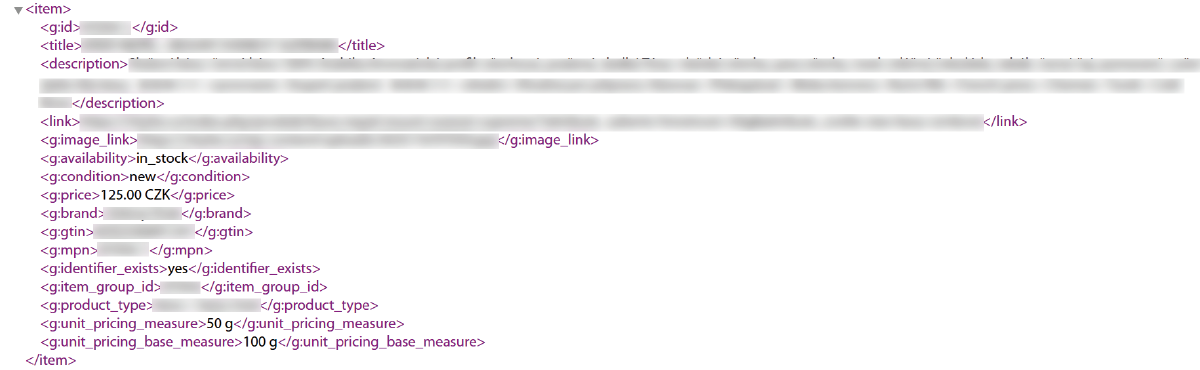
Example of the generated XML feed with a single item. 
Example filter tdl_gmc_google_categorymapping to a Google Product Category (GPC) ID.
Installation
- Upload the folder
3dl-product-feed-for-googleto/wp-content/plugins/. - Activate the plugin via Plugins Installed Plugins.
- Open 3DL GMC in the left menu configure custom GTIN keys if needed.
- Feed URL:
https://example.com/3dl-gmc-feed.xml
FAQ
-
Why doesn’t the plugin send google_product_category by default?
-
Because it’s optional and not required for a valid Google Merchant feed. Leaving it empty is safer for a broad audience: Google can infer a category automatically, and advanced users can still provide an explicit category via the
tdl_gmc_google_categoryfilter. -
How do I add a Google Product Category?
-
By default, LITE does not send
<g:google_product_category>. If you really need it, add this filter in a small mu-plugin or your theme:
add_filter('tdl_gmc_google_category', function($cat, $product){

    // Example: Tea & Infusions

    return 'Food, Beverages & Tobacco > Beverages > Tea & Infusions';

}, 10, 2); -
Where is my feed URL?
-
Use
/3dl-gmc-feed.xml(or legacy?zd_gmc=1). -
How do I include GTIN/EAN?
-
Add your meta keys in 3DL GMC Settings or use standard keys from common plugins/themes (already detected).
-
Is PRO required?
-
No. LITE is fully usable. PRO only unlocks advanced features.
Reviews
There are no reviews for this plugin.
Contributors & Developers
“3DL Product Feed for Google Merchant Center” is open source software. The following people have contributed to this plugin.
Contributors
Translate “3DL Product Feed for Google Merchant Center” into your language.
Interested in development?
Browse the code, check out the SVN repository, or subscribe to the development log by RSS.
Changelog
1.1.7
- Remove automatic google_product_category mapping; by default LITE does not send GPC.
- Docs: add FAQ showing how to provide GPC via the
tdl_gmc_google_categoryfilter.
1.1.5
- Rename slug and text domain to match WP.org rules.
- Escape all dynamic XML values (PHPCS).
- Avoid WooCommerce internal meta notices for
_global_unique_id. - Use
THREEDL_GMC_CAP(defaultmanage_woocommerce) for admin access.