

Descripción
OrangeSMTP replaces WordPress’s default mail function with a reliable SMTP connection, ensuring your emails actually reach the inbox — not the spam folder.
Whether you’re running a WooCommerce store, a membership site, or a business blog, OrangeSMTP gives you complete control over how your WordPress emails are sent, tracked, and monitored.
Why WordPress Emails Fail
By default, WordPress sends emails using the PHP mail() function, which has no authentication. Most email providers reject or silently drop these messages. OrangeSMTP routes your emails through a trusted SMTP provider with proper authentication, so your messages are delivered reliably every time.
12+ Email Providers Supported
Connect to the provider that works best for you:
- Gmail / Google Workspace — Send using your Google account with App Password or OAuth
- Mailgun — API + SMTP with open & click tracking
- Amazon SES — High-volume sending with AWS reliability
- SendGrid — Industry-leading deliverability
- Brevo (formerly Sendinblue) — Free tier with generous limits
- Zoho Mail — Ideal for Zoho Workspace users
- Postmark — Built for transactional email
- SparkPost — Enterprise-grade delivery
- SMTP.com — Dedicated SMTP infrastructure
- Resend — Modern API-first email service
- MailerSend — Transactional email with templates
- Generic SMTP — Any provider: Yahoo, Outlook, Hotmail, and more
Failure Alert Channels
Get instantly notified the moment an email fails to deliver — before your customers notice:
- 📧 Email — Alert sent to any address
- 💬 Slack — Post to any Slack channel
- 🎮 Discord — Send to a Discord webhook
- 📱 Telegram — Message via Telegram bot
- 🔷 Microsoft Teams — Post to a Teams channel
- 🔗 Custom Webhook — Connect to Zapier, Make, n8n, or any HTTP endpoint
Each channel can be enabled, disabled, and tested independently from the Failure Alerts page.
Email Log & Tracking
Every outgoing email is logged with full delivery details:
- Sent / failed status
- Provider used
- Delivery timestamp
- Open tracking
- Click tracking
- Error messages for failed emails
Email Template Builder
Design professional transactional emails with the built-in template editor:
- Rich HTML editor with live preview
- 5 built-in starter templates
- Custom templates with your own branding
- Fallback plain-text generation
Routing & Failover
- Smart Routing — Route emails to different providers based on from-address, subject keywords, email type, or source plugin
- Failover / Circuit Breaker — Automatically switch to a backup provider when the primary fails; circuit reopens after 30 minutes
Setup Guides
Step-by-step setup guides are built into the plugin for every provider and every alert channel — no documentation tab switching needed.
Capturas

Email provider selection — choose from 12+ providers 
Gmail SMTP setup 
Email log with delivery status and tracking 
Email template builder 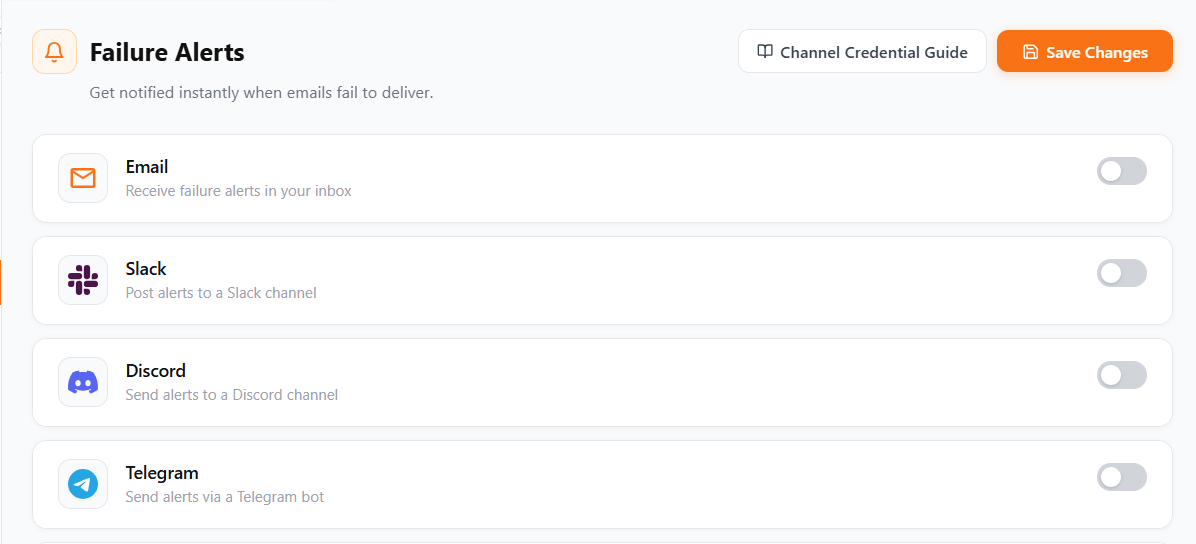
Failure alert channels — Email, Slack, Discord, Telegram, Teams, Webhook
Instalación
- Upload the
orange-smtpfolder to the/wp-content/plugins/directory, or install directly from the WordPress plugin screen. - Activate the plugin through the Plugins screen in WordPress.
- Navigate to OrangeSMTP in the admin sidebar.
- Follow the setup wizard to connect your first email provider.
- Send a test email to confirm delivery is working.
Preguntas frecuentes
-
Will this plugin work with my current theme?
-
Yes. OrangeSMTP hooks into the WordPress
wp_mail()function and works with any theme or plugin that sends emails through WordPress. -
Which email provider should I choose?
-
For most sites, Gmail (with an App Password) or Brevo (free tier: 300 emails/day) are the easiest to get started with. For high-volume or transactional sending, Mailgun, SendGrid, or Amazon SES are recommended.
-
Can I send more than one type of email through different providers?
-
Yes. The Smart Routing feature lets you define rules to send password-reset emails through one provider and WooCommerce order emails through another.
-
What happens if my primary email provider goes down?
-
If you configure a backup connection, the Failover Engine automatically routes emails through the backup provider. A circuit breaker prevents repeated failed attempts and tests recovery after 30 minutes.
-
Are my SMTP credentials stored securely?
-
Yes. All credentials are encrypted using libsodium (or AES-256-CBC as a fallback) before being stored in the database. The encryption key is derived from your site’s unique
wp_saltand is never stored in the database. -
Does this plugin log emails?
-
Yes. Every outgoing email is logged with its status, provider, subject, and delivery time. Logs can be filtered, searched, and exported. You can configure how long logs are retained.
-
Can I get notified when an email fails?
-
Yes. OrangeSMTP 1.4.0 adds Failure Alerts with support for Email, Slack, Discord, Telegram, Microsoft Teams, and custom webhooks. Each channel has a test button so you can verify it works before relying on it.
-
Is there a free plan for Mailgun?
-
Mailgun offers a 3-month free trial that includes 5,000 emails per month.
Reseñas


Colaboradores y desarrolladores
“OrangeSMTP” es un software de código abierto. Las siguientes personas han colaborado con este plugin.
Colaboradores


Traduce “OrangeSMTP” a tu idioma.
¿Interesado en el desarrollo?
Revisa el código , echa un vistazo al repositorio SVN , o suscríbete al log de desarrollo por RSS .
Registro de cambios
1.4.0
- New: Failure Alerts page with enable/disable toggles and per-channel test notifications
- New: Support for 6 alert channels — Email, Slack, Discord, Telegram, Microsoft Teams, Custom Webhook
- New: Channel Credential Guide with step-by-step setup instructions for every alert channel
- Improved: Provider selection grid redesigned with wider cards and larger brand logos
- Improved: Real brand logos integrated for all email providers and notification channels
- Improved: Email template preview with 5 random body variants and live demo values
- Improved: Provider names display in full (e.g., “Gmail / Google Workspace”)
- Improved: Provider Setup Guides reordered to match connection form sequence; added SMTP.com guide
- Improved: Removed anchor tags from default email template HTML
- Improved: Admin sidebar simplified — no dropdown items
- Fixed: Focus outline on external links inside guide modals
- Fixed: Disabled alert channels no longer appear grayed-out incorrectly
1.0.0
- Initial release