
Descripción
Este plugin permite a los usuarios clonar entradas de cualquier tipo, o copiarlas en nuevos borradores para su posterior edición.
Cómo funciona:
-
En ‘Editar entradas’/’Editar páginas’, podés hacer clic en el enlace ‘Clonar’ debajo del título de la entrada/página: esto va a crear de inmediato una copia y te va a devolver al listado.
-
En ‘Editar entradas’/’Editar páginas’, podés seleccionar uno o más elementos, y luego elegir ‘Clonar’ en el menú desplegable de ‘Acciones en lote’ para copiarlos todos a la vez.
-
En ‘Editar entradas’/’Editar páginas’, podés hacer clic en el enlace ‘Nuevo borrador’ debajo del título de la entrada/página.
-
En la pantalla del editor, podés hacer clic en ‘Copiar a un nuevo borrador’ encima de “Cancelar”/”Mover a la papelera” en la barra de administración.
-
Mientras ves un contenido como un usuario conectado, podés hacer clic en ‘Copiar a un nuevo borrador’ en la barra de administración.
3, 4 y 5 te van a llevar al editor para modificar el nuevo borrador: cambiá lo que quieras, hacé clic en ‘Publicar’ y ya está.
También hay una etiqueta de plantilla, para que puedas ponerla en tus plantillas y clonar tus entradas/páginas desde la portada. Haciendo clic en el enlace te va a llevar al editor para modificar el nuevo borrador, tal como el enlace de la barra de administración.
Duplicate Post has many useful settings to customize its behavior and restrict its use to certain roles or post types. Check out the extensive documentation on yoast.com and our developer docs.
Colaborar
Si encontrás este plugin útil y querés contribuir, hay tres maneras:
- Submit your bug reports, suggestions and requests for features on GitHub;
- Si querés traducirlo a tu idioma (solo son algunas líneas de texto), podés usar el proyecto de traducción;
Capturas

Classic editor. 
Block editor. 
Post list. 
Admin bar menu. 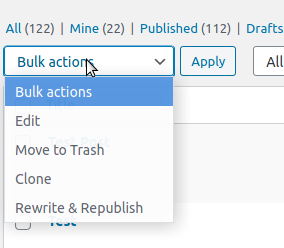
Bulk actions. 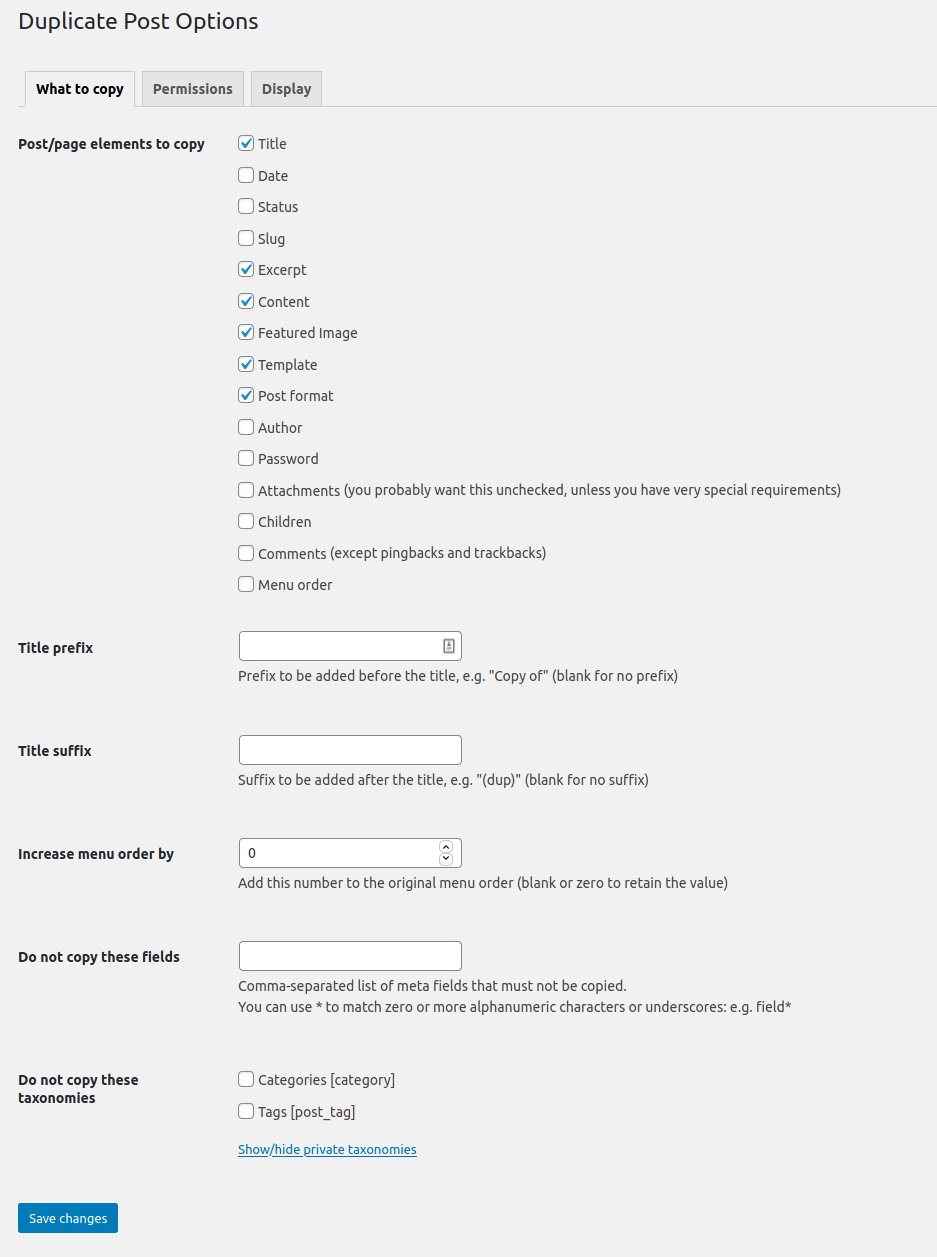
La página de opciones.
Instalación
Usá la función “Agregar nuevo plugin” de WordPress, buscá “Duplicate Post” o descargá el archivo y:
- Descomprimí el archivo en tu computadora
- Subí el directorio
duplicate-postal directorio/wp-content/plugins/ - Activa el plugin en menú ‘Plugins’ de WordPress
- Andá a Ajustes > Duplicate Post y personalizá su comportamiento como necesités.
Preguntas frecuentes
-
El plugin no funciona, ¿por qué?
-
En primer lugar, chequeá tu versión de WordPress: el plugin no se supone que funcione más en versiones antiguas. ¡Asegurate también de actualizar el plugin a la última versión!
Luego intentá desactivarlo y volver a activarlo, algunos usuarios informaron que esto soluciona algunos problemas.
Poné atención también a la pestaña “Permisos” de los ajustes: asegurate de que el plugin está habilitado para los roles deseados y los tipos de entrada.
Si todavía no funciona, tal vez hay algún tipo de conflicto con otros plugins: sentite libre de escribir en el foro y vamos a intentar descubrir una solución (será realmente útil si intentás desactivar todos los demás plugins uno por uno para ver cuál entra en conflicto con el mío. Pero hacelo solo si sabés lo que estás haciendo, no seré responsable de ningún problema que puedas experimentar).
-
¡Este plugin no está traducido a mi idioma!
-
Desde la versión 3.0 las traducciones del plugin son gestionadas por la plataforma WordPress.org, y el plugin se entrega sin ficheros de idioma, así que antes que nada, tenés que actualizar las traducciones desde Escritorio->Actualizaciones.
If Duplicate Post is still in English, or if there are some untranslated strings, you can help translating to your language: you only need a WordPress.org account.
Reseñas


Colaboradores y desarrolladores
“Yoast Duplicate Post” es un software de código abierto. Las siguientes personas han colaborado con este plugin.
Colaboradores

“Yoast Duplicate Post” ha sido traducido a 51 idiomas. Gracias a los traductores por sus contribuciones.
Traduce “Yoast Duplicate Post” a tu idioma.
¿Interesado en el desarrollo?
Revisa el código , echa un vistazo al repositorio SVN , o suscríbete al log de desarrollo por RSS .
Registro de cambios
4.6
Release date: 2026-03-09
Introduces smoother post duplication, more reliable rewrite workflows, and better compatibility across languages and configurations. Read more here!
Enhancements
- Improves the compatibility with the Block Editor.
- Improves the style of the Copy to a new draft and Rewrite & Republish actions in the Block Editor.
- Replaces the metabox with a sidebar panel in the Block Editor.
Bugfixes
- Fixes a bug where cloning an attachment did not copy its caption as expected. Props to @masteradhoc.
- Fixes a bug where cloning an attachment did not copy its description as expected.
- Fixes a bug where notices would not be appearing in the block editor, throwing console errors, with some locales.
- Fixes a bug where Rewrite & Republish copies could remain orphaned, blocking editors from creating a new Rewrite & Republish copy for the original post.
- Fixes a bug where the block editor button were not styled if the admin bar links where not present.
- Fixes a bug where translations where missing in the buttons and the notices in the Block Editor. Props to @petitphp.
Other
- Improves security of the Bulk Clone action and the republishing of a copy.
- Adds
duplicate_post_before_republishandduplicate_post_after_republishaction hooks fired before and after republishing. Props to @piscis. - Deprecates the
dp_duplicate_postanddp_duplicate_pagehooks and introduces a new unifiedduplicate_post_after_duplicatedaction hook that replaces them. The new hook includes the post type as a fourth parameter for flexible filtering. - Sets the minimum supported WordPress version to 6.8.
- Sets the WordPress tested up to version to 6.9.
- Drops compatibility with PHP < 7.4.
- Verified compatibility with PHP up to version 8.5.
- Fixes the Developer Guide link that was leading to a non-existent page. Props to @masteradhoc.
- Fixes the documentation link to use a shortlink. Props to @masteradhoc.
- Improves how the translations are loaded by relying on the WordPress mechanism for that. Props to @swissspidy.
- Improves discoverability of security policy in Packagist.
- Users requiring this package via [WP]Packagist can now use the
composer/installersv2.
4.5
Release date: 2022-06-28
Enhancements
- Improves the impact of the plugin on the performance of the site by avoiding useless calls on the
gettextfilter.
Bugfixes
- Fixes a bug where a section in the Classic Editor’s submitbox would be displayed with incorrect margins.
Other
- Sets the WordPress tested up to version to 6.0.
Earlier versions
For the changelog of earlier versions, please refer to the changelog on yoast.com.