
Priskribo
Adding Google Analytics to your website never has been easier. Just add your analytics ID and the correct asynchronous Javascript code is added to every page. No fiddling around anymore with manually pasting the code in your template.
Ekrankopioj
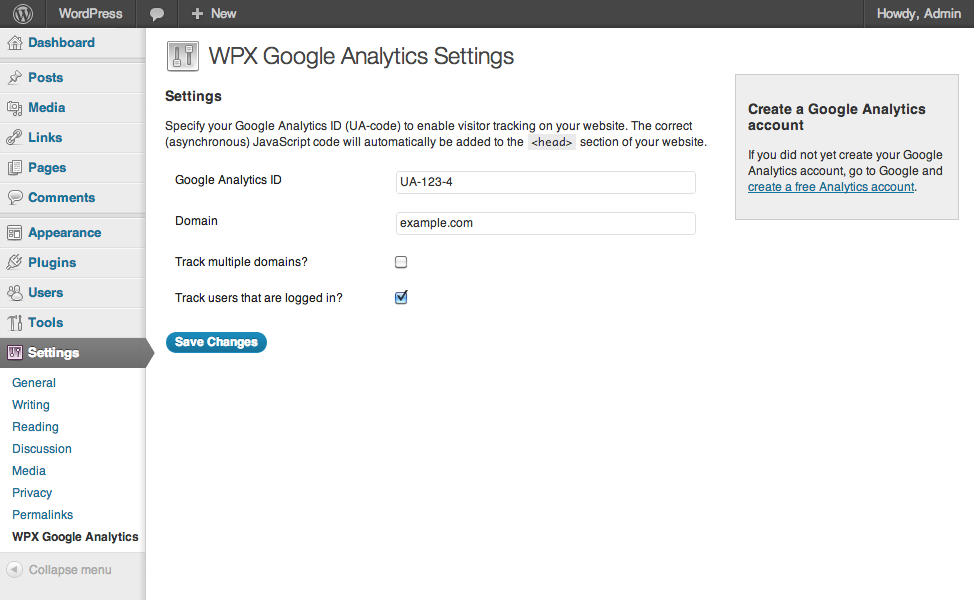
Google Analytics Settings
Instalo
- Upload
wpx-google-analytics.phpto the/wp-content/plugins/directory - Activate the plugin through the ‘Plugins’ menu in WordPress
- Go to
Settings>WPX Google Analyticsand paste in your analytics ID
Pritaksoj
There are no reviews for this plugin.
Kontribuantoj k. programistoj
“WPX Google Analytics” estas liberkoda programo. La sekvaj homoj kontribuis al la kromprogramo.
Kontribuantoj
Traduki “WPX Google Analytics” en vian lingvon.
Ĉu interesita en programado?
Browse the code, check out the SVN repository, or subscribe to the development log by RSS.
Ŝanĝprotokolo
1.1
- Language support added
1.0.2
- Cleaned up the code, removed debug statements that caused issues on certain installations.
1.0.1
- Added: Forbidden characters are stripped from the domain.
1.0
- First public release of the plugin.