

Priskribo
Subscribe Button Bar for YouTube Embed Videos is a robust WordPress plugin designed to seamlessly integrate YouTube subscription functionality into your website. It automatically detects YouTube videos within your content, including both embedded iframes and direct URLs, and strategically places a customizable YouTube video subscription button bar directly beneath them.
This plugin serves as an effective video marketing tool, creating a sleek, non-intrusive call to action that encourages viewers to subscribe to your channel immediately. Whether you aim to increase YouTube subscribers, improve viewer engagement, or ensure a consistent user experience with a fully responsive design, Subscribe Button Bar provides the professional features necessary for channel growth.
Key Features:
- Intelligent Detection: Automatically identifies YouTube videos (iframes and URLs) within your posts and pages.
- Fully Customizable: Tailor settings including colors, text, and layout to perfectly match your brand identity.
- Responsive Design: Ensures optimal display and functionality across all devices, including desktops, tablets, and mobile phones.
- Performance Optimized: Lightweight architecture ensures your site remains fast and efficient.
Customization Options:
1. Enable/Disable Toggle: Turn the subscribe button on or off
2. Channel ID: Enter your YouTube Channel ID
3. Theme Selection: Choose between default and dark themes
4. Subscriber Count: Show or hide subscriber count
5. Layout Options: Default or full layout
6. Custom Text: Add personalized text before the button
7. Background Color: Customize the background color
8. Text Color: Customize the text color
Getting Started:
- Install and activate the plugin ‘Subscribe Button Bar’ via the WordPress dashboard.
- Navigate to Settings > Subscribe Button Bar.
- Enter your YouTube Channel ID (available at https://www.youtube.com/account_advanced).
- Configure your desired appearance settings and save.
Locating Your Channel ID:
- Visit https://www.youtube.com/account_advanced while logged into YouTube.
- Copy the string listed under “Channel ID”.
External Services
This plugin uses the YouTube API to show the subscribe button and your subscriber count. This is provided by the “Google Platform Library”. Just so you know, it might send your IP and user agent to Google when it loads.
Policies: Google Privacy Policy, YouTube Terms of Service
Ekrankopioj
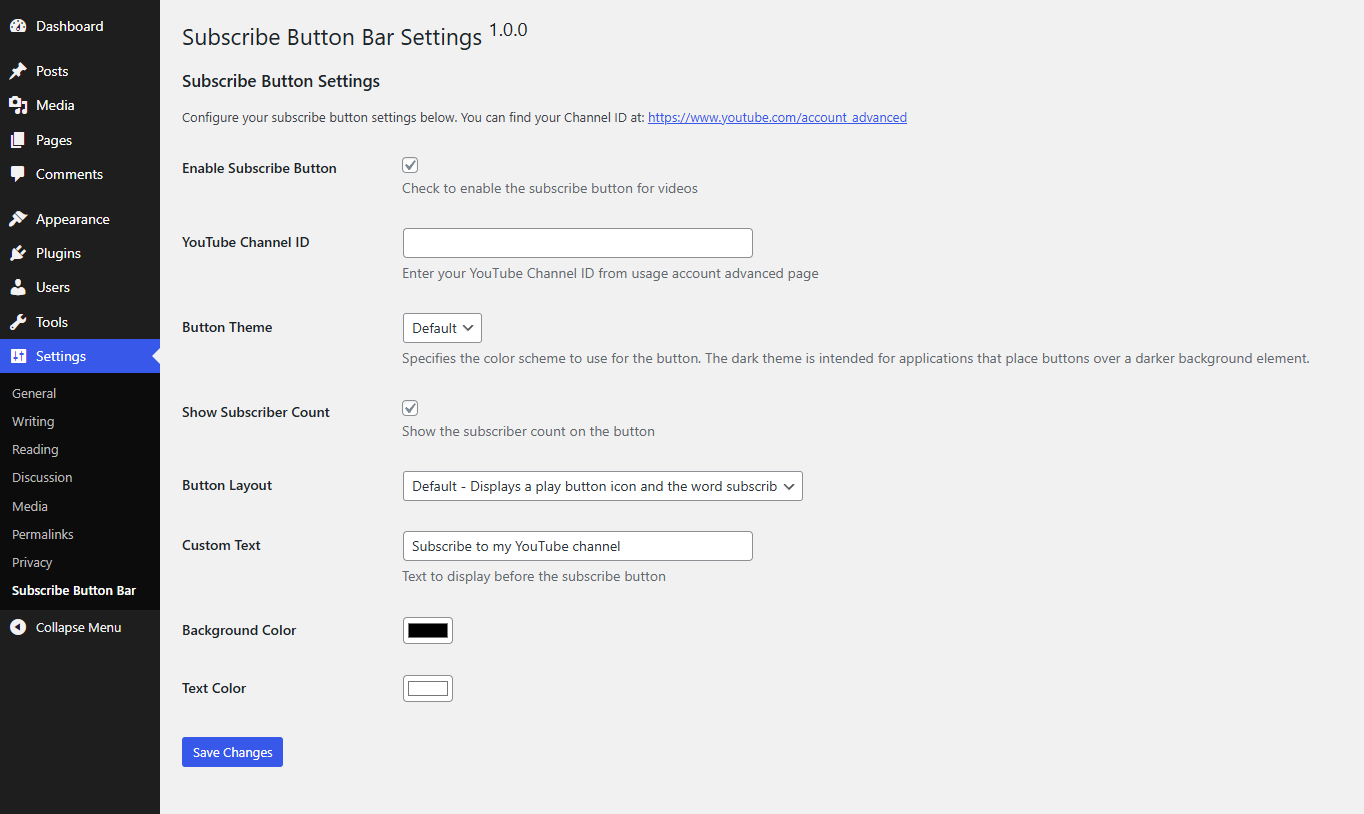
Plugin settings page with all customization options 
Subscribe button displayed below a YouTube video
Instalo
- Upload the plugin files to the
/wp-content/plugins/subscribe-button-bardirectory, or search for “Subscribe Button Bar” in your WordPress dashboard and install it. - Activate it.
- Go to Settings > YouTube Subscribe to set it up.
- Enter your YouTube Channel ID, pick your colors, and save.
OD
-
Where is my YouTube Channel ID?
-
You can find it at https://www.youtube.com/account_advanced. It’s the string of random characters starting with “UC”.
-
Does it work with all videos?
-
Yes, it finds both the embedded iframes and just plain YouTube links you put in your text.
-
Is it responsive?
-
Yep, it looks good on mobile.
-
Can I change how it looks?
-
Yes, check the settings page. You can change everything there.
-
The plugin isn’t working for me, what should I do?
-
If something’s broken or just not showing up, don’t worry. Just head over to the support forum and create a ticket. I check it regularly: https://wordpress.org/support/plugin/subscribe-button-bar/#new-topic-0
Pritaksoj
There are no reviews for this plugin.
Kontribuantoj k. programistoj
“Subscribe Button Bar for YouTube Embed Videos” estas liberkoda programo. La sekvaj homoj kontribuis al la kromprogramo.
Kontribuantoj
Traduki “Subscribe Button Bar for YouTube Embed Videos” en vian lingvon.
Ĉu interesita en programado?
Browse the code, check out the SVN repository, or subscribe to the development log by RSS.
Ŝanĝprotokolo
1.0.0
- Initial release
- Automatic YouTube video detection
- 9 customization options
- Responsive design
- Admin settings panel
- Plugin activation notice