
Priskribo
BlackBox is symfony like unobstrusive debug bar attached to the top of the browser window.
How can it help you with development:
1. instantly inspect global variables (GET, POST, COOKIE, SERVER)
2. debug both frontend and admin area
3. executed MySQL queries and time it took to execute each query (useful for finding slow queries)
4. profiler for measuring performance of your plugins and themes
5. errors occurred when loading WordPress page
Ekrankopioj
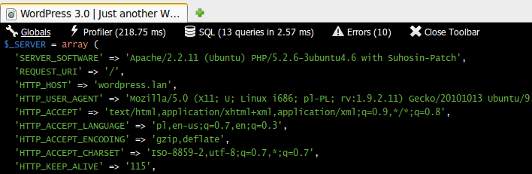
Glabal variables foramted using var_export() function, syntax coloring using awesome highlight.js library (75% zoom) 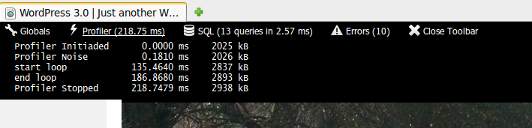
Profiler tab. Displays checkpoint name, time passed since profiler start and current memory usage (75% zoom) 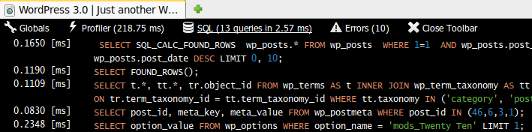
SQL tab. Displays each query execution time and the executed queries. Syntax highlighting using highlight.js library (75% zoom) 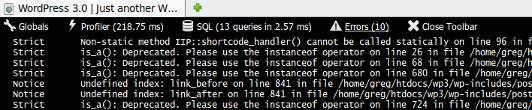
Errors tab. Displays error type and the error message. If the error occured more then once its type is displayed as “Notice (X)” where X is the number of error occurances.
Instalo
This section describes how to install the plugin and get it working.
- Upload plugin to
/wp-content/plugins/directory - Activate the plugin through the ‘Plugins’ menu in WordPress
- Done!
Pritaksoj

Septembro 17, 2021
The bar displays on the main site for people not signed in and visiting the site. Could not access the plugins section of WordPress to deactivate it; had to remove through File Manager. Status bar just sits at “Waiting for [site].com”

Junio 2, 2018
Immediate feedback on a great majority of errors. Added a conditional red background to the Errors, and with this modification I have never miss even a notice anymore.
Thank you very much!
Kontribuantoj k. programistoj
“BlackBox Debug Bar” estas liberkoda programo. La sekvaj homoj kontribuis al la kromprogramo.
Kontribuantoj
Traduki “BlackBox Debug Bar” en vian lingvon.
Ĉu interesita en programado?
Browse the code, check out the SVN repository, or subscribe to the development log by RSS.