
Περιγραφή
Advanced Firewall and Security Scanner
Tired of worrying about your WordPress site getting hacked?
VMP Security is like having a professional security team watching your website 24/7. We combine a powerful firewall, intelligent malware scanner, and advanced threat detection to keep your site safe from hackers, malware, and security vulnerabilities.
Why Choose VMP Security?
✅ Comprehensive Real-Time Protection – Advanced security features that detect and stop attacks in real-time.
✅ Easy to Use – Set it up in 5 minutes. No security degree required.
✅ Performance Optimized – Won’t slow down your site. Runs efficiently in the background.
✅ Always Up-to-Date – Our 280+ firewall rules and malware signatures are constantly updated.
✅ Complete Coverage – Firewall, malware scanner, 2FA, brute force protection, and more in one plugin.
🔥 Web Application Firewall (WAF)
Think of it as a security guard for your website.
Our firewall inspects every visitor before they reach your WordPress site. Bad guys? Blocked instantly. Legitimate visitors? They won’t even notice we’re there.
What It Protects Against:
- SQL Injection – Hackers trying to steal your database
- Cross-Site Scripting (XSS) – Malicious code injection
- Remote File Inclusion (RFI) – Attempts to upload backdoors
- Local File Inclusion (LFI) – Unauthorized file access
- Command Injection – Server takeover attempts
- Path Traversal – Directory browsing attacks
Key Features:
- 280+ Built-in Security Rules – Covering all major attack types
- Zero-Day Protection – Pattern-based detection catches new threats
- Attack Logging – See exactly who’s trying to hack you
- Custom Rules – Add your own protection patterns
- Learning Mode – Fine-tune rules based on your legitimate traffic
- IP Blocking – Automatic permanent bans for repeat offenders
🛡️ Brute Force Protection
Stop password guessing attacks before they succeed.
Hackers use bots to try thousands of password combinations. We stop them cold.
Features:
- Smart Login Limiting – Lock out IPs after failed attempts
- Invalid Username Blocking – Instant block for fake usernames
- Leaked Password Detection – Check credentials against breach databases
- Strong Password Enforcement – Force admins and users to use secure passwords
- Username Blacklist – Block known malicious usernames instantly
- Permanent Bans – Get rid of persistent attackers for good
⚡ Rate Limiting & Bot Protection
Prevent site scraping, resource exhaustion, and vulnerability scanning.
Not all attacks are malicious code. Some attackers just overwhelm your site with requests. We stop that too.
What We Control:
- Request Limits – Maximum requests per IP per time period
- Human vs Bot Detection – Smart classification of traffic
- 404 Error Monitoring – Detect scanning attempts
- Google Crawler Handling – Special treatment for legitimate search engines
- Throttling or Blocking – Slow down or stop violators
- Allowlist Support – Whitelist your own IPs and trusted services
🌍 Country Blocking
Block entire countries from accessing your site.
Protect your WordPress site from geo-targeted attacks by blocking traffic from specific countries. Perfect for sites with regional focus or facing attacks from certain locations.
Features:
- Comprehensive Geo-Blocking – Block any country by ISO code
- Granular Control – Block login only or entire site access
- Block Statistics – Track attempts and blocks per country
- Top Attackers Report – See which countries attack you most
- Temporary Blocks – Set expiration times for country blocks
- Permanent Blocks – Long-term protection from persistent threats
- Detailed Logging – Complete audit trail with IP, country, and request data
- Attack Analytics – Visual reports showing attack patterns by country
- GeoIP Integration – Automatic IP-to-country lookup with IP2Location
- Auto-Updates – GeoIP database updates automatically
🎯 Custom Pattern Matching
Block threats using advanced pattern matching.
Go beyond simple IP blocking. Create sophisticated blocking rules based on hostnames, user agents, referrers, and IP ranges.
Pattern Types:
- Hostname Blocking – Block specific domains or wildcard patterns
- User Agent Blocking – Stop malicious bots and scrapers
- Referrer Blocking – Block traffic from specific sources
- IP Range Blocking – CIDR notation support for network blocks
- Wildcard Patterns – Flexible matching with * wildcards
- Regex Support – Advanced users can use regular expressions
Management Features:
- Pattern Groups – Organize related patterns together
- Match Statistics – Track how often patterns trigger
- Active/Inactive – Enable or disable patterns without deleting
- Source Tracking – Know if patterns are local or from sync service
- Reason Logging – Document why each pattern was created
- Match History – See when patterns last matched
🚫 Blocking Options
Centralized management for all blocking features.
Manage all your site’s blocking rules from one convenient location. Control who can access your site and how.
Features:
- IP Blocking – Block individual IPs or entire IP ranges using CIDR notation
- Country Blocking – Block entire countries from accessing your site
- Pattern Blocking – Create custom blocking rules based on hostnames, user agents, and referrers
- Temporary Blocks – Set time-limited blocks that expire automatically
- Permanent Blocks – Long-term protection from persistent threats
- Block Statistics – See what’s being blocked and why with detailed analytics
- Allowlist Management – Whitelist trusted IPs and services to bypass all blocks
- Unified Dashboard – Manage all blocking types in one place
🔐 Two-Factor Authentication (2FA)
Add an extra layer of security to your WordPress login.
Even if someone steals your password, they can’t get in without the second factor.
Features:
- QR Code Setup – Easy configuration with any authenticator app
- Backup Codes – Never get locked out of your own site
- User Management – Force 2FA for admins or specific roles
- Frontend 2FA Management – Users can manage their own 2FA settings
- Email Notifications – Get notified when 2FA is enabled/disabled
- Shortcode Support – Add 2FA controls anywhere on your site
- XML-RPC Protection – Require 2FA for XML-RPC requests
- WooCommerce Integration – Secure your online store checkout
🔍 Advanced Malware Scanner
Multiple specialized scanners working together to find threats.
We don’t just look for known malware. Our intelligent scanner detects suspicious patterns, unauthorized changes, and hidden backdoors.
Our Security Scanners:
- Malware Scanner – Detects backdoors, trojans, and malicious code from our 40,000+ malware scanner
- File Integrity Monitor – Compares files against official WordPress versions
- Vulnerability Scanner – Identifies security flaws in plugins and themes
- User Security Scanner – Finds suspicious admin accounts
- Content Safety Scanner – Analyzes posts/comments for malicious content
- Public Files Scanner – Detects exposed configuration files
- Server State Scanner – Monitors server security settings
- Binary Scanner – Checks images and executables for embedded malware
- Domain Reputation Scanner – Verifies URLs against threat databases
Scan Types:
- Quick Scan – Critical files only (2-5 minutes)
- Standard Scan – Balanced coverage (6-12 minutes)
- High Sensitivity Scan – Complete site analysis (10-25 minutes)
- Custom Scan – Choose exactly what to scan
🚨 Advanced Threat Detection
Advanced pattern matching and behavioral analysis.
Intelligent Detection:
- Pattern Analysis – Detects obfuscated and encrypted malware
- Behavior Analysis – Identifies suspicious file operations
- Reputation Checking – Validates URLs against Google Safe Browsing
- Legitimacy Assessment – Distinguishes real threats from false positives
- Unknown File Detection – Flags files that shouldn’t be there
- Password Breach Checking – Scans for compromised credentials
📊 Live Traffic Monitor & Event Tracking
See exactly what’s happening on your site in real-time.
Features:
- Real-Time Traffic View – Watch visitors and attacks as they happen
- Event Logging – Complete audit trail of security events
- Attack Statistics – Visual dashboards showing threats over time
- IP Intelligence – WHOIS lookup and IP reputation checking
- Human vs Bot Tracking – Classify and analyze traffic patterns
- Export Capabilities – Download logs and reports for analysis
🎛️ Easy-to-Use Dashboard
All your security in one place. No tech degree required.
What You Get:
- Security Status – Green, yellow, or red. Know your status at a glance
- Recent Attacks – See who’s trying to hack you
- Scan Results – Detailed reports with clear action items
- Firewall Status – Protection levels and rule statistics
- One-Click Actions – Block IPs, ignore false positives, repair files
- Scheduled Scans – Set it and forget it
⚙️ Advanced Features for Power Users
Need more control? We’ve got you covered.
- Custom Firewall Rules – Write your own protection patterns
- File Exclusions – Skip certain directories or file types
- Performance Tuning – Adjust memory limits and timeouts
- API Integrations – Google Safe Browsing, IP reputation databases
- IPv4/IPv6 Support – Dual-stack or IPv4-only mode
- Multisite Compatible – Works perfectly with WordPress networks
- Developer Friendly – Hooks and filters for customization
- Sync Service – Central management for multiple sites
🔒 Privacy & Your Data
Your site data and scan results stay on your server. Optional features like settings export use secure cloud storage.
What We DON’T Do:
❌ We don’t send your file content or database data to external servers
❌ We don’t track your users
❌ We don’t collect analytics about your site
❌ We don’t send data without your knowledge
External Services (Optional):
We use external services only when necessary for specific security features. You can see exactly what’s sent:
VMP Security Servers
* License activation and validation (free/premium)
* WAF rules synchronization and updates
* Malware signature database updates
* Two-Factor Authentication (2FA) system management
* Settings export/import cloud storage(optional)
* Privacy: Your site data remains on your server – only configuration and security rules are synced
Google Services (safebrowsing.googleapis.com, www.google.com/recaptcha)
* URL threat detection and reCAPTCHA spam protection
* Privacy: https://policies.google.com/privacy
WordPress.org APIs (api.wordpress.org, downloads.wordpress.org, core.svn.wordpress.org)
* Download original files for integrity checking during malware scans
* Privacy: https://wordpress.org/about/privacy/
GitHub (raw.githubusercontent.com)
* Download WordPress core files for file comparison
IP Lookup Services (api.ipify.org, ifconfig.me, icanhazip.com, ip-api.com, ipwhois.app, download.ip2location.com)
* Server IP detection, geolocation, and country blocking features
Threat Intelligence (api.urlvoid.com, www.virustotal.com, checkurl.phishtank.com)
* URL reputation checking and threat validation
Vulnerability Databases (services.nvd.nist.gov, wpscan.com, cvedetails.com, cve.mitre.org)
* Check for known security vulnerabilities during scans
All malware scanning happens on YOUR server. We do not upload your files or database content to external services except for certain features used by the user.
🛠️ Advanced Tools
Professional-grade tools for site management and troubleshooting.
Diagnostics Tool
Comprehensive system health check to troubleshoot issues quickly.
Run 15+ diagnostic tests to verify your site’s security configuration and identify potential problems:
- Plugin Status – Check if VMP Security is working correctly
- File Permissions – Verify read/write access to critical directories
- Connectivity Tests – Ensure your site can communicate with security services
- Time Sync – Verify server time is accurate for security features
- WordPress Health – Complete audit of WordPress configuration
- Plugins & Themes – View all installed plugins and themes with versions
- Scheduled Tasks – Monitor cron jobs to ensure scans run on time
- PHP Environment – Check PHP version and required extensions
- Firewall Status – Verify WAF is protecting your site
Settings Export/Import
Backup and migrate your security configuration easily.
Cloud-based configuration backup and migration using secure tokens:
- Generate Export Token – Upload settings to VMP server and receive a unique token
- Cloud Storage – Your settings are securely stored on VMP servers
- Easy Import – Use the token to download settings on any site
- Site Migration – Quickly migrate security settings between sites
- Configuration Backup – Keep your settings safe in the cloud
- Flexible Import – Choose to merge with or replace existing settings
Στιγμιότυπα
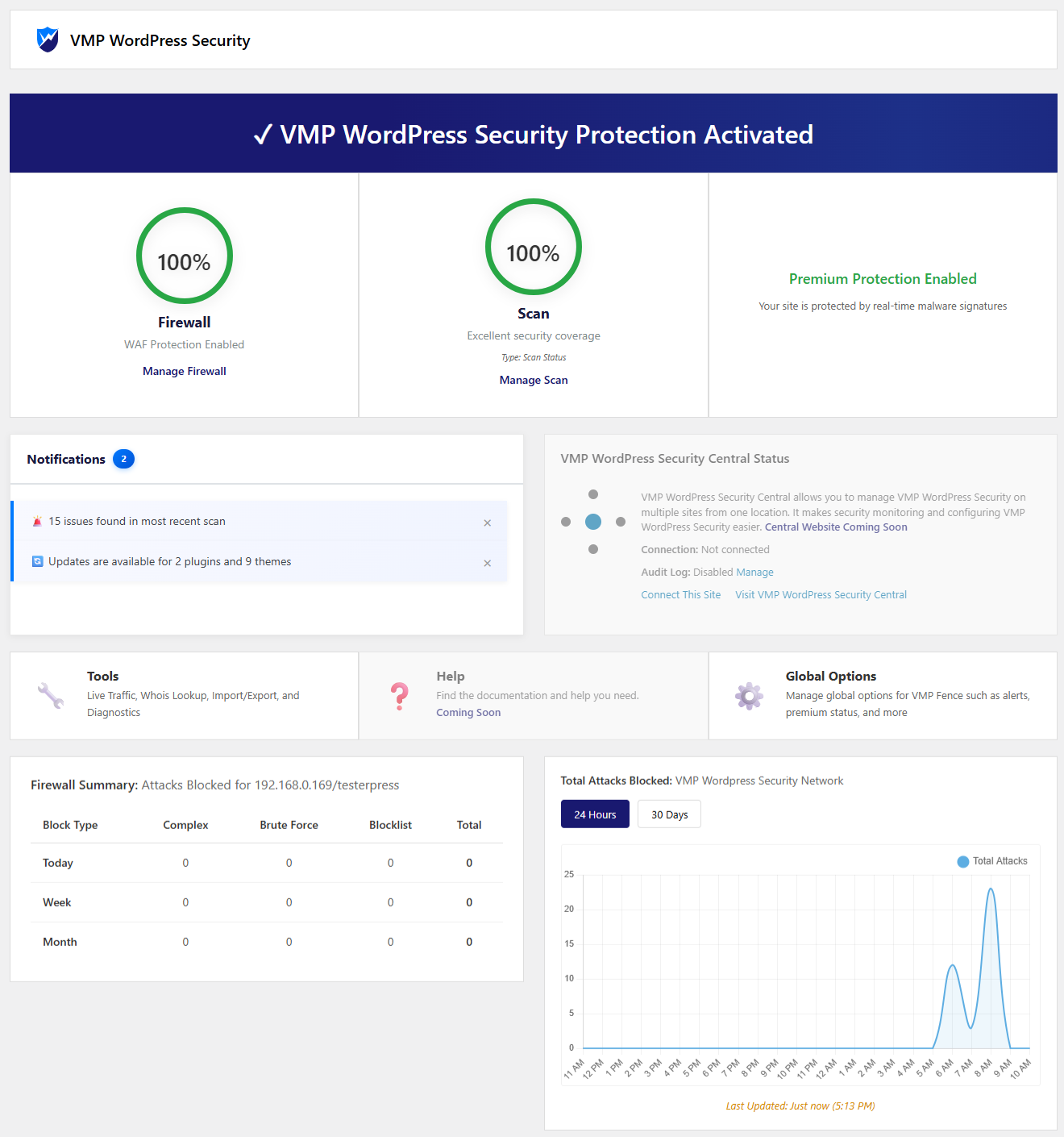
Security Dashboard – Your security status at a glance with firewall protection, scan results, and threat overview 
Active Scan Interface – Real-time scan progress with detailed statistics and threat detection 
Scan Results – Complete threat analysis with actionable remediation options 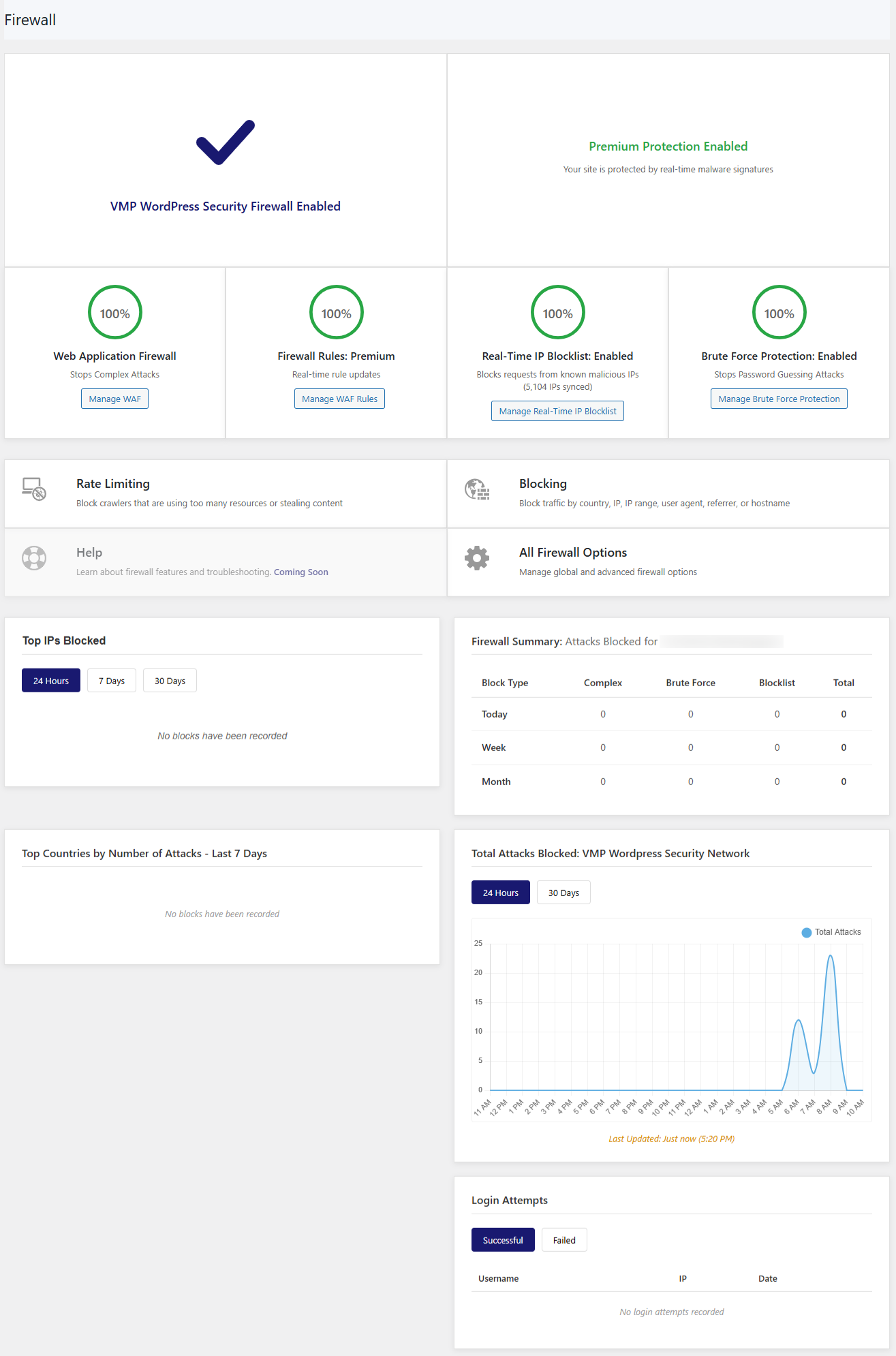
Firewall Dashboard – WAF protection status, attack statistics, and blocked threats 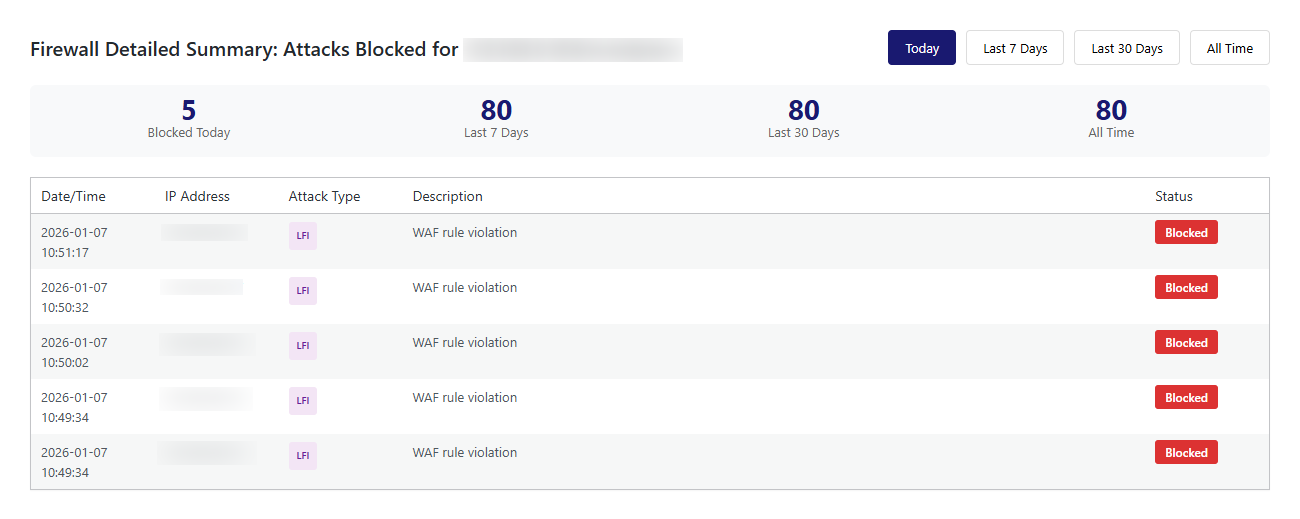
Attack Log – Detailed view of blocked attacks with IP, attack type, and violated rules 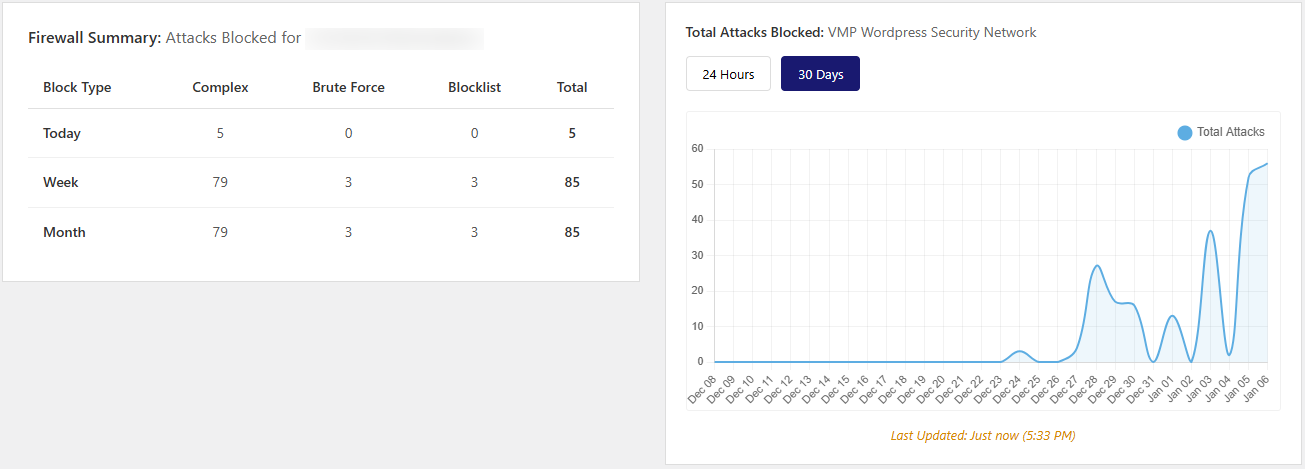
Firewall Summary & Attack Graph – Firewall attack summary and global network attack graph 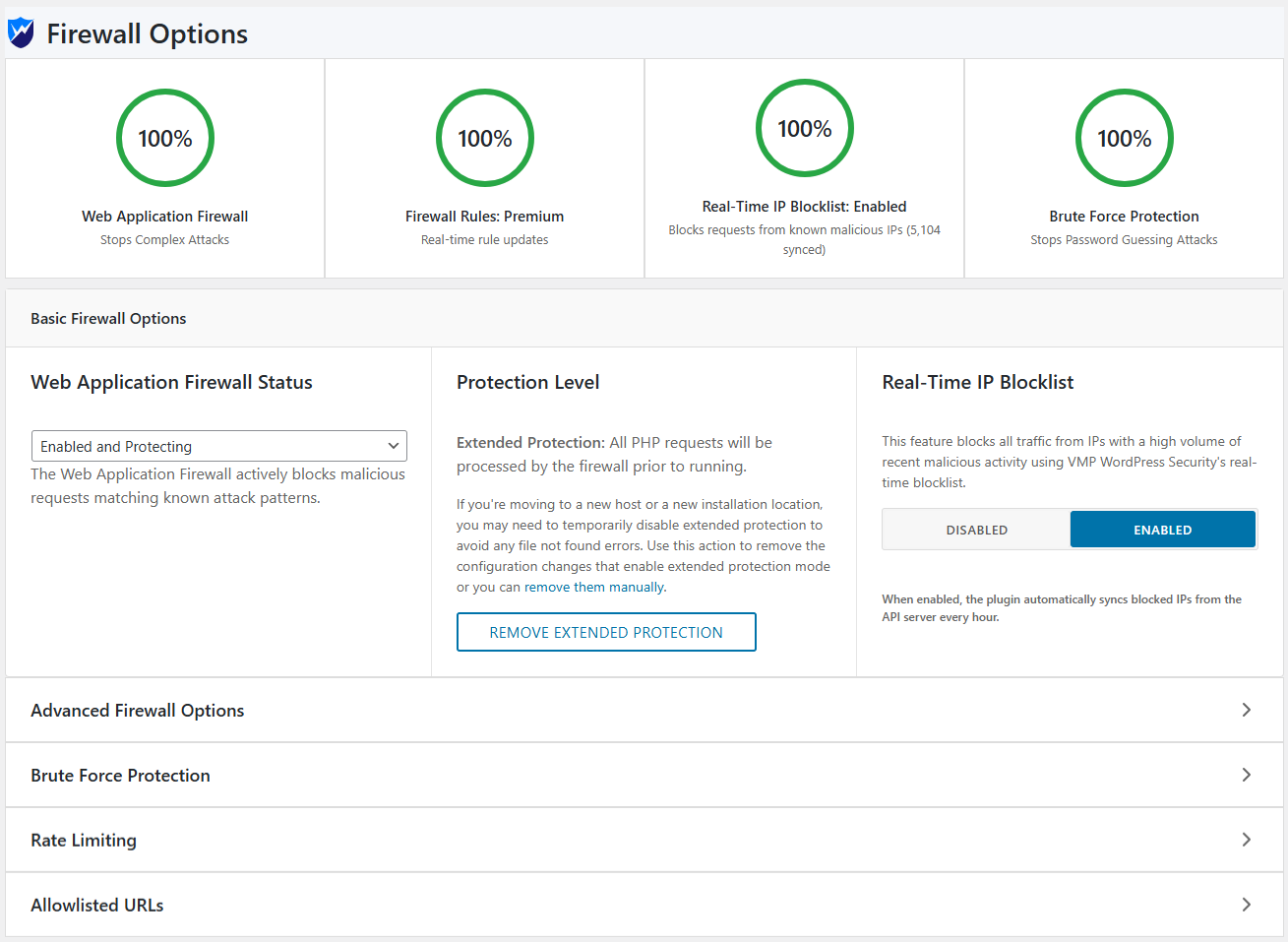
Firewall Configuration – Comprehensive settings for WAF, brute force, and rate limiting 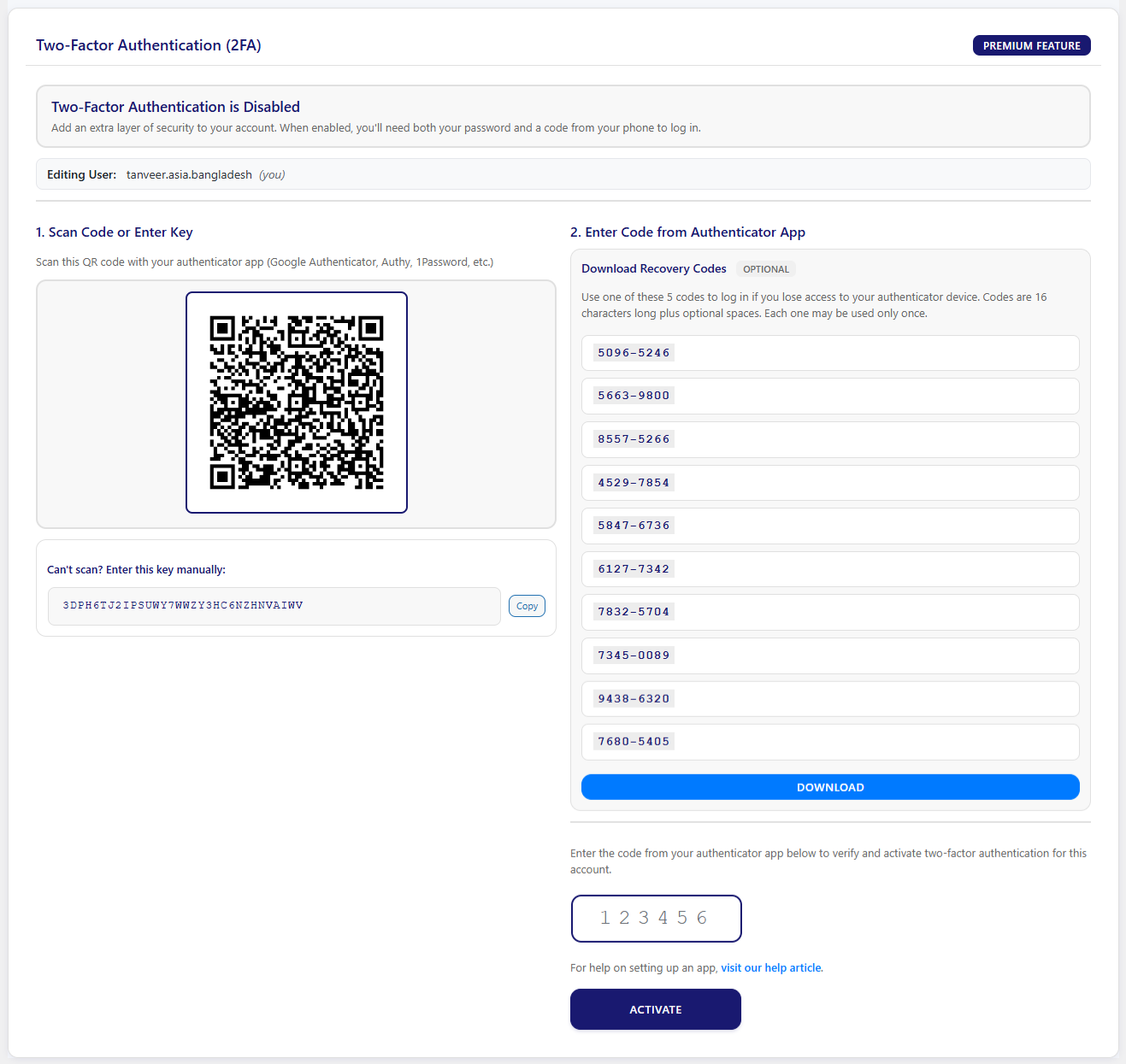
2FA Setup Screen – QR code setup for two-factor authentication 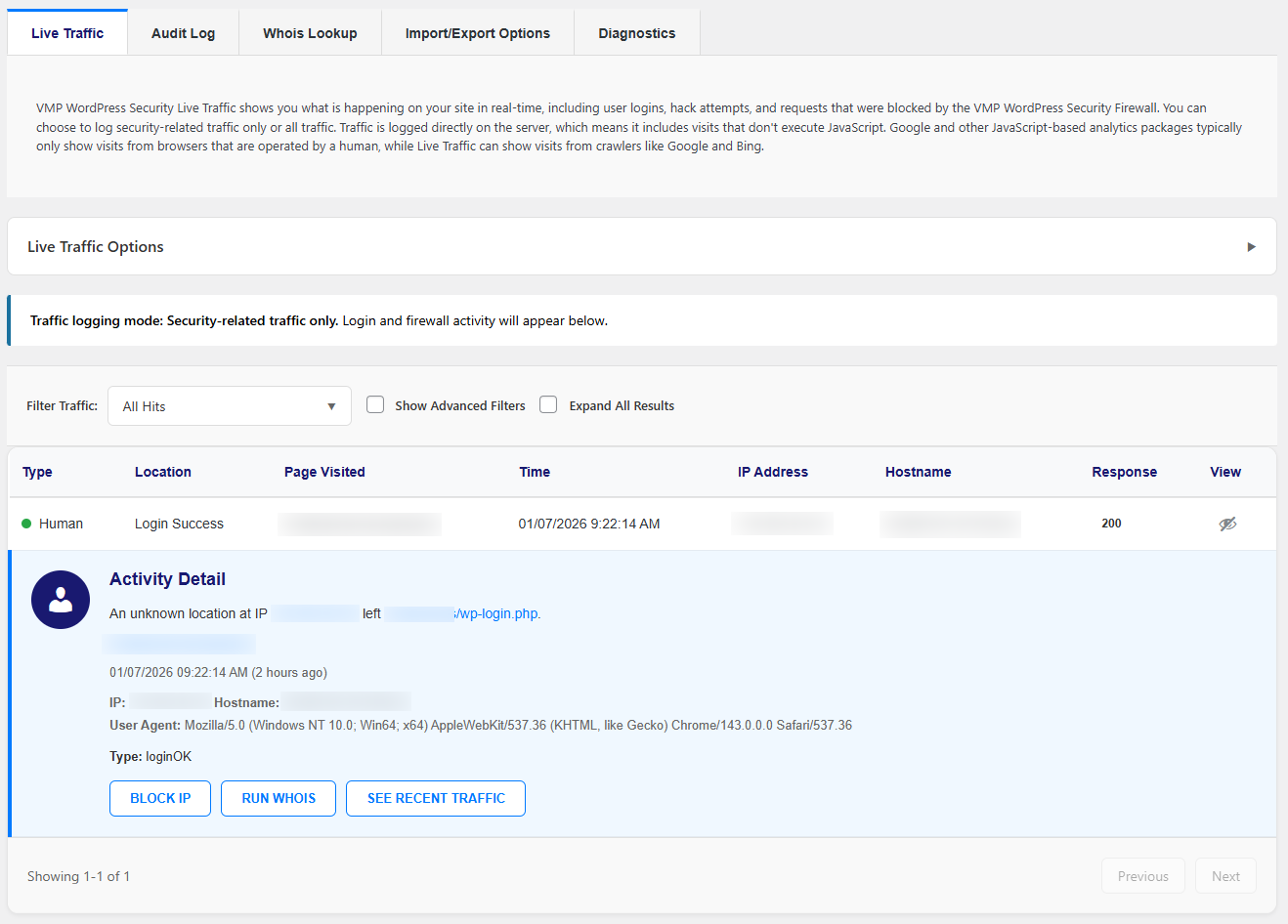
Live Traffic Monitor – Real-time traffic view with human vs bot classification
Εγκατάσταση
Get protected in 5 minutes:
- Install VMP Security from the WordPress plugin directory
- Activate the plugin
- Go to VMP Security > Dashboard
- Run your first security scan
- Configure firewall settings (or use our secure defaults)
- Enable 2FA for your admin account
- Set up scheduled scans
- Relax. You’re protected.
Συχνές Ερωτήσεις
-
Will this slow down my website?
-
Nope. We’re obsessed with performance. The firewall uses efficient pattern matching, scanners run in the background, and we optimize memory usage. Your visitors won’t notice any slowdown.
-
Do I need to configure anything?
-
Not really. It works great out of the box with secure defaults. But if you want to customize, we give you full control over every feature.
-
What happens when an attack is blocked?
-
The attacker gets a 403 Forbidden page. We log the attack details (IP, type, time, violated rules) so you can see what happened. Repeat offenders get permanently banned.
-
Can I whitelist my own IP address?
-
Yes! Go to Firewall > Options and add your IP to the allowlist. You’ll bypass all firewall rules (useful for testing).
-
How does 2FA work?
-
Use any authenticator app (Google Authenticator, Authy, 1Password, etc.). Scan the QR code during setup, and you’re done. You’ll enter a 6-digit code when logging in.
-
Will it detect all malware?
-
No security tool catches 100% of threats. But our specialized scanners with pattern matching, behavior analysis, and reputation checking catch the vast majority. We’re constantly updating our detection signatures.
-
Can it repair infected files automatically?
-
We focus on detection and give you safe repair options that you control. When we find infected WordPress core files, you can restore the original version with one click. For plugins/themes, we recommend reinstalling from official sources.
-
Does it work with WooCommerce?
-
Yes! We have special integrations for WooCommerce to protect your store and customer data.
-
How do I update firewall rules?
-
Rules are updated automatically with plugin updates. You can also add custom rules in Firewall > WAF Rules.
-
Can I schedule automatic scans?
-
Absolutely. Daily, twice daily, weekly, weekdays only, weekends only, or custom schedules. The scan monitor ensures they complete successfully.
-
What if I get locked out?
-
2FA includes backup codes that you save during setup. For firewall lockouts, you can disable the plugin via FTP or use WordPress recovery mode.
-
Do you offer support?
-
Yes! We provide support through the WordPress.org forums. Premium support options coming soon.
Κριτικές
Δεν υπάρχουν αξιολογήσεις για αυτό το πρόσθετο.
Συνεισφέροντες & Προγραμματιστές
“VMP Security – Firewall, Malware Scan, and Login Security” είναι λογισμικό ανοιχτού κώδικα. Οι παρακάτω έχουν συνεισφέρει στη δημιουργία του.
Συντελεστές
Μεταφράστε το “VMP Security – Firewall, Malware Scan, and Login Security” στην γλώσσα σας.
Ενδιαφέρεστε για την ανάπτυξη;
Περιηγηθείτε στον κώδικα, ανατρέξτε στο αποθετήριο SVN ή εγγραφείτε στο αρχείο καταγραφής αλλαγών ανάπτυξης μέσω RSS .
Σύνοψη αλλαγών
2.2.3 – January 31, 2026
Maintenance & Optimization Update
- Cleanup Improvements: Added metadata cleanup on deactivation for cleaner uninstalls
- Cron Management: Clear scheduled crons on uninstall to prevent orphaned tasks
- Performance: Added API key local validation before making external API calls
- UI Enhancements: Improved UI design and branding color for different pages
- Bug Fixes: Fixed redirect URLs for Import/Export and Login Security buttons in All Options page, Fixed bug for some cases where user can’t see the install license overlay modal after closing the activation form during fresh installation.
2.2.2 – January 20, 2026
Enhanced Features Performance, Branding & UI Consistency Update
- UI Updates: Updated plugin name and branding across all view pages for consistency
- Auto Updates: Added automatic plugin update option in All Options page
- Dynamic Updates: Dynamic update intervals for audit log and dashboard live updates
- Data Retention: Added data retention choice on deactivation option
- Dashboard Widget: Added WordPress dashboard widget for quick security overview
- Auto Sync: Blocked IPs, WAF rules, and malware signatures now auto-sync after activation
- HTAccess Management: Improved .htaccess modification, removal, and activation notice handling
2.2.1 – January 19, 2026
WordPress.org Compliance Update
- Naming: Updated plugin display name
- Text Domain: Verified text domain consistency using ‘vmpfence-security’ throughout
- Documentation: Added comprehensive External Services section documenting all API connections
- Restore Default: Restore default button in firewall options page now working
2.2.0 – January 18, 2026
MAJOR UPDATE: Country Blocking, Custom Pattern Matching, Export/Import & Diagnostics Tools
** New Features:**
* Added Country Blocking system with comprehensive geo-blocking capabilities
* Implemented Custom Pattern Matching for advanced blocking rules (hostname, user agent, referrer, IP ranges)
* Added attack statistics showing top attacking countries
* Implemented Settings Export/Import system for easy configuration backup and migration
* Added comprehensive Diagnostics tool with 15+ system health checks
* Created GeoIP database integration with automatic updates
** Blocking Enhancements:**
* Block entire countries from accessing your site
* Create pattern-based blocking rules with wildcard and regex support
* Choose granular blocking options (block login only or entire site)
* Set temporary or permanent country blocks
* Track block statistics and attempt counts
* View detailed block logs with IP, country, and request information
** Tools & Management:**
* Full-featured Diagnostics tool for troubleshooting site issues
* Export and import your security settings for easy site migration
* Backup and restore your configuration with one click
* System health monitoring with connectivity tests
* Time synchronization checks to ensure security features work properly
* Complete WordPress settings and plugins audit
* Cron job monitoring to verify scheduled scans run correctly
** Improvements:**
* Enhanced security scanning performance
* Improved plugin stability and reliability
* Better error handling and user notifications
* Optimized database operations for faster performance
2.1.2 – January 10, 2026
- Fixed scan status persistence and auto-refresh issues
- Fixed browser close handling during active scans
- Fixed file cleanup for certain files during uninstallation
- Fixed auto sync of malware signature and waf rule
- Fixed status calculation hover issue
- Fixed firewall detailed summary table and responsive layout issues
- Fixed debug log handling and dashboard path resolution
- Fixed global options page loading issue
2.1.1 – January 9, 2026
- Major scanner engine overhaul with memory optimization
- Added batching and checkpointing for large scans
- Fixed concurrent scan prevention mechanism
- Fixed async scan worker cleanup on deactivation
- Enhanced scan forking and interruption handling
- Improved progress tracking reliability
- Optimized memory usage for large file scans
2.1.0 – January 7, 2026
MAJOR UPDATE: Two-Factor Authentication, Enhanced Blocking, Tools & Advanced Features
** New Features:**
* Added complete Two-Factor Authentication (2FA) system with QR code setup
* Created live traffic monitoring with real-time request logging
* Added event tracking system for comprehensive security auditing
* Implemented sync service for centralized multi-site management
* Added WHOIS lookup and IP intelligence tools
* Created frontend 2FA management interface with shortcode support
* Added reCAPTCHA integration for enhanced bot protection
* Implemented WooCommerce security integration
* Added XML-RPC security with 2FA enforcement
* Implemented Audit log
** Security Enhancements:**
* Improved IP blocking with granular control and temporary/permanent options
* Implemented advanced file repair engine for infected file recovery
* Added binary file detection for embedded malware in images
* Improved legitimacy assessment to reduce false positives
* Enhanced user security scanning for suspicious accounts
** Performance & UX:**
* Improved progress tracking with detailed status updates
* Enhanced exclusion system with pattern-based file filtering
* Optimized memory management for large site scans
** Technical Improvements:**
* Added comprehensive audit logging for all security events
** Added signature sync service for automatic updates
* Improved file type detection and handling
* Added IP allowlist system for trusted services
** Bug Fixes:**
* Improved text domain consistency across translation strings
* Fixed edge cases in IP address validation and blocking
* Improved compatibility with WordPress 6.9
2.0.0 – December 11, 2025
MAJOR UPDATE: Advanced Firewall Protection & Attack Prevention
** Firewall Features:**
* Added complete Web Application Firewall (WAF) with 280+ security rules
* Implemented real-time attack detection for XSS, SQLi, RFI, LFI, and RCE
* Created WAF rules management interface with filtering capabilities
* Added comprehensive attack logging and statistics
* Implemented early bootstrap protection (loads before WordPress)
** Brute Force Protection:**
* Added login attempt limiting with configurable thresholds
* Implemented invalid username blocking for user enumeration prevention
* Added leaked password checking against breach databases
* Created strong password enforcement system
* Added username blacklisting for instant blocking
** Rate Limiting:**
* Implemented request rate limiting for humans and crawlers
* Added 404 error monitoring to detect scanning attempts
* Created Google crawler verification and handling
* Added intelligent traffic classification
* Implemented throttling and blocking actions
** Advanced Blocking:**
* Added IP address blocking with CIDR range support
* Implemented user agent and referrer blocking
* Created URL pattern blocking with instant bans
* Added IP whitelist for trusted services
* Implemented permanent ban system for repeat offenders
** Dashboard & Reporting:**
* Created firewall dashboard with visual status indicators
* Added attack statistics by time period
* Implemented blocked attacks table with filtering
* Created comprehensive firewall options page
* Added custom security block messages
1.0.0 – September 29, 2025
Initial Release – Comprehensive Security Scanner
- Released specialized security scanner modules
- Added malware detection with advanced pattern matching
- Integrated Google Safe Browsing API for URL reputation
- Created multi-scan type support (Quick, Standard, Deep, Custom)
- Implemented file integrity monitoring against WordPress.org
- Added vulnerability scanning for plugins, themes, and core
- Created user security analysis and admin monitoring
- Implemented content safety scanning
- Added public files scanner for exposed configurations
- Created scheduled scanning with automatic recovery
- Implemented comprehensive audit logging
- Added flexible file exclusion system
- Created dashboard with detailed security reporting