
Περιγραφή
UM Profile Form Tutorial
Many new users the majority of the time don’t know how to fill out a profile page form properly. This add-on for the Ultimate Member plugin (“UM”) allows admins to provide users with a step by step guided virtual tour to fill out an UM profile form. This plugin uses javascript code to create pop up bubbles with comments and back/next buttons and is a custom version of WP-Tutorial.
The default ‘tour.js’ helps users fill out the form with 8 elements, but it can manually be modified to add many more and to target any element in the profile page form.
It’s assumed that Ultimate Member (“UM”) plugin is installed. The plugin is 100% compatible with Ultimate Member up to version 1.3.26
The Features
- Easy to install.
- Custom shortcode is provided.
- Comes with a default tour containing 8 bubbles (3 more than the free version of “Walk Me Through”.
Live Demo
Username: Test
Password: averyniceweb
Στιγμιότυπα

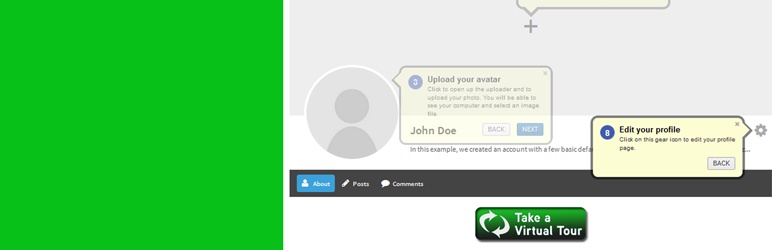
UMPFT showing the last step of an 8 step virtual tour. The possibilities are as endless as the number of fields.
Εγκατάσταση
Installation
- Upload ‘um-profile-form-tutorial’ folder to the ‘/wp-content/plugins/’ directory.
- Activate the plugin through the ‘Plugins’ menu in WordPress.
- Read the easy set up instructions.
Συχνές Ερωτήσεις
- FAQ
-
- Read explanation of use
- For more questions or help, contact me.
- [Or on twitter.](not available yet)
Κριτικές

Συνεισφέροντες & Προγραμματιστές
“UM Profile Form Tutorial” είναι λογισμικό ανοιχτού κώδικα. Οι παρακάτω έχουν συνεισφέρει στη δημιουργία του.
Συντελεστές
Μεταφράστε το “UM Profile Form Tutorial” στην γλώσσα σας.
Ενδιαφέρεστε για την ανάπτυξη;
Περιηγηθείτε στον κώδικα, ανατρέξτε στο αποθετήριο SVN ή εγγραφείτε στο αρχείο καταγραφής αλλαγών ανάπτυξης μέσω RSS .
Σύνοψη αλλαγών
1.2.
- Few minor edits which makes it easier to understand. Nothing major.