

Περιγραφή
Did you find this plugin helpful? Please consider leaving a 5-star review.
Please help by contributing to the GitHub repository Protect the Children on GitHub
Do you have a password protected post or page that has child (and grandchild) pages? Currently, you have to password protect each of these pages individually but, with this simple and efficient plugin, you can automatically password protect a page and all of it’s children automatically with the click of a button.
Once you choose the ‘Visibility’ option on a post and update it to ‘Password Protected’, you will be given a checkbox where you can opt into protecting all of that post’s children and grandchildren.
PROTECT THE CHILDREN!
Localizations
This plugin is available in the following languages:
- Albanian (Shqip)
- Arabic (العربية)
- Armenian (Հայերեն)
- Basque (Euskara)
- Bengali (বাংলা)
- Bulgarian (Български)
- Catalan (Català)
- Chinese Simplified (简体中文)
- Croatian (Hrvatski)
- Czech (Čeština)
- Danish (Dansk)
- Dutch (Nederlands)
- Estonian (Eesti)
- Finnish (Suomi)
- French (Français)
- Galician (Galego)
- Georgian (ქართული)
- German (Deutsch)
- Greek (Ελληνικά)
- Hebrew (עברית)
- Hindi (हिन्दी)
- Hungarian (Magyar)
- Indonesian (Bahasa Indonesia)
- Irish (Gaeilge)
- Italian (Italiano)
- Japanese (日本語)
- Korean (한국어)
- Latvian (Latviešu)
- Lithuanian (Lietuvių)
- Macedonian (Македонски)
- Norwegian (Norsk)
- Persian (فارسی)
- Persian – Afghanistan (دری)
- Polish (Polski)
- Portuguese – Brazil (Português do Brasil)
- Portuguese – Portugal (Português)
- Romanian (Română)
- Russian (Русский)
- Serbian (Српски)
- Slovak (Slovenčina)
- Slovenian (Slovenščina)
- Spanish (Español)
- Swedish (Svenska)
- Tamil (தமிழ்)
- Thai (ไทย)
- Turkish (Türkçe)
- Ukrainian (Українська)
- Urdu (اردو)
- Vietnamese (Tiếng Việt)
- Welsh (Cymraeg)
Στιγμιότυπα
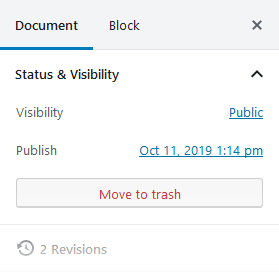
WP 5.0+ Before changing to ‘Password Protected’ 
WP 5.0+ Change to ‘Password Protected’ 
WP 5.0+ Additional option now added 
WP <5.0 Before changing to ‘Password Protected’ 
WP <5.0 After changing to ‘Password Protected’ (note the checkbox directly above the Publish button) 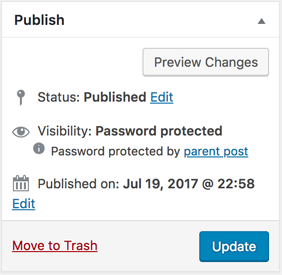
WP <5.0 Admin screen for child post when being protected by parent 
WP <5.0 Child posts displayed as protected by parent
Εγκατάσταση
- Upload the plugin files to the
/wp-content/plugins/protect-the-childrendirectory, or install the plugin through the WordPress plugins screen directly. - Activate the plugin through the ‘Plugins’ screen in WordPress
- On any post or page, click ‘Edit’ next to Visibility, change the post to ‘Password Protected’ and an optional checkbox to turn on protection of that page’s children will appear.
Συχνές Ερωτήσεις
-
How do I protect child pages?
-
Edit the parent page, set its Visibility to “Password Protected”, enter a password, and check the “Protect child pages” checkbox. All child and grandchild pages will automatically be protected with the same password.
-
Does it work with custom post types?
-
Yes! As of version 1.3.9, the plugin fully supports custom post types that have hierarchical (parent/child) relationships.
-
Do users need to enter the password for every child page?
-
No. Once a user enters the password on any protected page (parent or child), all related pages are unlocked for that session.
-
Does it work with the Gutenberg block editor?
-
Yes. The plugin supports both the classic editor and the Gutenberg block editor (WordPress 5.0+). The protection checkbox appears in the Visibility settings panel.
-
What languages are supported?
-
The plugin is available in 30 languages with more being added regularly. We are working toward supporting 50 languages total!
Κριτικές


Συνεισφέροντες & Προγραμματιστές
“Protect the Children!” είναι λογισμικό ανοιχτού κώδικα. Οι παρακάτω έχουν συνεισφέρει στη δημιουργία του.
Συντελεστές


Μεταφράστε το “Protect the Children!” στην γλώσσα σας.
Ενδιαφέρεστε για την ανάπτυξη;
Περιηγηθείτε στον κώδικα, ανατρέξτε στο αποθετήριο SVN ή εγγραφείτε στο αρχείο καταγραφής αλλαγών ανάπτυξης μέσω RSS .
Σύνοψη αλλαγών
1.5.2
- Added ABSPATH checks to _inc/admin.php, _inc/deprecated.php, _inc/review-notice.php
- Fixed unescaped output in add_classic_checkbox() and deprecated warning functions
- Added sanitization callback to register_setting()
- Added translators comment for printf call with placeholder
- Fixed mixed line endings in index.php (normalized to Unix LF)
- Removed deprecated load_plugin_textdomain() call
- Updated “Tested up to” to 6.9
1.5.1
- Added GPL license declaration to plugin header
- Updated Author URI
- Added direct file access protection to all PHP files
- Improved output escaping and input sanitization
- Removed non-production files from plugin directory
1.5.0
- Added translations for 50 languages
- Added POT translation template file
- Added opt-in data cleanup on plugin deletion
- Updated FAQ section
- Updated readme with complete language list
1.4.7
- Added translations for Russian, Polish, Dutch, Turkish, and Swedish
- Updated localization section in readme
1.4.6
- Added Chinese Simplified (zh_CN) translation
1.4.5
- Added Japanese (ja) translation
1.4.4
- Tested up to WordPress 6.9.1
1.4.3
- Fixed critical bug where updating parent page via Quick Edit removed password protection from children
- Added dismissible review prompt notice after 14 days of usage
1.4.2
- Added translations for Spanish, French, German, Portuguese (Brazilian), and Italian
1.4.1
- Compatibility updates for WordPress 6.9 and PHP 8.1+
1.4.0
- Fixed issue with nested child pages
1.3.9
- Added full support for custom post types
- Fixed Gutenberg issues with protected meta fields
- Added public GitHub link to plugin description
1.3.5
- Fixed valid header warning when activating
1.3.4
- Code enhancements
1.3.3
- Bug fix when save_post hook is called during page save
1.3.2
- Minor Bug Fix
1.3.1
- Minor Bug Fix
1.3
- Add support for WordPress 5.0 i.e. Gutenberg Editor
1.2.3
- Bug fix for password protection input on child and grandchild posts
1.2.2
- Support for password protection of grandchildren/nested child posts
- Additional display on the post list screen to specify protected child posts
1.2.1
- Performance improvements
- Bug fix for parent post link
1.2
- Child post displays password protected status in admin when its parent is protecting children.
- Misc code cleanup
1.1
- All posts (parent and children) are now unlocked by entering the password on one of those protected pages.
1.0.1
- Tested and confirmed compatibility for PHP 7.2
- Tested and confirmed compatbility with WordPress 4.9.4
- Removed support for PHP versions lower than 5.6
1.0
- The initial public release!