
Περιγραφή
Shopping cart software modules for online stores offer a quick and easy integration process as well as smooth shopping experience for your customers. this payment module extends WooCommerce and allows you to accept payments via OKPAY.
Στιγμιότυπα

Here you can configure your Gateway settings. 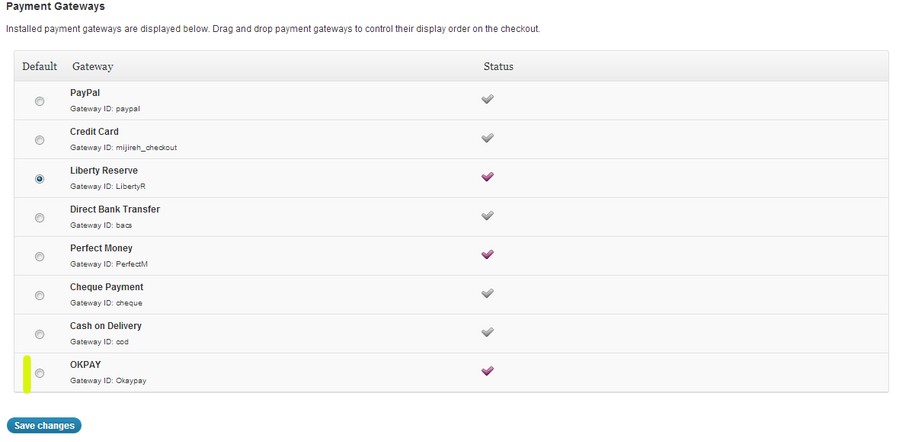
Here you can see installed payment gateways and contorol their display order on checkout.
Εγκατάσταση
- Ensure you have latest version of WooCommerce plugin installed
- Download the plugin zip file
- Upload the files to the /wp-content/plugins
- Activate the plugin through the “Plugins” menu in WordPress
- Open the settings page for WooCommerce and click the “Payment Gateways” tab
- Click on the sub tab for “OKPay”
- Configure your OKPay Commerce Gateway settings
Συχνές Ερωτήσεις
- Do I need a account before I can use the OKPAY Payment gateway plugin?
-
Yes. In order to use this plugin you will need a merchant services account
Κριτικές
Δεν υπάρχουν αξιολογήσεις για αυτό το πρόσθετο.
Συνεισφέροντες & Προγραμματιστές
“OKPAY Payment gateway” είναι λογισμικό ανοιχτού κώδικα. Οι παρακάτω έχουν συνεισφέρει στη δημιουργία του.
Συντελεστές
Μεταφράστε το “OKPAY Payment gateway” στην γλώσσα σας.
Ενδιαφέρεστε για την ανάπτυξη;
Περιηγηθείτε στον κώδικα, ανατρέξτε στο αποθετήριο SVN ή εγγραφείτε στο αρχείο καταγραφής αλλαγών ανάπτυξης μέσω RSS .
Σύνοψη αλλαγών
1.0
- First Public Release.