
Περιγραφή
MieBadge creates an impossible-to-miss staging site indicator that stays visible on every page of your WordPress site. Inspired by the dramatic mie poses in Kabuki theater that command the audience’s attention, this badge ensures no one accidentally makes changes on a staging environment.
Features
- Flexible Visibility: Display on frontend, backend, or both — control each separately
- Five Ready-Made Badges: Choose from MieBadge (Kabuki icon), Staging, Mockup, Satire, or Parody designs
- Draggable: Click and drag to reposition anywhere on screen; position saved per-user in browser storage
- Physics Mode: Optional momentum and bounce when dragging, with adjustable slide intensity (1–10)
- Three Graphic Modes: Default logo (5 options), custom uploaded image, or custom text with your own colors
- Clickable Badge: Optionally turn the badge into a link, with new-tab support
- Explainer Card: Hover tooltip with a custom message and configurable delay, frontend only
- Kabuki Design: Red and white Kumadori-inspired default pattern
Perfect For
- Staging/development/mockup sites
- Client review environments
- Multisite networks where staging is needed
- Any WordPress install that needs clear environment identification
- Satire, parody, or spoof sites that need clear labeling
One Job: Be Seen
MieBadge makes sure you never confuse a staging or mockup site for the live one. Every feature — graphic modes, links, the explainer card — is in service of that one job.
Credits
- Inspired by the dramatic mie poses in Kabuki theater
- Kumadori pattern inspired by traditional Japanese theatrical makeup
Στιγμιότυπα

Access MieBadge from Admin Menu Appearance MieBadge 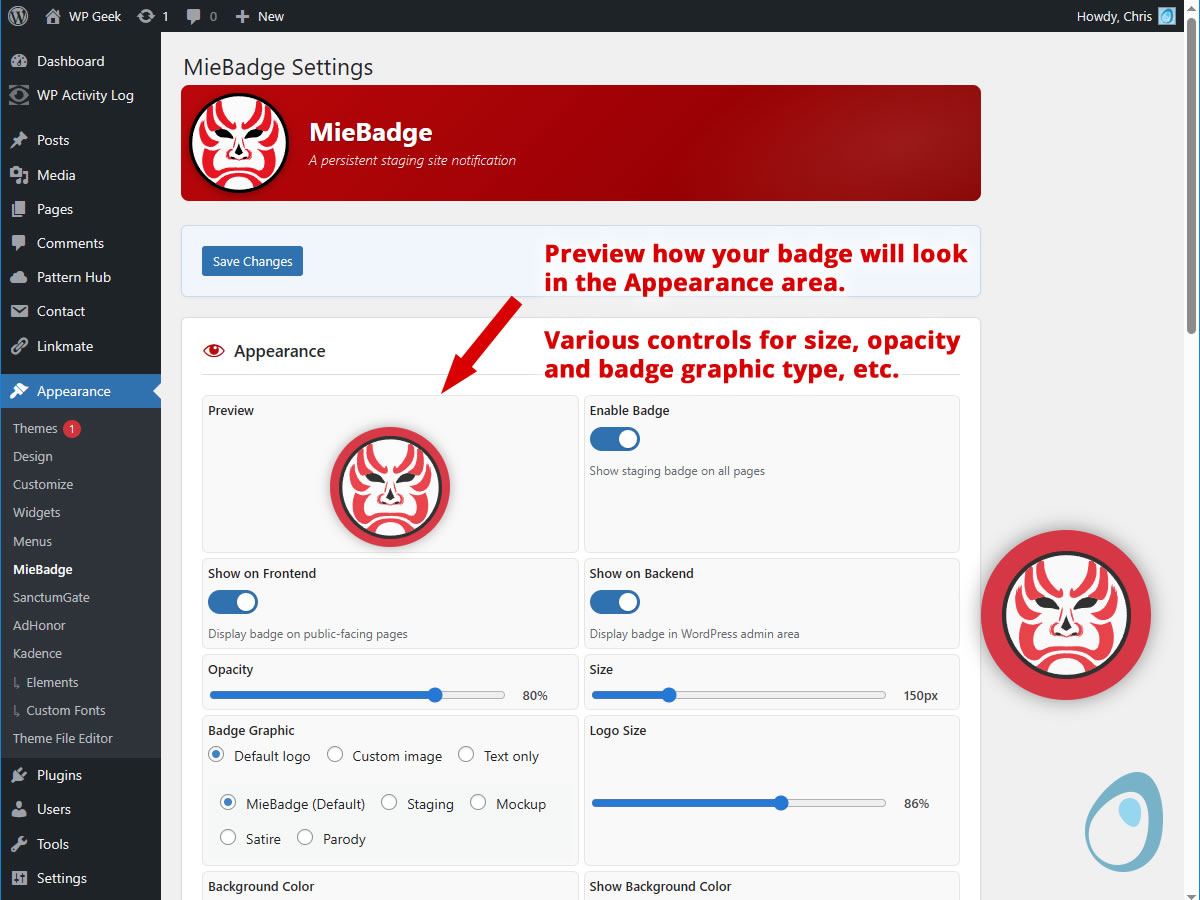
Appearance settings with preview 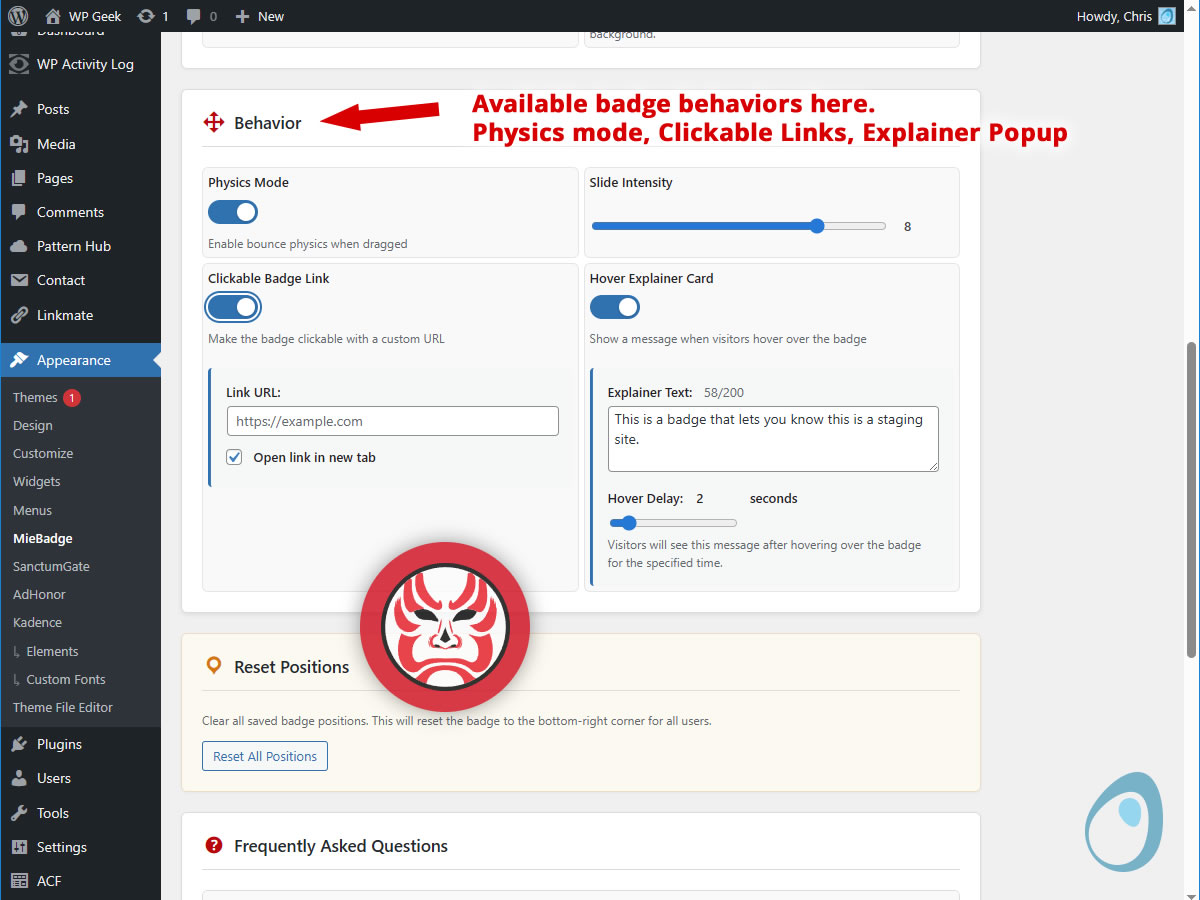
Behavior settings with Physics Mode and Popup Explainer Card 
Explainer popup example 
Avaialble badges that come with the plugin 
Example Physics Mode – “Hockey Puck” action
Εγκατάσταση
- Upload the plugin files to
/wp-content/plugins/miebadge/, or install the plugin through the WordPress plugins screen directly. - Activate the plugin through the ‘Plugins’ screen in WordPress.
- Navigate to Appearance > MieBadge to customize settings.
- The badge appears immediately on activation with default settings.
Συχνές Ερωτήσεις
-
What does MieBadge do?
-
MieBadge displays a persistent circular badge on every page of your WordPress site. It is designed for staging environments, reminding you and your team that you are working on a staging site, not production. The badge appears on both the site frontend and the WordPress admin dashboard.
-
Why is it called MieBadge?
-
In Kabuki theater, a “mie” (pronounced mee-eh) is a dramatic frozen pose where the actor demands the audience’s complete attention — exactly what this badge does for your staging site. We chose the name because it is both a fitting description and considerably more interesting than “Staging Badge 3000.”
-
How do I move the badge?
-
Click and drag the badge anywhere on the screen. Its position is saved automatically in your browser and will persist across page loads. If Physics Mode is enabled, the badge will continue sliding with momentum after you release it.
-
What is Physics Mode?
-
Physics Mode adds momentum and bounce behavior when you drag and release the badge. The Slide Intensity slider controls how far it travels: 1 is a gentle slide (just a nod), while 10 creates dramatic movement across the entire viewport with energetic wall bounces.
-
How do I customize the badge graphic?
-
Under Badge Graphic, choose from three modes. “Default logo” offers five ready-made badge designs: MieBadge (default Kabuki icon), Staging, Mockup, Satire, and Parody. “Custom image” lets you upload your own graphic via the WordPress Media Library — use the Logo Size slider to adjust how large it appears inside the badge circle. “Text” displays your own label with independent text and background color controls.
-
Can I make the badge a link?
-
Yes. Under Badge Link, toggle the link on, enter your destination URL, and optionally enable “Open in new tab.” The badge becomes clickable as a link. Dragging still works as normal — the link only fires on a tap or click, not after a drag.
-
What is the Explainer Card?
-
The Explainer Card is a tooltip that appears when you hover over the badge on the public site. You can set a custom message and adjust the hover delay — how long before it shows. It is automatically hidden on touch devices and never appears in the WordPress admin area.
-
Can I control where the badge appears?
-
Yes. By default, the badge appears on both the site frontend and the WordPress admin area — ensuring you never forget you are on a staging site. You can control visibility separately using the “Show on Frontend” and “Show on Backend” toggles in the Appearance settings. For example, you might hide it on the backend while keeping it visible to clients viewing the staging site.
-
How do I hide the badge temporarily?
-
You have three options. Toggle “Enable Badge” off to hide it everywhere. Use “Show on Frontend” to control visibility on public pages only. Use “Show on Backend” to control visibility in the WordPress admin area only. Changes take effect immediately after saving.
-
Will MieBadge slow down my site?
-
No. MieBadge is designed to be lightweight. It adds a single small HTML element, a minimal CSS file, and lightweight JavaScript that only activates when you interact with the badge. The physics calculations run only during drag events.
Κριτικές
Δεν υπάρχουν αξιολογήσεις για αυτό το πρόσθετο.
Συνεισφέροντες & Προγραμματιστές
“MieBadge” είναι λογισμικό ανοιχτού κώδικα. Οι παρακάτω έχουν συνεισφέρει στη δημιουργία του.
Συντελεστές
Μεταφράστε το “MieBadge” στην γλώσσα σας.
Ενδιαφέρεστε για την ανάπτυξη;
Περιηγηθείτε στον κώδικα, ανατρέξτε στο αποθετήριο SVN ή εγγραφείτε στο αρχείο καταγραφής αλλαγών ανάπτυξης μέσω RSS .
Σύνοψη αλλαγών
1.0.0
- Initial release
- Draggable badge with localStorage persistence
- Five ready-made badge designs (MieBadge, Staging, Mockup, Satire, Parody)
- Separate frontend and backend visibility controls
- Customizable appearance (size, opacity, colors, text)
- Physics mode with bounce effects
- Kabuki-inspired default styling