

Περιγραφή
With this add-on, you will have the opportunity to enhance the security of your website.
It will allow you to decide which pages can receive a special level of security, authenticating access to your content with JWT and limiting access to the posts you want.
You can also select a different token signature for each of the pages you want to have high security, giving your website an extra layer of protection.
Στιγμιότυπα

JWT security settings panel. 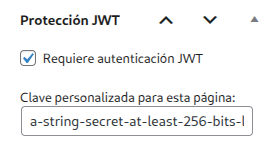
JWT Selector Authenticator panel on the page. 
Page inaccessible without a correctly signed token. 
Access to the page with a correctly signed token.
Εγκατάσταση
- Upload the plugin folder to the
/wp-content/plugins/directory. - Activate it from the WordPress ‘Plugins’ menu.
- Configure the options from the Plugin’s ‘Settings’ page.
Συχνές Ερωτήσεις
-
Do I need to configure anything to use JWT?
Yes, you must access (you can do this through the JWT Selector Authenticator administration panel) the pages you want to secure and activate the ‘Require JWT authentication’ checkbox and set the signature you want for that page. -
Is it compatible with all themes?
Yes, as long as you use the standard WordPress functions to render content.
Κριτικές
Δεν υπάρχουν αξιολογήσεις για αυτό το πρόσθετο.
Συνεισφέροντες & Προγραμματιστές
“JWT Selector Authenticator” είναι λογισμικό ανοιχτού κώδικα. Οι παρακάτω έχουν συνεισφέρει στη δημιουργία του.
Συντελεστές
Μεταφράστε το “JWT Selector Authenticator” στην γλώσσα σας.
Ενδιαφέρεστε για την ανάπτυξη;
Περιηγηθείτε στον κώδικα, ανατρέξτε στο αποθετήριο SVN ή εγγραφείτε στο αρχείο καταγραφής αλλαγών ανάπτυξης μέσω RSS .
Σύνοψη αλλαγών
1.4
- Second version of the plugin. Remember configure correctly the JWT’ signatures. Must be the shame used to sign the token.