

Περιγραφή
Admin Safety Guard is a complete WordPress security helper focused on securing the login flow and hardening the admin area — without sacrificing usability or performance. It ships with a clean UI, smart defaults, and guardrails against the most common attacks (brute force, credential stuffing, bot logins, and XML-RPC abuse). You also get granular control over the login experience (custom URL, redirects, branding, and more).
Whether you need to block suspicious IPs, enforce two-factor authentication, or ship a branded login for clients, Admin Safety Guard has you covered.
🌟 Admin Safety Guard Pro
Admin Safety Guard Pro takes your security and customization to the next level. It strengthens defenses against unauthorized access, brute-force attacks, and data risks while giving you deeper control over how users log in and interact with your admin area. The Pro version also adds flexible design tools and smart automations — a complete solution for both security and convenience.
👥 Who Should Use Admin Safety Guard?
Admin Safety Guard is perfect for users who need more control, security, and customization in their WordPress admin area:
👩💻 Freelancers & Developers: Add backend security and branding to client sites—no heavy coding.
🏢 Agencies & Teams: Secure multiple websites with a single workflow and consistent branding.
🔒 Site Owners: Protect dashboards from brute-force attacks and unauthorized logins.
🧩 Plugin/Theme Authors: Add layered protection in demo or test environments.
📈 Online Businesses: Secure customer data with 2FA, CAPTCHA, and password protection.
🎓 Educators & Bloggers: Maintain a professional look while increasing security.
✅ Free Features at a Glance
- Hide Admin Bar (with conditions)
- Dashboard Overview (in progress)
- Change Login URL
- Redirect After Login / Logout
- Limit Login Attempts
- CAPTCHA Protection
- Login Logs & Activity Tracking
- IP Blocking
- Two-Factor Authentication (2FA)
- Password Protection
- Disable XML-RPC
- Add Custom Logo on Login Form
- Custom Logo & Branding
💎 Premium Feature List
- Passwordless Login
- 2FA via Mobile App (TOTP)
- CSRF Protection
- Database Table Prefix Check
- Whitelist IP Addresses
- Hide Admin Bar
- WP Directory File Permissions Check
- Social Login (Google, Facebook, etc.)
- Disallow Unauthorized REST Requests
- Password Strength Tool
- Provide Login Template (ready-made)
- Customize Design Pro (advanced styling)
- Email Notification
Free Feature Details
👤 Hide Admin Bar (With Conditions): Hide the admin bar selectively for specific users or roles.
📊 Dashboard Overview: Visualize user activity and security stats in one glance.
🔗 Change Login URL: Customize the default wp-login.php to block automated bots.
🔁 Redirect After Login/Logout: Redirect users to any page after login/logout.
📋 Limit Login Attempts: Block repeated failed logins to prevent brute-force attacks.
🤖 CAPTCHA Protection: Stop bots with reCAPTCHA or similar human verifications.
🕵️♂️ Login Logs & Activity Tracking: Track user login times and backend actions.
⛔ IP Blocking: Block access by IP address to prevent hostile logins.
🔐 Two-Factor Authentication (2FA): Add extra verification layers to secure logins.
🛂 Password Protection: Protect private pages or areas with a password.
⚙️ Disable XML-RPC: Disable vulnerable XML-RPC endpoints to stop exploits.
🖼️ Custom Logo on Login Form: Replace WordPress logo with your brand.
🏷️ Custom Branding: Apply your own design across login and admin pages.
🔐 Pro Feature Details
🔑 Passwordless Login: Secure email-based login with one-time magic links—no password required.
📱 2FA via Mobile App: Add app-based Two-Factor Authentication (Google Authenticator / Authy).
🧩 CSRF Protection: Prevent Cross-Site Request Forgery attacks with token verification.
🗃️ Database Table Prefix Check: Detects and helps change the insecure wp_ prefix.
🌐 Whitelist IP Addresses: Restrict admin access to trusted IPs only.
🧑💻 Hide Admin Bar (Conditional): Show or hide admin bar for specific roles or users.
🗂️ WP Directory File Permissions Check: Scans and verifies file and directory permissions.
🌍 Social Login: Allow users to log in with Google, Facebook, or Twitter accounts.
🚫 Disallow Unauthorized REST Requests: Restrict REST API access conditionally.
💪 Password Strength Tool: Enforce strong password rules for better protection.
🎨 Provide Login Template: Instantly apply stylish, ready-to-use login templates.
🧰 Customize Design Pro: Fully customize admin and login design with a simple UI.
📧 Email Notification: Receive and customize security alerts directly to your inbox.
Explore Pro Features: Admin Safety Guard Pro
Support
For any issues, questions, or feature requests, please reach out via Support.
External Services
This plugin uses the following third-party and external services:
1) Google reCAPTCHA (Google LLC)
Purpose:
Used to protect forms from spam and automated abuse.
When it is used:
– When reCAPTCHA is enabled in plugin settings
– On login forms and support forms protected by reCAPTCHA
What data is sent:
– User IP address
– reCAPTCHA response token generated by Google
– Browser information as required by Google reCAPTCHA
Service provider:
Google LLC
Terms of Service:
https://policies.google.com/terms
Privacy Policy:
https://policies.google.com/privacy
2) ThemePaste API (Plugin Author Service)
Purpose:
Used for:
– Collecting optional admin email addresses for plugin updates and notifications
– Sending support requests from the plugin support form
When it is used:
– When a user submits the built-in support form
– When a user opts to send diagnostic information
What data is sent:
– Name
– Email address
– Phone number (if provided)
– Message content
– Site URL
– Plugin name
No data is sent without user action.
Service provider:
ThemePaste.com
Terms of Service:
https://themepaste.com/terms-condition
Privacy Policy:
https://themepaste.com/privacy-policy
Development / Source Code
This plugin includes compiled JavaScript bundles in:
– assets/admin/build/*.bundle.js
The original (human-readable) source files are included in this plugin under:
– spa/admin/
Build Tools
– Node.js (LTS recommended)
– npm
– Webpack + Babel
Source Entry Points
The admin SPA bundles are built from the following entry points:
- spa/admin/login-template/Main.jsx -> assets/admin/build/loginTemplate.bundle.js
- spa/admin/login-logs-activity/Main.jsx -> assets/admin/build/loginLogActivity.bundle.js
- spa/admin/analytics/Main.jsx -> assets/admin/build/analytics.bundle.js
- spa/admin/security-core/Main.jsx -> assets/admin/build/securityCore.bundle.js
- spa/admin/firewall-malware/Main.jsx -> assets/admin/build/firewallMalware.bundle.js
- spa/admin/privacy-hardening/Main.jsx -> assets/admin/build/privacyHardening.bundle.js
- spa/admin/monitoring-analytics/Main.jsx -> assets/admin/build/monitoringAnalytics.bundle.js
Install Dependencies
From the plugin root directory (or the directory where package.json exists):
1) Install dependencies:
npm install
Build (Production)
To generate the production bundles:
npm run build
Output Location
Webpack outputs the compiled bundles to:
- assets/admin/build/[name].bundle.js
Important Notes
– Do not edit files in assets/admin/build/ directly. They are generated files.
– Edit the source files under spa/admin/ and re-run the build command.
– For WordPress.org distribution, production builds should be used (mode=production).
Links
Website
Documentation
Pro Version
Facebook
Pinterest
LinkedIn
Instagram
Στιγμιότυπα

Dashboard Overview 
Login Security Settings 
Limit Login Attempts 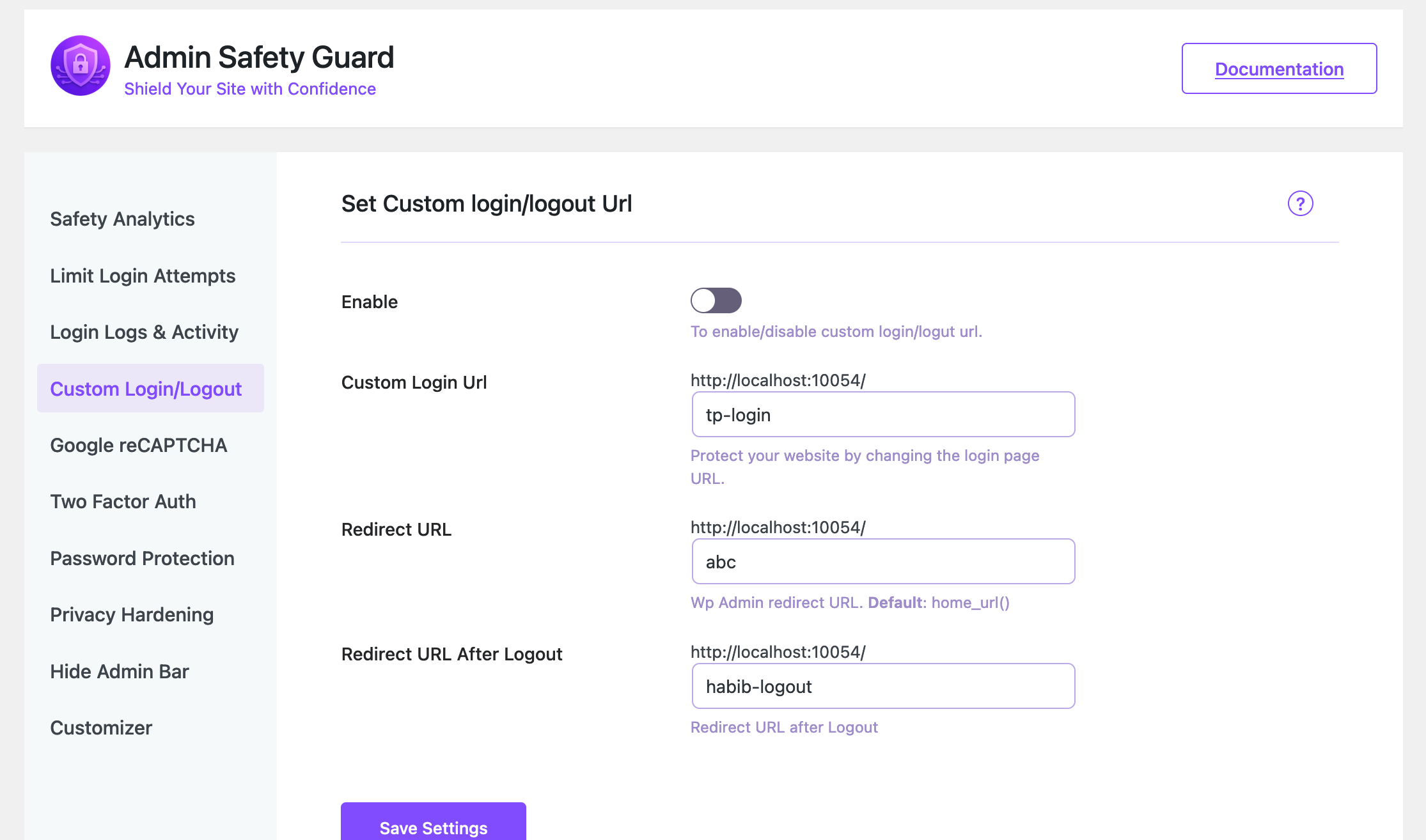
Two-Factor Authentication 
CAPTCHA Protection 
IP Blocking 
Login URL Customization 
Activity & Login Logs 
Branding Settings 
XML-RPC & Advanced Settings
Εγκατάσταση
- Download the plugin
.zipfile. - Go to your WordPress Admin Plugins Add New Upload Plugin.
- Choose the file and click Install Now.
- After installation, click Activate Plugin.
Συχνές Ερωτήσεις
-
Q: Does changing the login URL break existing links?
-
A: Update your bookmarks to the new login URL. The plugin automatically flushes permalinks when needed.
-
Q: Can I limit login attempts?
-
A: Yes. It blocks users after multiple failed attempts and logs the IP address.
-
Q: Is 2FA required for everyone?
-
A: Optional. You can enable or enforce it per role or user.
-
Q: Will this slow down my site?
-
A: No. It loads assets conditionally and is performance-optimized.
-
Q: Where can I get help?
-
A: Support
Κριτικές


Συνεισφέροντες & Προγραμματιστές
“Admin Safety Guard — Login Security & 2FA” είναι λογισμικό ανοιχτού κώδικα. Οι παρακάτω έχουν συνεισφέρει στη δημιουργία του.
Συντελεστές

Μεταφράστε το “Admin Safety Guard — Login Security & 2FA” στην γλώσσα σας.
Ενδιαφέρεστε για την ανάπτυξη;
Περιηγηθείτε στον κώδικα, ανατρέξτε στο αποθετήριο SVN ή εγγραφείτε στο αρχείο καταγραφής αλλαγών ανάπτυξης μέσω RSS .
Σύνοψη αλλαγών
1.2.2 – Maintenance Update
- Fixed critical errors and PHP warnings
- Improved WordPress coding standards compliance
- Optimized long descriptions and code structure
- Enhanced stability and performance
- General bug fixes and cleanup
1.2.1 – Security & Compliance Update
- Fixed security issues reported by WordPress Plugin Review Team
- Improved data sanitization and escaping across plugin files
- Updated code to follow WordPress coding standards and best practices
- Replaced unsafe database queries with prepared statements
- Improved nonce verification and permission checks
- Removed unused and deprecated functions
- Updated plugin documentation and inline comments
- Updated “Tested up to” version to latest WordPress release
- General code cleanup and optimization
1.2.0
- [Fix] fixed the taxdomain and esc issues.
1.1.9
- [New] Added breadcrumb navigation for better page clarity and navigation.
- [New] All major pages are now fully dynamic.
- [Improved] Updated UI/UX with refined layouts, spacing, and design elements.
- [Improved] Enhanced responsiveness and overall page behavior.
- [Fix] Fixed multiple minor issues from previous versions.
- [Fix] Resolved layout and alignment inconsistencies.
- [Maintenance] Refactored code for better performance and maintainability.
- [Maintenance] General stability improvements and internal optimizations.
1.1.8
- [New] Introduced a fully redesigned, modern admin UI for a cleaner and more intuitive experience.
- [New] Added colorful visual elements and icons across the plugin for better clarity and usability.
- [Improved] Improved overall navigation to make all features easier and faster to access.
- [Improved] Enhanced layout consistency and spacing for a more polished look.
- [Improved] Optimized UI responsiveness across different screen sizes.
- [Update] Updated iconography and color scheme to improve visual hierarchy and readability.
- [Maintenance] Refactored UI-related code for better performance and maintainability.
- [Maintenance] Minor internal improvements and stability enhancements.
1.1.7
- [Fix] Active license URL now shows correctly based on the Pro plugin status.
- [Fix] Fixed the documentation link on the plugin page.
1.1.6
- [New] – Introduced a dynamic Security Score system based on overall site protection status.
- [New] – Added Login Activity Rate Limiting (maximum 6 login attempts within 24 hours).
- [New] – Implemented Login & Activity Status React-based graphs for better visual insights.
- [Update] – Improved dashboard UI/UX for clearer security data presentation.
- [Update] – Enhanced activity monitoring layout and responsiveness.
- [Fix] – Resolved minor issues in login activity tracking.
- [Fix] – Fixed UI alignment and styling inconsistencies in the admin dashboard.
- [Maintenance] – Internal code optimization and performance improvements.
- [Maintenance] – Security hardening and internal consistency checks.
1.1.5
- [Maintenance] – Release preparation and version alignment.
- [Maintenance] – Internal consistency checks.
- [Maintenance] – No code or feature changes in this version.
1.1.4
- [new] – [New] All Pro features are now available in the free version.
- [New] – Added a Purchase / Upgrade button to allow users to unlock premium support and future enhancements.
- [Improved] – Updated plugin UI and feature visibility for better clarity between free and premium offerings.
- [Improved] – Minor UX and performance optimisations.
- [Fixed] – Small stability issues and internal clean-ups.
1.1.3
- Fixed an issue where OTP-verified logins could result in session cookies instead of persistent cookies.
- Refactored OTP verification to run earlier in the login flow via
login_init. - Updated the authentication process to use
wp_signon()so WordPress handles Remember Me cookies correctly. - Tested across multiple environments and browsers to confirm expected cookie expiration behavior.
- Minor improvements and stability adjustments.
1.1.2
- [fix] – 2FA login cookie session issue when OTP verification completed.
- [Improved] –
wp_set_auth_cookie()now uses correct $remember flag for persistent login. - [Improved] – OTP authentication flow now respects the user’s “Remember me” choice.
- [new] – Added a phone number field to the in-plugin support form, including country code.
1.1.0
- [fix] – Resolved several important WordPress admin warnings.
- [new] – Added an in-plugin support system.
1.0.9
[new] Added deactivation email feature on plugin activation
1.0.6, 1.0.8
[new] Release the pro version
[new] Compotable with pro version
1.0.5
[new] Added extendable action and filter hooks
[new] Ready to integrate Pro version
[new] Conditionally loaded all assets
[new] Added default logo URL, width, and height
[fix] Fixed logo issue from customizer
[fix] General improvements and bug fixes
1.0.4
[new] Auto permalink flush for custom login/logout URLs
[new] Admin Notice added
[new] Setup Wizard
[new] Documentation link added
1.0.3
[new] Subdirectory support
[new] Tooltip in failed login table
[new] Auto-redirect after max login attempts
[fix] Custom login/logout URLs
[fix] Lockout message
[fix] Failed login table issues
1.0.2
[fix] Minor bug fixes
1.0.1
[fix] Build issue resolved
1.0.0
- Initial release featuring 2FA, CAPTCHA, Limit Login Attempts, IP Blocking, Custom Login URL, Password Protection, and Login Logs.