ownCloud and CryFS
It is a great idea to encrypt files on client side before uploading them to an ownCloud server if that one is not running in controlled environment, or if one just wants to act defensive and minimize risk.
Some people think it is a great idea to include the functionality in the sync client.
I don’t agree because it combines two very complex topics into one code base and makes the code difficult to maintain. The risk is high to end up with a kind of code base which nobody is able to maintain properly any more. So let’s better avoid that for ownCloud and look for alternatives.
A good way is to use a so called encrypted overlay filesystem and let ownCloud sync the encrypted files. The downside is that you can not use the encrypted files in the web interface because it can not decrypt the files easily. To me, that is not overly important because I want to sync files between different clients, which probably is the most common usecase.
Encrypted overlay filesystems put the encrypted data in one directory called the cipher directory. A decrypted representation of the data is mounted to a different directory, in which the user works.
That is easy to setup and use, and also in principle good to use with file sync software like ownCloud because it does not store the files in one huge container file that needs to be synced if one bit changes as other solutions do.
To use it, the cypher directory must be configured as local sync dir of the client. If a file is changed in the mounted dir, the overlay file system changes the crypto files in the cypher dir. These are synced by the ownCloud client.
One of the solutions I tried is CryFS. It works nicely in general, but is unfortunately very slow together with ownCloud sync.
The reason for that is that CryFS is chunking all files in the cypher dir into 16 kB blocks, which are spread over a set of directories. It is very beneficial because file names and sizes are not reconstructable in the cypher dir, but it hits on one of the weak sides of the ownCloud sync. ownCloud is traditionally a bit slow with many small files spread over many directories. That shows dramatically in a test with CryFS: Adding eleven new files with a overall size of around 45 MB to a CryFS filesystem directory makes the ownCloud client upload for 6:30 minutes.
Adding another four files with a total size of a bit over 1MB results in an upload of 130 files and directories, with an overall size of 1.1 MB.
A typical change use case like changing an existing office text document locally is not that bad. CryFS splits a 8,2 kB big LibreOffice text doc into three 16 kB files in three directories here. When one word gets inserted, CryFS needs to create three new dirs in the cypher dir and uploads four new 16 kB blocks.
My personal conclusion: CryFS is an interesting project. It has a nice integration in the KDE desktop with Plasma Vault. Splitting files into equal sized blocks is good because it does not allow to guess data based on names and sizes. However, for syncing with ownCloud, it is not the best partner.
If there is a way how to improve the situation, I would be eager to learn. Maybe the size of the blocks can be expanded, or the number of directories limited?
Also the upcoming ownCloud sync client version 2.6.0 again has optimizations in the discovery and propagation of changes, I am sure that improves the situation.
Let’s see what other alternatives can be found.
Noisy Workshop
Usually, in my workshop I am listening to the great radio station Bayern 2 (Yeah for public law media). But sometimes you just need to listen to nice classic english punk music, speed folk or (the one and only) Lemmy and friends.
For that I was looking for a so called boom box to stream to from my mobile, simple, dirty and loud. Good that I was a proud awardee at the HiFiBerry Maker Contest 2017 with my TeakEar build, where I won a nice set of a RaspberryPi Zero with a little HiFiBerry MiniAmp, coming with all what is needed to make that working.
 That should be enough to get proper punk sound in the workshop – and escape the
boring normal commercial boom boxes all around.
At a flee market I found a great case for that – exactly one of these that were in the classrooms of my school giving the unbanning gong at the end of each lesson. Nicely with the original non-color textile hiding the speaker and nicely done bended and veneered wood for the elegance.

A great fit for my usecase.
Two 3.3 inch Visaton fullrange speaker are mounted in simple closed chassis. The Raspi with the Amp is mounted between them. All is mounted on a back plate that fits the school speaker chassis. Boombox ready.
From a software perspective, it is there is just a Raspbian running that is configured to act as a bluetooth audio device for my mobile.
I think it is a nice addition to my workshop, with a great ease of use since it auto-connects to my mobile. Does it sound great? Oh no, not ..really. Is it loud? Well, yes, loud enough to not get in trouble with the neighbors. Given it’s size, it is actually impresse.
Surely Lemmy would be fine to play Rock’n Roll through it 🙂
The only downsize of the whole thing is that it disturbs the radio reception quite a bit, so it is really either or. Any hints how to reduce that?
Eighty Percent ownCloud
Recently the German computer magazin C’t posted an article about file sync solutions (“Unter eigener Regie”, C’t 23, 2018) with native sync clients. The article was pretty positive about the FOSS solution of… Nextcloud! I was wondering why they had not choosen ownCloud’s client as my feeling is that ownCloud is way more busy and innovative developing the desktop client for file synchronization together with community.
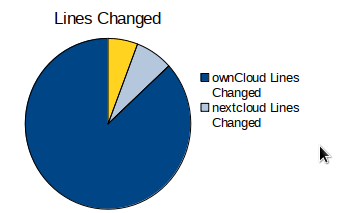
Code lines changed as of Nov. 10, 2018
That motivated me to do some investigation what the Nextcloud client actually consists of (at due date Nov. 10, 2018). I was looking into the NC desktop client git repoository grouped the numbers of commits of people that can be associated clearly to either the ownCloud- or Nextcloud project, or to “other communities” or machine commits. Since the number of commits could be misleading (maybe some commits are huge?) I did the same exercise with numbers of changed lines of code.
When looking on the changed lines, the first top six contributors to the Nextcloud desktop client are only active in the ownCloud project. Number seven is an “other community” contributor whos project the client was based on in the beginning. Number eight to eleven go to Nextcloud, with a low percentage figure.

# of commits to the Nextcloud Desktop repository as of Nov. 10, 2018
As a result, far more than 80% of the changed lines of the Nextcloud client is actually work that ownClouders did (not considering the machine commits). In the past, and also today. The number would be even higher if it considered all the commits that go into the NC repo with an NC author, but are actually ownCloud patches where the original author got lost on the way by merging them through a NC branch. It looks like the Nextcloud developers were actually adding less commits to their client than all “other community” developers so far.
No wonder, it is a fork, you might think, and that is of course true. However, to my taste these numbers are not reflecting a “constructive” fork driving things forward when we talk about sync technology.
That is all fine, and I am proud that the work we do in ownCloud is actually stimulating two projects, with different focus areas nowadays. On the other hand, I would appreciate if the users of the technology would take a closer look to understand who really innovates, drives things forward and also fixes the nasty bugs in the stack. As a matter of fairness, that should be acknowledged. That is the motivation that keeps free software contributors busy and communities proud.
Change in Professional Life
This November was very exciting for me so far, as I was starting a new job at a company called Heidolph. I left SUSE after working there for another two years. My role there that was pretty far away from interesting technical work, which I missed more and more, so I decided to grab the opportunity to join in a new adventure.
Heidolph is a mature German engineering company building premium laboratory equipment. It is based in Schwabach, Germany. For me it is the first time that I am working in company that doesn’t do only software. At Heidolph, software is just one building block besides mechanical and electronic parts and tons of special know how. That is a very different situation and a lot to learn for me, but in a small, co-located team of great engineers, I am able to catch up fast in this interesting area.
We build software for the next generation Heidolph devices based on Linux and C++/Qt. Both technologies are in the center of my interest, over the years it has become more than clear for me that I want to continue with that and deepen my knowledge even more.
Since the meaning of open source has changed a lot since I started to contribute to free software and KDE in particular, it was a noticeable but not difficult step for me to take and move away from a self-proclaimed open source company towards a company that is using open source technologies as one part of their tooling and is
interested in learning about the processes we do in open source to build great products. An exciting move for me where I will learn a lot but also benefit from my experience. This of course that does not mean that I will stop to contribute to open source projects.
We are still building up the team and look for a Software Quality Engineer. If you are interested in working with us in an exciting environment, you might wanna get in touch.
Kraft Version 0.82
A new release of Kraft, the Qt- and KDE based software to help to organize business docs in small companies, has arrived.
A couple of days ago version 0.82 was released. It mainly is a bugfix release, but it also comes with a few new features. Users were asking for some new functions that they needed to switch to Kraft with their business communication, and I am always trying to make that a priority.
The most visible feature is a light rework of the calculation dialog that allows users to do price calculations for templates. It was cleared up, superflous elements were finally removed and the remaining ones now work as expected. The distinction between manual price and calculated price should be even more clear now. Time calculations can now not only done in the granularity of minutes, as this was to coarse for certain usecases. The unit for a time slice can now be either seconds, minutes or hours.

New calculation dialog in 0.82
Apart from that, for example sending documents per email was fixed, and in addition to doing it through thunderbird, Kraft can now also utilize the xdg-email tool to work with the desktop standard mail client, such as KMail.
Quite a few more bugfixes make this a nice release. Check the full Changelog! Update is recommended.
Thanks for your comments or suggestions about Kraft!
Kraft Version 0.81 Released
I am happy to announce the release of Kraft version 0.81. Kraft is a Qt based desktop application that helps you to handle documents like quotes and invoices in your small business.
Version 0.81 is a bugfix release for the previous version 0.80, which was the first stable release based on Qt5 and KDE Frameworks5. Even though it came with way more new features than just the port, it’s first release has proven it’s stability in day-to-day business now for a few month.
Kraft 0.81 mainly fixes building with Qt 5.11, and a few other installation- and AppStream metadata glitches. The only user visible fix is that documents do not show the block about individual taxes on the PDF documents any more if the document only uses one tax rate.
Thanks for your suggestions and opinions that you might have about Kraft!
Kraft Version 0.80 Released
I am happy to announce the release of the stable Kraft version 0.80 (Changelog).
Kraft is desktop software to manage documents like quotes and invoices in the small business. It focuses on ease of use through an intuitive GUI, a well choosen feature set and ensures privacy by keeping data local.
After more than a dozen years of life time, Kraft is now reaching a new level: It is now completely ported to Qt5 / KDE Frameworks 5 and with that, it is compatible with all modern Linux distributions again.
KDE Frameworks 5 and Qt5 are the best base for modern desktop software and Kraft integrates seamlessly into all Linux desktops. Kraft makes use of the great KDE PIM infrastructure with KAddressbook and Akonadi.
In addition to the port that lasted unexpectedly over 12 months, Kraft v. 0.80 got a whole bunch of improvements, just to name some examples:
More Flexible Addressbook Integration
As Akonadi is optional now, Kraft can be built without it. Even if it was built with, but Akonadi for whatever reason is not working properly, Kraft still runs smoothly. In that case it only lacks the convenience of address book integration.
The Address book access was also nicely abstracted so that other Addressbook backends can be implemented more easily.
GUI Improvements
Even though the functionality and GUI of Kraft was not changed dramatically compared to the last stable KDE 4 version, there were a few interesting changes in the user interface.
- A new, bigger side bar simplifies navigation.
- In the timeline view, a click on years and month in the treeview show summaries of the selected time span, ie. the number of documents with financial summaries per month or year.
- A filter allows to limit the view on the current week or month.
Reduction of dependencies
Kraft makes broad use of the core Qt5 libraries. The required KDE dependencies were reduced to a bare minimum. Akonadi libraries, which enable KDE PIM integration are now optional. The former dependency on heavyweight web browser components were completely removed and replaced by the far more simple richtext component of Qt.
These changes make it not only easier and more transparent to build Kraft but allow make a port to other platforms like MacOSX more easy in the future.
Under the Hood
A countless number of bugfixes and small improvements went in. Also updates to the newer C++ concepts where applicable make the rather mature code base more modern and better maintainable.
The Reportlab based PDF document creation script was updated and merged with a later version for example.
Deployment
Installing Kraft is still a bit complicated for unexperienced users, and distributions sometimes haven’t made a good job in the past to provide the latest version of Kraft.
To make it easier to test, there is an AppImage of Kraft 0.80 available that should be runable on most modern distributions. Just download a single file that can be started right away after having added the executable permissions.
Linux packages are already built for openSUSE (various versions) or Gentoo.
Kraft’s website will contain a lot more information.
Kraft out of KDE
Following my last blog about Krafts upcoming release 0.80 I got a lot of positive reactions.
There was one reaction however, that puzzles me a bit and I want to share my thoughts here. It is about a comment about my announcement that I prefer to continue to develop Kraft on Github. The commenter reminded my friendly that there is still Kraft code on KDE infrastructure, and that switching to a different repository might waste peoples time when they work with the KDE repo.
That is a fair statement, of course I don’t want to waste peoples time. What sounds a bit strange to me is the second paragraph, that says that if I decide to stay with Github, I should let KDE people know that I wish Kraft to not be a KDE project anymore.
But … I never felt that Kraft should not be a KDE project any more.
A little History
Kraft has come a long way together with KDE. I started Kraft in (probably) 2004, gave a talk about Kraft at the Akademy Dublin 2006, maintained it with the best effort I could contribute until today. There is a small but loyal community around Kraft.
During all the time I got little substancial contribution to the code directly, with the exception of one cool developer who got interested for some time and made some very interesting contributions.
When I asked a for the subdomain http://kraft.kde.org long time ago I got the reply that it is not in the interest of KDE to give every little project a subdomain. As a result I reserved http://volle-kraft-voraus.de and run it since then, happily showing a “Part of the KDE family” logo on it.
Beside the indirect contributions to libraries that Kraft uses, I shipped Kraft with the translations made by the KDE i18n team, for which I always was very grateful. Otherwise I got no other services from KDE.
Why Github?
Githubs workflow serves me well in my day job, and since I have only little time for Kraft, I like to use the tools that I know best and give me the most efficiency.
I know that Github is not free software and I am sceptical about that. But Github also does not lock in, as we still are on git. We all know the arguments that usually come on the table at this point, so I am not elaborating here. One thing I want to mention though is that since I moved to Github publically I already got two little pull requests with code contributions. That is a lot compared to what came in the last twelfe years when living on KDE infrastructure only.
Summary
Kraft is a small project, driven by me alone. My development turnaround is good with Github as I am used to it. Even if no KDE developer would ever look at Github (which I know is not true) I have to say with heavy heart that Kraft would not take big harm by leaving KDEs infra, based on the experience of the last 12 years.
If the KDE translation teams do not want to work with Github, I am fine to accept that, and wonder if there could be a solution rather than switching to Transifex.
One point however I like to make very clear: I did not wish to leave KDE, nor aimed to move Kraft out.
I still have friends in the KDE community, I am still very interested in free software on desktop and elsewhere, and my opinion is still that KDE is the best around.
If the KDE community feels that Kraft must not be a KDE project any longer because it is on Github, ok. I asked KDE Sysadmins to remove Kraft from the KDE git, and it is already done.
Kraft Moving to KDE Frameworks: Beta Release!
 Kraft is KDE/Qt based desktop software to manage documents like quotes and invoices in the small business. It focuses on ease of use through an intuitive GUI, a well chosen feature set and ensures privacy by keeping data local.
Kraft is around for more than twelve years, but it has been a little quiet recently. However, Kraft is alive and kicking!
I am very happy to announce the first public beta version of Kraft V. 0.80, the first Kraft version that is based on KDE Frameworks 5 and Qt 5.x.
It did not only go through the process of being ported to Qt5/KF5, but I also took the opportunity to refactor and tackle a lot of issues that Kraft was suffering from in the past.
Here are a few examples, a full changelog will follow:
- Akonadi dependency: Earlier Kraft versions had a hard dependency on Akonadi, because it uses the KDE Addressbook to manage customer addresses. Without having Akonadi up and running, Kraft was not functional. People who were testing Kraft without having Akonadi up were walking away with a bad impression of Kraft.
Because Akonadi and the KDE contacts integration is perfect for this use case, it still the way to go for Kraft, and I am delighted to build on such strong shoulders. But Kraft now also works without Akonadi. Users get a warning, that the full address book integration is not available, but can enter addresses manually and continue to create documents with Kraft. It remains fully functional.
Also, a better abstraction of the Akonadi-based functionality in Kraft eases porting to platforms where other system address books are available, such as MacOSX.
- AppImage: The new Kraft is available as AppImage.
There was a lot of feedback that people could not test Kraft, because it was hard to set up or compile, and dependency are missing. The major Linux distributions seem to be unable to keep up with current versions of leaf packages like Kraft, and I can not do that for the huge variety of distros. So AppImage as container format for GUI applications seems to be a perfect fit here.
- A lot more was done. Kraft got simplifications in both the code base and the
functionality, careful gui changes, and a decreased dependency stack. You should check it out!
Today (on FOSDEM weekend, which could be a better date?) the pre version 0.80 beta10 is announced to the public.
I would appreciate if people test and report bugs at Github: That is where the development is currently happening.
Another DIY Net Player
Following up on my first DIY Net Player Post on this blog, I like to present another player that I recently built.

TeakEar media player
This is a Raspberry Pi based audiophile net player that decodes my mp3 collection and net radio to my Linn amplifier. It is called TeakEar, because it’s main corpus is made from teak wood. Obviously I do not want to waste rain forest trees just because of my funny ideas, the teak wood used here has been a table from the 1970ies, back when nobody cared about rainforests. I had the chance to safe parts of the table when it was sorted out, and now use it’s valuable wood for special things.
Upcycling is the idea here, and the central iron part has been a drawbar part from an old hay cart. The black central stone piece is schist, which I found outside in the fields, probably a roofer material.

Backside view
I wanted to combine these interesting and unique materials to something that stands for it’s own. And even though it covers a high tech sound device, I decided against any displays, lights or switches to not taint the warm and natural vibes of the heavy, dark and structured exotic wood, the rusty iron part, which obviously is the hand work of a blacksmith many years ago, and the black stone. Placed on my old school Linn Classic amplifier, it is an interesting object in my living room.
On it’s backside it has a steel sheet fitted into the wood body, held in place by two magnets to allow it to be quickly detached. On that, a Raspberry Pi 2 with a Hifiberry DAC is mounted. The Hifiberry DAC has a chinch output which is connected to the AUX input of the Linn Classic Amplifier. The energy supply is an ordinary external plug in power supply, something that could be improved.
On the software side, I use Volumio, the open audiophile music player. The Volumio project could not amaze me more. After a big redesign and -implementation last year, it is back with higher quality than before but still the same clear focus on music playing. It does nothing else, but with all features and extension points that are useful and needed.


I enjoy the hours in my workshop building these kind of devices, and I am sure this wont be the last one. Maybe next time with a bit more visible tech stuff.
 Dragotin's Blog (archived)