An Improved ChatPlus Is Now Live

We’ve been testing an updated version of ChatPlus on the Dokkio Sidebar with a handful of enabled accounts, and the early results have been encouraging. This version includes intelligent auto-open, along with several adjustments intended to make responses more accurate and more helpful.

The feature is still a work in progress, and we know there’s more to refine. However, we’re releasing it more widely so we can learn from how you, as a user, utilize the product.

We’d love for you to try out ChatPlus and tell us what you think. Your feedback directly shapes what we build next here at Dokkio.

As always, if you have any feedback or concerns, feel free to email us anytime at [email protected].

The Community’s Growing – Be Part of Chat Plus Early Access

A big thank you to everyone who’s supported the rollout of Chat Plus.

We’ve seen a great response since launch, and it’s been exciting to watch users explore how Chat Plus connects ChatGPT with their own Dokkio-linked files, emails, and notes. The result has been smarter, more personalized answers that reflect how you work.

As we continue refining the experience, we’d love to hear your thoughts: what’s working well, what could be improved, and what you’d like to see next. Your input helps shape how Chat Plus evolves.

If you haven’t tried Chat Plus yet, now’s a great time to jump in and see how it transforms your workflow:
https://forms.gle/VpWywJLhWC9cwXeT6

Thank you again for being part of Dokkio’s early community. We can’t wait to see what you build with Chat Plus.

Announcing Dokkio Sidebar 4!

Today, we’re excited to release the biggest enhancement to Dokkio Sidebar since MultiSearch!

Sidebar 4 brings a better user experience and new features that make Sidebar less intrusive, more useful, and easier to understand.

The changes you will see in Sidebar 4 include:

  • New Panel: Sidebar 4 appears as a full-height overlay panel on the right-hand side of the browser window, instead of a smaller floating panel. This provides a clearer split between page contents and Sidebar, and it gives Sidebar more room to surface your valuable information.
  • Easy to dismiss: Rather than having to explicitly “X” out of Sidebar to dismiss it, you can click anywhere in the body of the page you are viewing to hide Sidebar.
  • In-line MultiSearch for web searches: When you do a web search, Sidebar now presents MultiSearch results in-line with the rest of your Google, Bing, or Yahoo results. So Sidebar does not obscure important page content; the Sidebar search results blend right in.
  • In-line MultiSearch for Gmail searches: In Gmail, Sidebar now shows MultiSearch results in a one-line “mini-banner” at the top of the page, rather than covering any page content.
  • Enhanced LinkedIn, Facebook and YouTube pages: When viewing a profile page (for a person or organization), Sidebar automatically shows related information from your content.
  • New “Important” Tab: Dokkio understands your content, identifies the new or revised items that may be most relevant to you, and surfaces it – just one click away – on the “Important” tab.
  • Improved UX: Sidebar 4 has a cleaner, more intuitive look and terminology. Feature tabs have moved to the top of Sidebar, clip & screenshot buttons are handier, lists of files, emails, and pages provide more context, and we’ve renamed “Saved” Pages to “Visited” Pages for clarity.
  • Improved Auto-Capture of Visited Pages: The Sidebar icon and panel more clearly indicate when you are, or aren’t, automatically capturing and tagging the pages you visit.

If you tried Sidebar in the past, and removed it because it was “too aggressive”, you owe it to yourself to try it again! We’re confident that Sidebar 4 delivers a lot more value and a much clearer UX.

You can install (or re-install) Sidebar for Chrome or Edge for free — or sign up for a free demo — through the following link:

Install Dokkio Sidebar 4

If you already have Sidebar installed, it should automatically update to version 4 today.

As always, please reach out to [email protected] if you have questions or feedback. Many of the improvements in Sidebar 4 are the direct result of feedback from users like you.

If you like what we’ve done with Sidebar 4, please leave a rating and a review in the Chrome Web Store or Microsoft Edge Add-ons. We get a significant percentage of new Dokkio users from our listings.

Improved Sidebar MultiSearch in Gmail

Sidebar, Dokkio’s browser extension, now extends Gmail search with a new look. Some users have told us that our previous approach (a floating panel with Dokkio search results appearing when you did a Gmail search) obscured important information in the browser window.

Now, Sidebar shows MultiSearch results inline, in a one-line “mini-banner”. This retains Dokkio’s “we’ll automatically find it, wherever it lives” approach, but with a lot less clutter. Here’s a screenshot showing what it looks like:

In this case, a search in Gmail for “bmw” provided some results, but they weren’t quite what we were looking for. Below the search bar you can see that Dokkio found 71 results in the content connected to the underlying Dokkio account. Clicking the Dokkio logo expands the side panel, which provides a list view of mirrored search results for your Dokkio account – in this case, results for “bmw”. If you have yet to try Dokkio Sidebar or would like to re-enable it, you can do so by visiting the following link:

Try Dokkio Sidebar in Edge or Chrome

As always, if you have any questions or feedback, or would like a demo, please reach out to [email protected].

Dokkio Sidebar is now available in Microsoft Edge

Previously only available as an extension for Google Chrome, we are excited to announce that Dokkio Sidebar is now available as an add-on for Microsoft Edge!

When you browse the web or use online apps, Sidebar finds the right content and knowledge from all of your important files, emails, attachments, and web history, making it instantly available to boost your productivity and effectiveness.

And when you find compelling content on the web, you can immediately clip it, bookmark it, and add it to your knowledge base.

Plus, Sidebar’s MultiSearch feature notices when you search for files in Dropbox, Gmail, Google Drive, OneDrive, GitHub, and HubSpot — or even when doing a web search in Google, Bing, or Yahoo — and runs a parallel search across all your content connected to Dokkio to display files that relate to that search.

When you are working in the browser – whether you’re writing an email, collaborating on a Google Doc or Notion page, or finding articles or information on the web, Dokkio Sidebar:

  • Automatically deduces “what this doc or page is about”
  • Shows relevant metadata and content
  • Runs a parallel search of your Dokkio content when searching Gmail, Google Drive, OneDrive, Google.com, Bing, and more
  • Conducts a full-text search of your connected Dokkio content when you simply highlight text on the page
  • Creates embeddable hyperlinks to files or data in text that you write
  • Clips and bookmarks entire pages or excerpts
  • Automatically tags clipped content
  • Adds to your knowledge base as you work

To install Sidebar for Edge, or if you haven’t tried it yet on Chrome, visit dokkio.com/sidebar to install it today. It’s free!

If you would like a demo of Sidebar in action, or Dokkio’s core product, please feel free to sign up for a Zoom call on the page linked above.

And if you try Sidebar for Microsoft Edge and enjoy it, please do us a favor and rate and review us in the Edge store!

As always, if you have any questions or feedback, please reach out to [email protected].

We’ve made major changes to Dokkio Sidebar’s Multisearch!

We are pleased to announce changes to Dokkio Sidebar that improve the way MultiSearch presents results from Google, Bing, and Yahoo web searches.

Previously, Sidebar mirrored the search term typed into a search engine and presented results from your Dokkio account – files, folders, attachments, messages, and browsed pages –  in a floating panel on the page.

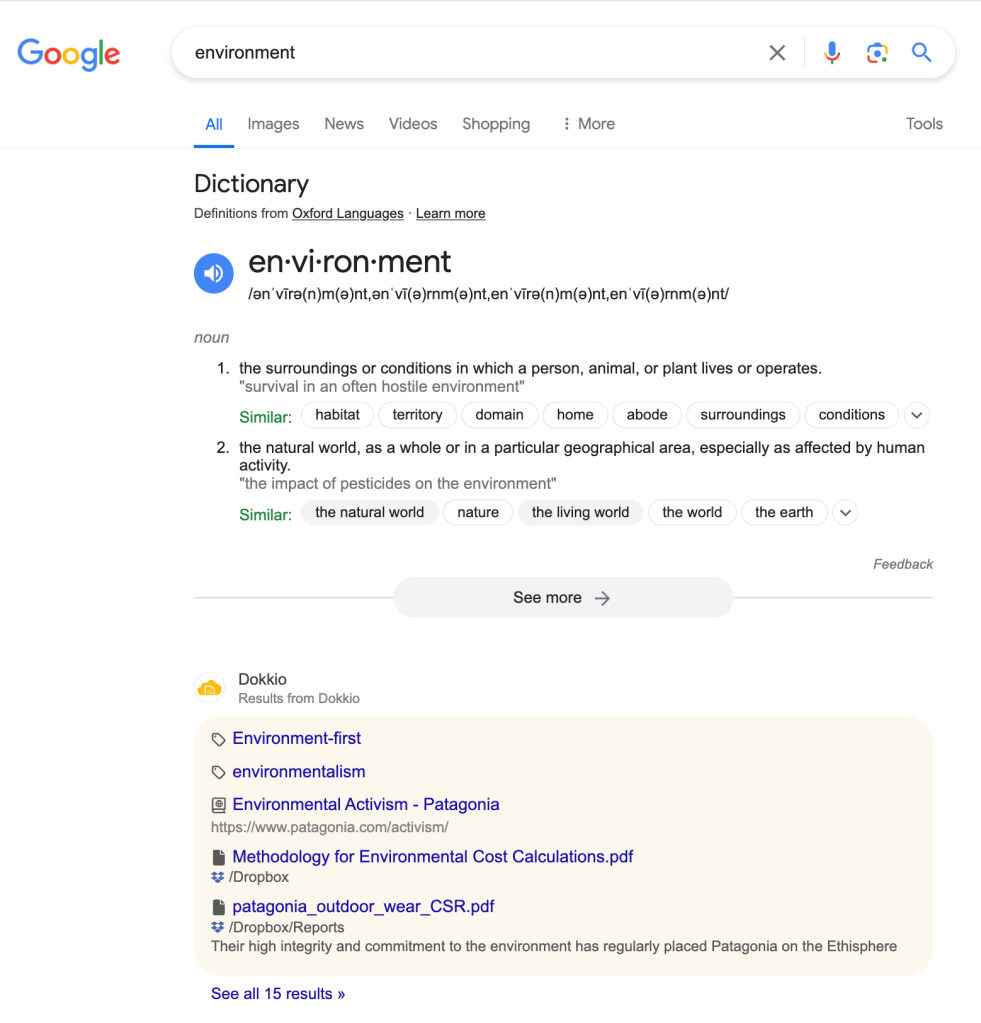
Now, Sidebar presents these results in-line with the rest of your Google, Bing, or Yahoo web search results. This gives Sidebar a more intuitive look and feel, and ensures that it’s not obscuring important page content with the floating panel.

Here’s a screenshot of a search for “environment” in Google, with Dokkio Sidebar connected to our Patagonia demo account. You’ll see that, rather than expanding the side panel, the results are presented in-line with the search engine’s results:

The search includes an option to “See all results”, which will take you to a search results view in your Dokkio account.

You can still uncheck the checkbox in the Sidebar toolbar drop-down if you don’t want MultiSearch results to automatically appear. The Sidebar “mini-tile” will simply “jiggle” to let you know that Sidebar has results to see, but they don’t appear unless you click the mini-tile.

To install Sidebar, you can log in to your Dokkio account, click your name in the lower left, and select “Install Sidebar”. Alternatively, you can visit dokkio.com/downloads to install Sidebar from our website.

We are eager to hear your thoughts on this change, so please share any feedback or questions you have with [email protected].

Introducing Browsed Pages

We’re pleased to announce with today’s update, Sidebar brings Dokkio’s hallmark intelligence to Chrome with our newest feature, Browsed Pages. 

With this update of Sidebar, you can now keep track of the web pages that you visit and Sidebar will recognize when a page is relevant to your Dokkio tags and will automatically tag items in your history for you. 

For example, suppose you saw a web page that mentioned a client, Acme, but you forget where you saw it. With our new Browsed Pages feature, Sidebar keeps track of the pages you’ve browsed and applies the appropriate tags, like client names, so you’d simply select your “Acme” client tag, and the page you were looking for will be there.  

The history content is private to you; other members of your organization will not have access to your browsing history. Additionally, it does not run in incognito mode and has an easy toggle.

toggle for Browsed Pages on Account tab

As a part of this release, you will notice “All Saved Pages” in the left nav in Dokkio.  All Saved Pages provides you with a feed of recently visited pages that you can edit or filter.

If you already have Dokkio Sidebar installed, no action is needed — Sidebar will update automatically. If you haven’t tried it yet, you can get Sidebar from the Chrome Web Store. It’s free!

As always, if you have any questions or feedback, reach out to us at [email protected] or message us through the in-product chat.

Announcing Dokkio Sidebar 3.2 with Major Enhancements to Tagging

We’re very pleased to announce Sidebar 3.2, which makes tagging easier and better, with:
Tag suggestions:  See Dokkio’s tag suggestions, without leaving Sidebar.  For example if you tag files by Company, Sidebar shows you there are more suggested Company-Tags, and lets you easily accept or reject each one – all within the Sidebar pane

Page Tagging suggestions:  When you view a page, Sidebar’s “About this Page” panel now includes matches to suggested tags. You can easily tag and clip the page, and add the new tag to your actively-used tags, all with a single click.

Tag management: Within Sidebar, you can view all active tags and tagged content, drop an existing tag, or add new tags (such as new Project or Customer tags when you start a Project or win a Customer), and Dokkio will start auto-tagging.
If you have already installed Dokkio Sidebar, your extension will automatically update to version 3.2.  If you have yet to install Dokkio Sidebar, you can do so for free by visiting the Google Chrome store, linked below:
Install Dokkio Sidebar
Please note: We’re currently rolling out and testing an enhanced tagging foundation, and these new Sidebar capabilities are built on it. If you created an account after May 2022, your account already uses the new foundation; you can simply start using the new features.

If your account was created prior to May 2022 and you have not been part of our beta program and want to try these new Sidebar features, please contact [email protected]; we will enable them for you. We plan to migrate the entire user base in the next couple of weeks, and will update you again when that is complete.

Rearranged Dashboard Puts Emphasis on Tags

The Dokkio team has rearranged the dashboard on the home screen to put a greater emphasis on tagging and organizing.

The “All Tags” and “Tag Dropdown” (which defaults to Category tags) tiles are now presented at the top of the dashboard, while the “Sources” and “All Files” tiles are presented at the bottom, shown below:

Dokkio tags are a powerful way to automatically organize your files and content by category or context, and the goal of this change is to ensure users find, interact with, and utilize this feature.

Sidebar Now Supports Long Sessions

Dokkio Sidebar 3.1.1 now maintains a “stickier” connection to your Dokkio account, in response to user feedback about Sidebar’s “silent logout” behavior.

When Sidebar is enabled but not connected to your Dokkio account, a small alert appears in your browser window, asking you to login. You may encounter this alert when you next use your browser. Once logged in, the connection remains for up to 30 days after your last interaction. You can explicitly logout via the Dokkio toolbar icon, or temporarily disable Sidebar using the Chrome “Manage Extensions” (puzzle piece) icon. Sidebar 3.1.1 is live in the Chrome Store now, and your Sidebar will automatically upgrade.