
The Scroll to Top Widget in the Ansar Elements Elementor Add-on provides an easy way for visitors to quickly navigate back to the top of the page.
It improves user experience, especially on long blog or news pages, by offering a customizable button with icon and text options.
The widget supports multiple display settings, design controls, and placement options to ensure seamless integration into any layout.
How to Use
- Open a page or template in the Elementor editor.
- Locate the Scroll to Top Widget under the Ansar Elements section in the widget panel.
- Drag and drop the widget into the desired section of the layout.
- Choose an icon, configure text options, and adjust styling settings as needed.

Content Setting
The Scroll to Top Widget offers flexible content options:
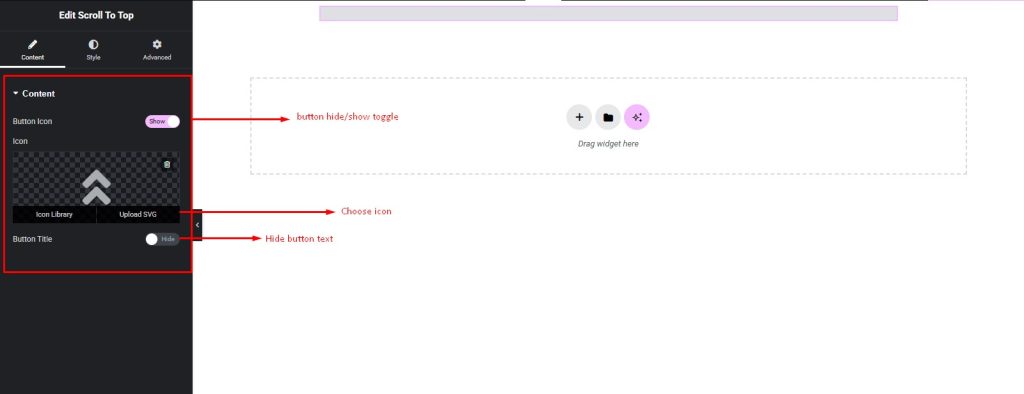
- Icon Selection: Choose an icon from the built-in icon library or upload a custom SVG icon.
- Title Option: Add a custom title alongside the icon to make the button more descriptive.
- Display Controls: Show either the icon, the title text, or both, with the ability to hide/show each element as required.
Styling Setting
The widget includes comprehensive styling options for full customization:
- Position Settings:
- Choose between Fixed or Inherit positioning.
- Adjust alignment, z-index, opacity, and other placement controls.
- Box Styling:
- Set background color, text/icon color, and define hover styles.
- Customize border, border-radius, padding, margin, and box-shadow for the button container.
- Icon Styling:
- Adjust icon color, hover color, size, and position.
- Control margin around the icon for better spacing.
- Title Styling:
- Define text color and hover color.
- Customize typography settings including font family, size, weight, and spacing.
- Apply margin values for spacing control.

Pro Tip
- For a modern design, use a simple arrow icon with subtle hover effects and a semi-transparent background.