
When a design created by design editor -> add to cart and checkout. This orders will included design info and you can manager design on orders.
Create order #
To create a order have design. You need select product you want -> Click customize and go to design editor mode
- Add your design
- Select product color
- Select quantity
- Click continue

Next: You are bring to add cart screen
After check all info and design ok. You can add your note for shop manager and click Add to cart button
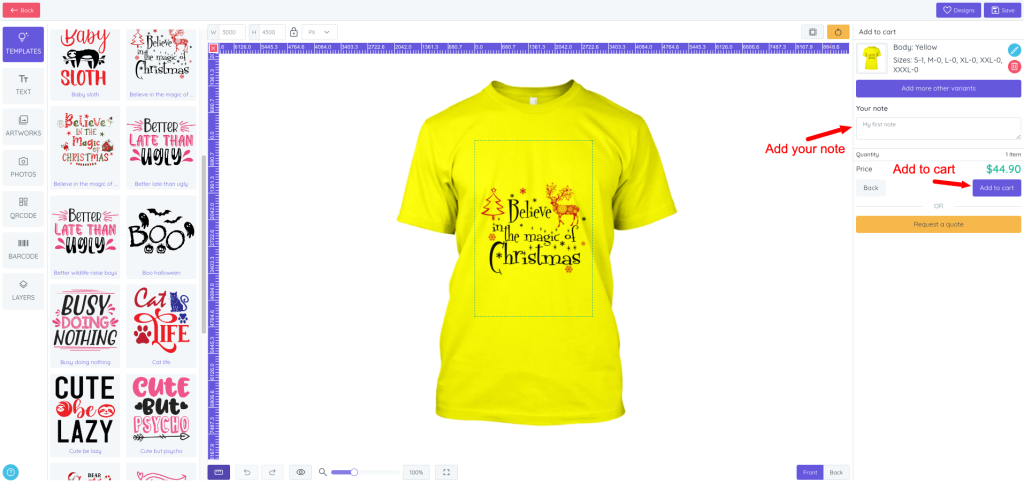
Next: on cart screen. You can check all info again. If all ok. You can click Checkout button go to checkout

Next: on checkout screen. You can check all info again. If all ok. You can select shipping method, payment method and click Confirm order button go to completed order

Manager orders #
List orders #
List orders show on backend. Allow shop manager can check info of design (thumbnail, contact info, status). To show list orders. You need select menu Orders
On list orders you can’t edit or remove. It will remove when you delete order from Opencart -> order -> delete.
- Search order by ID
- Filter order by status
- order ID: You can click to view order of opencart. Also, If your order is new and no one open to checked it will show a flag new
- Thumbnail of design
- Status: It show same status of opencart order
- Date: Time customer were created order
- View detail: You can click to view detail of order

Order detail #
Order detail show all info of design (options, quantity, attributes, file print, note and price…). You can view order detail by click button view detail from list orders
- Opencart product: You can download file by click button Download design. Also, You can know what product on this order by product name and can view opencart product by click on product name
- See all thumbnail of product views.
- See all options color, size and extra attribute.
- See note of customer


Click Download design to download file format (PNG, PDF, SVG)


