# Introduction

## What is NannyML Cloud?

NannyML Cloud is a machine learning monitoring platform to monitor, analyze, and improve ML models in production.

To monitor today’s and tomorrow’s ML models properly, we need solutions that frame the monitoring problem better, solutions that have full coverage, and that monitor the model, not just its features. Because of this, NannyML Cloud focuses on model performance estimation and takes a performance-centric monitoring approach. Our monitoring approach goes as follows.

## The NannyML way

### 1. Monitor what matters

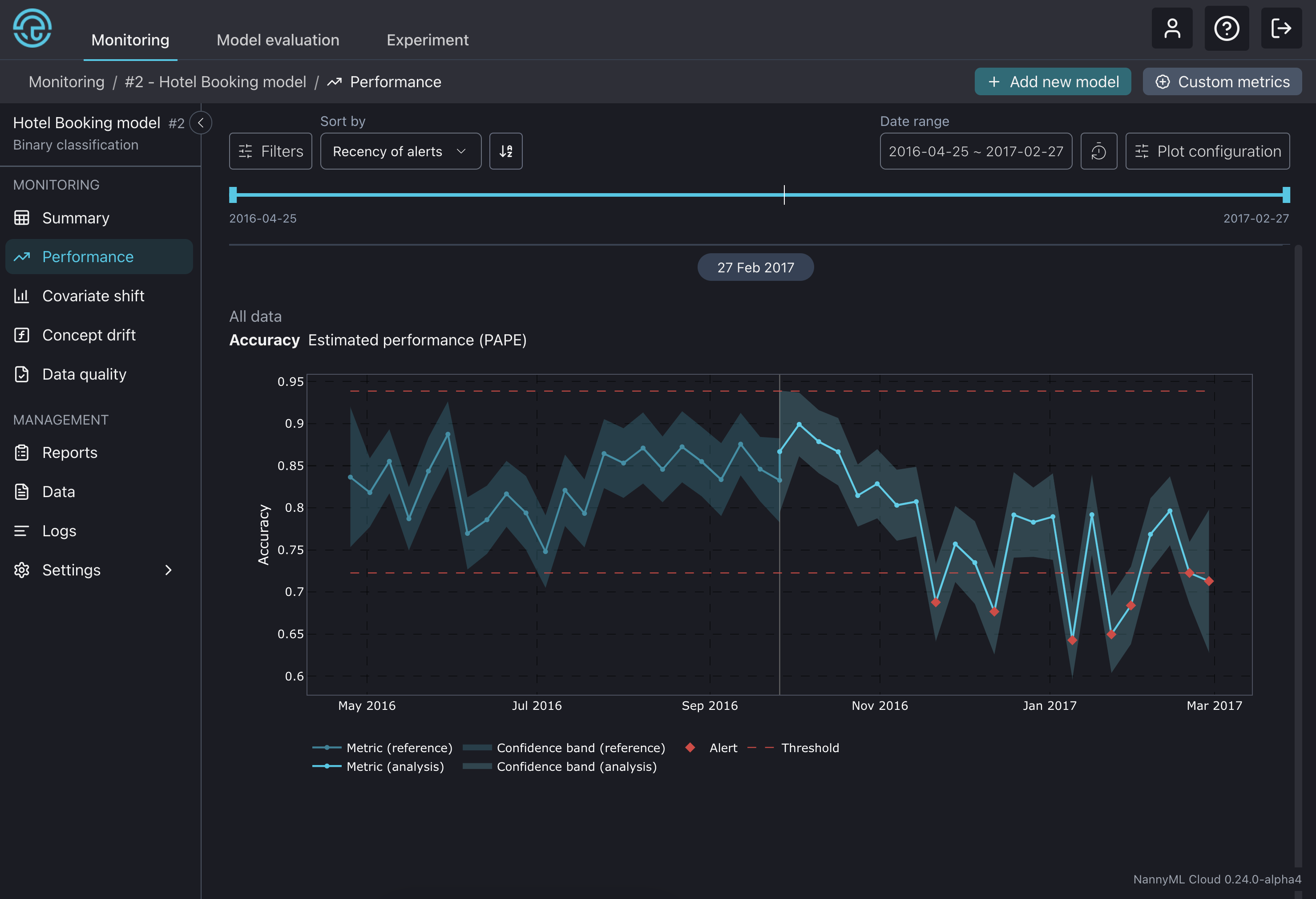
Focus on one single metric to know how your model is performing and get alerted when the performance drops.

* **Estimate model performance:** Know the performance of your ML models 24/7. NannyML estimates the performance of your ML models even if the ground truth is delayed or absent.
* **Measure the business impact of your models:** Tie the performance of your model to monetary or business-oriented outcomes. So that you always know what your ML brings to the table.
* **Avoid alert fatigue:** Traditional ML monitoring tends to overwhelm teams with many false alarms. By focusing on what matters, NannyML alerts are always meaningful.

<figure><img src="https://content.gitbook.com/content/2wXpsFdZLc0Ed8e18KiO/blobs/Ui6YDYcgxROTfG1WkSVV/Screenshot%202024-11-08%20at%2009.17.51.png" alt=""><figcaption><p>Estimated Accuracy using Probabilistic Adaptive Performance Estimation (PAPE)</p></figcaption></figure>

### 2. Find what is broken

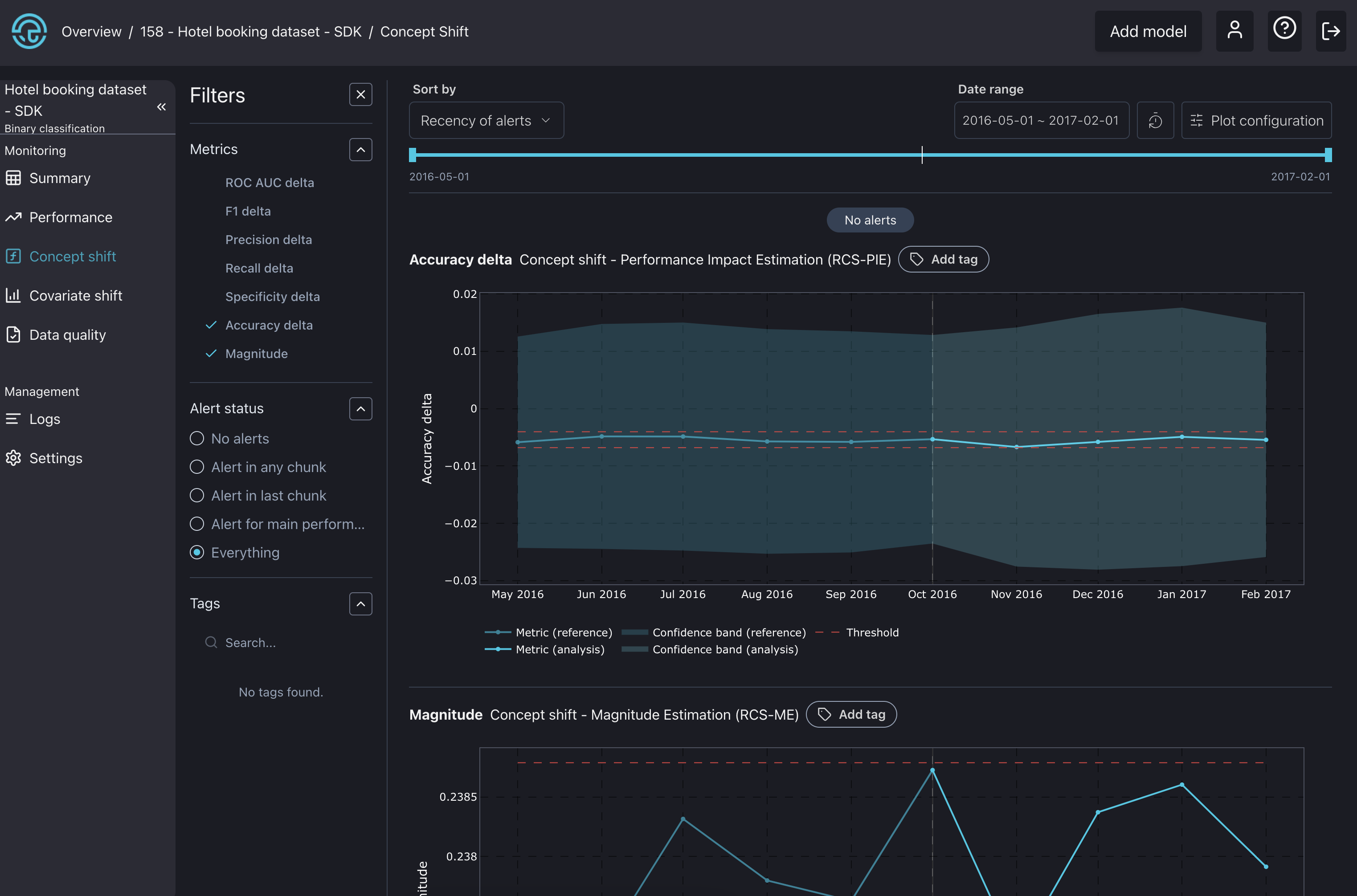
If something is broken, understand the underlying causes by correlating performance issues with data drift alerts and concept drift variations. This approach provides an actionable path for solving model performance issues.

* **Measure the impact of Concept Drift** **on model performance:** Our concept drift algorithms use the latest ground-truth data to validate if the performance change has been due to a change of concept.
* **Uncover the most subtle changes in the data structure:** Leverage our multivariate drift detection method to uncover changes that univariate approaches cannot detect.
* **Go on a granular investigation:** Apply univariate drift detection methods allow to perform a granular investigation across the model's features. And easily find which ones correlate with the performance changes.
* **Intelligent alert ranking:** NannyML links back data drift alerts to changes in the model performance. So you can easily detect which features are causing the performance issues.
* **Segment your data for better interpretability:** Use segmentation to divide a dataset into meaningful subgroups, allowing you to monitor and analyze specific subsets of the population more effectively.

<figure><img src="https://content.gitbook.com/content/2wXpsFdZLc0Ed8e18KiO/blobs/gm4owASMeKjE44bYVOFP/Screenshot%202024-02-07%20at%2014.46.32.png" alt=""><figcaption><p>Concept drift detection panel</p></figcaption></figure>

### 3. Fix it

Once you understand what went wrong, it becomes possible to tell whether a model is worth retraining, refactoring or if another issue resolution strategy is needed.

* **Retrain only when necessary:** Leverage [NannyML Cloud SDK](https://github.com/NannyML/docs/blob/v0.22.0/broken-reference/README.md) to automate monitoring data ingestion and the [webhooks](https://docs.nannyml.com/cloud/deployment/application-setup/webhooks) to trigger retraining pipelines when the estimated performance drops.

## How to set up NannyML Cloud?

NannyML Cloud is available on both the Azure and AWS marketplaces, and you can deploy it in two different ways, depending on your needs.

* **Managed Application:** With the Managed application, no data will leave your environment. This option will provision the NannyML Cloud components and the required infrastructure within your Azure or AWS subscription. To learn more about this, check out the docs on how to set up NannyML Cloud on [Azure](https://docs.nannyml.com/cloud/deployment/azure/azure-managed-application) and [AWS](https://docs.nannyml.com/cloud/deployment/aws).
* **Software-as-a-Service (SaaS):** With the SaaS option, you send us the monitoring data, and the monitoring happens in our infrastructure. To learn more about this, check out the docs on how to set up NannyML Cloud on [Azure](https://docs.nannyml.com/cloud/deployment/azure/azure-software-as-a-service-saas) and [AWS](https://docs.nannyml.com/cloud/deployment/aws).

<table data-card-size="large" data-view="cards" data-full-width="false"><thead><tr><th></th><th data-hidden data-card-target data-type="content-ref"></th><th data-hidden data-card-cover data-type="files"></th></tr></thead><tbody><tr><td>Azure Marketplace: NannyML Cloud ↗</td><td><a href="https://azuremarketplace.microsoft.com/en-us/marketplace/apps?search=nannyml&#x26;page=1">https://azuremarketplace.microsoft.com/en-us/marketplace/apps?search=nannyml&#x26;page=1</a></td><td><a href="https://content.gitbook.com/content/2wXpsFdZLc0Ed8e18KiO/blobs/TNYwkjCyCTFM3UOn2mRa/Twitter%20post%20-%201.jpg">Twitter post - 1.jpg</a></td></tr><tr><td>AWS Marketplace: NannyML Cloud ↗</td><td><a href="https://aws.amazon.com/marketplace/pp/prodview-rtikbsvzcelcg?sr=0-3&#x26;ref_=beagle&#x26;applicationId=AWSMPContessa">https://aws.amazon.com/marketplace/pp/prodview-rtikbsvzcelcg?sr=0-3&#x26;ref_=beagle&#x26;applicationId=AWSMPContessa</a></td><td><a href="https://content.gitbook.com/content/2wXpsFdZLc0Ed8e18KiO/blobs/w19Irv6SbKbpQf84X9jG/Twitter%20post%20-%202.jpg">Twitter post - 2.jpg</a></td></tr></tbody></table>

## NannyML OSS vs NannyML Cloud

NannyML Cloud, built on our open-source [NannyML library](https://github.com/nannyml/nannyml), adds new features and algorithms into an all-in-one monitoring platform.

<table><thead><tr><th>Feature</th><th width="246" align="center">NannyML OSS</th><th align="center">NannyML Cloud</th></tr></thead><tbody><tr><td>Performance estimation - CBPE and DLE</td><td align="center">✅</td><td align="center">✅</td></tr><tr><td>PAPE - 10% better performance estimations than CBPE</td><td align="center">❌</td><td align="center">✅</td></tr><tr><td>Concept shift detection</td><td align="center">❌</td><td align="center">✅</td></tr><tr><td>Covariate shift detection</td><td align="center">✅</td><td align="center">✅</td></tr><tr><td>Data quality checks</td><td align="center">✅</td><td align="center">✅</td></tr><tr><td>Intelligent alerting</td><td align="center">✅</td><td align="center">✅</td></tr><tr><td>Interactive visualizations</td><td align="center">✅</td><td align="center">✅</td></tr><tr><td>Slack and email notifications</td><td align="center">❌</td><td align="center">✅</td></tr><tr><td>Customizable dashboards</td><td align="center">❌</td><td align="center">✅</td></tr><tr><td>Programmatic data collection</td><td align="center">❌</td><td align="center">✅</td></tr><tr><td>Metric storage</td><td align="center">❌</td><td align="center">✅</td></tr><tr><td>Scheduling monitoring runs</td><td align="center">❌</td><td align="center">✅</td></tr><tr><td>Segmentation</td><td align="center">❌</td><td align="center">✅</td></tr></tbody></table>

## Where to go next?

Here, you can find several helpful guides to aid with onboarding.

<table data-view="cards"><thead><tr><th></th><th></th><th data-hidden data-card-cover data-type="files"></th></tr></thead><tbody><tr><td>🏃‍♂️ <a href="model-monitoring/quickstart"><strong>Quickstart</strong></a></td><td>Get started with investigating the simple use-case</td><td></td></tr><tr><td>🧭 <a href="product-tour"><strong>Product tour</strong></a></td><td>Find out how to use NannyML Cloud</td><td></td></tr><tr><td>🧑‍💻 <a href="model-monitoring/tutorials"><strong>Tutorials</strong></a></td><td>Explore using NannyML Cloud with tabular, text, and image data</td><td></td></tr><tr><td>🚀 <a href="deployment"><strong>Deployment</strong></a></td><td>Learn how to deploy NannyML Cloud on Azure and AWS</td><td></td></tr><tr><td>&#x3C;/> <a href="nannyml-cloud-sdk"><strong>SDK</strong></a></td><td>Learn how to interact with NannyML Cloud via code</td><td></td></tr><tr><td>👷‍♂️ <a href="model-monitoring/how-it-works"><strong>Miscellaneous</strong></a></td><td>Learn how the NannyML Cloud model monitoring works under the hood</td><td></td></tr></tbody></table>