-
-
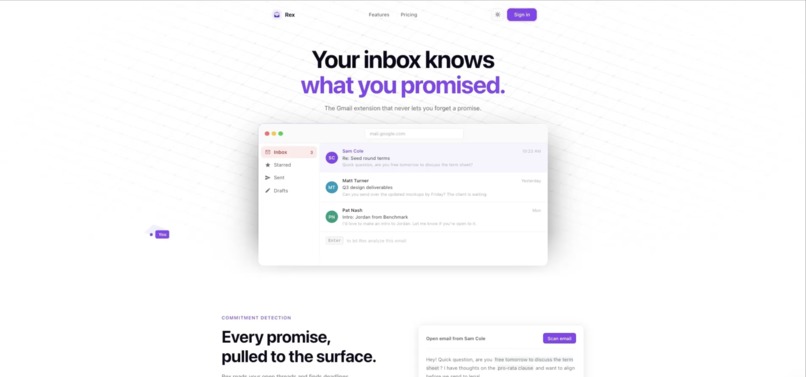
Clean landing page
-
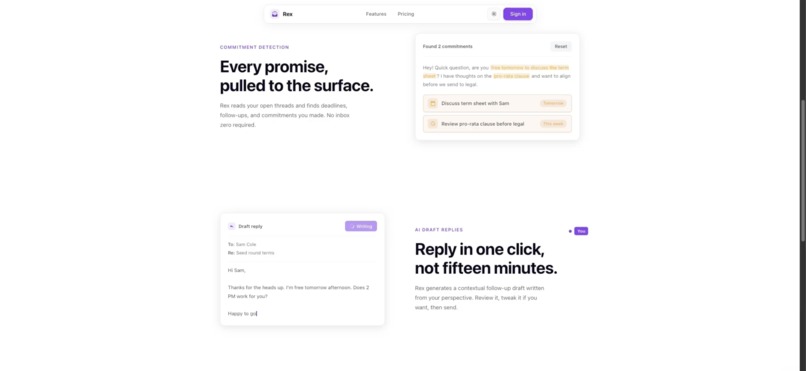
Features #1
-

Features #2
-

Pricing
-
Extension pop-up
-
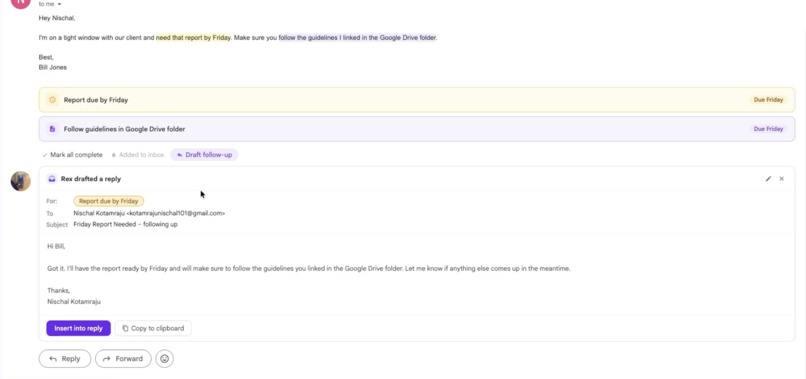
Detected commitments with follow-up draft
-
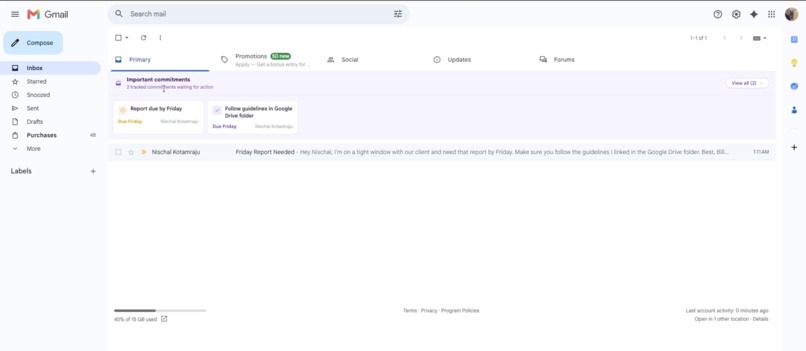
Gmail home page with commitments


Inspiration
"Hey Bill, I'll send that report over to you by Friday."
Email is the birthplace of false promises. You say you'll send something over by Friday and three weeks later someone from work is chasing you in a dark alley. We've all been there, and it sucks when your boss looks you in the eye, disappointed that you didn't play your part. That's why I made Rex, the Gmail extension that prevents something like this from ever happening again.
What it does
Rex is an AI Chrome extension that lives inside Gmail. When you open an email, Rex scans the entire thread and automatically pulls out any commitments you've made (i.e. deadlines, follow-ups, promises) and surfaces them in a clean sidebar. That way, every time you open up Gmail, you'll always be reminded of the tasks that you'll have to complete. Additionally, Rex will scan your entire inbox at once so nothing slips through. That's only the tip of the iceberg, though, because Rex also uses AI to draft contextual replies written from your perspective so that you can review, tweak and send in seconds instead of staring at a blank compose window when you have better ways to make use of your time. Rex learns from the way you write over time, so every draft sounds just like you.
How I built it
Rex is a Manifest V3 Chrome extension built with React, TypeScript, and Vite that injects code into Gmail via Shadow DOM. The AI layer runs on a Node/Express backend that calls the Anthropic (Claude) API to analyze email threads and extract commitments and generate draft replies personalized to your writing style. Authentication is handled through Supabase with Google OAuth, subscriptions run through Stripe, and the marketing site is built in Next.js 16.
Challenges I ran into
The main challenge was injecting cleanly into Gmail's DOM without breaking their UI. I also had to carefully handle CORS between the extension and my server, and getting the AI to reliably extract only genuine commitments (not every casual sentence in an email) took significant prompt engineering. On top of that, making replies drafted by AI actually sound like the user rather than a generic chatbot required careful design around how I pass context to the model.
Accomplishments that I'm proud of
Rex came to life! The extension detects real commitments in real emails (not marketing or spam emails), the AI drafts replies that actually sound like you, and the entire auth and subscription flow works in production. I'm also proud of how polished the experience feels, as Rex fits naturally inside Gmail without ever feeling like an unrelated object bolted onto the page.
What I learned
Shadow DOM is both your best friend and worst enemy when building browser extensions. I also learned how much prompt design matters, because the difference between an AI that finds everything and one that finds the right things is entirely in how you ask. Building Rex as a solo project also taught me how to think across the full stack at once, such as the extension injecting into Gmail and the server, auth, and payment management.
What's next for Rex
My goal is for Rex to be able to automatically add deadlines from emails into Google Calendar, as the commitments currently reside within the Gmail home page. A weekly digest of open commitments, mobile notifications, and support for email clients beyond Gmail are also desirable.
Built With
- anthropic-api
- chrome
- express.js
- google-oauth
- next.js-16
- node.js
- react
- shadow-dom
- stripe
- supabase
- tailwind-css
- typescript
- vite

Log in or sign up for Devpost to join the conversation.