-
-
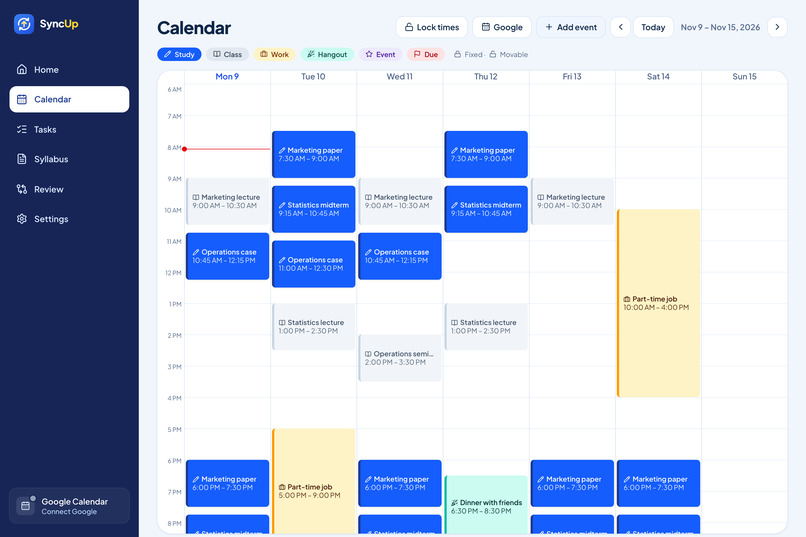
The plan placed around classes, the part-time job and dinner with friends ("Study time fits around your life").
-
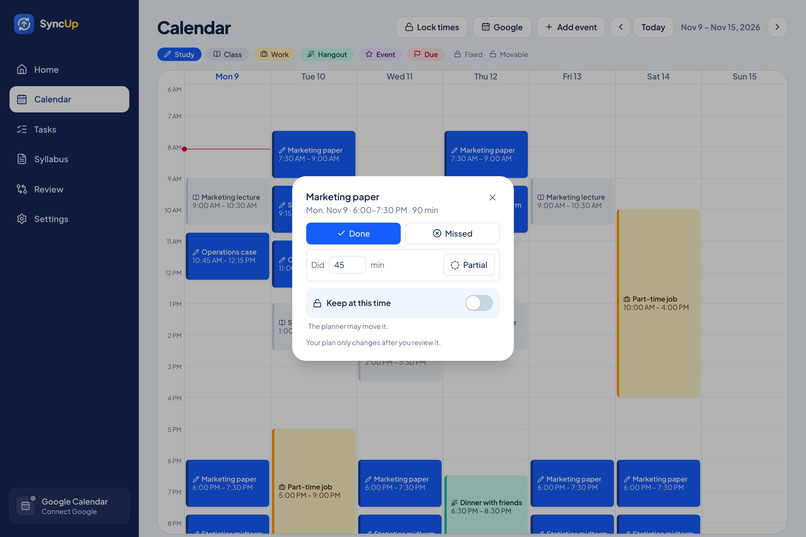
The session dialog with Done, Missed and Partial.
-
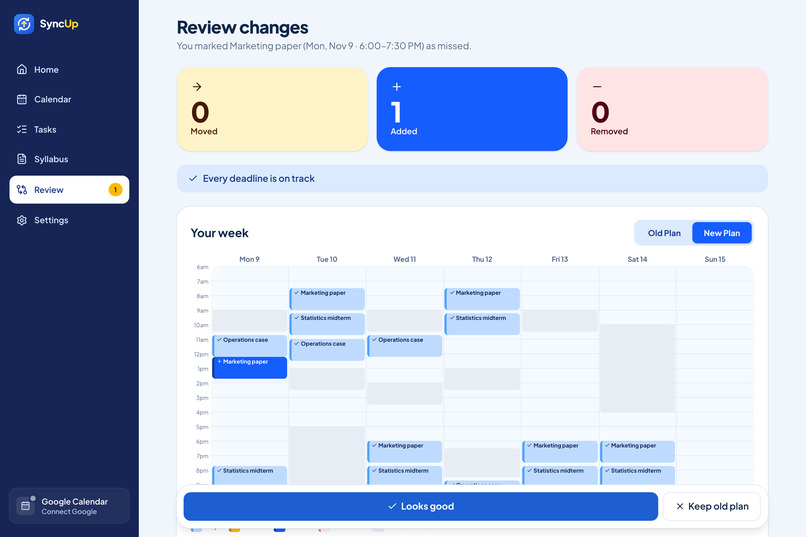
After a miss, the replan shows exactly what changed, and nothing moves until you accept.
-
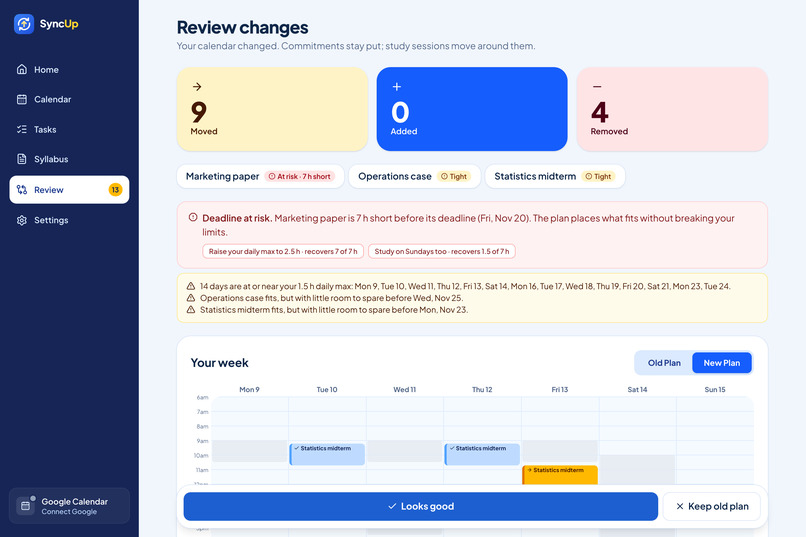
When the week is squeezed, the red warning names the assignment and the hours short and offers fixes ("Marketing paper is 7 h short").
-
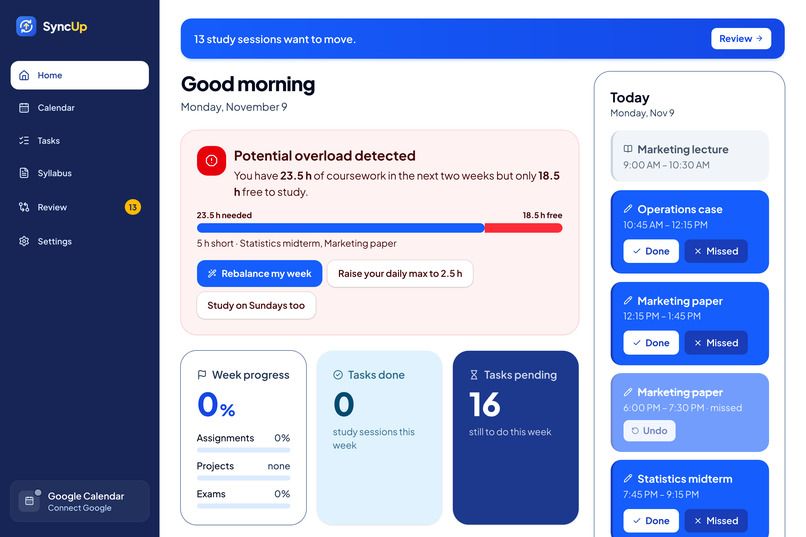
The overload card ("23.5 h needed, 18.5 h free"), shown with large text and high contrast on.
-
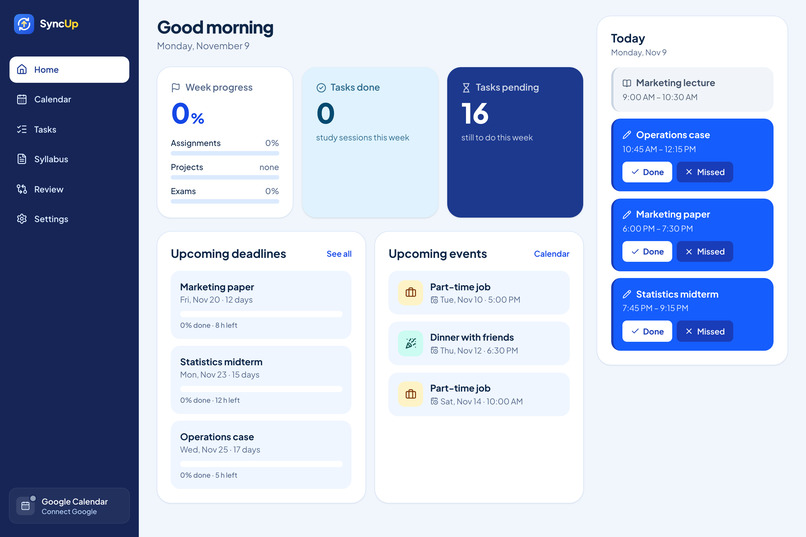
The home dashboard with today's sessions and upcoming deadlines.
-
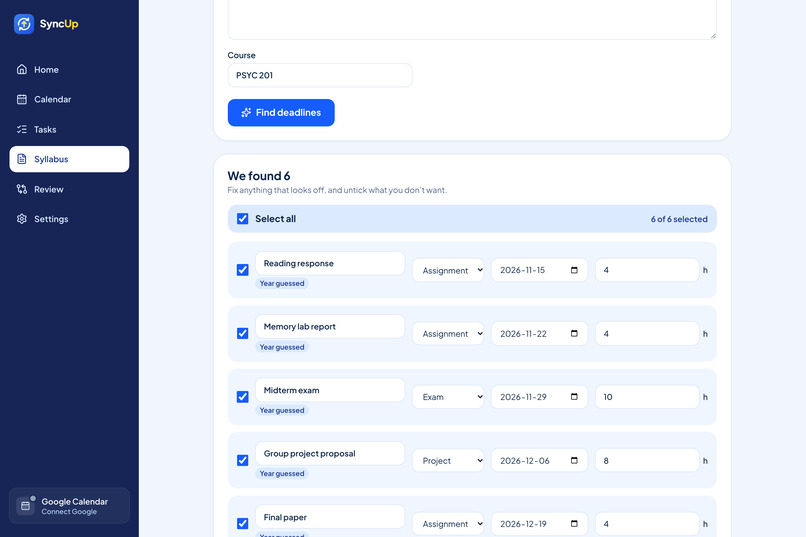
Deadlines found in a pasted syllabus, ready to review.
-
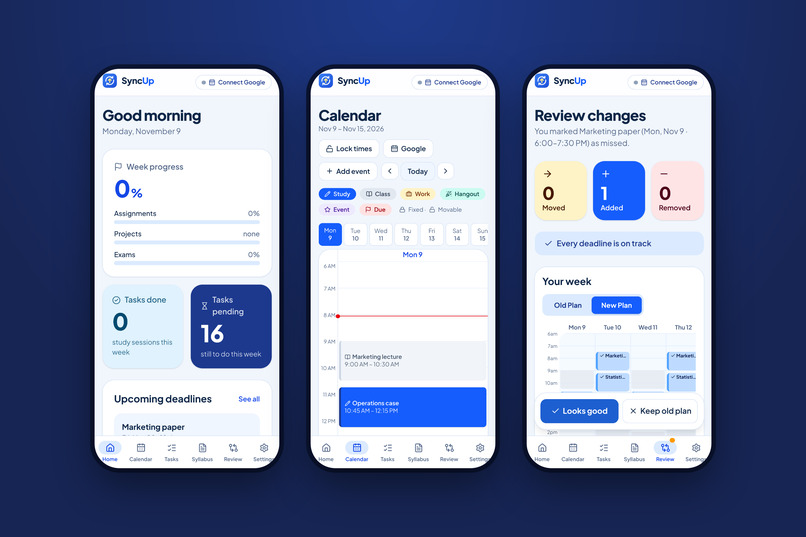
Three phone screens side by side (home, single-day calendar, review).


Inspiration
Every student has made the perfect study schedule on Sunday night, and by Tuesday it's already wrong. A class runs late, a shift gets added, a "two-hour" essay section takes five hours. Most planners just track deadlines. When you fall behind, you have to fix the whole plan yourself, at exactly the moment you're most stressed.
I wanted a planner that adjusts to your life, so you don't have to rebuild your life around the planner. When something goes wrong it should work out how much is really left and give you a new plan you can trust.
Problem Statement
University students juggle several assignments, classes, part-time jobs and social plans at once. Study plans break down for three reasons:
- Students underestimate how long work takes. A "3-hour" essay often takes twice that.
- Life gets in the way. A study session gets missed, a shift gets added, or a task only gets half done.
- Fixing the plan is manual and stressful. Calendars and to-do apps only record deadlines. When students fall behind, they have to work out what's left and rebuild the week themselves. Many give up on planning altogether, and that's when deadlines pile up and all-nighters happen.
Existing tools treat a schedule as a fixed thing you make once. Real student life changes every day.
Solution
SyncUp is a study planner that adapts when you fall behind, instead of falling apart.
- It builds a realistic schedule from your assignments, deadlines and calendar. It only uses your free time and respects sleep, days off and a daily study limit.
- When you miss a session or report your progress (for example, "only 25% done"), it recalculates how much work is really left and replans the sessions that haven't been locked.
- It never changes your plan silently. You see a preview of each session that moved and why, then accept or undo.
- When the work truly can't fit, it tells you honestly: "Marketing paper: 4 h short". It also suggests fixes you can try in one click, instead of cramming sessions into your sleep.
What it does
SyncUp is a study planner for university students. It builds a realistic schedule around classes, work, and social plans, then keeps it up to date as things change.
- Add assignments with a deadline, an estimated number of hours, and a priority. You can also import a syllabus.
- AI breakdown turns an assignment description into subtasks with time estimates, such as research, outline, draft, and edit. You can edit all of it before anything gets scheduled.
- Smart scheduling fills your free time with study sessions on a 15-minute grid. It respects your sleep window, days off, maximum hours per day, and every existing calendar event.
- Progress-aware rescheduling is the main feature. If you miss a session or say "I'm only 25% done," SyncUp works out how many hours are really left and replans everything that isn't locked.
- Review before anything changes. SyncUp never overwrites your plan silently. It shows a Preview of each session that moved and why, for example "moved: overlapped a missed session" or "added: progress behind estimate". You accept or reject the changes, and you can undo once.
- Honest overload warnings. If the work doesn't fit, SyncUp won't break your limits to cram it in. It shows a red warning with the assignment name and the number of hours you're short, and suggests fixes ("raise your daily max to recover 3 h") that you can try with one click.
- Works offline in demo mode, using a simulated calendar and cached AI results.
How I built it
- Next.js + TypeScript (strict) with a Zustand store saved to localStorage, plus optional Supabase (Postgres with row-level security) for accounts.
- The scheduler is a pure, deterministic function:
schedule(state, now) → Plan. It has no AI, no I/O, noDate.now(), and no randomness. Ties are broken by ID, so the same input always produces the same plan. That makes it easy to test and makes the diffs stable. - AI only does breakdowns. Claude (Gemini is optional) gets the assignment text and returns subtasks as structured output, which is checked with zod and clamped to sensible ranges. The AI never sees your calendar and never picks dates. Every failure path (8-second timeout, one retry, invalid output) falls back to a fixed template.
- Feasibility checks compare the remaining work against available capacity before each deadline. The "what-if" suggestions just rerun the same scheduler with one setting changed.
- Google Calendar OAuth with a provider interface, so the simulated calendar and the real one can be swapped freely.
Challenges I ran into
- Rescheduling without chaos. A naive re-run of the scheduler shuffles every session, and the student loses trust in the plan. I had to define "locked" sessions (past, completed, partial, pinned, or starting within 2 hours) and produce a stable diff, so only the sessions that really need to move are moved.
- Saying "it doesn't fit." It's tempting to squeeze in work at 2 a.m. Instead I decided hard limits are never broken. SyncUp places what fits and reports exactly how many hours are short.
- Time zones and recurrence. Weekly classes have to stay at the same local time across daylight-saving changes. So everything is stored in UTC and only converted to local time for display and for repeating events.
- Keeping the AI in its lane. LLMs love to suggest schedules. Strict schemas plus a deterministic fallback mean the AI can't break the plan, and the app still works with no API key at all.
- Never touching real events. Writing to Google Calendar safely meant tagging our own events and using a separate calendar, so a bug can never delete someone's dentist appointment.
Accomplishments that I'm proud of
- One missed session plus a progress update reorganizes the whole calendar in under 2 seconds, and every move comes with a reason.
- A scheduler that is fully deterministic and tested, with no AI involved in the time math.
- Overload warnings that say exactly how much you're short and offer real fixes.
- A complete offline demo mode, so it works even when Wi-Fi doesn't.
- Accessibility built in: calendar blocks use icons and patterns as well as color, contrast meets WCAGAA, everything works from the keyboard, and the layout works on a 390 px phone screen.
What I learned
- AI works best as a helper with clear limits. Letting it break down tasks and keeping it away from scheduling made the product both smarter and more reliable.
- Users trust a tool that asks before it changes things. The Preview/Accept step is what makes automatic rescheduling feel safe.
- Being honest about limits ("you're 4 hours short") helps more than a schedule that looks perfect and can't be followed.
What's next for SyncUp
- Two-way live Google Calendar sync, so a newly added event triggers a replan proposal right away.
- Learning from your history: if your essays usually take 1.4× your estimate, SyncUp adjusts future estimates for you.
- LMS integrations (Canvas, Moodle) to import assignments and deadlines automatically.
- Energy-aware scheduling, so hard tasks go in your best focus hours.
- A mobile app with check-in notifications ("Did you finish this session?") to keep progress up to date with one tap.
Built With
- claude
- css
- gemini
- html
- next.js
- react
- typescript
