-
-
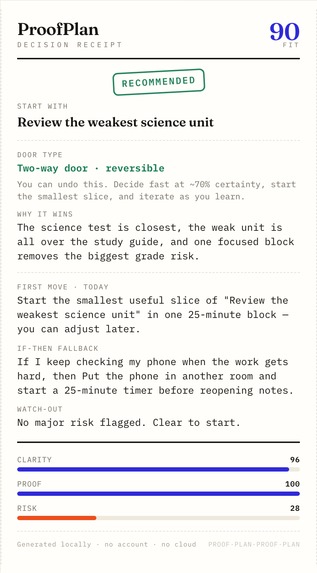
Decision Receipt for a reversible choice. Stamped RECOMMENDED: the path, why it wins, today's first move, and an if-then fallback.
-
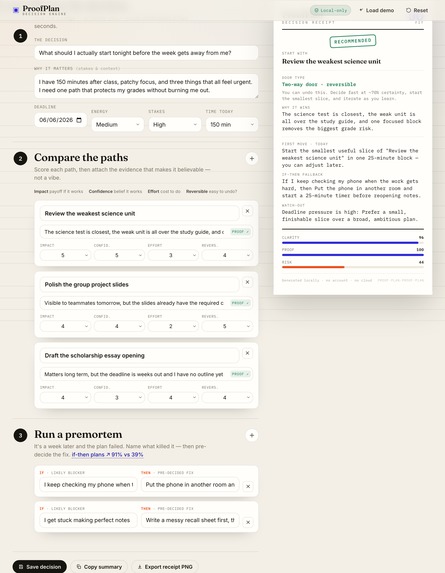
The full ProofPlan workbench: compare options on evidence on the left, with the live Decision Receipt updating on the right as you type.
-
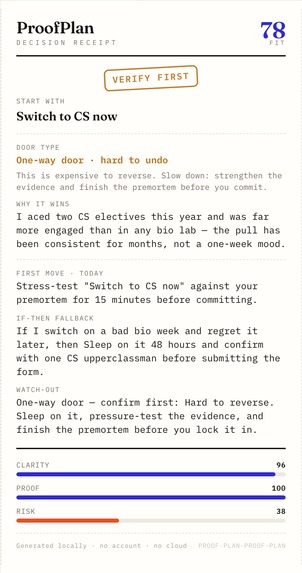
The same engine on an irreversible choice: it changes posture to a one-way door and stamps VERIFY FIRST: slow down before you commit.
-
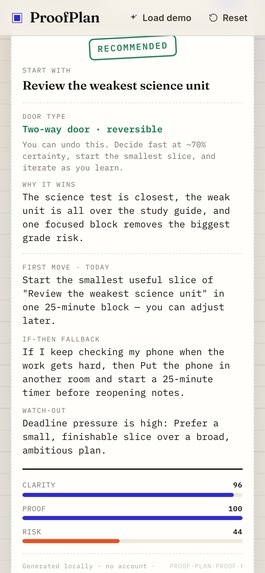
On mobile the Decision Receipt comes first: the result and next move are visible before the long form, so the answer is one glance away.


Inspiration
Students rarely fail for lack of a to-do list. They stall because every option feels plausible, the deadline is close, energy is low, and the plan collapses the moment the first obstacle appears. I wanted a tool that lives in that gap, the distance between a decision and the first real action.
What it does
ProofPlan is a glass-box decision engine for students. When several things all feel urgent, it tells you which one to start and prints the proof. You compare your real options on evidence, it classifies the choice as a two-way door (decide fast) or a one-way door (slow down and verify), and you leave with a Decision Receipt: the chosen path, the first move for today, and an if-then fallback for the one thing most likely to break it. No account, no cloud, no black-box AI. Every number is visible and editable.
How it works
- Frame the decision in one line: deadline, energy, stakes, and the time you actually have today.
- Compare paths on Impact, Confidence, Effort, and Reversibility, each backed by written evidence.
- ProofPlan scores them with a transparent, editable weighted matrix and ranks them live.
- It classifies the top path as a two-way door (reversible, decide fast at about 70 percent) or a one-way door (irreversible, stamped VERIFY FIRST).
- You run a premortem: assume the plan already failed, then pre-commit an if-then fallback for each likely blocker.
- The result is a Decision Receipt you can export as a PNG, or save to a local journal. Nothing leaves the browser.
What makes it different
ProofPlan is built on four named ideas from decision science, not a generic AI answer:
- Glass-box weighted matrix: Impact 30, Confidence 20, Feasibility 20, Reversibility 15, Evidence 15, all visible and editable.
- The door test (Bezos one-way and two-way doors): the app changes posture for irreversible decisions instead of always saying go.
- The premortem (Klein, HBR 2007): assume failure first to surface the risks that actually sink plans.
- If-then implementation intentions (Gollwitzer and Sheeran, 2006): a single if-then plan roughly doubles follow-through. In one study, gym attendance moved from 39 percent to 91 percent.
How I built it
Vanilla HTML, CSS, and JavaScript. The Canvas API draws the Effort by Payoff map and renders the exported receipt. localStorage holds the decision journal. Google Fonts provides the type. Icons are inline SVG. No frameworks, no bundler, no server, and no tracking, so it runs entirely in the browser.
Challenges and what I learned
The hardest part was keeping the scoring transparent while still giving a confident recommendation. Showing every weight and letting the user edit it, instead of hiding the logic, made the tool more trustworthy and easier to defend. I also learned how much a single if-then plan can change follow-through.
Why it fits Design4Future
Design4Future asks for practical tools that help people stay organized, productive, or make better decisions in daily life. ProofPlan helps a student make one better decision under pressure, see exactly why, and start the next useful action with a fallback ready.
Built With
- canvas
- css
- google-fonts
- html
- javascript
- localstorage

Log in or sign up for Devpost to join the conversation.