-
-
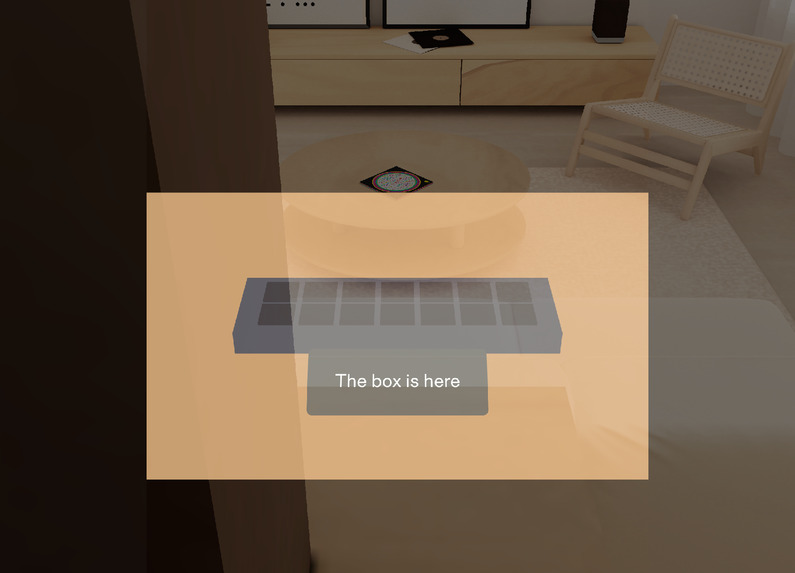
Start: the box stand-in on the table and the "The box is here" button
-
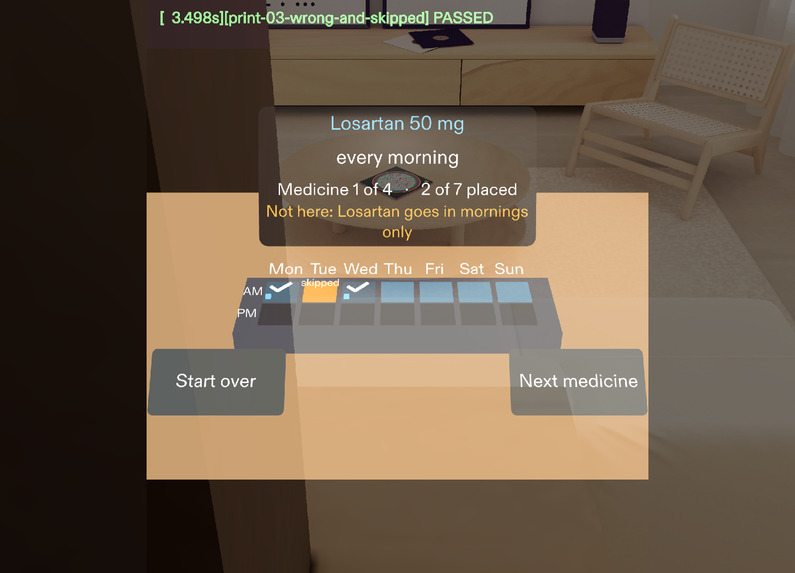
A wrong compartment is refused and a skipped one turns amber
-
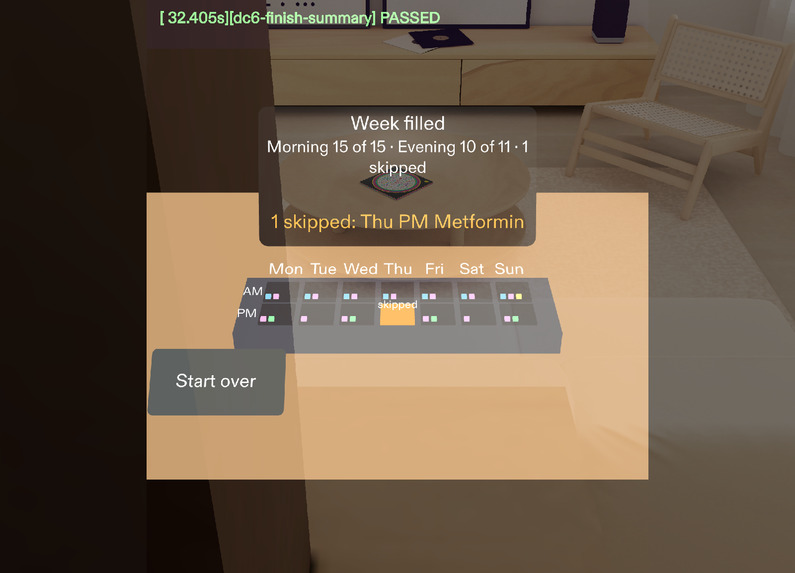
Summary: counts per row and the skipped compartment named
-
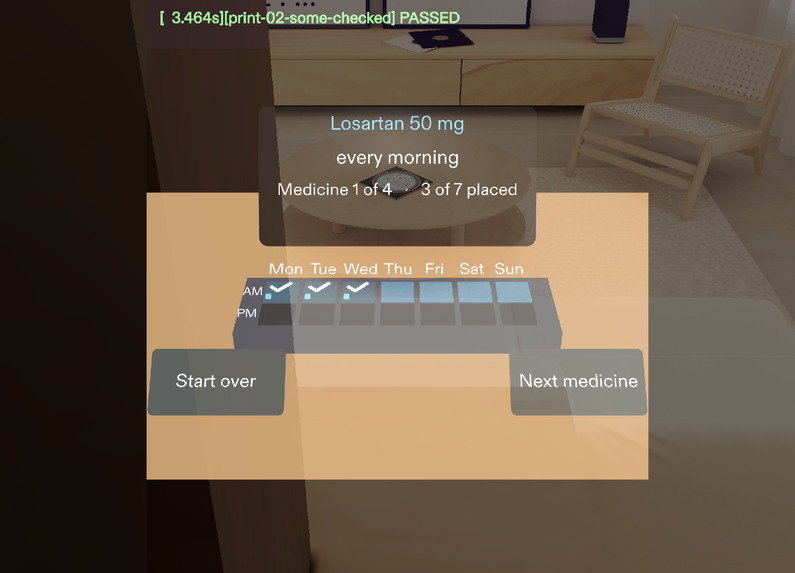
First medicine: only its 7 morning compartments light up; 3 checked


Inspiration
In our families, someone fills a weekly pill box for an older parent every Sunday. It is a seated, two-handed job: an open bottle in one hand, the box in the other, and a paper list of what goes where. The mistakes are quiet ones: a day skipped, or a tablet in the evening row that belongs in the morning. A phone checklist means putting the bottle down and looking away from the box for every tablet. The answer to "where does this one go?" belongs on the box itself, which is a job for glasses.
What it does
- Pinching "The box is here" runs a World Query hit test toward the spot in front of you. If it finds a level surface, the box, the card and the buttons move onto your table, turned to face you. If not, they stay where they are.
- Shows one medicine at a time on a card behind the box ("Losartan 50 mg, every morning, Medicine 1 of 4, 0 of 7 placed") and lights only the compartments where it goes, in its own light tint. The next one to fill pulses.
- You pinch a compartment as the tablet drops in: it gets a check and a dot in the medicine's tint, and the counter goes up. Pinch again to undo. Dots stack, so the box shows what is already inside.
- Filling a compartment while an earlier one of the same medicine is still empty turns the earlier one amber and marks it "skipped" until you fill it.
- A pinch on a compartment where the medicine does not go is refused: it flashes, a short low tone plays, and the card says why ("Not here: Losartan goes in mornings only").
- "Next medicine" walks four sample medicines with different schedules (every morning, twice a day, every other evening, Sunday morning only). Anything left empty counts as skipped.
- "Finish" shows the summary on the card, for example "Morning 15 of 15 · Evening 10 of 11 · 1 skipped" and "1 skipped: Thu PM Metformin", with that compartment still amber on the box, and a soft chime.
How we built it
We planned it with the Devpost Learn plan-lens skill pack (devpost/design-brief.md, 7 done criteria) and built it with Snap's CLAD agents through the Lens Studio MCP: Lens Studio 5.24.1 with Spectacles Interaction Kit 3.1.0, UI Kit and LEAF 3.0.0, then Lens Studio 5.25.1 with InteractionKit 4.0, UIKit 4.0 and LEAF 4.0 after the editor updated. World Query (WorldQueryModule, a filtered HitTestSession) places the layout; the pose math is plain functions tested under Node. The week, the regimen and the skip rules live in one state module separate from the scene. Each done criterion has a LEAF scenario that drives the Lens with SIK input on the real buttons and compartments. An eighth scenario feeds a hit into the World Query placement code: a wall hit is refused, and a level hit moves the box onto the hit point and still takes a pinch there. 8 of 8 pass in the preview, and two were made to fail on purpose first to prove the tests can fail. The seventh scenario drives LEAF's inverse kinematics arm, with no fallback, from a seated pose to all 3 buttons and all 14 compartments; every one is reached by direct touch. The tone and the chime are WAVs generated locally; no paid API was used.
Challenges
- Reach first: our first Round 2 project found controls out of reach only after building, so reach was a done criterion here from the start. Everything sits within about 60 cm of a seated user, and the IK test passed on its first run.
- Compartment-sized targets: in the preview, the IK hand reaching a compartment sometimes registers on the neighbor to the east. Opening a gap between the colliders did not fix it. The presses in the tests are simulated SIK pinches, and precise pinching on real 4 cm compartments stays an open risk.
- A skipped compartment that a later medicine also lights has to show the current medicine's state while lit and go back to amber after.
What we learned
A fixed grid with a strict order is a good fit for glasses: the Lens can say exactly what is wrong and where, on the object, without a screen.
What it does not do
- It runs in the Lens Studio preview only. Nothing has been tried on SPECS glasses.
- The regimen is a made-up sample of four medicines, hard-coded. It is not a prescription and not medical advice. The Lens does not read prescriptions, does not recognize tablets or bottles, and does not check doses.
- The pill box and the table are virtual stand-ins at real size. World Query puts the layout on your table, but it does not find or recognize a real pill box.
- The World Query placement is proven only with an injected hit: in the Lens Studio preview the hit test returns no hit and the stand-in stays. It has not been seen on a real surface.
- Feel unproven: holding the overlay on a real box to about 1 cm, pinch precision on real compartments, how the tints read over a real lid in kitchen light, and voice for "done" and "next" (buttons here).
What's next
Trying the table placement on SPECS glasses, registering a real pill box, entering the family's own list instead of the sample, and voice for "done" and "next".
Built With
- clad
- leaf
- lens-studio
- specs
- spectacles
- spectacles-interaction-kit
- typescript
- ui-kit
- world-query
