-
-
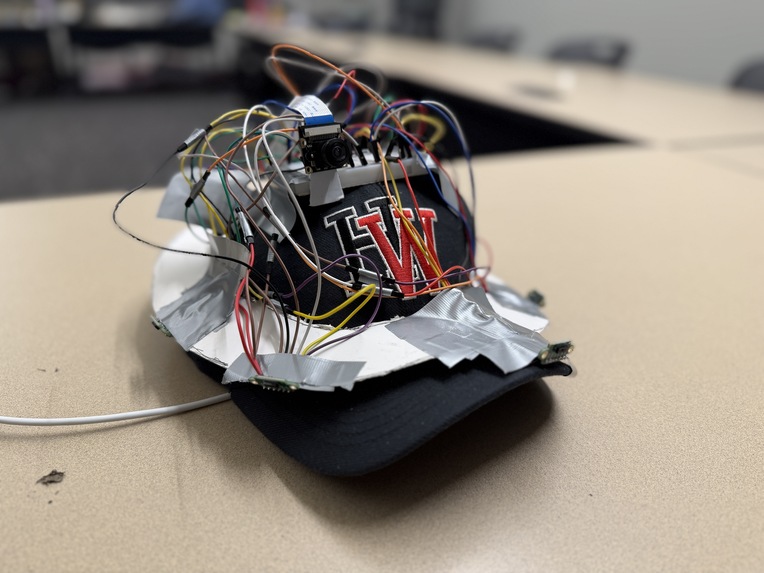
Meridies Wearable Headset
-
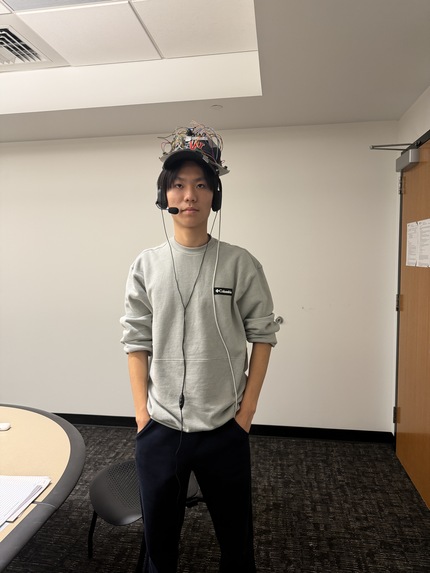
Meridies Full Equipment - Headset with LiDAR, Headphones for Spatial Audio navigation, Mic with voice agent integration, portable battery.


Inspiration
A white cane sweeps the ground, but it can't detect anything at head height. In a survey of 300 blind people (Manduchi & Kurniawan), more than half had a head-level accident at least once a year, 23% of those accidents had medical consequences, and 43% changed how they walk: slower, with an arm raised to protect their face.
We also kept hearing that existing audio aids feel alarming rather than helpful, and that losing sight means losing the spatial picture of places you once knew. We wanted one wearable that covers what the cane can't, speaks calmly, and helps people remember places, not just avoid them.
What it does
Meridies is a wearable hat with four parts, all controlled by voice through Meri, our AI assistant ("Hi Meri"):
- MeriSense: six LiDAR sensors turn obstacles at chest and head height into spatial sound, placed where they actually are. A front camera lets Meri describe what's ahead.
- MeriMark: mark a place with your voice, and hear the memory again when you return.
- MeriVerse: walk through a 3D scan of your space by voice, with your memories anchored inside it.
- MeriCircle: share a memory with people you trust. Everything is private until you share it.
How we built it
Spatial audio. We turn each sensor reading into a 3D point around the head, group the points into objects, and play only the closest three. Each object is placed in space so it sounds like it comes from where it is: sounds ahead are bright, sounds behind are muffled. Closer objects play faster, louder and brighter, and under half a meter a distinct two-note cue overrides everything.
Meri (Gemini). We route each task to a Gemini model. Gemini 3.8 Flash handles real-time object detection on camera frames, understanding spoken requests, and function calling: each Meridies feature is a tool Meri can call, so one sentence moves the user between features. Gemini 2.5 Pro TTS gives Meri a calm, natural voice. Before each request, our backend passes the user's relevant memories to Gemini as context.
Spatial memory. MeriVerse combines two views of the same address: Matterport 3D scans for the inside and Vexcel aerial imagery for the outside. Through the Showcase SDK, each memory is anchored to a model ID, floor and 3D position in the scan's coordinate space. Before a visit, Meri sends the Vexcel image to Gemini, which describes the route from the sidewalk to the entrance, then continues the walkthrough inside the scan.
Data. Memories live in MongoDB Atlas: metadata, transcripts and status (draft, private, pending_review, shared), with compressed audio in a separate collection and a compound index on model and floor for fast nearby lookups.
Hardware. Six 8×8 multizone time-of-flight sensors give the hat 384 depth zones around the wearer’s chest and head. A Raspberry Pi 4 reads the sensors, captures the front camera feed and drives the audio, and a power bank keeps the whole system portable.
Challenges we ran into
Making direction audible. Generic 3D audio collapsed to just left and right for our testers, because our low warning tone carries few of the cues the ear uses for 3D sound. We rebuilt localization from first principles. A dummy-head HRTF provides the base, with a stronger left/right level difference added on top. Sounds ahead stay dry and bright; sounds behind are muffled with a bit of room echo. A soft hum that rises in volume as objects get closer signals that something is there.
Calibrating six LiDAR sensors. Each sensor’s position, angle and tilt on a curved cap is hard to measure, and small errors produced phantom or misplaced obstacles. We built a live-editable sensor layout sheet that the coordinate code reads to turn every reading into a 3D point around the head, so we could recalibrate without touching code.
Wiring and I²C. We had six sensors with six wires each, plus a breadboard and a Pi, all on a cap, and every sensor starts at the same I²C address. Each had to be brought up and given its own address. We tracked down dropouts with a script that probes the bus address by address.
From readings to sound. The sensors produce hundreds of readings per frame, and the user only needs the big, close things. We group nearby points into objects, rank them by distance and size, and send only the top three to the audio engine.
Filtering out noise. The LiDAR picks up the wearer’s shoulders, loose power wires and even small sensor glitches as very close objects. We mapped the blind zones each sensor sees on the cap and masked them out. We also require an object to appear in several consecutive frames before it can trigger a warning, which filters out one-off blips.
What we learned
- Audio-first design is a different discipline: every word Meri says costs the user attention they need for walking.
- Safety and AI should be separate systems. LiDAR never waits on a model response.
- Calm beats loud. A cue people can trust works better than an alarm they learn to tune out.
- Check every statistic against its source. One number in an early pitch draft didn't hold up.
What's next
Real-time spatial positioning. Combine live camera feeds and depth sensing with 3D scans to continuously track the wearer's position, connecting MeriVerse's virtual spaces with the physical world.
A unified indoor-outdoor experience. Integrate outdoor 3D mapping, such as Google Earth, to extend MeriVerse beyond buildings into streets, neighborhoods, and public spaces.
End-to-end navigation previews. Expand pre-visit walkthroughs from building entrances to complete indoor routes, helping users familiarize themselves with unfamiliar environments before arriving.
A wearable designed for everyday life. Transform our prototype into a lightweight, comfortable, and stylish smart hat that users can confidently wear all day.
Accessibility-driven development. Collaborate closely with blind and low-vision users to test, refine, and shape Meridies around their real-world needs.
Built With
- api
- costar
- css
- gemini
- html
- javascript
- mongodb
- python
- raspberry-pi
- spatial-audio
