-
-
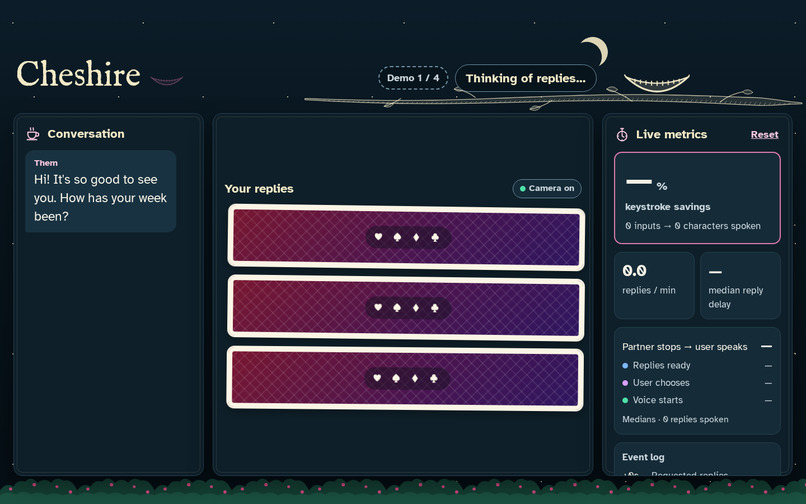
Thinking: the cat vanishes, only the grin remains
-
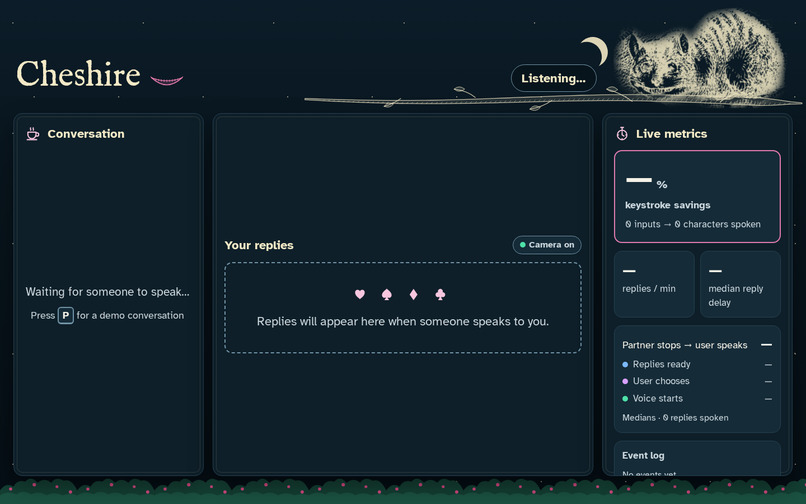
Listening: cat on its branch
-
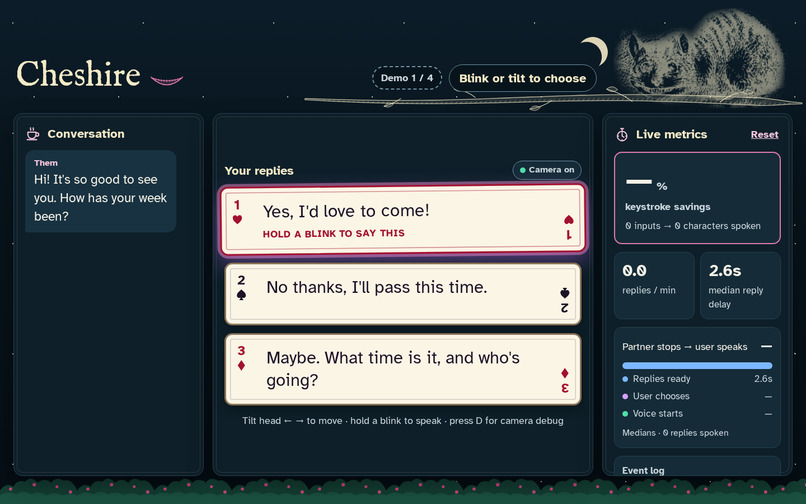
Choosing: everything holds still
-
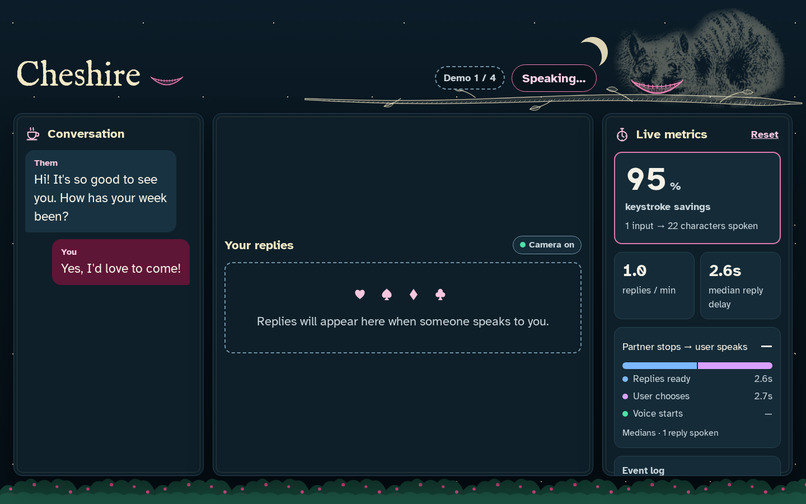
Speaking: the grin turns rose


Cheshire
Reply in your own voice with a blink.
Cheshire listens to the person you're talking to, suggests three full replies, and lets you pick one hands-free: a nod, a head tilt and a blink. It then speaks your choice out loud in your own voice, cloned with ElevenLabs, or in a natural stock voice if you haven't recorded one.
Tracks: Social Impact, Most on Theme
🎥 Demo video: https://youtu.be/StyUeoj7k2c?is=ulmWSzb3fsdFGkzL
🌐 Try it: https://cheshire-wonderland.vercel.app (Chrome, webcam + mic). Replies and voice need a passcode, so ask us at our table.
- Allow the camera and mic. The first reply asks for the passcode once.
- Click the page once before your first blink, so the browser allows audio.
- Press P for a scripted demo conversation, or just talk.
- Nod to turn the cards face up, tilt your head to move between them, and hold a blink to speak.
Built for CutieHacks' theme, Dream x Alice in Wonderland. The page is a moonlit night garden. John Tenniel's 1865 Cheshire Cat (public domain) sits on a branch in the header and acts out what the app is doing. As in the book, it vanishes until only its grin is left while Cheshire thinks of replies. The replies arrive as cards from the Queen of Hearts' deck. The decoration stays behind the panels, never behind text, and holds still while the user is choosing.
The problem
People who lose the ability to speak, from ALS, a stroke or other conditions, often communicate by typing on an AAC (augmentative and alternative communication) device. Typing one letter at a time is slow, and with limited hand movement it's slower still. Spoken conversation doesn't wait. By the time a reply is typed, the topic has moved on, the other person has filled the silence, and the user has been talked over or left out. When the reply does come, it's in a generic synthetic voice that doesn't sound like them.
We wanted conversation to feel like conversation again: fast enough to keep up, with no hands needed, and in the user's own voice.
How it works
- Listen. Chrome's Web Speech API transcribes the conversation partner continuously. Chrome sometimes splits one sentence into pieces, so Cheshire waits for a 0.8 s pause before treating what the partner said as one complete turn.
- Suggest. When the partner finishes a phrase, the last 10 turns go to Claude Opus 5.5, which returns three replies written as the user, in the first person:
- Each reply is under 15 words, so it's quick to read and quick to say.
- The three replies have to contradict each other, not just be worded differently. A yes/no question or an offer gets accept, decline and something else. An open question gets answers that go in different directions, at least one of them less positive. The user always has a real choice.
- The engine is instructed never to invent facts about the user, only to use what was said in the conversation or what's in the user's profile. The demo sends a fictional persona, Alice.
- We run Claude at low effort with a strict JSON schema to keep replies fast. On our eval of 20 scripted conversations, all 20 returned valid reply sets, with a median latency of 1.94 s.
- Choose. MediaPipe's face landmarker runs in the browser on the webcam feed:
- The replies wait face down, like cards from the Queen's deck, until the user nods to say they want to answer. That way an ordinary glance or blink never sends anything, and the user decides whether to reply at all.
- Tilting your head left or right (past 15° for 300 ms) moves the highlight between the three replies.
- Holding a blink for 400 ms speaks the highlighted reply. A normal blink is too short to trigger it, so the user can blink naturally while reading.
- Carers can also use a mouse or touch: "Show replies" stands in for the nod, and clicking a card speaks it.
- Speak. The chosen reply is spoken through ElevenLabs' low-latency Flash model, in a clone of the user's voice when one is set up and a natural stock voice otherwise. Our demo uses a stock voice: ElevenLabs' voice cloning needs a paid plan, and we built this on the free one. Audio for all three options starts loading the moment they appear, so the one the user picks usually plays immediately. If it isn't ready yet, it streams in and starts before synthesis finishes. If the voice service is unreachable, Cheshire falls back to the browser's built-in voice, so the user is never left silent. The mic pauses while Cheshire speaks so it doesn't transcribe itself.
A live metrics panel shows keystroke savings, replies per minute, and how long each stage takes: partner stops → replies ready → user chooses (including the nod) → voice starts.
The interface is built for low vision:
- Reply text is about 31 px.
- All text has at least 7:1 contrast (WCAG AAA).
- All reading text uses Atkinson Hyperlegible. Only the "Cheshire" title uses a storybook font (IM Fell English).
- It respects the system "increase contrast" and "reduce motion" settings.
The result: keystroke savings
We measure keystroke savings rate (KSR) = 1 − inputs ÷ characters spoken, where every nod, head tilt, blink or key press counts as one input. Typing letter by letter is roughly one input per character, a KSR near 0%. On Cheshire, a nod and a blink speak a whole sentence.
Live session KSR: [91-96]% across [20] replies. (placeholder: fill in from the metrics panel)
For reference, our demo conversation's replies are 28 to 60 characters long, averaging 44.7. That works out to:
| Inputs per reply | KSR (average reply) |
|---|---|
| 2 (nod + blink on the first suggestion) | 95.5% |
| 3 (nod + one tilt + blink) | 93.3% |
| 4 (nod + two tilts + blink) | 91.1% |
So even in the worst case, picking the third suggestion takes 4 inputs instead of about 45.
Ethics
Only clone your own voice. Cheshire speaks in a single voice, which the owner configures on the server. The setup asks the user to record 1 to 2 minutes of their own speech, ideally while they still can (voice banking), and create a clone from that recording. There is no feature for cloning anyone else's voice, and the user should never clone a voice that isn't theirs. Without a clone, a stock voice works.
Nothing is stored, and the camera stays on your device.
- Stays on the device: the webcam feed. Face tracking runs entirely in the browser, and the only thing the app uses is the resulting nod, tilt or blink event. No video is sent anywhere.
- Never stored: the transcript exists only in the browser's memory for the current session and is gone on reload. There's no database, and our server logs only timings and errors, never what was said. The one thing the server holds is the audio of the last 200 reply options it voiced, picked or not, in memory only (never on disk), so a repeated line plays instantly. It's cleared whenever the server restarts.
- Sent out to work, and we're upfront about it: Chrome's speech recognition sends microphone audio to Google to transcribe it, the last 10 turns go to Anthropic's API to generate replies, and the text of all three reply options goes to ElevenLabs, so the chosen one can play immediately. API keys stay on our server, never in the browser.
The user stays in control. Nothing is spoken until the user deliberately chooses it, with a held blink, not a passing one. The suggestions are options, not words put in someone's mouth, and the engine is instructed never to invent facts, feelings or plans for the user.
The other person should know. Cheshire transcribes the conversation partner, so the user or a carer should tell people the mic is listening.
Built with
TypeScript · React 19 · Vite · Express · Web Speech API · MediaPipe Tasks Vision (Face Landmarker) · Claude Opus 5.5 (Anthropic API, structured outputs) · ElevenLabs (Flash v2.5 streaming TTS) · Media Source Extensions · Vercel
Built With
- elevenlabs
- express.js
- react
- typescript
- vite


