-
-
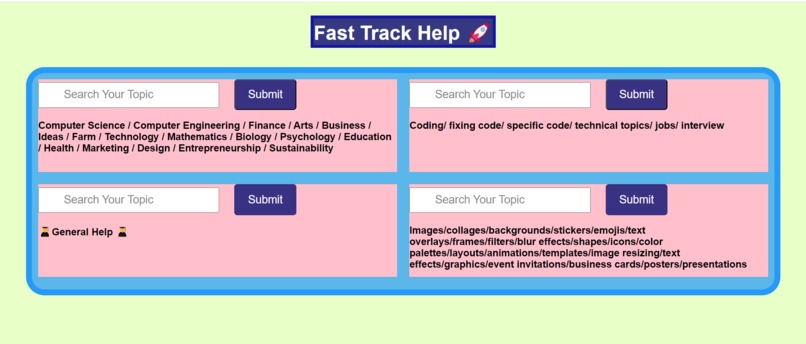
Fast Track Help:Your Go-To Resource for Topics Ranging from Technology & Business to Design & Education. Get Your Assistance in everything

Inspiration
The inspiration for my project, Fast Track Help, stemmed from the need to enhance #AutomationAndProductivity in the online search process. With the overwhelming amount of information available, I aimed to create a tool that simplifies and automates the search experience, allowing users to access relevant websites quickly with just a few keystrokes.
What It Does
Fast Track Help revolutionizes the search experience by automating the process of finding relevant websites. Users simply type a search term or topic, and the tool instantly redirects them to the most pertinent site, significantly boosting productivity. This automation not only saves time and effort but also enhances the overall user experience (UX) by providing a more efficient way to find specific information.
How I Built It
I developed Fast Track Help using HTML, CSS, and JavaScript for the front-end interface. The project integrates with an API that handles search queries and determines the best matching websites. Additionally, I explored the potential of *AI And ML * to refine the search algorithms, ensuring accurate and relevant redirects. This integration enabled me to focus on optimizing the UI/UX aspects of the application, creating a seamless and intuitive user experience.
Challenges I Ran Into
One of the significant challenges was ensuring that the redirects were both accurate and relevant. To address this, I leveraged **AI And ML **techniques to fine-tune the search algorithms, improving the matching process and minimizing incorrect redirects. I also faced technical issues related to API limits, which required optimizing my calls to maintain consistent functionality.
Accomplishments That I'm Proud of
I’m particularly proud of creating a functional and user-friendly application that significantly enhances Automation And Productivity* for users. The seamless redirect feature works effectively, and I successfully implemented a clean, intuitive interface. Additionally, I initiated a #Forum within the project where users can share feedback and discuss ways to further improve the tool, fostering a community-driven approach to development.
What I Learned
This project provided me with invaluable experience in API integration and the application of AI And ML techniques for handling user inputs effectively. I also honed my skills in debugging and optimizing code for better performance. The importance of user feedback became even more apparent, and the **Forum feature allowed me to gather insights directly from users, further refining the application.
Whats Next For Fast Track Help
Looking ahead, I plan to expand Fast Track Help by incorporating personalized search recommendations and voice input support using AI and ML tools **. I will continue to gather user feedback through the **Forum to enhance the application's functionality and usability. My ultimate goal is to make Fast Track Help an indispensable tool for online navigation, showcasing creativity in UI/UX design while driving Automation And Productivity to new heights.
Built With
HTML CSS JavaScript API Integration AI and ML Techniques


Log in or sign up for Devpost to join the conversation.