-
-

Logo
-
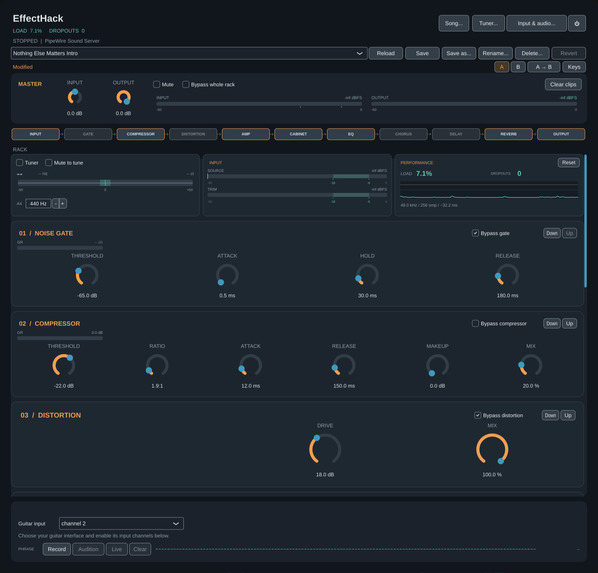
Main program UI
-
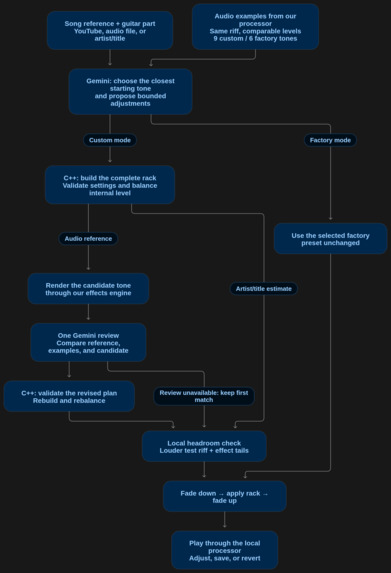
Tone selection algorithm diagram


Inspiration
The inspiration came from playing guitar myself. I previously tried to build a Bluetooth-controlled effects processor, but that project never got very far. This was a chance to return to something I enjoy while making life easier for beginners. I remember being one myself and not knowing what all those knobs did. I wanted to make it easier to sit down with a guitar and get a sound close to the song you want to play, without having to understand every control first.
EffectsHack starts with the song. You provide a YouTube link, get a practical starting tone, and keep control over how it sounds.
What it does
EffectsHack is a standalone guitar effects processor with AI-assisted rack configuration. It can select a factory preset or generate a custom rack configuration for a song, then process a guitar connected through an audio interface.
The rack includes a noise gate, compressor, distortion, amp simulation, cabinet simulation, EQ, chorus, delay, and reverb. Effects can be reordered, bypassed, and adjusted individually. Players can save their tones, revert a generated configuration, and restore their setup on the next launch.
A tuner, input/output meters, and performance indicators help with setup. A built-in test riff and audio-file playback also make the processor usable for experimentation without a guitar connected.
How I built it
The application uses C++20 and JUCE for the desktop interface, audio-device integration, and DSP building blocks. CMake handles the build, libcurl handles HTTPS requests, and versioned JSON stores presets and session settings. The current prototype has been tested on Linux.
In custom mode, the application uses the Gemini API to analyze a public YouTube reference or an uploaded audio excerpt alongside nine example tones rendered by EffectsHack’s own processor. Each example plays the same synthetic guitar phrase at comparable levels, giving the model examples of the sounds the app can produce. Players can choose rhythm, lead, or intro guitar and focus on a particular section. An artist/title input also provides a knowledge-based estimate when reference audio is unavailable.
Gemini returns a structured plan containing a starting tone and bounded adjustments. The C++ application validates the plan, builds the complete rack, and balances its internal level. It then renders a candidate for one further comparison against the recording and checks output headroom before applying the result with a short fade. Master Input and Output remain under the player’s control by default. Live guitar processing runs locally, while AI requests and preparation happen in the background.
Challenges I ran into
The main challenge was getting a guitar. Building a guitar effects processor is all fun and games until you realize you need an actual guitar. Thankfully, another participant, Raffy, lent me his guitar, audio interface, and the other gear needed to put it to the test. Getting the hardware and setting it up turned out to be the biggest challenge of the project.
Then came the sound-check side quests: getting an older Tascam interface working on Linux, dealing with Bluetooth monitoring delay because I only had Bluetooth headphones with me, and figuring out why the audio behaved differently depending on the laptop’s power profile. There were also random drops in volume on high-pitched notes—the kind of surprise effect I definitely hadn’t added to the rack. Comparing dry and processed signals helped narrow down the issue without immediately blaming the effects engine, though the cause wasn’t fully pinned down.
Once everything was connected, there was still the musical challenge: turning descriptions like “tight rhythm” or “bright clean” into settings that actually sounded good. Valid JSON is nice, but listeners get the final vote.
Accomplishments I’m proud of
Honestly, the part I’m most proud of is pasting in a YouTube link, picking up a guitar, and hearing a tone that feels right for the song. Making that experience work felt like a real breakthrough for the project.
The algorithm gives Gemini the reference recording and nine example tones rendered by EffectsHack’s own processor. Gemini selects a starting tone and suggests bounded adjustments, which C++ validates and turns into a complete rack. The app then renders that candidate and sends it back for a second comparison against the recording, allowing Gemini to revise its suggestion. Finally, it balances the internal level, checks headroom, and applies the tone with a short fade. I’m really proud of coming up with this two-pass approach, which uses feedback from the actual effects engine while keeping live guitar processing local and the controls editable.
What I learned
This was my first major project with JUCE. I knew about the framework before but hadn’t had a proper chance to explore it in depth. Building EffectsHack gave me hands-on experience using it to bring audio processing and a desktop interface together.
I also learned to work with Google’s Gemini API, the first LLM API I’ve integrated into a project. It provided a straightforward way to bring an AI model into the application’s workflow, while structured output and local validation helped turn its suggestions into usable settings.
What’s next for EffectsHack
There’s plenty left to do. After all the caffeine-powered late-night coding, the project still has rough edges in performance, UI, and edge-case handling, so polishing those comes first.
I also want to improve the accuracy of effect recognition and parameter estimation. I found some interesting research on estimating guitar effects from isolated recordings, including AutoFX, and I want to explore how a more specialized approach could improve the current audio-based matching.
Building and publishing a Windows version would help bring the project to more players. Beyond that, I want to support custom effects so users can write and share their own implementations, letting the rack’s capabilities grow with the community.

