-
-
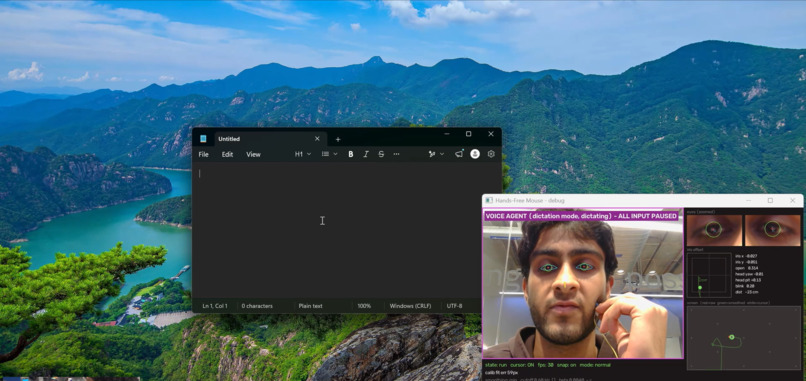
Eye tracking + voice agent + jaw tracking in action

Inspiration
For people with limited hand mobility, from spinal cord injuries, ALS, arthritis or repetitive strain, the mouse and keyboard are barriers. Assistive devices like Augmental's MouthPad inspired us, but dedicated hardware is expensive and hard to get. We wanted to see how far we could get with things most people already have: a webcam, a microphone, and a few dollars of sensor. We also wanted every gesture to stay subtle, with no exaggerated head movements and no wide-open mouth.
What it does
Byte turns three natural signals into full computer control:
- 👀 Look at something, and the cursor goes there. It uses webcam eye tracking with no special hardware.
- 🦷 Tap your teeth to click. A small sensor on the jaw, read by an Arduino, picks up the taps. One tap clicks, two double-click, and three open an action menu (right click, drag/select, scroll, zoom) that you step through with more taps.
- 🗣️ Say "byte" and then a command, like "open Chrome", "search for the weather", "volume to 30", or "write this down: …". Dictation is cleaned up and pasted into whatever text box you're in.
Three features make it usable rather than just a demo:
- Snapping. The cursor locks onto nearby buttons, links, text boxes, and window controls, so webcam-level accuracy is enough to hit small targets.
- Talk-aware clicking. Talking shakes the jaw sensor, so Byte uses Presage SmartSpectra to detect when you're speaking and ignores taps then. The cursor keeps following your eyes.
- Inputs that cooperate. While the voice agent works on a command, the cursor and clicks pause, so nothing moves or clicks away from the text box it's typing into.
How we built it
Eye cursor. MediaPipe FaceLandmarker tracks the face and irises in every webcam frame. We combine where the irises sit in the eyes with head position and tilt, then map that to a screen position using a short 13-point calibration and a regression model. A One Euro filter smooths the result. It keeps the cursor steady when you're looking at one spot and responsive when you move your eyes quickly.
Jaw clicks. An Arduino streams loudness readings from the sensor over USB serial. We compare a fast-moving average of the signal against a slow one, so a sharp tap stands out while steady sounds like humming fade away. Taps close together are grouped into single, double, or triple gestures. Each click lands where you were looking just before the tap, so the small head jolt from tapping doesn't throw it off.
Snapping. A background thread uses Windows UI Automation to check what's under and around your gaze about ten times a second. It locks on when you look near a target for a moment, and only lets go when you deliberately look away. Small jitter doesn't unsnap you.
Talk detection. The Presage SDK only runs on Node.js, so we wrote a small Node bridge. Python sends it webcam frames, and it sends back whether you're talking. If Presage isn't available, we fall back to counting lip movement from the MediaPipe landmarks.
Voice agent. The pipeline starts with wake word spotting (sherpa-onnx) and then local speech-to-text (faster-whisper on the GPU). Common commands run instantly. Everything else goes to Claude, which has a fixed set of safe tools: open apps and sites, press keys, change volume and brightness, and clean up dictation. It also exposes a small local status endpoint, so the eye and jaw app always knows when the agent is busy.
Overlay. The action menu, snap highlight, and zoom view are drawn on a transparent, click-through, always-on-top window that never steals focus.
Challenges we ran into
- The webcam's frame rate broke Presage. At 720p, our laptop camera dropped to about 5 fps and Presage kept failing. Lowering the resolution and automatically restarting the bridge on errors fixed it.
- The sensor's speed varied wildly depending on whether another tool was using the serial port. Our tap detector assumed a steady rate and fell apart, so we rebuilt it to track real elapsed time instead of counting samples.
- Talking looks like tapping to a jaw sensor. That's why talk detection exists, and why it blocks clicks but not the cursor.
- Invisible window buttons. VS Code, Chrome, and Discord draw their own title bars, so Windows doesn't report their minimize, maximize, and close buttons. We work out where those buttons are from each window's frame and the display scaling, and skip any that another window covers.
- The voice agent and the clicker fought each other. During dictation, stray taps clicked out of the text box before the text arrived. We made the agent report when it's busy, and paused the cursor and clicks until it finishes.
- No C++ build tools on Windows meant native Node mouse libraries wouldn't install, so we moved all input control to Python.
Accomplishments that we're proud of
- A complete hands-free loop of point, click, right-click, drag, scroll, zoom, type, and launch, using a webcam, a cheap sensor, and a microphone.
- Gestures that stay subtle: a glance, a quiet tooth tap, a word.
- Three independent input systems with clear rules about who's in control at any moment, so they help each other instead of colliding.
What we learned
- Accuracy isn't only about the model. Interaction design (snapping, aiming at where you looked before the tap, freezing the cursor during a click) mattered more than tuning the regression.
- Real-world sensor data is messy. Tracking time explicitly made the tap detector reliable.
- Accessibility software has to fail safe. Every pause has a timeout, so a crashed component can never leave you frozen.
What's next for Byte
- Using a jaw clench as push-to-talk for the voice agent, instead of the wake word.
- Self-calibrating gaze that keeps improving from the clicks you make.
- A wearable, wireless jaw sensor.
- macOS and Linux support.
- Testing with users who rely on assistive technology and tuning with them.
Built With
- c++
- javascript
- jupyter
- python
