


Let’s be honest: documentation often feels like a tax on development. In my experience, it’s the first thing to get pushed off the list when a deadline is breathing down your neck. It’s treated like a static artifact you create at the very end of a project, not a living, breathing part of the product itself.
That exact mindset is why so much documentation is doomed to fail from the start.
TL;DR
- Documentation drift is costly: Outdated docs slow down onboarding, waste developer time, and frustrate users. The root cause is managing docs outside the development workflow.
- Follow five key stages: A robust software documentation process includes Planning, Authoring, Review, Publishing, and Maintenance. Skipping any stage, especially maintenance, leads to failure.
- Docs-as-Code is the foundation: Treating docs like code by using Git for version control and pull requests for reviews is a massive improvement over traditional methods.
- Continuous documentation is the future: AI-powered automation is the next step, proactively finding and fixing documentation drift to keep docs and code perfectly in sync.
- Measure what matters: Track metrics like “Time to First Hello World” and support ticket reduction to prove the value of your documentation efforts.
Table of Contents
- Why Most Software Documentation Fails
- Breaking Down the Five Stages of Documentation
- Assembling Your Documentation Team
- Moving From Manual Work To Continuous Documentation
- Measuring What Matters for Your Documentation
- Common Questions About the Documentation Process
Why Most Software Documentation Fails
Viewing docs as a final, one-off task is the root cause of what we call documentation drift. This is when your documentation and your code slowly, silently part ways until the docs become not just useless, but actively misleading. One day you have a helpful guide, the next it’s a work of fiction.
This isn’t just a minor annoyance; it has a real, measurable impact on the business. The hidden costs pile up fast:
- Slower Onboarding: New engineers spend weeks trying to decipher a codebase instead of minutes reading a clear guide.
- Wasted Developer Time: Senior engineers get pulled from critical work to answer the same questions over and over again.
- More Support Tickets: Frustrated users create tickets for problems good documentation would have solved.
- Poor Product Adoption: If people can’t figure out how to use your product, they’ll simply go somewhere else.
The problem is systemic. A recent study highlighted that a staggering 47% of employees have wasted significant time struggling with outdated documents. Even worse, 56% find that trying to review changes from multiple contributors is a major headache. You can read more about these software documentation trends if you want to dig in, but the takeaway is clear. These aren’t just small frustrations; they’re massive drains on productivity and morale.
“The core issue is that documentation is almost always managed outside of the actual development workflow. When your docs live in a separate world from your code, they are absolutely guaranteed to fall out of sync.”
This fundamental disconnect is why a formal software documentation process is so critical. This isn’t about adding bureaucracy or slowing things down. It’s about weaving documentation into the fabric of your engineering culture so that it evolves right alongside your code.
By defining clear stages, roles, and workflows, you can transform documentation from a liability into a strategic asset that actually speeds your team up and makes your users happy. Ensuring consistent quality through this entire lifecycle is essential, which is why having a solid plan for documentation quality assurance is completely non-negotiable for any high-performing team.
Breaking Down the Five Stages of Documentation
A solid software documentation process isn’t a one-and-done task; it’s a living cycle. I find it helps to think of it like the software it describes. Framing it as a lifecycle transforms documentation from a dreaded chore into a predictable, manageable part of development. This approach neatly breaks down the work into five distinct stages, making sure nothing slips through the cracks.
The five core stages are Planning, Authoring, Review, Publishing, and Maintenance. Each stage builds on the one before it, creating a structured flow that prevents the kind of chaos that gives documentation a bad name.
This structured flow is non-negotiable. When the process breaks down especially at the maintenance stage it kicks off a predictable chain of failure that hemorrhages engineering time and leaves users completely frustrated.

As you can see, it doesn’t take long for outdated docs to spiral into confusion and lost productivity. That’s why getting the process right from the very beginning is so critical.
Stage 1: Planning and Strategy
Before you write a single word, you need a game plan. This stage is all about asking the right questions to nail down the “what” and “why” of your documentation. Skipping this step is like coding without a spec you might build something, but it probably won’t be what anyone actually needs.
The absolute most important part of planning is defining your audience. Are you writing for a senior backend engineer, a new frontend dev, or a non-technical product manager? Each one comes with a different set of needs and a completely different level of assumed knowledge.
Your planning phase should deliver clear answers to these questions:
- Who is the audience? (e.g., internal developers, external API consumers)
- What are their goals? (e.g., integrate an API, set up a local environment, understand a feature)
- What format is best? (e.g., tutorials, API reference, conceptual guides)
- What is the scope? (e.g., documenting a single endpoint vs. an entire microservice)
Stage 2: Authoring the Content
With a solid plan in place, the authoring stage becomes much more focused. This is where the rubber meets the road—the actual work of translating raw technical knowledge into clear, helpful information.
In my experience, the biggest challenge here is consistency. When you have multiple authors, you often end up with wildly different styles, tones, and terminology, which only confuses readers. This is where a simple style guide and a few templates can be a total game-changer. You don’t need a massive rulebook; just agreeing on a few basics makes a world of difference.
Key activities during this stage usually include:
- Gathering Information: Interviewing subject matter experts (SMEs) typically the engineers who built the feature.
- Drafting the Content: Writing the first version based on your plan, with a laser focus on clarity and accuracy.
- Using Templates: Applying pre-defined structures for consistency across READMEs, API guides, and tutorials.
- Adding Visuals: Creating diagrams, screenshots, or code snippets to demystify complex points.
Stage 3: Review and Collaboration
No document should ever go live without a thorough review. Think of this stage as quality control, designed to catch everything from technical inaccuracies to embarrassing typos. A good review process always involves a few different perspectives.
I’ve found it’s best to split reviews into two types:
- Technical Review: An engineer or SME gets their eyes on it to verify that all the information is accurate, the code examples actually work, and the steps are correct.
- Editorial Review: A technical writer or a peer checks for clarity, grammar, style, and tone. This makes sure the content is genuinely easy for the target audience to understand.
Using a “Docs-as-Code” approach makes this process incredibly efficient. When your documentation lives in Git, you can use pull requests for reviews, just like with your source code. Reviewers can drop comments directly on the changes, which creates a transparent and collaborative workflow.
Stage 4: Publishing and Deployment
Once a document is authored and reviewed, it needs to be published where people can actually find it. This stage is what connects your documentation efforts to your live product. For modern teams, this is often baked right into the CI/CD pipeline.
The idea is simple: when a pull request with documentation changes gets merged, an automated job builds and deploys the docs site. This ensures that documentation updates are released in lockstep with code changes. It also handles versioning, so users can always find the docs that are relevant to the specific version of the software they’re using.
Stage 5: Maintenance and Improvement
This is the most critical and, sadly, the most neglected stage of the entire documentation process. Code is always changing, which means every piece of documentation has an expiration date. Maintenance isn’t an afterthought; it is the core loop of the process.
A proactive maintenance strategy includes a few key habits:
- Regular Audits: Periodically reviewing documentation to check for accuracy and relevance.
- User Feedback Channels: Making it dead simple for readers to report issues or suggest improvements.
- Integrating Updates into Workflows: Requiring documentation updates as part of the “definition of done” for any new feature or bug fix.
Looking at some essential process documentation examples can give you practical ideas for how different teams manage these stages. The ultimate goal is to make maintenance a continuous, low-friction activity instead of a massive, painful cleanup project you have to tackle every six months.
Assembling Your Documentation Team
Great documentation isn’t a solo act; it’s a team sport. I’ve seen it time and again: when roles aren’t clear, docs become an orphan project that nobody really owns. A solid software documentation process depends on everyone knowing their part and collaborating smoothly.
Think of it like a relay race. Each person has a specific job, but the whole thing falls apart if the handoffs aren’t clean. One dropped baton, and the entire team loses momentum. Let’s break down the key players and the positions they play on the field.

Key Roles and Their Responsibilities
Defining these roles isn’t just about bureaucracy. It establishes a clear chain of ownership and ensures every part of the documentation gets the attention it deserves.
Software Engineers: The Source of Truth
Engineers are the subject matter experts. They hold the raw, technical knowledge about how a system works, why certain design decisions were made, and what the code is actually doing. Their main job is to provide that initial, accurate technical detail this could be a rough draft, a few bullet points in a pull request, or even just solid code comments. They are the first link in the documentation chain.Technical Writers: The Storytellers
Technical writers (or a developer wearing that hat) are translators. They take complex technical information and shape it into clear, accessible content that a user can actually follow. They’re the ones thinking about the audience, structuring the content logically, and keeping the tone and style consistent. They build the bridge between the code and the person trying to use it.Product Managers: The User’s Advocate
Product managers own the “why.” They have the deepest insight into user goals, pain points, and the journey they take with the product. In the documentation process, they champion the user’s perspective, making sure the content answers the right questions and solves real-world problems. Their feedback is what makes documentation genuinely helpful, not just technically correct.DevOps Engineers: The Process Enablers
DevOps engineers are the architects of the documentation pipeline. They set up the tools and automation that make the whole process tick. This means integrating docs into the CI/CD pipeline, handling versioning, and ensuring the final docs site is always up and running. They’re the ones who make sure the baton passes seamlessly from one person to the next.
Establishing Clear Ownership with a RACI Chart
To turn this collaborative spirit into a concrete plan, a RACI (Responsible, Accountable, Consulted, Informed) chart is an incredibly powerful tool. It cuts through the ambiguity and spells out exactly who does what for each documentation task.
A RACI chart forces you to have the conversation about ownership upfront. It moves you from “I thought someone else was handling that” to a clear, shared understanding of responsibilities.
Here’s a simple template your team can adapt to get started.
| Task / Deliverable | Software Engineer | Technical Writer | Product Manager | DevOps Engineer |
|---|---|---|---|---|
| Drafting Initial Technical Content | Responsible | Consulted | Consulted | Informed |
| Reviewing for Technical Accuracy | Accountable | Responsible | Consulted | Informed |
| Editing for Clarity & Style | Consulted | Accountable | Consulted | Informed |
| Approving Final Content | Consulted | Accountable | Responsible | Informed |
| Automating Doc Deployment | Informed | Informed | Informed | Accountable |
By defining these roles and using a simple framework like RACI, you create a system where documentation is a shared responsibility, not an afterthought. This collaborative foundation is essential for building and maintaining documentation that people will actually want to use.
Moving From Manual Work To Continuous Documentation
For years, the gold standard for managing technical documentation has been the Docs-as-Code philosophy. It was a massive step up from the old days of wikis and shared documents. The idea was simple but powerful: treat your documentation with the same discipline you apply to your source code.
This meant storing documentation usually as Markdown files right inside your Git repositories.
That single change brought documentation into the development lifecycle for the first time.
- Version Control: Your docs are now versioned right alongside the code they describe. No more guessing which version of the guide matches which feature release.
- Pull Requests: Changes to docs go through the same review process as code. This lets engineers and writers collaborate, providing technical and editorial feedback all in one place.
- CI/CD Integration: The publishing process can be kicked off automatically, deploying fresh docs every time code is merged.
This workflow solved a ton of the collaboration and versioning headaches that plagued older methods. But in my experience, it still leaves one critical gap. Docs-as-Code gives you a better process for making manual updates, but it doesn’t fix the core problem of documentation drift.
At the end of the day, a developer still has to remember to go and update the docs, and a reviewer has to have the context to catch any inaccuracies. That’s a big ask in a fast-moving team.
DeveloperHub: Interactive Documentation Made Easy
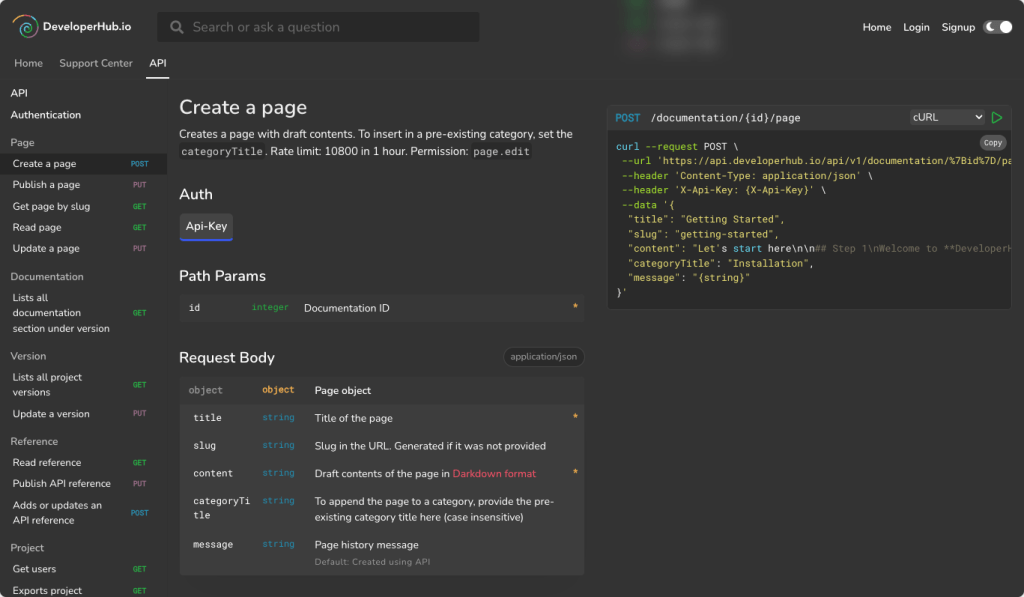
While Docs-as-Code handles workflow and versioning, platforms like DeveloperHub provide a central hub for hosting and interacting with your documentation. DeveloperHub makes it easy for your team to:
- Test API endpoints directly in the docs without switching tools.
- Organize guides, tutorials, and references in one place.
- Collaborate efficiently, with built-in review features for both technical and editorial checks.
- Keep docs up-to-date alongside your code, complementing automated drift tools like DeepDocs.
Think of DeveloperHub as the bridge between your living documentation and the developers using it, giving everyone a clear, interactive, and reliable experience.
The Next Evolution: Continuous Documentation
This is where the next stage of the software documentation process comes in: continuous documentation. This isn’t just a new name for Docs-as-Code; it’s about adding a layer of smart automation that proactively finds and fixes documentation drift before a human even has to think about it.
If Docs-as-Code is like giving your team a better set of wrenches, continuous documentation is the robotic arm that picks up the right wrench and uses it for you. It closes that final, painful loop in the maintenance stage by automating the detection and correction of stale content.
And the market’s hunger for this level of automation is impossible to ignore. The global process documentation software market was valued at around USD 1.5 billion in 2023 and is projected to hit USD 3.8 billion by 2032. This growth shows the immense pressure on teams to find smarter, more automated ways to handle their documentation.
How Continuous Documentation Works In Practice
Continuous documentation is powered by tools that plug directly into your CI/CD pipeline. These systems act like intelligent agents, constantly watching your codebase for changes that could make your docs obsolete.
Here’s how it fits into a workflow you already know:
- A Developer Pushes Code: A developer commits a change maybe they rename a function, add a new parameter to an API, or tweak an environment variable.
- The CI Pipeline Triggers: As part of the usual CI run, the continuous documentation tool is activated.
- The Tool Scans for Drift: The tool analyzes the code changes and cross-references them with your existing documentation. It actually understands the relationship between your code and your words.
- Updates are Automatically Generated: If it spots a mismatch, the tool doesn’t just flag it. It automatically generates the exact changes needed to bring the documentation back in sync.
- A Pull Request is Created: The tool then opens a new pull request with the suggested documentation updates, ready for a quick human review before merging.
This visual shows how an automated system can fit neatly into a standard Git workflow, making documentation updates a seamless part of every single code change.

This workflow turns maintenance from a reactive, manual chore that everyone puts off into a proactive, automated process. Docs and code never even get the chance to drift apart.
Bringing AI Into The Documentation Process
This is exactly where AI documentation tools like DeepDocs come into play. DeepDocs acts as an AI agent inside your GitHub workflow, designed specifically to solve the drift problem by performing deep scans of your entire repository on every commit.
Unlike generic AI coding assistants that need you to manually prompt them and point them to the right files, DeepDocs works on its own. It intelligently figures out which documentation files are affected by a code change and then makes precise edits, carefully preserving your original formatting and style.
The real power here is moving from a prompt-based workflow to an autonomous one. You don’t have to tell the tool what to do; it already knows what to look for, turning documentation maintenance into a background task you can actually trust.
This proactive approach makes the entire software documentation process more reliable and way less of a burden. Instead of depending on human memory to keep things updated, you have an automated system guaranteeing accuracy around the clock. By finally closing this loop, you can reach a state where your documentation is always an accurate, trustworthy reflection of your code.
If you want to dive deeper, you can learn more about how to set up automated software documentation in your own projects.
Measuring What Matters for Your Documentation
Establishing a solid software documentation process is a huge win, but the work doesn’t stop there. How do you actually prove it’s making a difference? Without a way to measure success, even the best process can feel like a shot in the dark.
In my experience, treating documentation like any other product feature is the key. It needs goals, metrics, and a way to demonstrate its value to the business. You need to shift from “we wrote some docs” to “our docs reduced onboarding time by 20%.”
Key Metrics to Track
Vague goals lead to vague results. Instead of just aiming for “better docs,” you should focus on tracking specific, actionable metrics that tie directly to business outcomes. A critical step in refining your documentation strategy involves learning how to measure SOP process documentation effectiveness to truly understand its impact.
Here are a few metrics that I’ve found provide the most signal:
Time to First “Hello World” (TTFHW): This is a powerful metric for measuring the effectiveness of your onboarding and getting-started guides. Track how long it takes a new engineer to get a local development environment set up and running a basic command. A shrinking TTFHW is a clear sign your docs are working.
Reduction in Specific Support Tickets: Work with your support team to categorize incoming tickets. If you see a high volume of questions about a particular feature, like setting up integrations, make a targeted effort to improve that section of the documentation. The goal is a measurable drop in tickets related to that topic.
Documentation Coverage Score: While it’s not a perfect metric, a coverage score can be a useful internal benchmark. You can define this in a few ways, such as the percentage of public functions or API endpoints that have corresponding documentation. This helps you spot gaps and prioritize where to focus your efforts.
User Satisfaction Ratings: Add a simple “Was this page helpful?” widget to the bottom of your documentation pages. While it’s qualitative, this direct feedback is invaluable for identifying which pages are hitting the mark and which ones are causing confusion.
Choosing the right metrics is about connecting the dots between your documentation efforts and what the business actually cares about. Here’s a quick breakdown of how these metrics translate into real-world value.
Key Documentation Metrics and Their Business Impact
| Metric to Track | How to Measure | Business Impact |
|---|---|---|
| Time to First “Hello World” | Time tracking for new hires from day one until their first successful build. | Faster developer onboarding means new engineers become productive sooner, accelerating feature delivery. |
| Support Ticket Reduction | Analyze support ticket data (e.g., in Zendesk or Jira) for topics with improved docs. Look for a percentage decrease over time. | Fewer repetitive support tickets free up your support team to handle more complex issues, lowering operational costs. |
| Documentation Coverage | Automated scripts that count documented functions/APIs vs. total. Set a baseline and track improvements. | Higher coverage reduces institutional knowledge gaps and makes the codebase easier for everyone to maintain and build upon. |
| User Satisfaction | Simple “Yes/No” or 1-5 star rating widgets on documentation pages, coupled with an optional comment field. | Direct feedback helps you prioritize doc improvements that matter most to users, leading to higher product adoption and satisfaction. |
Ultimately, the goal is to tell a story with data. Showing a graph where support tickets for “API Authentication” dropped by 40% after a doc overhaul is far more compelling than just saying the docs are “better.”
Establishing a Governance Policy
Metrics tell you how you’re doing, but a governance policy ensures your process is repeatable and lasts over time. It’s a simple set of rules that keeps everyone aligned and maintains quality. You don’t need a 50-page document; a few clear guidelines in your repository’s CONTRIBUTING.md file can make a world of difference.
Your governance policy is the constitution for your documentation. It sets the ground rules, defines standards, and ensures that documentation remains a first-class citizen in your development workflow.
Here is a simple template you can adapt:
- Style and Tone: All documentation should follow the Microsoft Writing Style Guide. Use active voice and keep sentences short.
- Requirements for New Features: Every pull request that introduces a user-facing change must include corresponding documentation updates. PRs without doc changes will not be merged.
- Process for Deprecation: When a feature is deprecated, its documentation must be updated with a clear deprecation notice and a link to its replacement. Once the feature is fully removed, the old documentation must be archived.
- Ownership and Review: The engineer who writes the code is responsible for the initial doc draft. A peer from another team must review it for clarity before it can be merged.
By combining clear metrics with a lightweight governance policy, you can build a software documentation process that not only works but also proves its value day in and day out.
Common Questions About the Documentation Process
Even with a solid plan, getting a new software documentation process off the ground has its own set of challenges. Over the years, I’ve seen teams stumble over the same hurdles time and time again.
This section gets right to the point, tackling the most common questions I hear. The goal is to give you clear, practical answers to help you navigate these sticking points and build a documentation culture that actually works.
How Do We Start With No Technical Writers?
This is easily the most common question I get, especially from startups and smaller teams. The answer is simple: start small and focus on impact. Please don’t try to document your entire codebase in a week.
The best first step is to adopt a Docs-as-Code approach. Create a /docs directory in your main repository and start with simple Markdown files. If you do only one thing, make documentation a required part of your pull request template for any change that a user will see. It’s the single most effective habit you can build.
Then, assign clear ownership. Even if it’s just the developer who wrote the code, someone has to be responsible for that first draft.
To keep things from getting messy, create a few basic templates for common documents:
- READMEs: A standard structure covering what the project is, how to set it up, and how to run tests.
- API Endpoints: A simple template detailing the endpoint, required parameters, and an example response.
- Feature Guides: A short format explaining what a new feature does and how to use it.
The real key here is building the habit of documenting as you code, not weeks after the fact. The cultural shift is the most important part. The fancy tools can come later.
What Is The Biggest Mistake Teams Make?
The single biggest mistake I see is treating documentation as a one-time task that’s “done” when a project ships. Code is never static, so your documentation can’t be either.
This “write it and forget it” mindset is the direct cause of documentation drift. It quickly erodes user trust and makes your docs worse than useless they become actively misleading. I’ve seen beautifully written launch-day documentation become a liability just six months later because nobody was tasked with keeping it alive.
A successful software documentation process is cyclical and continuous, not linear. It has to be woven into the development lifecycle, with maintenance planned from day one.
Without a process for ongoing updates, even the most amazing initial documentation will eventually fail. It’s not a project; it’s a living part of your product.
How Can AI Help Without Replacing Our Voice?
This is a real concern. Nobody wants their carefully crafted, human-friendly guides replaced by generic, robotic text. The good news is that modern AI documentation tools are designed to be assistants, not authors.
The best tools focus on the most soul-crushing part of the process: maintenance and accuracy. They aren’t meant for staring at a blank page and creating content from scratch.
Instead, they work by intelligently updating only the specific parts of your documentation that have drifted from the source code. For instance:
- A parameter name changes in an API reference.
- An environment variable is renamed in a setup guide.
- A code snippet in a tutorial is now out-of-date.
A good AI tool can spot these mismatches and generate a precise fix. This approach preserves your original formatting, style, structure, and most importantly, your team’s unique voice. The AI just handles the tedious job of keeping the facts straight, freeing up your developers and writers to focus on creating clear, helpful explanations that no machine could ever replicate.
Should Documentation Live In The Same Repo As Code?
For most developer-facing documentation like API references, SDK guides, and READMEs the answer is a resounding yes.
Keeping your docs in the same repository as the code they describe is the bedrock of a modern documentation process. This is the core idea behind Docs-as-Code, and the benefits are massive:
- Synced Versioning: You can version your docs and code together. When you check out an older branch, you get the docs that correspond to that exact version of the code. No more guesswork.
- Unified Review Workflow: You use the same pull request workflow for both code and doc changes. Engineers can review for technical accuracy while writers check for clarity, all in one place.
- Simplified Automation: It becomes dead simple to set up CI/CD jobs that automatically build and deploy your docs site whenever a change is merged.
When a single pull request contains both the code change and the matching doc update, it’s exponentially easier to keep them in sync. This tight coupling is your best defense against documentation drift.
Now, for less technical content like marketing-focused product overviews, a separate system might make more sense. But for anything a developer needs to build with your software, keeping it all together is the way to go.
How Much Documentation Is Enough?
There’s no magic number, and “document everything” is just terrible advice. The goal isn’t to create the most documentation; it’s to create the most effective documentation. You should focus your energy on a simple mission: resolving friction points.
A great place to start is to prioritize documentation for areas that are:
- Critical: Core functionalities that most of your users will touch.
- Complex: Parts of the system that aren’t intuitive or have a steep learning curve.
- Frequently Asked About: Any topic that keeps popping up in Slack or support tickets is screaming for better documentation.
In my experience, a case study on software documentation practices found that starting with high-level architectural diagrams and process flows provides the biggest initial impact. These artifacts help everyone from new hires to seasoned vets understand how all the pieces fit together.
From there, you can add more detail where it’s needed most. And if your team tells you a particular document isn’t useful, listen to them. Be ruthless about cutting ineffective docs and refocusing that energy on areas that will actually make a developer’s life easier.
Keeping your documentation accurate and trustworthy shouldn’t be a constant battle. At DeepDocs, we built an AI agent that plugs directly into your GitHub workflow, automatically detecting and fixing outdated documentation on every commit. It makes the maintenance stage of your software documentation process completely seamless.
Get started for free and see how DeepDocs can keep your docs in sync with your code.
Leave a Reply