


You usually know the project is in trouble before anyone says it out loud. A new engineer asks how a service works, and the answer is a Slack thread, a stale diagram, and “read the code.” A dependency breaks in production, and nobody can tell whether the current behavior was intentional or accidental.
That’s when the software design document earns its keep.
A good software design document format gives teams a durable place to record architecture, interfaces, assumptions, constraints, and design trade-offs. It shortens handoffs, improves reviews, and stops important decisions from disappearing into PR comments.
Key takeaways
- A software design document is about the how, not the product vision or business case.
- The format is stable and well-established, with roots in IEEE 1016.
- Strong SDDs use named sections, not free-form prose. Atlassian highlights 8 key components in a modern structure in its software design document guide.
- The document has to live with the code, or it becomes fiction.
- Review discipline matters as much as the template. A weak review process produces polished but useless docs.
Table of Contents
- What a Software Design Document Is and Is Not
- The Core Software Design Document Template
- Optional Sections for Advanced Scenarios
- Formatting and Version Control Best Practices
- A Checklist for Effective SDD Reviews
- Bridging the Gap Between Docs and Code
- Practical SDD Snippets and Examples
What a Software Design Document Is and Is Not
A software design document exists for the moment implementation stops being obvious.
One team member is adding a feature, another is reviewing a risky change, and someone else is on call trying to understand why a dependency behaves the way it does. The SDD gives all three the same reference point. It records structure, interfaces, constraints, failure modes, and the design choices that shaped the system.

A good SDD is an engineering document. It explains how the system should work closely enough that a reviewer can challenge the design before the code hardens it into reality. It also gives future maintainers context they will not get from reading handlers, schemas, and Terraform in isolation.
That scope matters. Product requirements define what the business wants. Roadmaps define sequencing. Project updates track status. The SDD covers design mechanics: component boundaries, data flow, interfaces, assumptions, trade-offs, and operational concerns.
What teams use it for
The audience is wider than the authoring team.
- New engineers use it to build a correct mental model before they change production code.
- Reviewers use it to assess risks, edge cases, and alternatives before approval.
- Maintainers use it to understand why the system looks the way it does months later.
- Managers and adjacent teams use it to spot dependencies, rollout concerns, and ownership gaps.
The format has formal roots. IEEE 1016 established a shared structure for documenting software design, including architecture, interfaces, components, and traceability. That history matters because strong SDDs tend to converge on the same shape. Teams can start from proven software documentation templates rather than inventing a format from scratch every time.
Where teams go wrong
I have seen design docs fail in predictable ways.
- They become a copy of the requirements doc. That adds volume, not clarity.
- They freeze after the first draft. Then the code changes, the doc does not, and reviewers stop trusting it.
- They read like essays. If readers cannot scan for interfaces, dependencies, and decisions, the document is too loose.
- They pretend every detail is final. Good design docs leave room for implementation learning while still naming the decisions that need review.
The useful standard is simple: a reviewer should be able to read the SDD, understand the proposed design, and ask better questions before opening the code.
That is also the difference between a template and a workflow. A template gives the team sections to fill in. A working process keeps those sections current through review checklists, version control, and doc updates tied to code changes. Without that second part, the document becomes polished fiction.
The Core Software Design Document Template
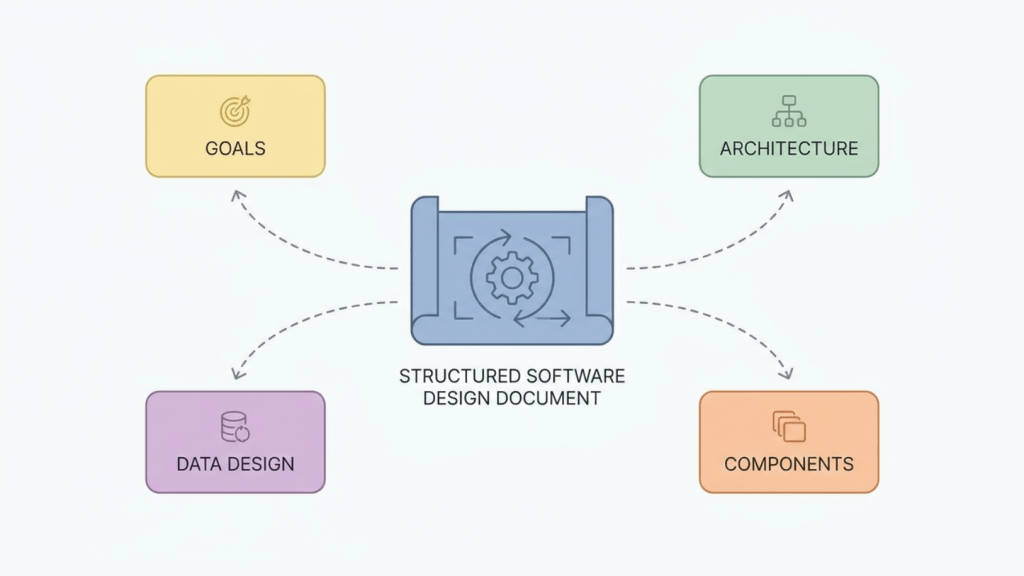
A useful SDD should let a reviewer answer three questions quickly: what is being built, how it works, and where the risk sits. If those answers are buried in prose, the format is failing.
Use a standard shape and keep it boring. Teams get more value from a repeatable structure than from a custom document style every project. If you want a starting point your team can reuse across systems, keep a small library of software documentation templates in your engineering docs repo and adapt them to fit the scope.
The core template below covers the sections that earn their keep on most projects. It is also built to support the rest of the workflow in this guide: review checklists, version control, and updates tied to code changes so the doc stays useful after the first approval.
Introduction and goals
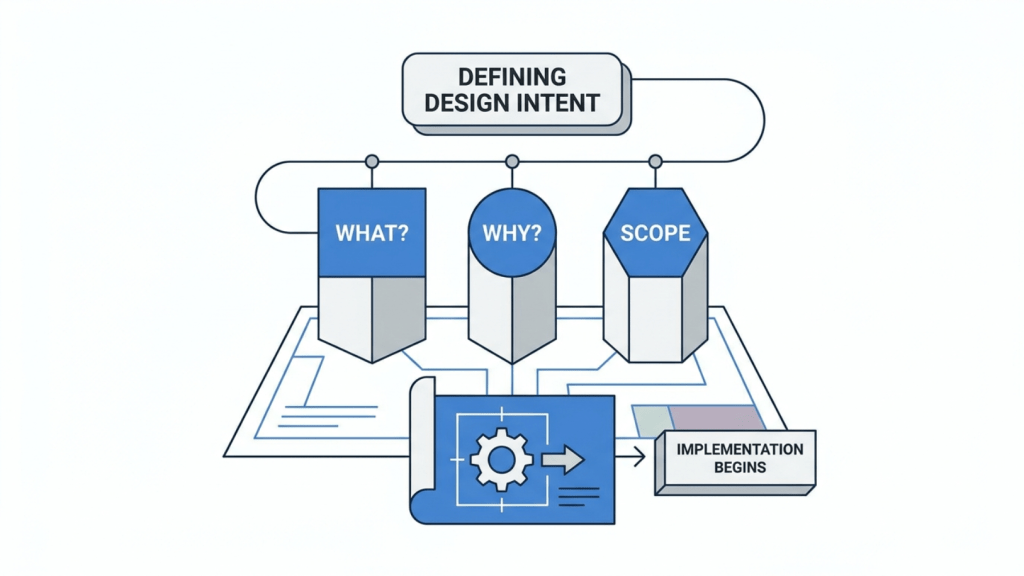
Readers should understand the problem in under a minute. If the opening reads like a product brief or a status update, trim it.
Purpose
State the system or change being designed, the problem it solves, and the boundaries of the document.
What to include
- Problem statement describing the engineering need
- Goals the design must satisfy
- Non-goals that stop scope creep
- Intended audience for the document
- Links to related requirements and upstream docs
Questions this should answer
- What are we designing?
- Why does this design exist?
- What is intentionally out of scope?
Micro-example
“Design for the event ingestion service that accepts partner webhooks, validates payloads, persists accepted events, and forwards normalized messages to downstream workers. This document excludes analytics dashboards and billing reconciliation.”

System overview and architecture
This section gives readers the mental model they need before they inspect modules or APIs. Keep it high enough to show boundaries and flow, but concrete enough that ownership is obvious.
Purpose
Show the major parts of the system and how requests, events, or jobs move through them.
What to include
- Context diagram showing the system and external actors
- Major components and their responsibilities
- Data flow across services, queues, stores, and clients
- Runtime behavior for important paths
- Failure boundaries and fallback behavior
Questions this should answer
- Where does a request enter?
- Which component owns each responsibility?
- What happens when a dependency is unavailable?
Micro-example
“Requests arrive through the API gateway, pass to the ingestion service for schema validation, then move to the normalization worker through a queue. The persistence layer stores the raw payload before transformation to preserve replay capability.”
A good architecture section lowers review friction. Engineers can spot bad coupling, missing boundaries, and shaky assumptions before those problems harden into code.
Data design

Teams often spend pages on request handlers and give the data model a paragraph. That trade-off usually ages badly because schemas, contracts, and retention rules last longer than controller code.
Purpose
Describe what gets stored, transformed, indexed, or emitted.
What to include
- Core entities and relationships
- Schema decisions and naming conventions
- Retention rules where relevant
- Migration concerns
- Serialization formats for messages or APIs
Questions this should answer
- What is the source of truth?
- Which fields are required, derived, or mutable?
- How will schema changes be introduced safely?
Micro-example
“Raw events are stored with original headers and payload for replay. Normalized events add a canonical event type and partner identifier. The normalized record is append-only.”
Component and module design
The design starts paying off for the engineers who will build and maintain it. The goal is not to document every class. The goal is to make responsibility boundaries hard to misread.
Purpose
Explain how internal modules are divided so engineers know where logic belongs.
What to include
- Module boundaries
- Responsibility per package or service
- Key classes, workers, or jobs
- Concurrency or state management behavior
- Build or organization notes if repo structure matters
Questions this should answer
- Which module owns validation?
- Where does orchestration end and business logic begin?
- What should a new engineer avoid coupling together?
Micro-example
“ingest/api handles transport concerns only. ingest/domain owns validation and normalization rules. ingest/store persists raw and normalized events. Queue publishing is isolated in ingest/events.”
Interface design
Loose interface sections create expensive misunderstandings. Precision matters here because teams discover whether a design is implementable across service boundaries.
Purpose
Document how components talk to users, systems, and each other.
What to include
- API endpoints and request and response shapes
- Event contracts
- UI flows when relevant
- Authentication and authorization rules
- Error behavior and compatibility expectations
Questions this should answer
- What does a caller send?
- What does the system return or publish?
- Which parts of the interface are stable, and which are likely to change?
Micro-example
“POST /v1/events accepts a signed JSON payload. On successful validation, the service returns an accepted status and a request identifier. Invalid signatures return an authorization error without persisting the body.”
Assumptions and constraints
Every design is shaped by things the team cannot change, at least not in this project. Write those down. Hidden constraints are a common reason design reviews feel easy and implementation feels painful.
Purpose
Expose the conditions under which the design remains valid.
What to include
- External dependencies
- Operational constraints
- Compliance or platform constraints
- Known assumptions
- Capacity or environment limits, stated qualitatively unless verified data exists
Questions this should answer
- What has to remain true for this design to work?
- Which external systems could force redesign?
- What constraints shaped the current trade-offs?
Micro-example
“The service assumes partner payload schemas remain versioned and discoverable. It must run inside the existing Kubernetes environment and use the organization’s standard identity provider.”
Traceability, testing, and maintenance
This section is where a template becomes part of a working process instead of a one-time artifact. It ties the proposed design to implementation, validation, and ownership so the document can keep pace with code.
Purpose
Connect design decisions to requirements, test coverage, and long-term maintenance.
What to include
- Requirement mapping from source requirements to components
- Test strategy for critical paths and failure cases
- Operational ownership
- Change history
- Maintenance notes for upgrades, migrations, or deprecations
Formal SDD templates have long treated traceability as part of the design, not extra paperwork. That is the right instinct. If the team cannot map a decision to code, tests, and owners, the doc will drift the first time the implementation changes.
Optional Sections for Advanced Scenarios
A thin SDD is better than a bloated one. But some projects need more than the core template. The trick is adding sections because the system demands them, not because a template generator did.
Security considerations
Include this when the system handles sensitive data, privileged actions, or exposed attack surfaces.
Write down trust boundaries, auth flows, secret handling, and abuse cases. If your design crosses service boundaries with higher permissions, this section isn’t optional in practice even if your template labels it that way.
Deployment and operational concerns
Include this when rollout strategy can break the system.
This section matters for migrations, backward compatibility windows, feature flags, blue-green deploys, queue consumers, and services that depend on ordering or replay. A lot of “design” failures are really deployment failures that nobody documented.
Failure modes and recovery
Include this when failure behavior is part of correctness.
For event-driven systems, distributed jobs, or anything async, document retries, dead-letter handling, idempotency, and partial-failure behavior. If operators need tribal knowledge to recover the system, the document is incomplete.
The teams that say “we’ll handle ops details later” usually end up debugging architecture problems during rollout.
Glossary and references
Include this when the project spans multiple teams or specialized domain terms.
A glossary feels boring until five teams use the same term differently. Then it becomes one of the most valuable pages in the whole document set.
Decision log
Include this when there were real trade-offs.
If you considered multiple storage models, queueing approaches, or service boundaries, write down what you rejected and why. That prevents the same debate from restarting every quarter.
Formatting and Version Control Best Practices
A good software design document format is also easy to update. That’s why I prefer docs-as-code almost every time.
Store the SDD in the same repository as the code when possible, usually under /docs or near the service it describes. Markdown is the practical default because it’s readable in GitHub, easy to diff, and doesn’t punish engineers for making small updates.
Conventions worth adopting
- Keep one canonical file per major design. Don’t split a small design into a maze of subpages.
- Add revision history near the top with date, author, and summary.
- Use pull requests for doc changes so architecture edits get reviewed like code.
- Link to implementation artifacts such as repo paths, API specs, and diagrams stored in version control.
- Archive superseded docs clearly instead of letting them linger as “final_v2_latest.”
A simple revision table works well:
| Version | Change | Author |
|---|---|---|
| v1 | Initial design | Team |
| v2 | Updated interface contract | Team |
| v3 | Added rollout notes | Team |
Teams that care about writing quality across engineering artifacts often borrow lightweight editorial discipline from other domains. If you want a concise style reference for clearer announcements and structured communication, this guide on writing AP style press releases is a surprisingly useful example of how format improves readability.
For the mechanics of keeping documentation changes visible in Git workflows, a dedicated guide to documentation version control is worth adding to your internal handbook.
A Checklist for Effective SDD Reviews
Most design docs don’t fail because the author forgot a heading. They fail because reviewers accept vagueness. A strong review looks for missing reasoning, unclear ownership, and hidden risk.

Questions that catch weak design docs
- Clarity
- Can a new engineer explain the architecture after reading this once?
- Are terms used consistently?
- Completeness
- Are interfaces, dependencies, and constraints explicitly documented?
- Does the document cover failure paths, not just happy paths?
- Trade-offs
- Are rejected alternatives named?
- Is the chosen approach justified against the actual constraints?
- Feasibility
- Can the team implement this with current tooling and skills?
- Are rollout and migration concerns believable?
- Testability
- Can critical behavior be verified through tests or observable checks?
- Maintainability
- Will future changes have an obvious place to go?
- Are responsibilities split cleanly enough to avoid accidental coupling?
- Risk
- Are operational, security, and dependency risks visible?
Review lens: If the design sounds clean only because it skipped the messy parts, the review isn’t finished.
I like reviews that leave comments such as “show me the boundary,” “what fails first,” and “what would make us revisit this decision.” Those questions surface reality fast.
For teams that want a repeatable process, adapt an internal documentation review checklist and use it across architecture docs, API docs, and onboarding material.
Bridging the Gap Between Docs and Code
Teams often don’t lose documentation quality because they hate documentation. They lose it because code changes faster than manual updates can keep up.

A design doc starts accurate. Then the endpoint changes, the queue name changes, the deployment path changes, and the fallback logic changes. Nobody updates the SDD because the PR was already large, release pressure was real, and the team assumed they’d come back to it later.
They usually don’t.
Manual discipline breaks under CI CD pressure
In a modern GitHub workflow, changes arrive continuously. One PR touches handler logic. Another changes schema assumptions. A third introduces a new background worker. Each change is reasonable in isolation, but the document drifts a little further from reality every week.
This is the hidden cost of treating design docs as ceremony completed before implementation instead of engineering assets maintained during implementation.
Continuous documentation is the practical answer
The fix isn’t “try harder.” It’s to wire documentation into the same operating model as code review, CI/CD, and release management.
That means:
- Keep docs close to code
- Review doc changes in the same workflow as implementation
- Trigger checks when interfaces or behavior change
- Use automation to detect likely drift
A short walkthrough helps make that concrete:
Teams are starting to treat architecture docs, API references, and onboarding guides as continuously maintained assets. That shift matters more than the tool choice. Once a team accepts that documentation drift is an operational problem, better workflow decisions follow naturally.
If the code is reviewed on every change but the design doc is reviewed only when someone remembers, drift is guaranteed.
Practical SDD Snippets and Examples
A team ships faster when the document includes text people can reuse. Blank sections invite vague writing. Good snippets set the bar for the level of detail expected in reviews, and they make the format practical instead of ceremonial.

Earlier templates already established the standard sections. What teams usually need next is working prose they can drop into a repo, review with engineers, and keep current as the system changes. That is the difference between a document people admire and a document they maintain.
Architecture snippet
This works because it names components, boundaries, and flow in a way reviewers can scan.
## System Architecture

The event ingestion system accepts partner webhooks, validates signatures,
stores raw payloads, and publishes normalized events for downstream processing.

```mermaid
flowchart LR
    Partner[Partner System] --> API[Ingestion API]
    API --> Validator[Signature Validator]
    Validator --> Store[(Raw Event Store)]
    Validator --> Queue[Normalization Queue]
    Queue --> Worker[Normalizer Worker]
    Worker --> Canonical[(Canonical Event Store)]
### Interface snippet

This is the level of specificity that prevents vague implementation debates.

```md
## API Interface

### POST /v1/events

**Purpose**
Accept a partner event for validation and ingestion.

**Request**
- Headers: `X-Signature`, `Content-Type: application/json`
- Body: Partner event payload

**Response**
- Accepted: returns request identifier
- Invalid signature: authorization error
- Invalid schema: validation error

**Notes**
- Raw payload is persisted before normalization
- Endpoint is idempotent for repeated deliveries with the same event key
Decision log snippet
This part is often missing, and it’s one of the most valuable.
Decision Log DecisionPersist raw payloads before normalization. WhyThis preserves replay capability and supports debugging when partner payloads change. Alternative consideredNormalize on receipt and store canonical form only. Why rejectedThat approach simplifies storage but loses original payload context during incident analysis.
A good software design document format doesn’t need to be ornate. It needs to be readable, reviewable, and maintainable. That’s what keeps it useful after the kickoff meeting is long over.
If your team wants design docs, READMEs, API references, and other developer docs to stay aligned with code changes, DeepDocs is worth a look. It’s a GitHub-native way to keep documentation continuously in sync with the codebase, which is exactly where teams often struggle once the initial document is written.
Leave a Reply