


Here’s what you need to know about choosing and using an open source document management system (DMS) for a technical team:
- It’s Git for your knowledge base: A good DMS provides a structured, version-controlled environment for all your project documentation, not just code.
- Developer-specific features are non-negotiable: Look for robust version control that mirrors Git, granular access controls, powerful full-text search, and a solid API for integrations.
- Cloud-native is the modern standard: Cloud-native architecture offers scalability, reduced maintenance overhead, and seamless integration with modern dev tools like Docker and Kubernetes.
- Traditional DMS can’t solve documentation drift: For code-adjacent docs like READMEs and API references, you need a specialized tool that works within your CI/CD pipeline to keep them in sync with your code.
Table Of Contents
- What to Look For in a Developer-Focused DMS
- How Cloud-Native Architecture Redefined Document Management
- Comparing Popular Open Source DMS Solutions
- Solving The Challenge Of Code-Adjacent Documentation
- How to Choose and Implement Your Open Source DMS
- Frequently Asked Questions About Open Source DMS
Every engineering team knows the pain of scattered information. Project specs, wikis, API references, and critical how-to guides end up in disconnected silos. In our experience, finding the single source of truth feels like a daily chore. This disorganization doesn’t just slow down development; it complicates onboarding and, worse, leads to costly mistakes.
An open source document management system (DMS) is designed to bring order to this chaos. It’s not just a digital filing cabinet. We think of it as a centralized control center for a team’s collective knowledge.
A good way to picture it is as Git for your project’s entire knowledge base. It provides a structured, version-controlled environment where you can manage every piece of documentation, from formal project plans to informal team wikis.
Why Open Source Really Matters for Developers

For engineering managers and technical leads, the “open source” part isn’t just about saving a few bucks. It offers real, practical advantages that proprietary, black-box solutions simply can’t match.
- Transparency and Control: With full access to the source code, you know exactly how the system works. Your team can audit security, customize features to fit your specific needs, and ensure the platform aligns perfectly with your development workflows not the other way around.
- Community-Driven Innovation: Open source projects thrive on a global community of contributors. This means you get the benefit of thousands of developers constantly fixing bugs, adding new features, and pushing the software’s capabilities far beyond what a single company could achieve.
- Freedom from Vendor Lock-In: Proprietary software often traps you with restrictive licensing fees and makes it painful to ever leave. An open source DMS gives you the freedom to deploy, modify, and scale the system as your team grows without worrying about surprise costs or being stuck with a tool that no longer serves you.
This push for better information management is a huge industry trend. The global DMS market was valued at around USD 7.68 billion in 2024 and is expected to hit USD 18.17 billion by 2030. This growth is driven by the sheer explosion of digital data and the critical need for secure, compliant ways to store it. Open-source options are a big piece of this puzzle, with some companies reporting up to a 70% lower Total Cost of Ownership (TCO). You can dig into more of this market data at Grand View Research.
A robust DMS transforms documentation from a burdensome chore into a strategic asset. It fosters better collaboration, provides a reliable single source of truth, and gives developers the confidence to build great software.
Ultimately, adopting an open source document management system is about taking ownership of your team’s knowledge. It lays a foundation for efficient, scalable, and transparent information management something every high-performing development team needs to succeed.
What to Look For in a Developer-Focused DMS
When your team starts looking at open source document management systems, it’s easy to get lost in a sea of generic features. But for a technical team, standard file storage and search just won’t cut it. You need a DMS built with a developer’s workflow in mind.
Let’s break down the non-negotiables that should be on every engineering manager’s checklist.
Caption: Key features like version control, RBAC, and API integrations are crucial for a developer-focused DMS.
To make this easier, here is a breakdown of the features that really matter for engineering teams. Think of this as your cheat sheet for evaluating potential DMS candidates.
Essential DMS Features for Technical Teams

| Feature | Why It Matters for Developers | Key Evaluation Criteria |
|---|---|---|
| Robust Version Control | Developers live in Git. A DMS should offer a similar, intuitive experience for docs. | Does it support branching and merging? Can you easily view diffs between versions? Does it allow for tagging releases? |
| Granular Access Control | You need to protect sensitive info like security audits or pre-release specs. | Can you define roles (admin, contributor, viewer)? Can permissions be set per-document or per-folder? |
| Powerful Search | When something’s broken, engineers need answers fast. A slow or inaccurate search is a productivity killer. | Does it offer full-text search? Can it index content inside code blocks, PDFs, and config files? Are there advanced filters? |
| Workflow Automation & API | A DMS shouldn’t be a silo. It needs to connect to the tools your team already uses daily. | Is there a well-documented REST API? Does it offer pre-built integrations for GitHub, Jira, and Slack? |
Robust Version Control That Mirrors Git
For developers, version control isn’t just a feature; it’s fundamental. Your DMS has to treat documents with the same rigor your team treats code.
You need a system that supports:
- Branching and Merging: The ability to create separate branches for documentation drafts is a game-changer. It lets people work on major updates to API docs or architectural diagrams in isolation.
- Clear Diffing: When a document is updated, you need to see exactly what changed line by line.
- Tagging and Releases: Just as you tag code releases, you should be able to tag documentation versions. This is crucial for aligning your docs with specific software versions.
Honestly, a DMS without these capabilities just forces developers into a clunky, unfamiliar workflow.
Granular Access Control and Security
Not everything you write is meant for public consumption. Your DMS must provide granular, role-based access control (RBAC) to protect sensitive information like security audits, internal architectural plans, or pre-release feature specs.
A solid RBAC system lets you define permissions based on user roles (like admin, contributor, or viewer) or even team membership.
Powerful, Developer-Friendly Search
When a production issue hits at 2 AM, your team doesn’t have time to sift through poorly organized folders. The search function in a developer-focused DMS has to be fast and accurate.
This means the system must support full-text search that can index more than just plain text. It needs to be smart enough to parse and index things like code snippets, PDF content, and config files.
Advanced search filters like searching by author, date range, or metadata tags are also critical.
Workflow Automation and Seamless Integrations
A DMS shouldn’t be an isolated island. To become a real part of your development lifecycle, it needs to plug into the tools your team already uses every single day. This is where an API-first design becomes non-negotiable.
An open source document management system with a robust API allows for some seriously powerful workflow automation. Imagine a process where a new pull request in GitHub automatically creates a draft technical design document in your DMS.
Key integrations to look for include:
- CI/CD Pipelines: Hooking documentation updates into your build and deployment processes.
- Issue Trackers: Linking documents directly to Jira tickets or GitHub Issues for better context.
- Collaboration Tools: Pushing notifications and updates to platforms like Slack.
These integrations transform the DMS from a passive filing cabinet into an active participant in your team’s workflow.
How Cloud-Native Architecture Redefined Document Management
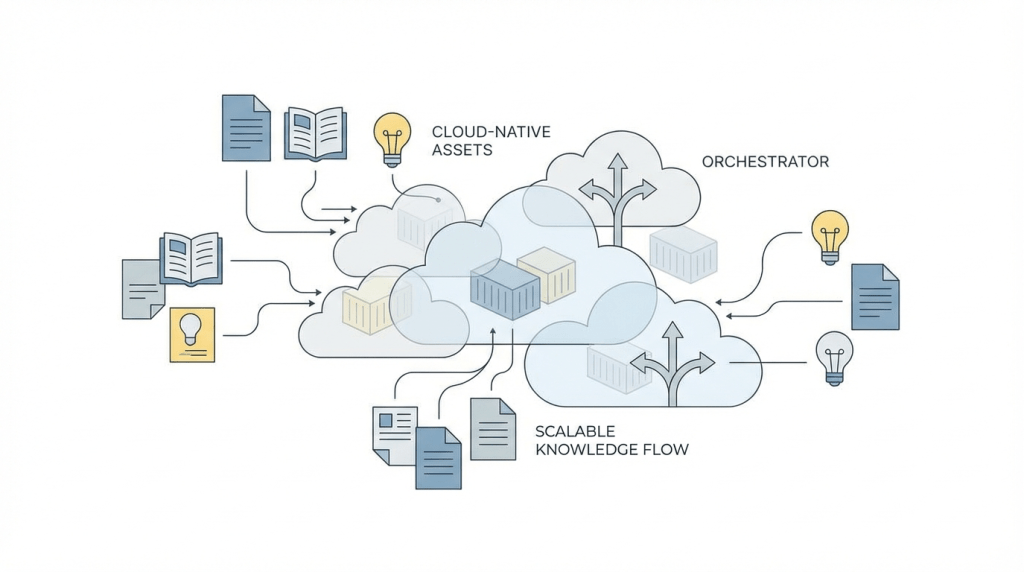
The days of monolithic, on-premise document management systems are fading fast. For distributed software teams, those legacy solutions often felt like clunky, high-maintenance relics.
The architectural shift to cloud-native solutions wasn’t just an upgrade; it was a complete reimagining of what a DMS could be.
*Caption: An overview of how cloud-native principles apply to modern software architecture.*
This evolution directly tackles the headaches of globally distributed engineering teams. Cloud-native architecture brings incredible scalability, a massive reduction in maintenance overhead, and seamless global access.
The Power of Open Source in a Cloud-Native World
Open source principles are a natural fit for this modern architectural model. This partnership gives technical teams the best of both worlds:
- Flexibility and Freedom: You get to sidestep vendor lock-in, gaining the freedom to deploy your open source document management system on any cloud provider or even in a hybrid setup.
- Modern Infrastructure Integration: Open source tools are built to thrive in cloud environments. They play nicely with technologies like Docker for containerization and Kubernetes for orchestration.
- Community-Driven Security: Mature open source projects often benefit from thousands of developers scrutinizing the code. This means vulnerabilities are often found and patched more quickly and transparently than in proprietary systems.
This shift often involves adopting principles like multi-tenancy in cloud computing, a fundamental concept that allows cloud platforms to serve multiple customers securely and cost-effectively by sharing resources.
Scalability and Reduced Overhead for Modern Teams
For a rapidly growing startup or a massive enterprise, the ability to scale is non-negotiable. A cloud-native DMS can handle a sudden flood of users or a huge spike in document volume without your team needing to manually intervene.
The real win here is the reduction in maintenance overhead. Instead of your DevOps team spending cycles patching servers and managing databases, they can focus on what they do best building and shipping great software.
The data backs this up. Cloud-based deployments are dominating, commanding over 67% of market share in 2024. The global DMS market is projected to hit USD 14.82 billion by 2029, with the cloud segment growing fastest. This shift is driven by teams demanding scalable, real-time solutions. You can dig into more of these market trends on Fortune Business Insights.
A New Model for Document Processing
This architectural evolution also unlocks new, more efficient ways to process documents. For instance, traditional systems often require you to permanently store and index all content, which can be slow and chew up resources.
In contrast, modern tools can take an ephemeral approach. For GitHub-centric teams, some tools mirror these cloud-native trends with a no-storage model. By processing code and docs ephemerally on each commit, they get rid of the need for bulky databases and slash update times from days to just minutes.
This lightweight, event-driven approach is a direct result of cloud-native thinking where resources are spun up to do a job and then spun down, optimizing for both speed and cost.
Comparing Popular Open Source DMS Solutions
Picking the right open source document management system isn’t about chasing the longest feature list. It’s about matching a tool’s architecture and philosophy to your team’s real-world technical needs.
Let’s break down some of the most popular players by their ideal use cases from a developer’s point of view.
The open source DMS world is booming, which isn’t surprising when you see the broader open source services market was valued at USD 30.2 billion in 2023. While the big proprietary players still hold a lot of ground, open source alternatives are carving out essential niches, especially with software teams. If you want to dig into the numbers, you can explore the market analysis from Mordor Intelligence.
Alfresco Community Edition: The Enterprise Powerhouse
Alfresco is one of the heavyweights in this space. It’s a Java-based platform built from the ground up for large-scale enterprise content management.
From a developer’s perspective, its main draw is its extensibility and a very robust API. You can build custom workflows, design bespoke content models, and weave it deep into your existing infrastructure. But all that power comes with a trade-off: complexity.
- Best for: Large organizations with dedicated IT teams that need deep customization and have strict governance requirements.
- Key Strength: Massively scalable and extensible, with a powerful API perfect for custom integrations.
- Potential Limitation: It’s often overkill for smaller teams. Setup and maintenance demand significant technical expertise and resources.
Mayan EDMS: The Digital Archivist
Mayan EDMS is laser-focused on turning your sprawling collection of digital files into a structured, searchable archive. It’s brilliant at document ingestion, using powerful OCR to make every scanned document full-text searchable.
Think of Mayan EDMS as the perfect librarian for a massive collection of static assets invoices, contracts, or technical manuals. It’s not really built for real-time, collaborative document creation. For more on this, check out our guide on choosing the right document management tool.
- Best for: Teams needing to digitize and manage a large archive of scanned or digital documents and make them instantly searchable.
- Key Strength: Fantastic OCR and metadata management, making it a beast for building a searchable digital library.
- Potential Limitation: Its workflow and collaboration features are pretty light. It’s more of an archive than a daily workspace.
LogicalDOC Community Edition: The User-Friendly Generalist
LogicalDOC strikes a nice balance between enterprise-grade features and genuine user-friendliness. We’ve seen it work well as a first step for small to medium-sized businesses finally moving away from chaotic shared drives.
For developers, LogicalDOC offers a solid set of core DMS features, including version control, metadata management, and a decent API. It gives you a structured environment without the steep learning curve of a tool like Alfresco.
- Best for: Small to mid-sized teams looking for a structured, all-around DMS that’s easier to get up and running.
- Key Strength: A user-friendly interface paired with essential DMS features, making it highly approachable.
- Potential Limitation: The community edition is missing some of the advanced automation and integration firepower found in its paid versions.
Comparison of Top Open Source DMS Solutions
To make the choice clearer, this table cuts straight to what matters for a technical team.
| DMS Tool | Primary Use Case | Key Strength for Developers | Potential Limitation |
|---|---|---|---|
| Alfresco Community | Enterprise Content Management (ECM) for large organizations with complex compliance and integration needs. | Highly extensible via a robust Java API, allowing for deep integration with other enterprise systems. | High complexity and resource-intensive; can be overkill and difficult to manage for smaller teams. |
| Mayan EDMS | Digital archiving and making large volumes of scanned or static documents full-text searchable. | Powerful REST API for programmatic access to the document archive and its rich metadata. | Not designed for active collaboration or real-time document editing; it’s an archive, not a workspace. |
| LogicalDOC Community | A general-purpose DMS for small to medium-sized businesses needing a structured alternative to shared drives. | A straightforward API and a less complex setup make it easier to integrate basic DMS functions quickly. | The community edition lacks advanced workflow automation and some enterprise integration features. |
This table highlights the core trade-offs. Alfresco gives you incredible power but demands a lot in return. Mayan is the undisputed king of archiving but isn’t a collaboration tool. LogicalDOC offers a friendly on-ramp but with some limitations in its free version.
Solving The Challenge Of Code-Adjacent Documentation

An open source document management system is fantastic at what it does: organizing static, long-form content. Think project plans, legal documents, or internal wikis.
But there’s a whole category of documentation where these traditional systems just don’t cut it—the docs that live right next to your code.
We’re talking about READMEs, API references, SDK guides, and code examples. This is the dynamic, developer-facing content that must evolve in lockstep with every single commit. For this kind of documentation, the problem is maintaining accuracy in an environment that changes by the minute.
Caption: Documentation drift occurs when docs become outdated as code evolves. Continuous documentation tools help close this gap.
The Inevitable Problem Of Documentation Drift
This is where every development team runs into documentation drift. It’s that natural, almost inevitable process where documentation goes stale as the codebase it describes moves on. A developer refactors a function, renames a parameter, or deprecates an endpoint, and suddenly the guide that explains it is just plain wrong.
Outdated docs mislead users, frustrate new developers trying to onboard, and blow up your support queue. This quiet accumulation of outdated information is a huge form of tackling technical debt, hitting productivity and maintainability where it hurts.
The root of the issue is a mismatch of purpose. A DMS is built for stability and governance over static files. It was never designed to monitor a GitHub repository and react to every pull request.
A New Approach: Continuous Documentation
To solve documentation drift, we need a totally different kind of tool one that works inside the developer’s workflow. This isn’t about throwing out your DMS, but complementing it with a specialized solution for what we call continuous documentation.
The concept borrows directly from CI/CD principles. Just as continuous integration automates builds and tests, continuous documentation automates the painful process of keeping docs synchronized with code.
This is where a GitHub-native tool changes the game. It can:
- Monitor Code Changes: It automatically watches every commit and pull request to see exactly what changed in the codebase.
- Detect Document Drift: Using intelligent analysis, it pinpoints which documentation files like READMEs or API guides are now out of sync with the new code.
- Propose Automated Updates: It then generates precise, targeted updates to the documentation to reflect the changes, often on a separate branch ready for review.
The Role Of a Specialized Tool
Tools like DeepDocs are built specifically for this job. It’s like an AI agent living inside your GitHub repository, performing a deep scan on every commit to understand the relationship between your code and your docs. When it finds a discrepancy, it proactively fixes it.
This approach ensures your developer-facing documentation remains accurate by default, without adding another manual chore to your team’s already-packed sprint. You can get a deeper look at how this works in our guide to automatic document generation.
Ultimately, it’s about treating your docs with the same automated rigor as your code, turning them from a liability into a reliable, always-current asset.
How to Choose and Implement Your Open Source DMS
Picking and rolling out an open source document management system can feel like a huge project, but a smart approach turns it from a headache into a manageable win.
This isn’t just about choosing a tool; it’s about fixing what’s broken.
Start By Defining Your Core Requirements
Before you even start looking at software, you have to get real about what you’re trying to solve. Get your team in a room and ask the tough questions. Are you drowning in a chaotic mess of shared drives? Is your review and approval process a constant bottleneck?
Use the answers to build a practical checklist:
- Scalability: Can this system handle our document load a year from now?
- Integrations: Does it have a solid API we can hook into GitHub, Jira, and our CI/CD pipeline?
- Team Expertise: Do we have the skills in-house (like Java, Python, or Docker) to actually deploy and maintain this thing?
- Workflow Needs: Can it support the specific review and approval workflows our team needs?
Having these answers upfront stops you from getting distracted by flashy features that don’t solve your real-world problems.
Adopt a Phased Implementation Strategy
Trying to launch everything at once a “big bang” rollout is just asking for trouble. In our experience, the most successful projects start small and build momentum.
A pilot project is your best friend. It lets you test the DMS in a real-world scenario, uncover hidden issues, and create internal champions who can advocate for the wider rollout.
Here’s a simple, three-step strategy that works:
- Launch a Pilot Project: Grab a small, enthusiastic team to be your guinea pigs. Pick a self-contained project with clear documentation needs.
- Gather Feedback and Iterate: After a few weeks, sit down with the pilot team. What worked? What felt clunky? Use their feedback to tweak your configuration and workflows.
- Expand Incrementally: Once the pilot is running smoothly, start onboarding other teams one by one. This gradual expansion is way less disruptive.
Plan Your Migration Carefully
Moving from what you have now is often the hardest part. A good migration is all about planning and communication. You can’t just dump all your old files into the new DMS and call it a day.
Focus on data mapping and change management. For a deeper dive, our guide on documentation management software offers more strategies. Decide what actually needs to be moved, what can be archived, and what should be left behind.
Most importantly, you have to sell the “why” to your team. Explain how this new system is going to make their lives easier. A little bit of change management goes a long, long way.
Frequently Asked Questions About Open Source DMS
Jumping into the world of open source document management systems always brings up a few practical questions. Here are some of the most common ones we hear from developers and engineering managers.
Can Open Source DMS Scale for Large Teams
Absolutely. Many of the big players in the open source DMS world, like Alfresco, were built from the ground up with enterprise-grade architecture.
Honestly, scalability often comes down to how you deploy it using modern tools like Docker and Kubernetes rather than a limitation in the software itself.
What Are the Real Costs of a Free DMS
While you won’t pay for a software license, “free” doesn’t mean zero cost. The total cost of ownership (TCO) is something you have to budget for:
- Infrastructure Hosting: You have to run the software somewhere. Whether it’s on a cloud provider or your own on-premise servers, you’ll be paying for that hardware.
- Implementation and Customization: Getting the system set up and molded to your team’s specific workflows takes developer and IT time.
- Ongoing Maintenance: Your team is on the hook for everything that comes after launch applying security patches, handling upgrades, and troubleshooting any issues that pop up.
The journey from idea to a fully rolled-out system involves a real investment of time and resources at each step.

Caption: A typical implementation flow involves defining requirements, running a pilot, and managing the migration.
As you can see, a successful implementation isn’t just a simple install. It involves careful planning, testing, and execution.
How Secure Are Open Source Options
An open source DMS can be incredibly secure, but the responsibility for that security falls squarely on your team’s shoulders.
One of the biggest strengths of mature projects is the global community of developers constantly scrutinizing the code, finding vulnerabilities, and patching them. However, you have to be vigilant about applying those updates and configuring your access controls correctly from day one. There’s a common misconception that “open” means insecure, but in reality, all those extra eyes on the code often make it stronger.
For documentation that lives alongside your code like READMEs and API guides a traditional DMS isn’t enough. DeepDocs provides continuous documentation by automatically detecting and fixing outdated content in your GitHub repository, ensuring your docs always stay in sync with your code. See how it works at https://deepdocs.dev.
Leave a Reply