


Good API documentation is one thing. Great sample documentation is what bridges the gap between a developer understanding your API and actually shipping code with it. Think of samples as the hands-on tutorials that complement dense reference material. They provide clean, copy-paste-ready snippets that slash onboarding time and kill frustration before it starts.
TL;DR
- Structure is Key: Every endpoint reference needs a clear path, method, summary, authentication details, and a breakdown of all parameters.
- Provide Multi-Language Examples: Offer request snippets in
cURL, JavaScript (fetch), and Python (requests) to cater to different developer stacks. - Document Both Success and Failure: Show realistic success responses (
200 OK) and common error responses (401,404,400) to help developers build resilient code. - Prioritize Authentication: Give clear, step-by-step instructions for authentication, using secure placeholders like
YOUR_API_KEYin all examples. - Automate to Stay Accurate: Manual updates lead to “documentation drift.” Use tools that sync your docs with your code automatically to maintain trust for example, DeepDocs for automated updates or DeveloperHub for full-featured developer hubs that combine guides, interactive examples, and version control in one platform.
Table of Contents
- Why High-Quality API Samples Are Non-Negotiable
- The Essential Structure Of An API Endpoint Reference
- Crafting Crystal-Clear Request And Response Examples
- Documenting Authentication And Authorization Securely
- Standardizing Error Handling And Status Codes
- Keeping API Samples In Sync With Your Code
- Common Questions About API Sample Docs
Why High-Quality API Samples Are Non-Negotiable

In my experience, developers don’t sit down and read documentation cover-to-cover. They scan, looking for actionable code.
High-quality samples are the first thing their eyes dart to. That’s the most direct path to getting that “hello world” moment with your product.
When examples are clear, accurate, and relevant, they build immediate trust. But nothing breaks that trust faster than outdated or wrong samples. It’s a huge source of friction that leads to support tickets and can cause developers to give up on your API entirely. This is why you must treat your docs especially the code examples as a core part of the product.
The Business Impact of Great Samples
Investing in top-notch sample documentation pays real dividends.
- Faster Onboarding: Clear examples mean a new developer makes their first successful API call in minutes, not hours.
- Increased API Consumption: When developers see how to use an endpoint, they’re more likely to explore and integrate more features.
- Reduced Support Load: Good samples answer common questions before they’re ever asked, freeing up your support and engineering teams.
Getting this right is crucial for a successful API Integration.
The Essential Structure Of An API Endpoint Reference

A well-structured API endpoint reference is predictable. When a developer knows where to find information, they can work faster.
In my experience, consistency across every endpoint is the most important goal. A developer should never have to hunt for parameter details or second-guess authentication requirements.
Every great endpoint reference I’ve seen shares a common anatomy. By breaking it down into a simple checklist, we can make sure no critical details get missed. This structure is the foundation for clear, actionable api sample documentation.
The Anatomy Of An Endpoint

Here’s my breakdown of the essential components every endpoint reference should include.
- Endpoint Path and Method: Be crystal clear about the HTTP method and the full request path.
- Example:
GET /v1/users/{id}
- Example:
- A Clear Summary: One concise sentence explaining what the endpoint does. No jargon.
- Example: “Retrieves the profile information for a specific user.”
- Authentication and Headers: Spell out any required headers, especially for auth.
- Parameters: Detail every possible parameter, broken down by type. This section is often the most referenced.
- Path Parameters: Variables inside the URL path, like
{id}. - Query Parameters: Key-value pairs for filtering or pagination, such as
?limit=10. - Request Body: The JSON payload for
POST,PUT, orPATCHrequests.
- Path Parameters: Variables inside the URL path, like
For every parameter, you must define its name, data type (string, integer), whether it’s required, and a brief description. This level of detail removes ambiguity. You can explore various API documentation templates that lay this all out cleanly.
Crafting Crystal-Clear Request And Response Examples
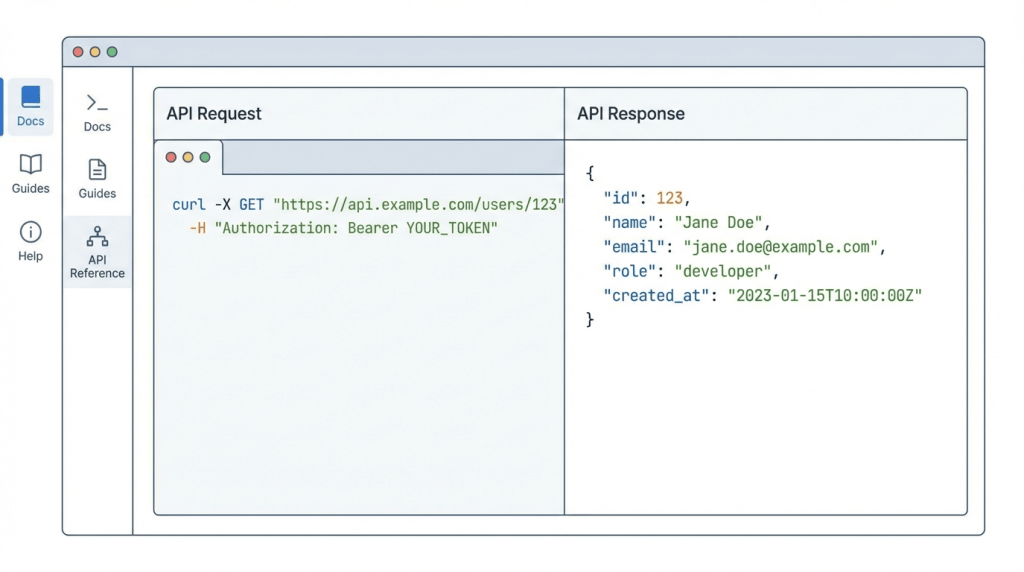
If an endpoint’s structure is the skeleton, then request and response examples are its lifeblood. These are the copy-paste-ready snippets most developers jump to first.
The trick is to think about your audience. Providing examples in a few popular formats is a massive win for the developer experience.
Presenting Versatile Request Snippets
A solid practice is to offer request examples that cater to different developer workflows.
- cURL: Always start with a
cURLcommand. It’s the lingua franca of APIs platform-agnostic and perfect for a quick test. - JavaScript: A snippet using the native
fetchAPI or a library likeAxiosis a must-have. - Python: The
requestslibrary is king for Python developers. A simplerequests.post()example will feel instantly familiar. - Other SDKs: If you provide official SDKs for Go, Ruby, or Java, include examples for those as well.
You can check out a great OpenAPI example that shows how to structure these snippets effectively. Here’s a side-by-side comparison of the same API call.
Sample Request Snippet Comparison
This table shows how to make the same API call using different tools and languages.
| Method | cURL Example | JavaScript (Fetch) Example | Python (requests) Example |
|---|---|---|---|
| POST User | curl -X POST https://api.example.com/users -H "Content-Type: application/json" -d '{"name": "Jane Doe"}' | fetch('https://api.example.com/users', { method: 'POST', headers: {'Content-Type': 'application/json'}, body: JSON.stringify({name: 'Jane Doe'}) }); | import requests; requests.post('https://api.example.com/users', json={'name': 'Jane Doe'}) |
| GET User | curl https://api.example.com/users/123 | fetch('https://api.example.com/users/123').then(res => res.json()); | import requests; response = requests.get('https://api.example.com/users/123').json() |
| DELETE User | curl -X DELETE https://api.example.com/users/123 | fetch('https://api.example.com/users/123', { method: 'DELETE' }); | import requests; requests.delete('https://api.example.com/users/123') |
Detailing Success and Failure Responses
A developer needs to know what to expect when a call works and when it breaks.
For successful requests, show a complete 200 OK response body. Don’t use generic placeholders like "string"! Use realistic data that mimics a real-world response.
“Good response examples are a form of contract. They set clear expectations for the data structure, data types, and potential null values, which helps developers write more resilient code from the start.”
For errors, document your standard error object format and provide full examples for the most common culprits:
401 Unauthorized: Show the response when an API key is missing or invalid.404 Not Found: Illustrate what a developer gets back when a resource doesn’t exist.400 Bad Request: Provide an example for a validation error, like a missing parameter.
By documenting these common failure cases, you give developers the tools they need to build proper error-handling logic.
Documenting Authentication And Authorization Securely
Authentication is often the first hurdle developers hit. If you get this part wrong in your docs, you’ll cause immediate frustration. Clear authentication instructions are non-negotiable for good api sample documentation.
When poor documentation leads to roadblocks, developers walk away. Studies show that 55% of organizations struggle with inconsistencies in docs, a key reason many APIs get abandoned. You can read the full research on API marketing statistics to see the impact.
Common Authentication Schemes
Your documentation needs dedicated, copy-paste-ready examples for your authentication method.
- API Keys: Show precisely which HTTP header to use (e.g.,
X-API-Key: YOUR_API_KEY). Link them directly to the page where they can manage their keys. - OAuth 2.0: Detail the entire authorization flow, step-by-step, including how to get an access token and handle token refreshes.
- JWT Bearer Tokens: The example should be explicit:
Authorization: Bearer YOUR_JWT_TOKEN.
Security Best Practices in Samples
Always use placeholder credentials like YOUR_API_KEY or TEST_SECRET_TOKEN in your public-facing examples. Accidentally exposing real keys in documentation is a common and dangerous mistake.
This simple habit trains developers to handle sensitive data correctly from the start.
For a deeper look, check out this guide on how to use a company logo API. It’s a solid resource that demonstrates these principles. By providing secure patterns, you build trust with developers.
Standardizing Error Handling And Status Codes
What separates a frustrating API from a resilient one often comes down to error handling. When things go wrong, developers need clear, predictable feedback.
In my experience, standardizing your error response format across the entire API is the most effective thing you can do. It means developers can write one piece of logic to parse any error they get.
A solid error object should always contain core pieces of information to help developers debug and build robust integrations.
A Global Error Response Template
Here’s a simple but powerful template for a global error response.
{ "errorCode": "INVALID_PARAMETER", "message": "The 'email' field is required but was not provided.", "details": { "field": "email", "reason": "missing" }, "requestId": "a1b2c3d4-e5f6-7890-1234-567890abcdef"}
This structure works well because it provides:
errorCode: A machine-readable string for programmatic logic.message: A human-readable explanation for logging and debugging.details: A nested object for specific context.
Common API Error Codes and Meanings
You must also document the common HTTP status codes your API uses. A reference table can save developers a ton of time.
Common API Error Codes and Meanings
| HTTP Status Code | Meaning | Common Cause Example |
|---|---|---|
| 400 Bad Request | The server can’t process the request due to a client-side error. | A required field is missing from the JSON body. |
| 401 Unauthorized | The request doesn’t have valid authentication credentials. | The API key is missing, expired, or incorrect. |
| 403 Forbidden | The authenticated user lacks permission for the requested action. | A user with “read-only” permissions tries to make a POST request. |
| 404 Not Found | The requested resource couldn’t be found on the server. | Requesting a user that doesn’t exist, like GET /users/9999. |
| 500 Internal Server Error | Something unexpected went wrong on the server. | The database connection failed or an unhandled exception was thrown. |
Laying these out clearly prevents developers from having to guess whether a 403 means their key is bad or they just lack permissions.
Keeping API Samples In Sync With Your Code
Let’s be honest: the greatest challenge with API sample documentation is keeping it accurate. Your code is always changing. Every time an endpoint gets tweaked, those once-perfect examples risk becoming outdated.
This is “documentation drift,” and it’s a silent killer of developer trust. Nothing destroys confidence faster than copy-pasting a code sample only to have it fail.

Caption: Outdated docs create a frustrating cycle of failed requests and debugging, slowing down developers.
This cycle is exactly what happens when your documentation doesn’t reflect the API’s current state.
The Pitfalls Of Manual Updates
Relying on developers to manually update docs every time they ship code is a recipe for failure. In the rush to push features, documentation is almost always the first thing left behind.
Embracing Continuous Documentation
The only real solution is to treat your documentation like code by integrating it into your development lifecycle. This is the idea behind continuous documentation a system where docs are automatically updated right alongside your codebase.
This is the problem tools like DeepDocs were built to solve. By plugging into your GitHub workflow, DeepDocs watches for changes that might affect your API. Similarly, platforms like DeveloperHub offer end-to-end developer hubs where you can manage guides, interactive endpoint testing, and API references in one place, making it easier to keep your documentation accurate and developer-friendly.
It’s smart about it, too. DeepDocs only edits the parts that are out of date, preserving your formatting and style. This approach to automated software documentation can finally ensure your API samples are a source of truth, not frustration.
Common Questions About API Sample Docs
Even with the best templates, a few questions always pop up when building and maintaining API sample documentation.
What’s the Single Most Important Part of API Sample Docs?
Hands down, it’s the request and response examples. This is the first thing I see developers hunt for. They want a working example they can grab and see work right now.
Clear, copy-paste-ready snippets in key languages (cURL, JavaScript, Python) paired with a realistic JSON response offer the fastest path to a successful API call. If those examples are broken, you’ve lost the developer’s trust.
How Can I Stop My API Samples from Becoming Outdated?
Trying to keep samples updated manually is a losing game. The only sustainable way is through automation.
The gold standard is what I’d call “continuous documentation.” This is where a tool plugs directly into your source control, like GitHub, and actively watches for code changes that impact your API. It can then automatically update samples, descriptions, and parameters, ensuring your docs stay in sync.
Do I Really Need to Show Examples for Every Single Error Code?
Definitely not. A much smarter approach is to first document your standardized error response format.
Once you’ve done that, just provide one or two complete examples for the errors developers are most likely to run into—like a 401 Unauthorized or a 400 Bad Request. For the rest, a simple table listing the code and its meaning is enough.
What’s the Difference Between an API Reference and an API Guide?
This is an important distinction. The API reference is the technical encyclopedia for your API. It’s the exhaustive documentation of every endpoint, parameter, and response field. The samples we’ve been talking about are the heart of the API reference.
API guides, on the other hand, are story-driven tutorials that solve a specific problem. They often chain multiple API calls together to get something done, like “How to Create a User and Post Their First Comment.” You need both for a great developer experience. The reference tells them what the tools are, and the guide shows them how to build something cool.
Keeping your API sample documentation consistently accurate is a massive challenge, but it doesn’t have to be a manual nightmare. DeepDocs integrates into your GitHub workflow, automatically spotting when your code changes and updating the corresponding documentation to match. You can finally stop worrying about documentation drift and give your developers a source of truth they can rely on.
Leave a Reply