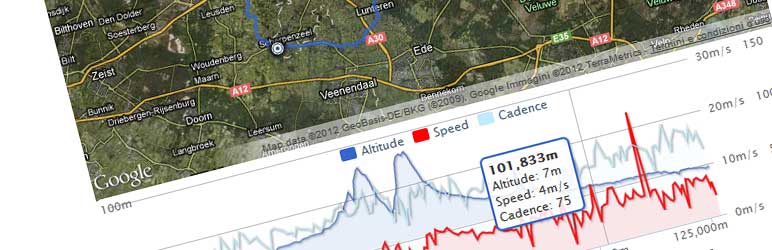

Beschreibung
Dieses Plugin hat als Eingabe die GPX-Datei mit der von dir erstellten Strecke und als Ausgabe die Streckenkarte und eine interaktive Höhenkurve (sofern verfügbar).
Fully configurable:
- Individuelle Farben
- Individuelle Icons
- Unterstützung für mehrere Sprachen
Supported charts:
- Höhenlinie
- Geschwindigkeit
- Herzfrequenz
- Temperatur
- Trittfrequenz
- Steigung
NextGen Gallery Integration:
Zeige deine NextGen Gallery-Bilder auf der Karte an!
Selbst wenn du keine GPS-Kamera hast, kann dieses Plugin die Bildposition von dem Bilddatum und deiner GPX-Datei abrufen.
Post Attachments Integration:
Diese Version wurde erweitert von: Stephan Klein und unterstützt die Anzeige aller an einen Beitrag angehängten Bilder ohne Verwendung von NGG.
Probiere dieses Plugin aus: https://devfarm.it/wp-gpx-maps-demo/
Support:
Wenn du Hilfe benötigst, verwende bitte: www.devfarm.it Support Forum
Möchtest du helfen, Fehler zu beheben oder das Plugin weiterzuentwickeln? Auf Github kannst du einfach mit deinem Code mitwirken.
Übersetzungen:
Übersetzer sind herzlich eingeladen, zum Plugin beizutragen. Bitte benutze die WordPress Übersetzungen Website.
Die Sprachdateien im Plugin enthalten 18 übersetzbare Texte für 13 Sprachen:
- Catalan ca
- Dutch nl_NL
- English (default)
- French fr_FR
- Hungarian hu_HU
- Italian it_IT
- Norwegian nb_NO
- Polish pl_PL
- Portuguese (Brazilian) pt_BR
- Russian ru_RU
- Spanish es_ES
- Swedish sv_SE
- Turkish tr_TR
- Bulgarian bg_BG
- Slovak cs_CZ
- Norwegian nb_NO
- Japanese ja_JP
(Vielen Dank an alle, die mir bei den Übersetzungen geholfen haben)
Supported GPX namespaces are:
-
http://www.topografix.com/GPX/1/0
-
http://www.garmin.com/xmlschemas/GpxExtensions/v3
-
http://www.garmin.com/xmlschemas/TrackPointExtension/v1
Dank an: www.securcube.net, www.devfarm.it
Icons gemacht von Freepik from www.flaticon.com ist lizensiert von Creative Commons BY 3.0
Screenshots
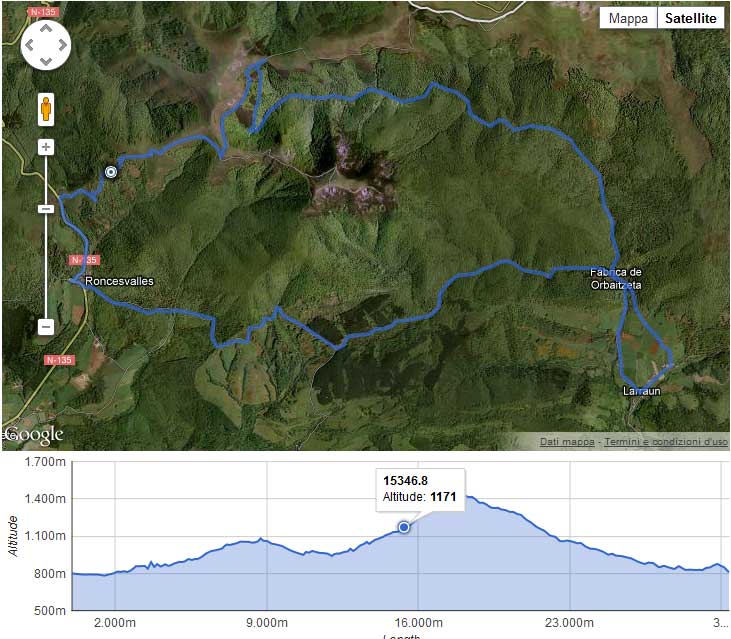
Einfaches GPX 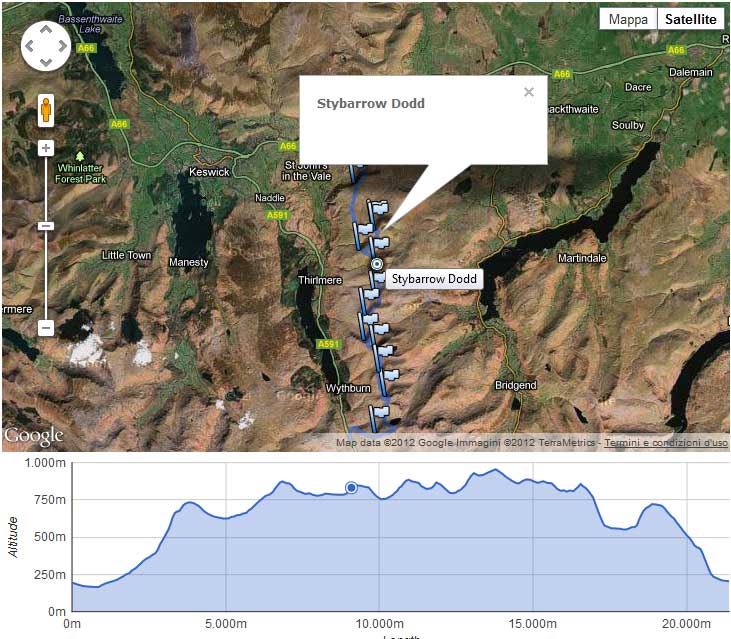
GPX mit Wegpunkten 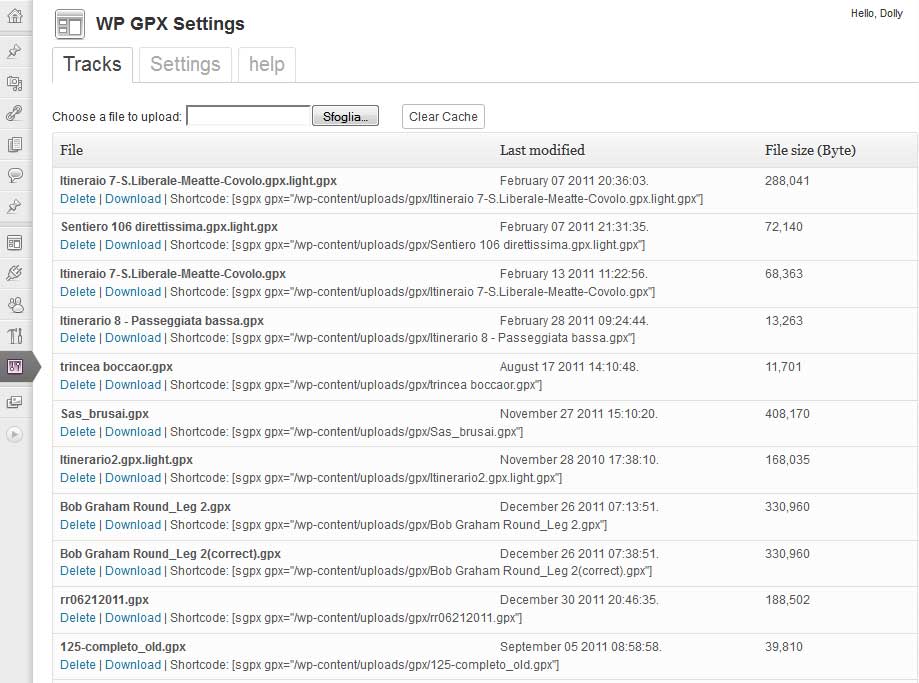
Admin-Bereich – Liste der Tracks 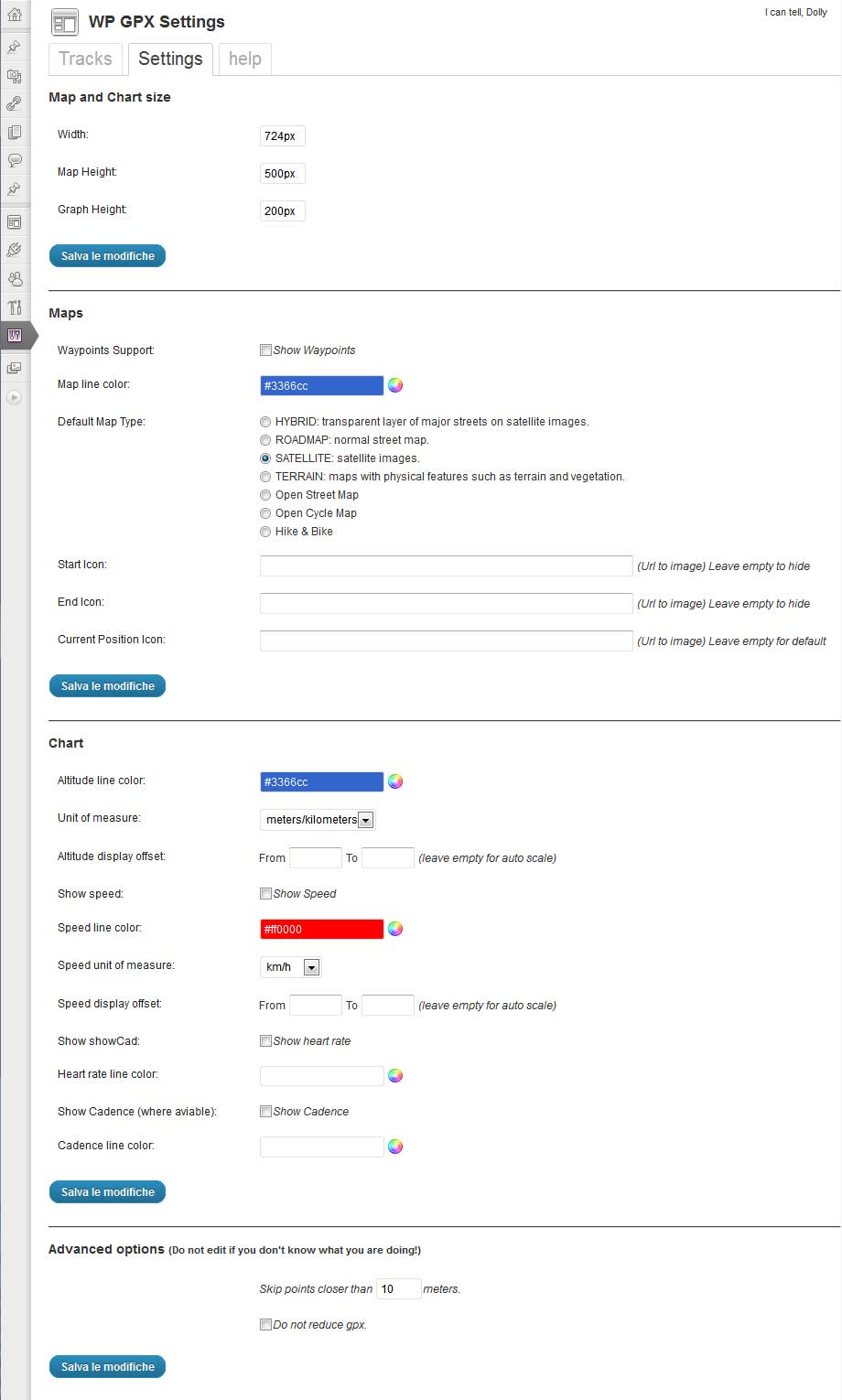
Admin-Bereich – Einstellungen 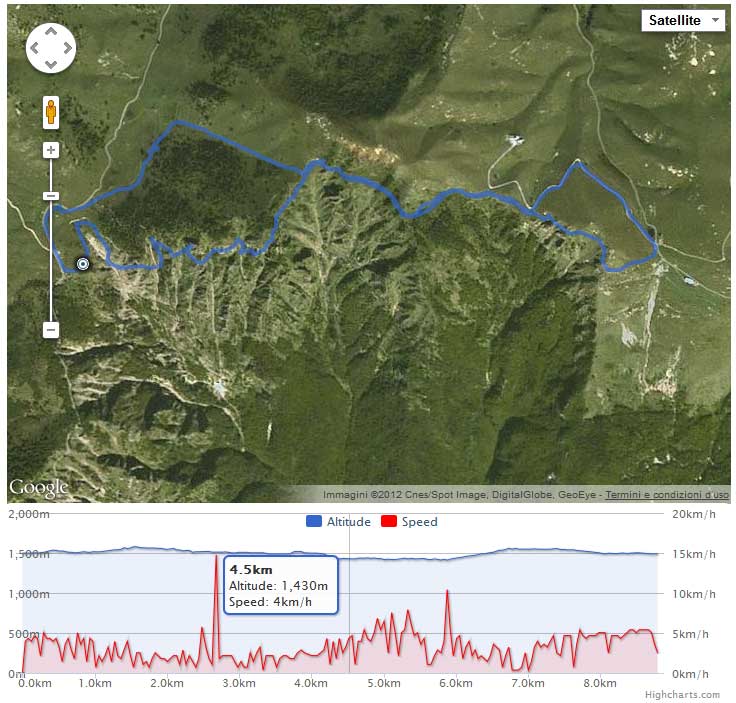
Höhenlinie & Geschwindigkeit 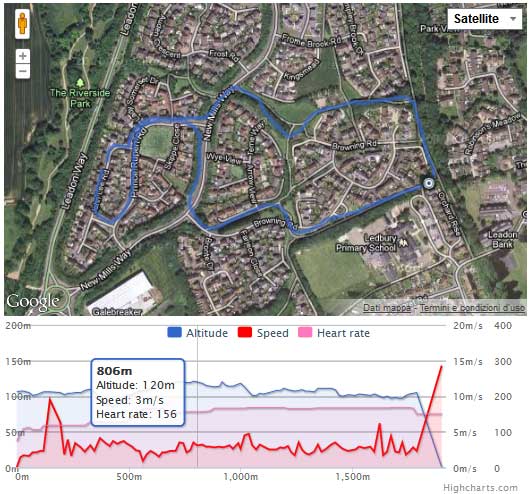
Höhenlinie & Geschwindigkeit & Herzfrequenz
Installation
-
Verwende den klassischen WordPress-Plugin-Installer oder kopiere den Plugin-Ordner in das
/wp-content/plugins/Verzeichnis -
Aktiviere das Plugin mit dem ‚Plugins‘-Menü in WordPress
-
Füge den Shortcode hinzu [sgpx gpx=“>relative path to your gpx<„] or [sgpx gpx=“>http://somesite.com/files/yourfile.gpx<„]
FAQ
-
Which map types are available?
-
Du kannst die folgenden Kartentypen verwenden:
- OSM1 = Open Street Map (Default setting)
- OSM2 = Open Cycle Map / Thunderforest – Open Cycle Map (API Key required)
- OSM3 = Thunderforest – Outdoors (API Key required)
- OSM4 = Thunderforest – Transport (API Key required)
- OSM5 = Thunderforest – Landscape (API Key required)
- OSM7 = Open Street Map – Humanitarian map style
- OSM9 = Hike & Bike
- OSM10 = Open Sea Map
If you use the OpenCycleMap without the API key, a watermark appears on the card: „API Key required“.
The Thunderforest maps Outdoors, Transport and Landscape are only displayed with an API Key.
-
Welche Shortcode-Attribute sind verfügbar?
-
Du kannst folgende Shortcodes verwenden:
- gpx: Relative path to the GPX file
- width: Map width (Value in percent)
- mheight: Map height (Value in pixeln)
- gheight: Graph height (Value in pixeln)
- skipcache: Do not use cache. If TRUE might be very slow (Default is false)
- download: Allow users to download your GPX file (Default is false)
- summary: Print summary details of your GPX track (Default is false)
- summarytotlen: Print total distance in summary table (Default is false)
- summarymaxele: Print max elevation in summary table (Default is false)
- summaryminele: Print min Elevation in summary table (Default is false)
- summaryeleup: Print total climbing in summary table (Default is false)
- summaryeledown: Print total descent in summary table (Default is false)
- summaryavgspeed: Print average Speed in summary table (Default is false)
- summarytotaltime: Print total time in summary table (Default is false)
- mtype: Map types
- mlinecolor: Map line color (Default is #3366cc)
- zoomonscrollwheel: Zoom on map when mouse scroll wheel (Default is false)
- waypoints: Print the gpx waypoints inside the map (Default is false)
- startIcon: Start track icon
- endIcon: End track icon
- currentIcon: Current position icon (when mouse hover)
- waypointicon: Custom waypoint icon
- showele: Show elevation data inside the chart (Default is true)
- uom: Distance/altitude unit of measure
- 0 = meters/meters (Default setting)
- 1 = feet/miles
- 2 = meters/kilometers
- 3 = meters/nautical miles
- 4 = meters/miles
- 5 = feet/nautical miles
- glinecolor: Altitude line color (Default is #3366cc)
- chartFrom1: Minimun value for altitude chart
- chartTo1: Maxumin value for altitude chart
- showspeed: Show speed inside the chart (Default is false)
- glinecolorspeed: Speed line color (Default is #ff0000)
- uomspeed: Unit of measure for speed
- 0 = m/s (Standardeinstellung)
- 1 = km/h
- 2 = Meilen/h
- 3 = min/km
- 4 = min/Meile
- 5 = Nautische Meilen/Stunde (Knoten)
- 6 = min/100 Meter
- chartFrom2: Minimun value for speed chart
- chartTo2: Maxumin value for speed chart
- showhr: Show heart rate inside the chart (Default is false)
- glinecolorhr: Heart rate line color (Default is #ff77bd)
- showatemp: Show temperature inside the chart (Default is false)
- glinecoloratemp: Temperature line color (Default is #ff77bd)
- showcad: Show cadence inside the chart (Default is false)
- glinecolorcad: Cadence line color (Default is #beecff)
- showgrade: Show grade inside the chart (Default is false)
- glinecolorgrade: Grade line color (Default is #beecff)
- nggalleries: NextGen Galerie-ID oder eine Liste durch Komma getrennter Galerie-IDs
- ngimages: NextGen Image id or a list of Images id separated by a comma
- attachments: Show all images that are attached to post (Default is false)
- dtoffset: Der Unterschied (in Sekunden) zwischen dem Datum deines GPX-Tools und dem Datum deiner Kamera
- pointsoffset: Skip points closer than XX meters (Default is 10)
- donotreducegpx: Print all the point without reduce it (Default is false)
-
Was passiert, wenn ich sehr große GPX-Dateien habe?
-
Dieses Plugin druckt eine kleine Anzahl von Punkten aus, um Javascript und das Laden von Seiten zu beschleunigen.
-
Ist es kostenlos?
-
Ja!
Rezensionen


Mitwirkende und Entwickler
„WP GPX Maps“ ist Open-Source-Software. Folgende Menschen haben an diesem Plugin mitgewirkt:
Mitwirkende

„WP GPX Maps“ wurde in 4 Sprachen übersetzt. Danke an die Übersetzer für ihre Mitwirkung.
Übersetze „WP GPX Maps“ in deine Sprache.
Interessiert an der Entwicklung?
Durchstöbere den Code, sieh dir das SVN-Repository an oder abonniere das Entwicklungsprotokoll per RSS.
Änderungsprotokoll
1.7.10
- Fix security issues
1.7.06
- Fix vulnerability
1.7.05
- Fix NextGen warnings
1.7.04
- Fix php8+ errors
1.7.03
- fix download file link
- fix error with images exif parsing
1.7.02
- fix admin error
1.7.01
- General: Removed Maptoolkit (code OSM6) map provider. Requested by H.F. (Maptoolkit Managing director)
- General: Added new map type „Thunderforest – Outddors“ (OSM3)
- Admin: Added admin notices in the dashboard
- Settings Tab: In the map selection changed to the correct maps provider from „Open Cycle Map“* Settings Tab: to „Thunderforest“
- Administration Tab: New Tab with the settings „Editor & Author upload“ and „Show update notice“
- Help Tab: In the map selection changed to the correct maps provider from „Open Cycle Map“ to „Thunderforest“
- Output: In the map selection changed to the correct maps provider from „Open Cycle Map“ to „Thunderforest“
- Output: Fixed in map footer for each map, the corresponding map provider is displayed with URL
- Code: Added PHP version notices, WordPress 5.3 requires PHP 5.6.20
- Code: Added Missing entries for add and delete options
- Code: Style for output moved in a seperate CSS file
- Code: Adjustments a la WPCS
- Code: Small CSS design optimizations for the tabs
- Code: Upgrade bootstrap-table to 1.13.2
- Code: Removed german language file (now over translate.wordpress.org)
1.7.00
- Added: Authors can upload GPX tracks in a folder called as your user name, inside [../wp-upload dir/gpx/[your user name] (thanks to wildcomputations)
- Added: Authors an Admins can see the current values for shortcodes in help tab
- Added: Button to instant copy the shortcode of the selected GPX file in the tab track
- Added: different size logos for the plugin store (icon.svg, icon128x128.png and icon256x256.png) [inside ../plugins/wp-gpx-maps/assets]
- Changed: Settings tab is for non-Admin users is not more visible
- Tweak: Help tab is easier to read
- Tweak: Plugin is now complete translatable (Backend + Frontend)
- Tweak: WordPress coding standards
- Upgrade: Leaflet to 1.5.1
- Upgrade: leaflet.fullscreen to 1.4.5
- Upgrade: Chart.min.js to 2.8.0
1.6.07
- resolve admin error
1.6.06
- Added average values under the graph (thanks to cyclinggeorgian)
1.6.04
- NGG gallery is working
- Getting HR, Cad and Temp working again (thanks to cyclinggeorgian)
- Fix javascript errors
- Fix multiple traks gpx
1.6.03
- Fix syntax error causing graph not to display (thanks to nickstabler)
1.6.02
- Resolved errors with start and end icons
1.6.01
- Removed Gogole maps. Leafletjs instead.
- — NextGen Gallery is not working, due next gen image format changed — I’ll fix soon
1.5.05
- renamed javascript functions to avoid collision with other plugins
- reduced chart line thickness
1.5.04
- fix uom
- fix file not found
1.5.03
- fix random error
1.5.02
- Security improvements
1.5.01
- Improved security
- Included javascript
- Multiple file upload
- Implemented sorting in file list
- Renamed internal function to improve wp compatibility
1.5.00
- replaced highcharts with chartjs. This is a forced choice due highcharts license issue, view: https://devfarm.it/wordpress-plugin/wordpress-plugin-directory-notice-wp-gpx-maps-temporarily-disabled/
1.3.16
- Added Norwegian nb_NO translation (thanks to thordivel)
- Added Japanese ja_JP translation (thanks to dentos)
1.3.15
- Switched to HTTPS where possible (thanks to delitestudio)
1.3.14
- Added Thunderforest Api Key on settings: for OpenCycleMap
1.3.13
- Added google maps api key on settings
- Removed parameter ’sensor‘ on google maps js
- Added unit of measure of speed for swimmers: min/100 meters
1.3.12
- Fix incompatibility with Debian PHP7 (thanks to phbaer) https://github.com/devfarm-it/wp-gpx-maps/pull/5
1.3.10
- Improved german translations (thanks to Konrad) http://tadesse.de/7882/2015-wanderung-ostrov-tisa-ii/
1.3.9
- Retrieve waypoints in JSON, possibility to add a custom marker (Changed by Michel Selerin)
1.3.8
- Improved Google Maps visualization
1.3.7
- NextGen Gallery’s Attachment support. Thanks to Stephan Klein (https://klein-gedruckt.de/2015/03/wordpress-plugin-wp-gpx-maps/)
1.3.6
- Fix: remote file download issue
- Fix: download file link with WPML
- Improved cache with filetime (thanks to David)
1.3.5
- Fix: Garmin cadence again
- Fix: WP Tabs
1.3.4
- Fix: Garmin cadence
- Infowindows closing on mouseout
1.3.3
- Add feet/Nautical Miles units (thanks to elperepat)
- Update OpenStreetMaps Credits
- WP Tabs fix
1.3.2
- fix: left axis not visible (downgrade highcharts to v3.0.10)
- fix: fullscreen map js error
1.3.1
- fix: http/https javascript registration
- fix: full screen map css issue
1.3.0
- Speed improvement
- Rewritten js classes
- Added Temperature chart
- Added HTML5 Gps position (you can now follow the gpx with your mobile phone/tablet/pc)
1.2.6
- Speed improvement
1.2.5
- Added Catalan translation, thanks to Edgar
- Updated Spanish translation, thanks to Dani
- Added different types of distance: Normal, Flat (don’t consider altitude) and Climb distance
1.2.4
- Added Bulgarian translation, thanks to Svilen Savov
- Added possibility to hide the elevation chart
1.2.2
- Smaller map type selector
- Fix: Google maps exception for NextGen Gallery
1.2.1
- Fix: NextGen Gallery 1.9 compatibility
1.2.0
- NextGen Gallery 2 support
- NextGen Gallery Pro support
1.1.46
- Added meters/miles chart unit of measure
- Added Russian translation, thanks to G.A.P
1.1.45
- Added nautical miles as distance (Many thanks to Anders)
1.1.44
- Added Chart zoom feature
- Some small bug fixes
1.1.43
- Added Portuguese (Brazilian) translation, thanks to André Ramos
- new map: Open Cycle Map – Transport
- new map: Open Cycle Map – Landscape
1.1.42
- qTranslate compatible
1.1.41
- Added Polish translation, thanks to Sebastian
- Fix: Spanish translation
- Minor javascript improvement
1.1.40
- Improved italian translation
- Added grade chart (beta)
1.1.39
- Added French translation, thanks to Hervé
- Added Nautical Miles per Hour (Knots) unit of measure
1.1.38
- Fix: garmin gpx cadence and heart rate
- Updated Turkish translation, thanks to Edip
- Added Hungarian translation, thanks to Tami
1.1.36
- Even Editor and Author users can upload their own gpx. Administrators can see all the administrators gpx. The other users can see only their uploads
1.1.35
- Fix: In the post list, sometime, the maps was not displaying correctly ( the php rand() function was not working?? )
- Various improvements for multi track gpx. Thanks to GPSracks.tv
- Summary table is now avaiable even without chart. Thanks to David
1.1.34
- 2 decimals for unit of measure min/km and min/mi
- translation file updated (a couple of phrases added)
- File list reverse order (from the newer to the older)
- nggallery integration: division by zero fixed
1.1.33
- Decimals reducted to 1 for unit of measure min/km and min/mi
- map zoom and center position is working with waypoints only files
- automatic scale works again (thanks to MArkus)
1.1.32
- You can exclude cache (slower and not recommended)
- You can decide what show in the summary table
- German translation (thanks to Ali)
1.1.31
- Fixed fullscreen map image slideshow
1.1.30
- Multi track gpx support
- Next Gen Gallery images positions derived from date. You can adjust the date with the shortcode attribute dtoffset
- If you set Chart Height (shortcode gheight) = 0 means hide the graph
- Fix: All images should work, independent from browser cache
1.1.29
- Decimal separator is working with all the browsers
- minutes per mile and minutes per kilometer was wrong
1.1.28
- Decimal and thousand separator derived from browser language
- Added summary table (see settings): Total distance, Max elevation, Min elevation, Total climbing, Total descent, Average speed
- Added 2 speed units of measure: minutes per mile and minutes per kilometer
1.1.26
- Multilanguage implementation (only front-end). I’ve implemented the italian one, I hope somebody will help me with other languages..
- Map Full screen mode (I’m sure it’s not working in ie6. don’t even ask!)
- Added waypoint custom icon
1.1.25
- Added possibility to download your gpx
1.1.23
- Security fix, please update!
1.1.22
- enable map zoom on scroll wheel (check settings)
- test attributes in get params
1.1.21
- google maps images fixed (templates with bad css)
- upgrade to google maps 3.9
1.1.20
- google maps images fixed in Yoko theme
1.1.19
- include jQuery if needed
1.1.17
- Remove zero values from cadence and heart rate charts
- nextgen gallery improvement
1.1.16
- Cadence chart (where available)
- minor bug fixes
1.1.15
- migration from google chart to highcharts. Highcharts are much better than google chart! This is the base for a new serie of improvements. Stay in touch for the next releases!
- heart rate chart (where available)
1.1.14
- added css to avoid map bars display issue
1.1.13
- added new types of maps: Open Street Map, Open Cycle Map, Hike & Bike.
- fixed nextgen gallery caching problem
1.1.12
- nextgen gallery display bug fixes