Zum Inhalt springen
WordPress.org

Deutsch

  • Themes
  • Plugins
  • News
  • Support
  • Über
  • Hilfe
    • Learn WordPress
    • Documentation (en)
    • Foren
    • Developers (en)
    • WordPress.tv
  • Meetups
  • Mitmachen
  • FAQ
  • Hol dir WordPress
Hol dir WordPress
WordPress.org

Plugin Directory

Secure Admin Login With Customize

  • Ein Plugin einreichen
  • Meine Favoriten
  • Anmelden
  • Ein Plugin einreichen
  • Meine Favoriten
  • Anmelden

Secure Admin Login With Customize

Von Dilip Bheda
Herunterladen
  • Details
  • Rezensionen
  • Installation
  • Entwicklung
Support

Beschreibung

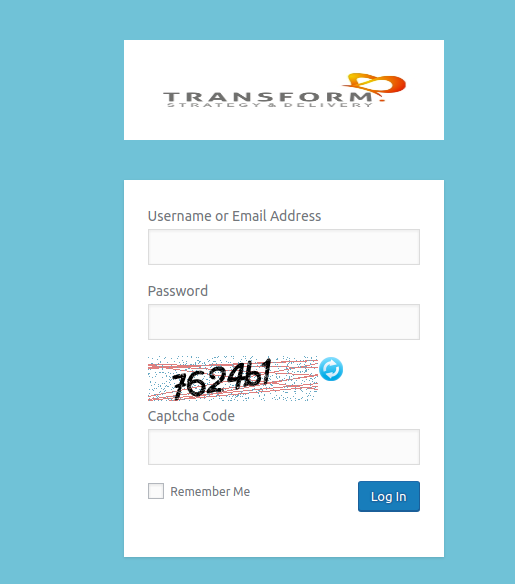
Create your own custom admin login page with google recaptcha and captcha code.

Plugin allows to change custom logo with replace with wordpress default logo, background color, background image, background slide show, form color, font size, login form position and many more features.

Supports full features.

  • You can add Google Recaptcha in your wordpress admin form (Site Key & Secret Key are required).
  • You can add Captcha Code in your wordpress admin form.
  • You can add customer logo above wordpress admin form.
  • You can add background color and background image to the wordpress admin form.
  • You can add custom message/text above & bottom of your wordpress admin login form.
  • Free support.
  • Multi-lingual support.
  • Translation ready (Gujarati, Hindi).

Main features.

  • Google Recaptcha.
  • Captcha Code.
  • Login button hover color.
  • Login button color.
  • Admin form custom color.
  • Admin form border custom style.
  • Admin form label size.
  • Admin form opacity.
  • Admin form custom background image.
  • Change label color.
  • Change login form color.
  • Set custom background image.
  • Set background color.
  • Add custom logo to admin login form.
  • Logo width.
  • Logo height.
  • Logo link.
  • Logo title.

Screenshots

Installation

  1. Upload the plugin to your ‚wp-content/plugins‘ directory, or download and install automatically through your wordpress admin panel.
  2. Activate the plugin through the ‚plugins‘ menu in WordPress.

FAQ

How to customizer?

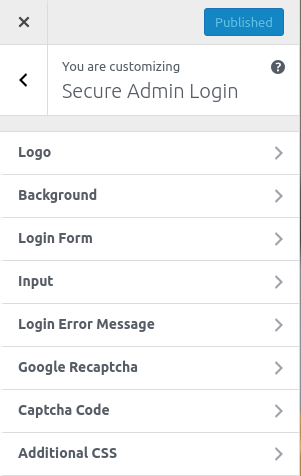
Go to WordPress dashboard, Navigate to Appearance > Customize > Customize secure login to get started.

How to get google reCpatch keys

Go to your google reCaptach dashboard and select the new/existing site with „Invisible reCAPTCHA“ label and enter your host where you want to add google recaptch and save it. After then you will get site and secret key from you have added site on google recaptcha

Rezensionen

Für dieses Plugin gibt es keine Rezensionen.

Mitwirkende und Entwickler

„Secure Admin Login With Customize“ ist Open-Source-Software. Folgende Menschen haben an diesem Plugin mitgewirkt:

Mitwirkende
  • Dilip Bheda
  • Girish Panchal
  • Jaydip
  • Hardik Raval

Übersetze „Secure Admin Login With Customize“ in deine Sprache.

Interessiert an der Entwicklung?

Durchstöbere den Code, sieh dir das SVN-Repository an oder abonniere das Entwicklungsprotokoll per RSS.

Änderungsprotokoll

1.0

  • Initial release.

1.1

  • Multi-lingual support.
  • Translation ready for Gujarati & Hindi.

1.2

  • Security Update.

1.3

  • Tested up to 5.0

Meta

  • Version 1.4
  • Zuletzt aktualisiert vor 1 Jahr
  • Aktive Installationen 10+
  • WordPress-Version 5.9 oder höher
  • Getestet bis 6.7.4
  • PHP-Version 7.2 oder höher
  • Sprache
    English (US)
  • Schlagwörter
    custom admin logincustom login logocustom wp-loginlogin customizer
  • Erweiterte Ansicht

Bewertungen

Es wurden noch keine Rezensionen eingereicht.

Meine Rezension hinzufügen

Alle Rezensionen anzeigen

Mitwirkende

  • Dilip Bheda
  • Girish Panchal
  • Jaydip
  • Hardik Raval

Support

Möchtest du etwas mitteilen? Brauchst du Unterstützung?

Support-Forum anzeigen

  • Über
  • News
  • Hosting (engl.)
  • Datenschutz
  • Showcase (engl.)
  • Themes
  • Plugins
  • Vorlagen
  • Learn
  • Support
  • Entwicklung (engl.)
  • WordPress.tv ↗
  • Mitwirken (engl.)
  • Veranstaltungen
  • Spenden (engl.) ↗
  • Five for the Future (engl.)
  • WordPress.com ↗
  • Matt (engl.) ↗
  • bbPress (engl.) ↗
  • BuddyPress (engl.) ↗
WordPress.org
WordPress.org

Deutsch

  • Das X-Konto (früher Twitter) von WordPress.org besuchen
  • Das Bluesky-Konto von WordPress.org besuchen
  • Das Mastodon-Konto von WordPress.org besuchen
  • Das Threads-Konto von WordPress.org besuchen
  • Die Facebook-Seite von WordPress.org besuchen
  • Das Instagram-Konto von WordPress.org besuchen
  • Das LinkedIn-Konto von WordPress.org besuchen
  • Das TikTok-Konto von WordPress.org besuchen
  • Den YouTube-Kanal von WordPress.org besuchen
  • Das Tumblr-Konto von WordPress.org besuchen
Code ist Poesie.
The WordPress® trademark is the intellectual property of the WordPress Foundation. WordPress® is not the same thing as WP Engine®. Since October 2024, WordPress.org’s creator Matt Mullenweg is a defendant in a legal action from WP Engine®. The WordPress Hosting page does not recommend WP Engine®.