

Beschreibung
Mit MailPoet kannst du deine E-Mail-Marketing-Kampagnen erstellen, versenden, verwalten und ausbauen – und das alles, ohne dein WordPress-Dashboard zu verlassen.
Unser Newsletter-Builder lässt sich perfekt in WordPress integrieren, so dass jeder Website-Besitzer schöne E-Mails von Grund auf erstellen kann, oder indem er unsere responsiven Vorlagen verwendet, die auf allen Geräten fehlerfrei angezeigt werden.
Mit nur wenigen Klicks kannst du deine Newsletter planen, sie sofort versenden oder Benachrichtigungen über neue Blogbeiträge einrichten, die automatisch versendet werden.
Trusted by 500,000 WordPress websites since 2011.
Mit einem kostenlosen Tarif für den Anfang und angepassten kostenpflichtigen Tarifen mit erweitertem Funktionsumfang ist MailPoet eine E-Mail-Marketinglösung, die sowohl für Anfänger als auch für erfahrene E-Mail-Marketer geeignet ist.
Besuche unsere Website für weitere Informationen über Tarife und Preise
Alle Funktionen
- Erstelle und füge deiner Website ein Newsletter-Abonnement-Formular hinzu
- Verwalte deine Abonnenten und Abonnenten-Listen in WordPress
- Erstelle und sende Newsletter mit WordPress
- Erstelle automatische E-Mails, um Benachrichtigungen über neue Beiträge zu senden
- Automatisierte Willkommens-E-Mails senden
- Verhaltens- und interessensbasierte Segmentierungsoptionen für Abonnenten
- Vorgefertigte und anpassbare E-Mail- und Anmeldeformular-Templates
- Mehrere Platzierungen für Abonnementformulare: unter Seiten, feste Leiste, Popup, Slide-in, Shortcode, beim Verlassen der Seite
- WooCommerce emails: abandoned cart, first purchase, specific product, product category, order status change, review added
- Anpassen von WooCommerce-Transaktions-E-Mails
- Automate subscriber management (add/remove from list, add/remove tags, update subscriber data) (paid plan required)
- Create custom automation triggers and actions (paid plan required)
- Branch your automations with if/else conditions to improve engagement (paid plan required)
- Zuverlässiger E-Mail-Versand mit dem MailPoet Sending Service (kostenlos verfügbar – Tarif erforderlich)
- Grundlegende Aktivitäts-Statistiken (kostenlos verfügbar) und detaillierte Aktivitäts-Statistiken (kostenpflichtiger Tarif erforderlich)
- Mehrfach-Bedingungen-Segmentierung (kostenpflichtiger Tarif erforderlich)
- Integration von Google Analytics (kostenpflichtiger Tarif erforderlich)
- Support über unsere Wissensdatenbank und Community-Foren (kostenlos verfügbar) und Kundensupport mit Priorität (kostenpflichtiger Tarif erforderlich).
Warum MailPoet wählen
- Einfach benutzbarer WordPress-Newsletter-Builder
- Schöne Templates, die auf allen Geräten perfekt funktionieren
- Keine Konfiguration nötig: Direkt loslegen
- Verwalte alles in deinem WordPress Dashboard
- Höhere Zustellungsraten mit dem MailPoet Sending Service
- DSGVO-konform
- Kostenloser Tarif für kleine Versender oder diejenigen, die gerade erst anfangen
- Erweiterte Funktionen verfügbar, die das Wachstum unterstützen.
WooCommerce-E-Mails
Fördere dein Business, verkaufe mehr Produkte und verbessere deinen Kundenservice mit den WooCommerce-Funktionen von MailPoet.
Nutze die automatischen E-Mail-Optionen für:
- Heiße deine neuen Kunden willkommen, wenn sie ihren ersten Einkauf machen
- Upselling durch Senden von E-Mails an Kunden, die ein bestimmtes Produkt oder aus einer bestimmten Produktkategorie gekauft haben
- Convert more customers by sending a series of abandoned cart emails
- Re-engage customers who haven’t made a purchase in a while with personalized offers (paid plan required)
- Follow up with customers who left a review to encourage more engagement (paid plan required).
And with WooCommerce-specific segmentation options, you’ll be able to send targeted emails to your customers based on criteria such as their country, the number of orders they’ve placed, how much they’ve spent, and if they have an active product subscription (powered by WooCommerce Subscriptions) or membership (powered by WooCommerce Memberships).
Außerdem kannst du den Wiedererkennungswert deiner Marke erhöhen, indem du deine WooCommerce-Transaktions-E-Mails anpasst. Schaffe ein einheitliches Markenerlebnis, indem du das Layout, die Farben und die Schriftarten in deinen E-Mails änderst und Bilder oder zusätzliche Informationen hinzufügst.
MailPoet Sending Service
Der MailPoet Sending Service ist kostenlos, solange du nur wenige Abonnenten hast, danach sind angepasste Tarife verfügbar. Mehr erfahren.
Das Versenden von E-Mails und Newslettern mit deinem Hoster ist keine gute Idee. Es kann sein, dass die Versandgeschwindigkeit eingeschränkt wird und deine E-Mails im Spam-Ordner landen.
Um dir mit dem Versand zu helfen, haben wir eine fortgeschrittene Infrastruktur zur E-Mail-Auslieferung für WordPress erstellt. Unsere Technologie erlaubt es dir:
- Erreiche Posteingänge, nicht Spam-Verzeichnisse
- Sende deine E-Mails superschnell (bis zu 50.000 E-Mails pro Stunde)
- Pflege den Ruf deines Absenders und verbessere Aktivitäten durch automatisierte Unzustellbarkeits- und Beschwerdebearbeitung. Höre automatisch auf, an nicht zustellbare und reklamierende Adressen zu senden.
- Authentifiziere deine E-Mails (mit SPF und DKIM), um die Zustellbarkeit zu verbessern und Spam-Postfächer zu vermeiden.
Der MailPoet-Versandservice ist sehr einfach einzurichten. Du musst nur einen Schlüssel in deinem WordPress-Dashboard eingeben und schon kann es losgehen!
MailPoet-Tarife und Preise
Du kannst MailPoet kostenlos herunterladen. Unser kostenloser Download enthält alle oben aufgeführten Funktionen (mit Ausnahme derjenigen, die einen Tarif erfordern), unter den folgenden Kriterien:
- Bis zu 1.000 Abonnenten
- MailPoet-Branding in E-Mails
- Versende E-Mails mit deiner eigenen Versandmethode (Host, SendGrid, Amazon SES, etc.).
Wenn du dich für einen MailPoet-Tarif entscheidest, erhältst du auch Zugang zum MailPoet Sending Service.
Für alle, die mit wenigen Abonnentenbeginnen und den MailPoet Sending Service nutzen möchten, gibt es einen kostenlosen Startertarif. Unsere kostenpflichtigen Tarife bieten Funktionen für Kunden mit größeren Listen, die ihr Unternehmen mit E-Mail-Marketing ausbauen möchten.
Auf unserer Preisseite findest du alle Details zu den einzelnen Tarifen.
Vor der Installation
Bitte beachte:
- Multisite-Unterstützung ist eingeschränkt
- Überprüfe unsere Mindestanforderungen.
Übersetzungen
- Albanisch
- Arabisch
- Katalanisch
- Tschechisch
- Dänisch
- Niederländisch
- Dutch (Formal)
- Französisch (Kanada)
- Französisch (Frankreich)
- Deutsch
- Deutsch (Schweiz)
- German (Formal)
- Griechisch
- Hindi
- Italienisch
- Japanisch
- Polnisch
- Portugiesisch (Brasilien)
- Portugiesisch (Portugal)
- Rumänisch
- Russisch
- Serbisch
- Slovak
- Spanisch (Mexiko)
- Spanisch (Spanien)
- Schwedisch
- Türkisch
- Ukrainisch
Wir freuen uns über erfahrene Übersetzer, die direkt in unser Transifex-Projekt übersetzen. Bitte beachte, dass Übersetzungen, die über die Website „Translating WordPress“ eingereicht werden, nicht funktionieren.
Sicherheit
Unser Repositorium ist öffentlich auf GitHub.
Hast du eine Frage an uns? Kontaktiere uns unter security@ unsere Domain oder melde Sicherheitsprobleme im Rahmen unseres Bug Bounty Programms.
Nutzung von Drittanbieter-Diensten
MailPoet nutzt die folgenden Dienste, die für seine volle Funktionalität notwendig sind:
- Translate WordPress.com – dient zum Herunterladen von Übersetzungen für das Plugin.
Um die Benutzerfreundlichkeit zu verbessern, kann MailPoet die folgenden Bibliotheken von Drittanbietern verwenden, wenn die Einstellung Bibliotheken von Drittanbietern laden aktiviert ist:
-
Google Fonts – wird im Formular-Editor verwendet, mit dem du deine Formulare anpassen kannst, und im E-Mail-Editor, um E-Mail-Adressen zu gestalten. Dies kann individuell durch einen Filter deaktiviert werden. AGB und Datenschutzerklärung
-
WordPress.com – used for searching in Knowledge Base with the help of AI.
-
Mixpanel – wird verwendet, um Daten über die Nutzung des MailPoet-Plugins zu senden, wenn du einwilligst, Nutzungsdaten mit uns zu teilen. AGB und Datenschutzerklärung
-
Satismeter – wird verwendet, um nach Feedback zu fragen. AGB und Datenschutzerklärung
-
Crowdsignal – wird verwendet, um unsere Umfrage zur Deaktivierung zu laden und unser Plugin zu verbessern. AGB und Datenschutzerklärung
Das Laden all dieser Bibliotheken ist standardmäßig deaktiviert. Die Option kann in den MailPoet-Einstellungen > Erweitert > Drittanbieter-Bibliotheken laden aktiviert werden.
Screenshots

Beispiel-Newsletter 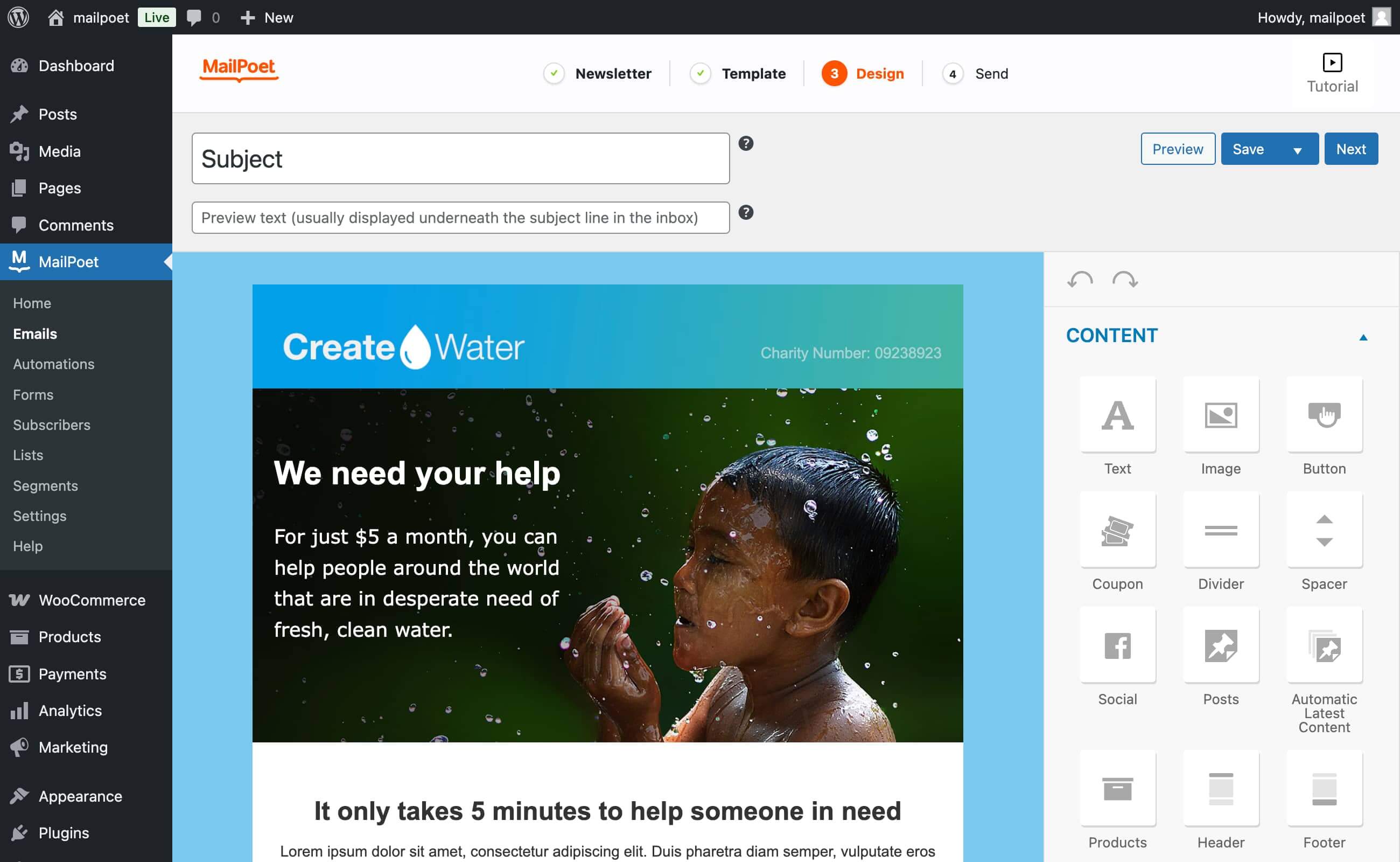
Der Drag-and-drop-E-Mail-Designer 
MailPoet-E-Mail-Typen 
Newsletter-Statistiken (Premium) 
Abonnenten-Import (via CSV-Datei oder direkt von MailChimp) 
Automation editor (Premium)
Blöcke
Dieses Plugin unterstützt 1 Block.
- MailPoet Marketing Opt-in
FAQ
-
Speichert MailPoet die Daten der Abonnenten der Benutzer?
-
Wir speichern keine Daten unserer Abonnenten. Doch, wenn du mit uns sendest, verarbeiten wir alle zu sendenden E-Mails. Das bedeutet, dass MailPoet nur die E-Mail-Adressen protokolliert, um sicherzustellen, dass unser Dienst effektiv funktioniert. Wir protokollieren nichts anderes.
-
Was ist der MailPoet Sending Service?
-
Der MailPoet-Versandservice ist ausschließlich für den Versand von WordPress- und WooCommerce-E-Mails konzipiert. Unsere hauseigene Technologie sorgt für unvergleichliche Geschwindigkeit (über 50.000 E-Mails pro Stunde) und Leistung, 99% Verfügbarkeit und null Verlust.
-
Du hast die Freiheit zu wählen, wie du deine E-Mails versendest: über deinen eigenen Host (Standard, aber nicht empfohlen), der MailPoet Sending Service, SendGrid, Amazon SES oder die meisten SMTP-Anbieter, einschließlich MailGun, etc.
-
Warum sollte ich den MailPoet Sending Service nutzen?
-
Unsere globale Zustellbarkeitsrate liegt bei 98,5% und übertrifft damit oft die Branchenstandards. Wir überwachen jede einzelne der Millionen von E-Mails, die wir für unsere Benutzer versenden.
Egal, ob du 10 oder 100.000 E-Mails pro Tag versendest, der MailPoet Sending Service bearbeitet routinemäßig kleine Unternehmensnewsletter bis hin zu riesigen Mailinglisten mit zehntausenden von Abonnenten.
Wir raten dir dringend davon ab, mit deinem Host zu senden, hier ist die Erklärung.
Wenn du gerade erst mit deinem Newsletter beginnst, bieten wir dir einen kostenlosen Tarif für die ersten Schritte an.
-
Kann ich bestimmte Kategorien aus meiner Beitragsbenachrichtigung herausfiltern?
-
Ja! In MailPoet kannst du Kategorien oder Schlagwörter entweder ein- oder ausschließen. So kannst du nur Beiträge aus bestimmten Kategorien oder mit bestimmten Schlagwörtern versenden und sicherstellen, dass nicht relevante Beiträge nicht in deinen E-Mails erscheinen. Du kannst auch mehrere Beitrags-Benachrichtigungs-E-Mails einrichten, um die Interessen deiner Abonnenten besser zu berücksichtigen.
-
Ist MailPoet DSGVO-konform?
-
Ja, wir sind DSGVO-konform. Wir haben jedoch keinen Auftragsverarbeitungsvertrag. Unsere Datenschutzerklärung kann als Einverständnis dienen und die DSGVO berücksichtigt das. Mit dem Benutzen unseres Dienstes erklärst du dich mit unserer Datenschutzerklärung einverstanden.
Wir schlagen vor, dass du deiner Datenschutzerklärung einen Link zu unserer Datenschutzerklärung hinzufügst. Wichtig ist, dass deine Abonnenten sich im Klaren sind, dass MailPoet deine E-Mails ausliefert, falls du das tust.
Du kannst auch unsere Anleitung für DSGVO-Konformität (engl.) lesen.
-
Ja, mit MailPoet können sich deine Kunden an der Kasse für deine Mailingliste anmelden. Du kannst ihnen sogar eine Erinnerung an den abgebrochenen Kaufvorgang schicken, wenn sie vergessen haben, ihren Kauf abzuschließen.
-
Heißt es MailPoet oder Mail poet?
-
Es heißt MailPoet, nicht mail poet. Wir werden aber trotzdem antworten!
-
Brauchst du Hilfe?
-
Besuche unsere Wissensdatenbank (engl.) oder kontaktiere uns über unsere Support-Website (engl.).
Rezensionen


Mitwirkende und Entwickler
„MailPoet – Newsletters, Email Marketing, and Automation“ ist Open-Source-Software. Folgende Menschen haben an diesem Plugin mitgewirkt:
Mitwirkende


„MailPoet – Newsletters, Email Marketing, and Automation“ wurde in 27 Sprachen übersetzt. Danke an die Übersetzer für ihre Mitwirkung.
Übersetze „MailPoet – Newsletters, Email Marketing, and Automation“ in deine Sprache.
Interessiert an der Entwicklung?
Durchstöbere den Code, sieh dir das SVN-Repository an oder abonniere das Entwicklungsprotokoll per RSS.
Änderungsprotokoll
5.21.2 – 2026-02-16
- Changed: Automation emails after non-delay actions (add tag, if/else, add to list) are now treated as transactional when using transactional triggers. Only the delay action converts emails to marketing;
- Fixed: Ensure automation emails consistently use ‚private‘ post status and prevent duplicate newsletter records;
- Fixed: Cron heartbeat action not being rescheduled after plugin updates;
- Fixed: Fix open tracking for emails created with the new email editor (Alpha).