Zum Inhalt springen
WordPress.org

Deutsch

  • Themes
  • Plugins
  • News
  • Support
  • Über
  • Hilfe
    • Learn WordPress
    • Documentation (en)
    • Foren
    • Developers (en)
    • WordPress.tv
  • Meetups
  • Mitmachen
  • FAQ
  • Hol dir WordPress
Hol dir WordPress
WordPress.org

Plugin Directory

IDer Login for WordPress

  • Ein Plugin einreichen
  • Meine Favoriten
  • Anmelden
  • Ein Plugin einreichen
  • Meine Favoriten
  • Anmelden

Dieses Plugin ist nicht mit den jüngsten 3 Hauptversionen von WordPress getestet worden. Es wird möglicherweise nicht mehr gewartet oder unterstützt und kann Kompatibilitätsprobleme haben, wenn es mit neueren Versionen von WordPress verwendet wird.

IDer Login for WordPress

Von ider
Herunterladen
  • Details
  • Rezensionen
  • Installation
  • Entwicklung
Support

Beschreibung

With this plugin you can provide login and registration process using the IDer Service.
An additional „Login with IDer“ button will appears along the regular one.

How it works?
1. First of all you need to create a profile in the IDer website
2. Clicking the button a redirect to the IDer server will display a QR Code
3. To scan it you need to download the free IDer App from the App Store or Google Play depending which cell phone you own.
Or just scan the QR code with any QR Code reader and you will be redirect to the download page.
Provide few infos and you are ready to scan the QR code
4. After that the IDer App will prompt you for the missing data required to complete the login/registration process.
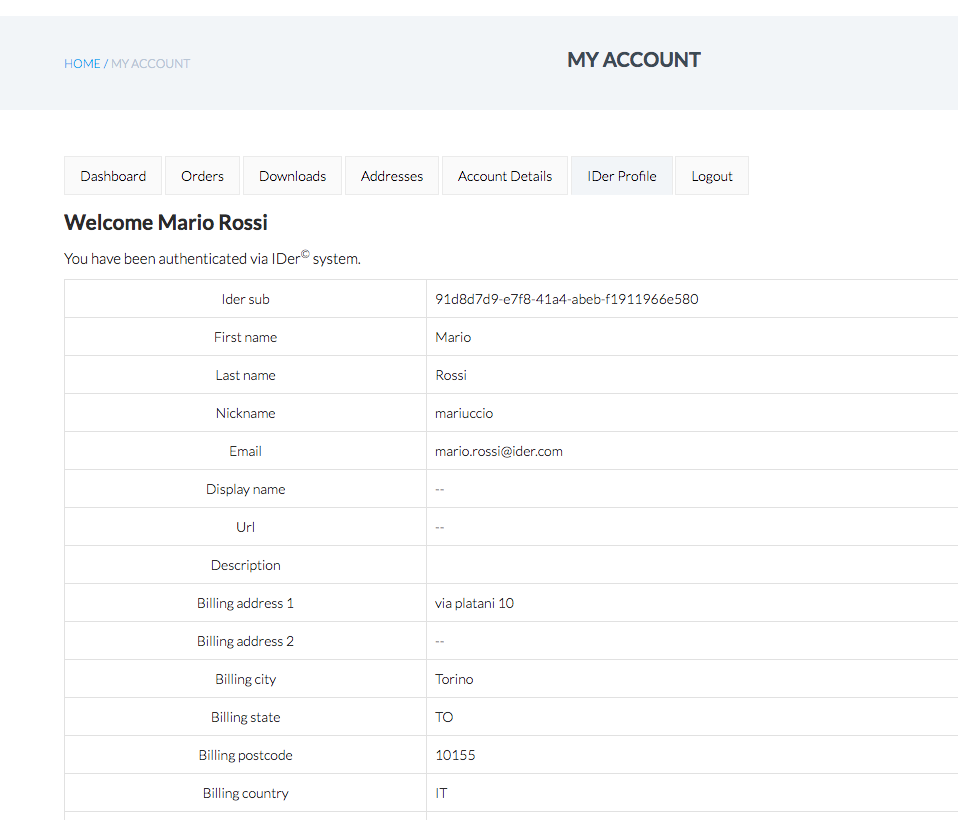
Confirming the data your browser will automatically log you in and show you which info the website saved.

Screenshots

  • Plugin settings
  • Login button
  • QR Code authentication
  • IDer welcome page after login

Installation

  1. Upload the plugin files to the /wp-content/plugins/ider-login directory, or install the plugin through the WordPress plugins screen directly.
  2. Activate the plugin through the ‚Plugins‘ screen in WordPress
  3. Go to the just appeared top level menu called „IDer Login“
  4. Configure the plugin as descripted. You need to create a profile in the IDer
  5. With the data collected during the profile creation process fill in the Client ID, Client Secret and Campagin ID fields
  6. Change the other settings if you want

FAQ

Where can I download the App?

You can find the IDer app in your App Store or Google Play. Search for „ider“.

Can I hack/improve/fork/edit this plugin?

Mmmm. Even though we encourage the developing and extension of new plugins it doesn’t sound like a good idea in this case.
This plugin has been very tested and stressed and it should be use as it is.
But if you got a brilliant idea or suggestion we would love to hear from you.

Rezensionen

Plugin

sergiotech 6. Juni 2024
The plugin works, but it took me some time to figure out how to configure partner.ider.com to get the access data. Perhaps that interface could be improved. Otherwise, it does everything it promises and does it well. I thank the support team for their help. Regards

Autenticazione veloce e sicura

matteolostumbo 31. Mai 2024
Onestamente, è fantastico. Funziona bene nel mio sito Wordpress! Grazie.

Works correctly on last WP version

verycool 30. Mai 2024
This latest version (2.1) works very well and configures in just a few seconds. I contacted support, and they responded promptly
Alle 3 Rezensionen lesen

Mitwirkende und Entwickler

„IDer Login for WordPress“ ist Open-Source-Software. Folgende Menschen haben an diesem Plugin mitgewirkt:

Mitwirkende
  • ider

Übersetze „IDer Login for WordPress“ in deine Sprache.

Interessiert an der Entwicklung?

Durchstöbere den Code, sieh dir das SVN-Repository an oder abonniere das Entwicklungsprotokoll per RSS.

Änderungsprotokoll

1.4.1

  • First fully working release

1.5

  • Added IDER_SERVER parameter for testing
  • Missing image
  • Minor in getProviderConfigValue
  • Fixed wrong paths for admin assets
  • Fields mapping as plugin setting in admin panel
  • Additional css for IDer button

1.6

  • Updated OID Client
  • Fixed wrong CSS path

1.6.1

  • Added flag „Allow Login only to Administrator Users“
  • Update ider-log path.

2.0

  • Removed deprecations.
  • Added support to newer WordPress versions.
  • Improve UI assets.

2.1

  • Improve address resolution.

Meta

  • Version 2.1
  • Zuletzt aktualisiert vor 2 Jahren
  • Aktive Installationen 90+
  • WordPress-Version 4.6 oder höher
  • Getestet bis 6.5.7
  • Sprache
    English (US)
  • Schlagwörter
    loginOpenIDqrcodesso
  • Erweiterte Ansicht

Bewertungen

5 von 5 Sternen.
  • 3 5-Sterne-Rezensionen 5 Sterne 3
  • 0 4-Sterne-Rezensionen 4 Sterne 0
  • 0 3-Sterne-Rezensionen 3 Sterne 0
  • 0 2-Sterne-Rezensionen 2 Sterne 0
  • 0 1-Sterne-Rezensionen 1 Stern 0

Meine Rezension hinzufügen

Alle Rezensionen anzeigen

Mitwirkende

  • ider

Support

Möchtest du etwas mitteilen? Brauchst du Unterstützung?

Support-Forum anzeigen

  • Das Projekt
  • News
  • Hosting (engl.)
  • Datenschutz
  • Showcase (engl.)
  • Themes
  • Plugins
  • Vorlagen
  • Learn
  • Support
  • Entwicklung (engl.)
  • WordPress.tv ↗
  • Mitwirken (engl.)
  • Veranstaltungen
  • Spenden (engl.) ↗
  • Five for the Future (engl.)
  • WordPress.com ↗
  • Matt (engl.) ↗
  • bbPress (engl.) ↗
  • BuddyPress (engl.) ↗
WordPress.org
WordPress.org

Deutsch

  • Das X-Konto (früher Twitter) von WordPress.org besuchen
  • Das Bluesky-Konto von WordPress.org besuchen
  • Das Mastodon-Konto von WordPress.org besuchen
  • Das Threads-Konto von WordPress.org besuchen
  • Die Facebook-Seite von WordPress.org besuchen
  • Das Instagram-Konto von WordPress.org besuchen
  • Das LinkedIn-Konto von WordPress.org besuchen
  • Das TikTok-Konto von WordPress.org besuchen
  • Den YouTube-Kanal von WordPress.org besuchen
  • Das Tumblr-Konto von WordPress.org besuchen
Code ist Poesie.